

Graphiti
AIOpen SourceFreeOpen-source project to build real-time knowledge graphs and persistent memory stores for AI agents.
Graphiti
Open-source project to build real-time knowledge graphs and persistent memory stores for AI agents.
About Graphiti
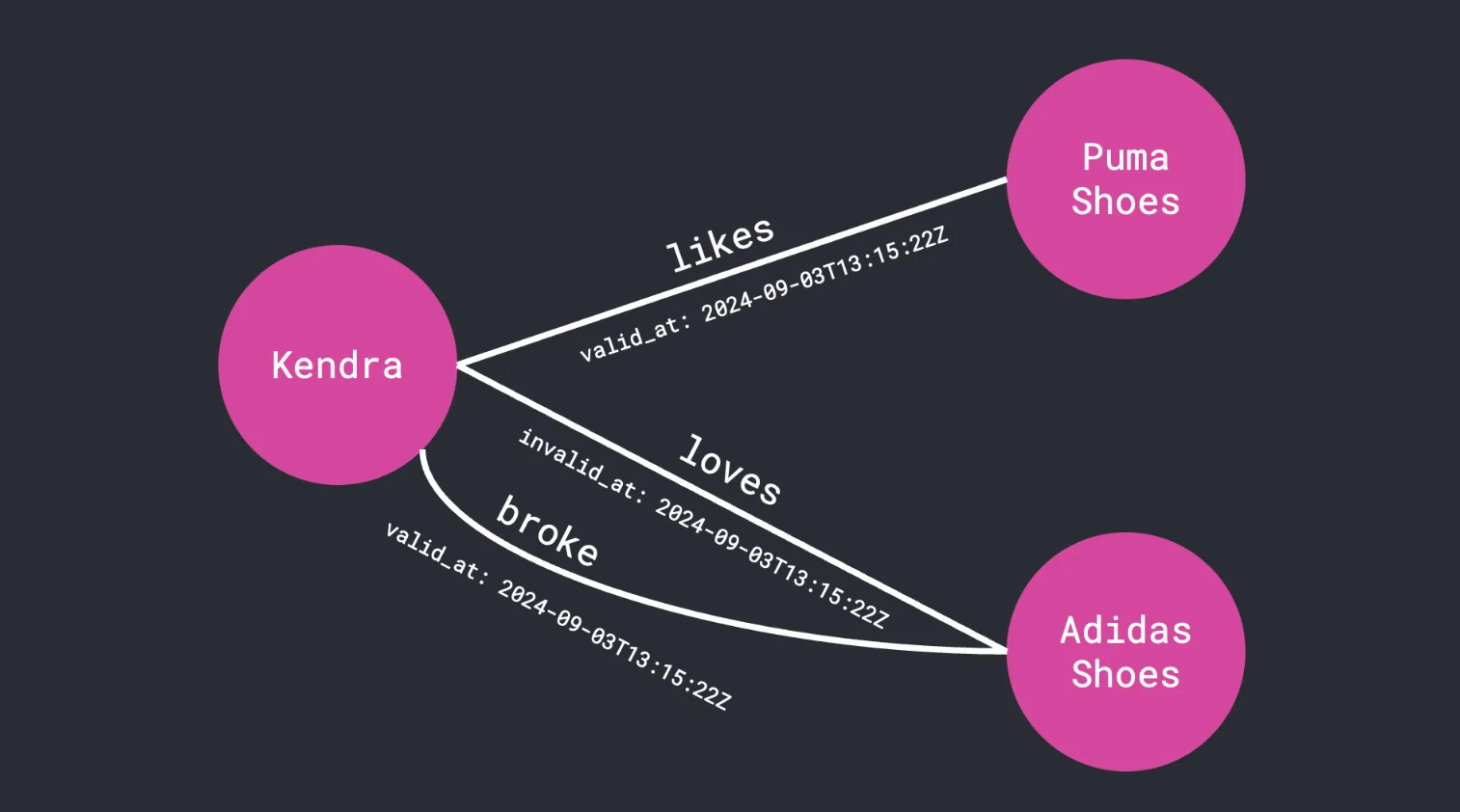
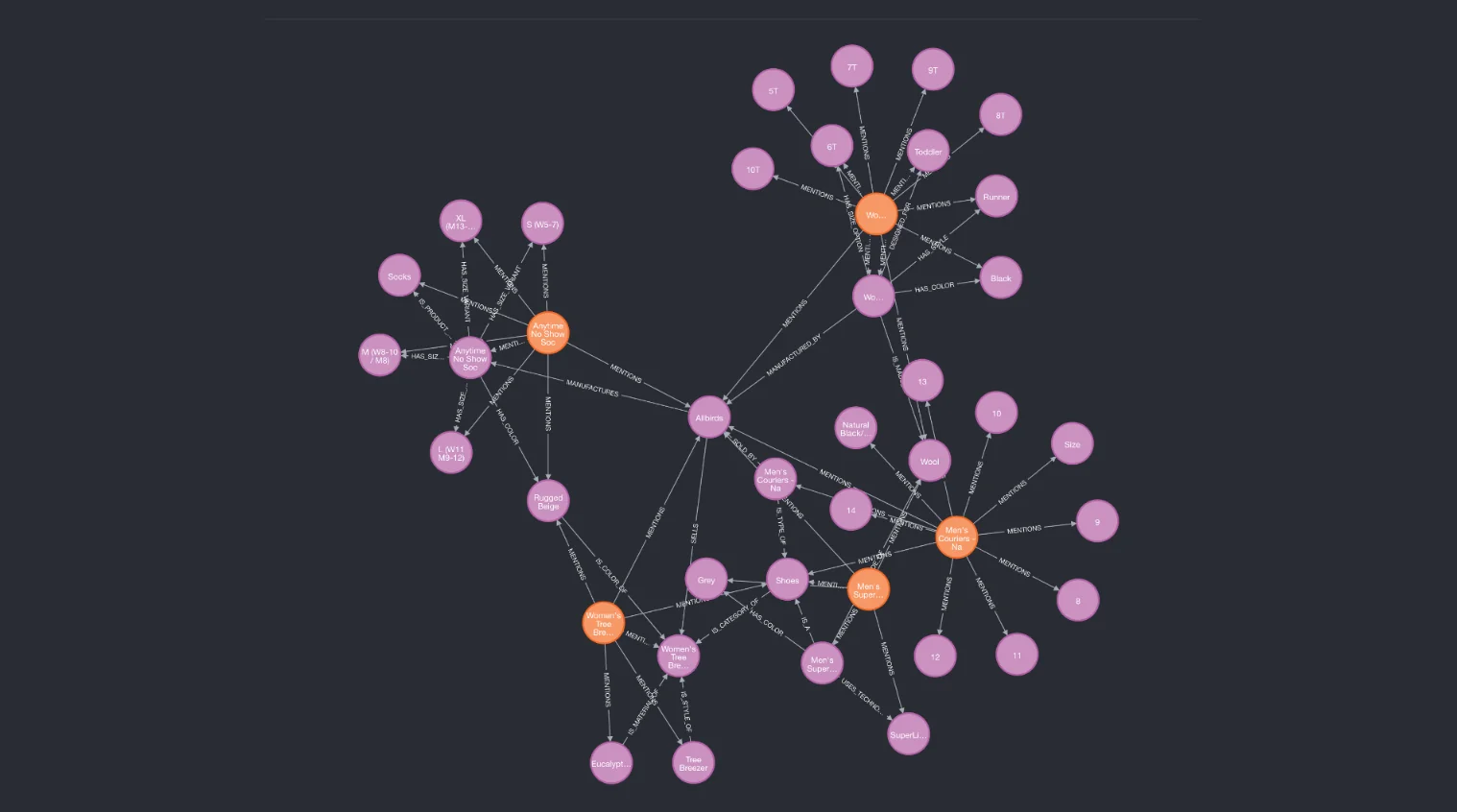
Graphiti is an open-source system for extracting entities and relationships from text and building real-time knowledge graphs that serve as persistent memory for AI agents. It provides server APIs compatible with Model Context Protocol (MCP) patterns so agents can query episodes, entities, and relationships as contextual memory. Graphiti integrates with graph/datastore backends and can be deployed via Docker/CLI workflows to power retrieval-augmented workflows, multi-project setups, and long-term agent state tracking.
Screenshots
Key Features
Use Cases



Frequently asked questions about Graphiti
Is Graphiti free to use?
Yes, Graphiti is a free, open-source project, allowing users to self-host and customize it at no cost. This means you can take full advantage of its features without incurring any fees, making it an accessible option for developers and businesses alike.
Key Points
- Open-Source Availability: Graphiti is completely free to use and modify.
- Self-Hosting Options: Users can host the application on their own servers.
- Customization Flexibility: Developers can tailor Graphiti to meet specific project needs.
Detailed Explanation
Graphiti is an open-source framework designed for building APIs and applications efficiently. As an open-source project, it allows users to download the source code and utilize it without any licensing fees. This makes it particularly attractive for startups, individual developers, and organizations looking to minimize costs.
Self-Hosting
Self-hosting Graphiti means you can deploy it on your own infrastructure, whether it’s on-premises servers or cloud platforms like AWS or Google Cloud. Self-hosting provides greater control over security, performance, and scalability compared to SaaS alternatives.
Customization
With Graphiti, developers can modify the code to fit their specific requirements. For instance, if you need additional features or integrations with other tools, you can directly alter the source code. This flexibility is invaluable for creating tailored solutions that align perfectly with business objectives.
Example Use Cases
- Startups: A startup can leverage Graphiti to build a custom API quickly and cost-effectively, allowing for rapid development and iteration.
- Enterprise Solutions: Large organizations can use Graphiti to create internal tools that integrate seamlessly with existing systems without incurring ongoing subscription costs.
Best Practices / Tips
- Explore the Documentation: Familiarize yourself with Graphiti’s documentation to understand its capabilities and best practices for implementation.
- Join the Community: Engage with the Graphiti community for support, tips, and shared experiences that can enhance your project.
- Regular Updates: Keep your Graphiti version updated to benefit from the latest features and security patches.
Additional Resources
By utilizing these resources, you can maximize your experience with Graphiti and effectively implement it into your development projects.
What are the main features of Graphiti?
Graphiti is a powerful AI tool that features real-time graph construction, document ingestion, and episode-based memory management. These capabilities facilitate dynamic interactions for AI agents, enhancing their ability to process information and respond effectively in various contexts.
Key Points
- Real-Time Graph Construction: Enables immediate visualization of data relationships.
- Document Ingestion: Allows seamless integration of large datasets.
- Episode-Based Memory Management: Enhances AI's contextual awareness during interactions.
Detailed Explanation
Graphiti's real-time graph construction allows users to create and visualize data relationships instantly. This feature is particularly useful for applications in data analysis, where understanding the connections between different data points is crucial. For example, in business intelligence, Graphiti can help identify trends and correlations that inform strategic decisions.
The document ingestion capability enables Graphiti to process and analyze large volumes of text and structured data efficiently. Users can upload documents in various formats, and Graphiti extracts key insights, making it invaluable for researchers and data scientists. For instance, a legal team can ingest case files and automatically summarize pertinent information, saving countless hours of manual review.
With episode-based memory management, Graphiti enhances the contextual understanding of AI agents. This allows the AI to maintain relevant information throughout a session, improving the coherence of conversations. For example, in customer support scenarios, the AI can remember previous interactions and provide tailored responses, thereby enhancing user satisfaction.
Best Practices / Tips
- Utilize Real-Time Graphs: Regularly update your graphs to reflect new data and insights for better decision-making.
- Optimize Document Formats: Ensure documents are well-structured before ingestion to maximize the extraction of relevant information.
- Leverage Memory Management: Design interactions that utilize the episode-based memory feature to create more personalized user experiences.
Additional Resources
How do I get started with Graphiti?
To get started with Graphiti, visit the official GitHub repository, download the source code, and follow the installation guide for self-hosting using Docker. This process allows you to set up a powerful tool for building APIs efficiently and effectively.
Key Points
- Access the official Graphiti GitHub repository.
- Download the source code for local development.
- Follow the Docker installation guide for self-hosting.
Detailed Explanation
Graphiti is an advanced API building tool designed to streamline the development process for developers. To initiate your journey with Graphiti, you should first download the source code from the Graphiti GitHub repository. Here’s a step-by-step guide to help you get started:
-
Visit the GitHub Repository: Go to the Graphiti GitHub page. Ensure you have Git installed on your machine to clone the repository easily.
-
Clone or Download the Source Code: You can either clone the repository using:
git clone https://github.com/graphiti-api/graphiti.gitOr download it as a ZIP file for manual extraction.
-
Install Docker: Graphiti recommends using Docker for self-hosting. If you don’t have Docker installed, visit the Docker installation page and follow the instructions for your operating system.
-
Follow the Installation Guide: Inside the downloaded Graphiti folder, you’ll find a detailed installation guide. Follow it step-by-step to set up your environment properly.
-
Run Your API: Once installed, you can run your API locally and begin building your application.
Best Practices / Tips
- Check Compatibility: Ensure that your Docker version is compatible with Graphiti to avoid installation issues.
- Explore Examples: Familiarize yourself with example projects provided in the repository to understand how Graphiti frameworks work.
- Use Version Control: Keep your Graphiti project under version control (like Git) to easily manage changes and collaborate with others.
Additional Resources
By following these steps, you can effectively set up Graphiti and begin leveraging its powerful capabilities for API development.
Can I integrate Graphiti with other tools?
Yes, you can integrate Graphiti with various tools, including graph-backed storage solutions like Neo4j. Additionally, Graphiti offers customization options for different agent systems and data pipelines, enhancing its flexibility to meet your specific requirements.
Key Points
- Integration with Neo4j: Seamlessly connect with a leading graph database.
- Customization Options: Tailor Graphiti for various agent systems and workflows.
- Support for Multiple Pipelines: Enhance data processing capabilities across different environments.
Detailed Explanation
Graphiti provides robust integration capabilities that allow users to connect with various tools and platforms. One of the primary integrations is with Neo4j, a popular graph database that enables efficient data storage and retrieval, especially for complex relationships. By leveraging Neo4j, Graphiti enhances its ability to manage and visualize interconnected data.
Use Cases
- Data Analytics: If you’re working on a data analytics project, integrating Graphiti with Neo4j allows for advanced data relationships to be analyzed effectively, offering deeper insights.
- Machine Learning Pipelines: Customize Graphiti to fit into your machine learning workflows, using its integration capabilities to streamline data collection and processing from multiple sources.
- Real-time Data Processing: Businesses can utilize Graphiti alongside real-time data pipelines to provide instant insights and analytics for decision-making.
Best Practices / Tips
- Understand Your Needs: Before integrating, clearly define what you want to achieve with Graphiti and how it will fit into your existing infrastructure.
- Test Integrations: Conduct thorough testing of integrations to ensure compatibility and performance. This prevents potential issues in production environments.
- Utilize Documentation: Take advantage of official documentation for both Graphiti and any external tools to understand best practices for integration.
Additional Resources
How does Graphiti compare to other AI models?
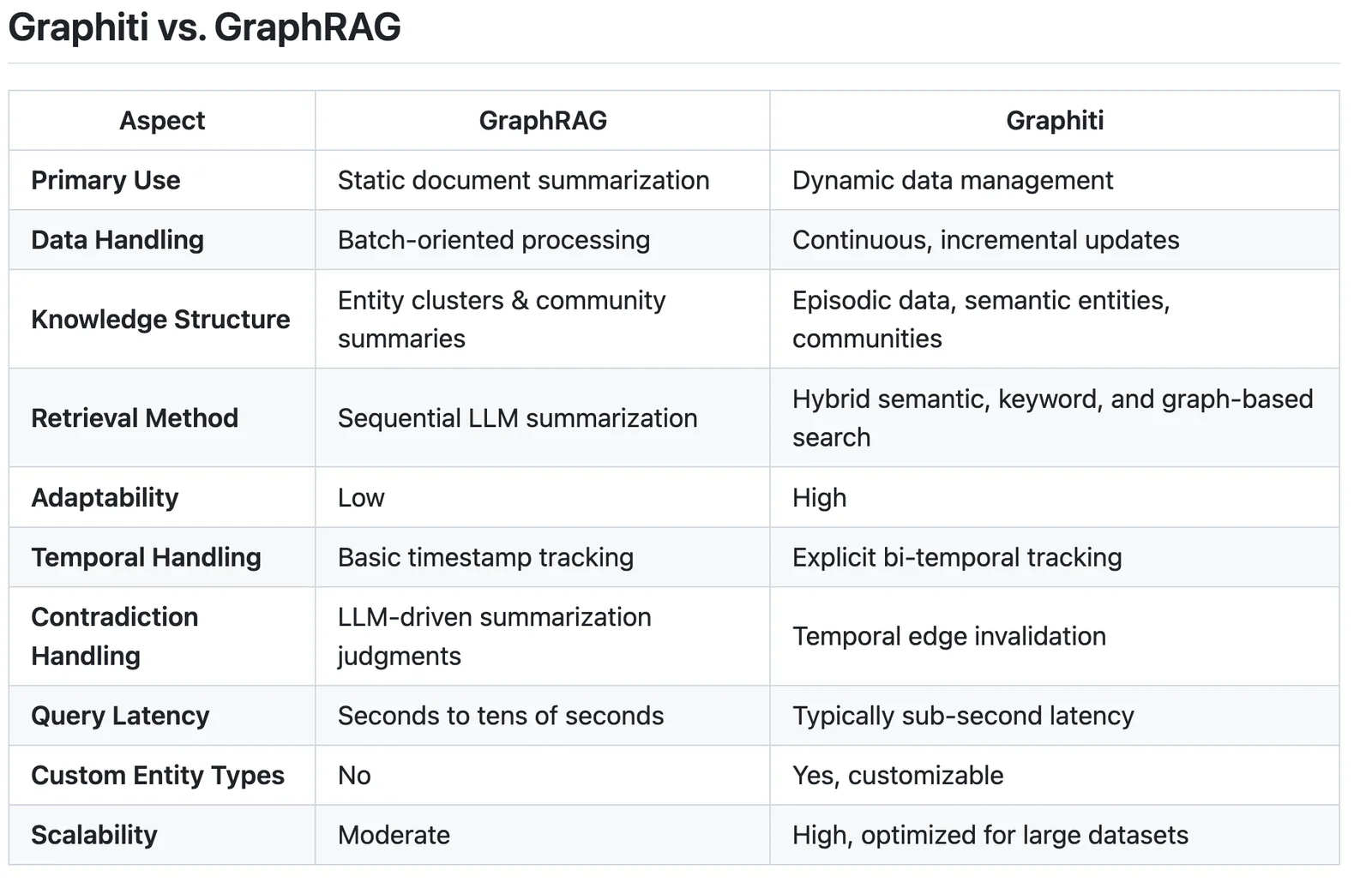
Graphiti is unique among AI models due to its open-source architecture and real-time graph capabilities, which enable persistent memory for AI agents. Unlike many commercial alternatives, these features allow for greater customization, flexibility, and enhanced performance in complex problem-solving scenarios.
Key Points
- Open-Source Advantage: Graphiti allows developers to modify and enhance the model.
- Real-Time Graph Capabilities: It supports dynamic data integration for immediate processing.
- Persistent Memory: Graphiti provides a long-term memory system, improving learning and adaptability.
Detailed Explanation
Graphiti distinguishes itself from other AI models through several key features:
-
Open-Source Advantage: Being open-source means that Graphiti is accessible to anyone, allowing developers to customize the model to suit specific needs. This flexibility leads to a vibrant community that contributes to its ongoing improvement, something that proprietary models often lack.
-
Real-Time Graph Capabilities: Graphiti’s innovative graph structure enables real-time data processing. This is especially beneficial for applications requiring instant decision-making, such as fraud detection or real-time recommendations. For example, in e-commerce, Graphiti can analyze user interactions on-the-fly and provide personalized suggestions.
-
Persistent Memory: One of the standout features of Graphiti is its persistent memory system. This allows AI agents to retain information over long periods, enhancing their ability to learn from past interactions. Unlike traditional models that may forget previous data, Graphiti helps maintain context, significantly improving user experiences in conversational AI and virtual assistants.
Best Practices / Tips
- Leverage Community Support: Utilize forums and resources from the Graphiti community to troubleshoot and innovate.
- Customize for Specific Use Cases: Tailor the model to fit your project’s needs, whether it's for natural language processing or data analytics.
- Monitor Performance: Regularly assess the model's performance and make adjustments based on real-world feedback.
Additional Resources
By understanding these key features and following best practices, users can fully leverage Graphiti's capabilities to create powerful AI applications that outperform traditional models.
Explore more AI Ai Tools tools
Browse all Ai Tools tools →Compare Graphiti: vs CleanSlop · vs Kalender Sync · vs UseIt Studio · vs Woven Video