

EQK
AIPer-app macOS equalizer with on-device AI song analysis and 3,985 bundled headphone correction profiles — nothing leaves your Mac.
EQK
Per-app macOS equalizer with on-device AI song analysis and 3,985 bundled headphone correction profiles — nothing leaves your Mac.
About EQK
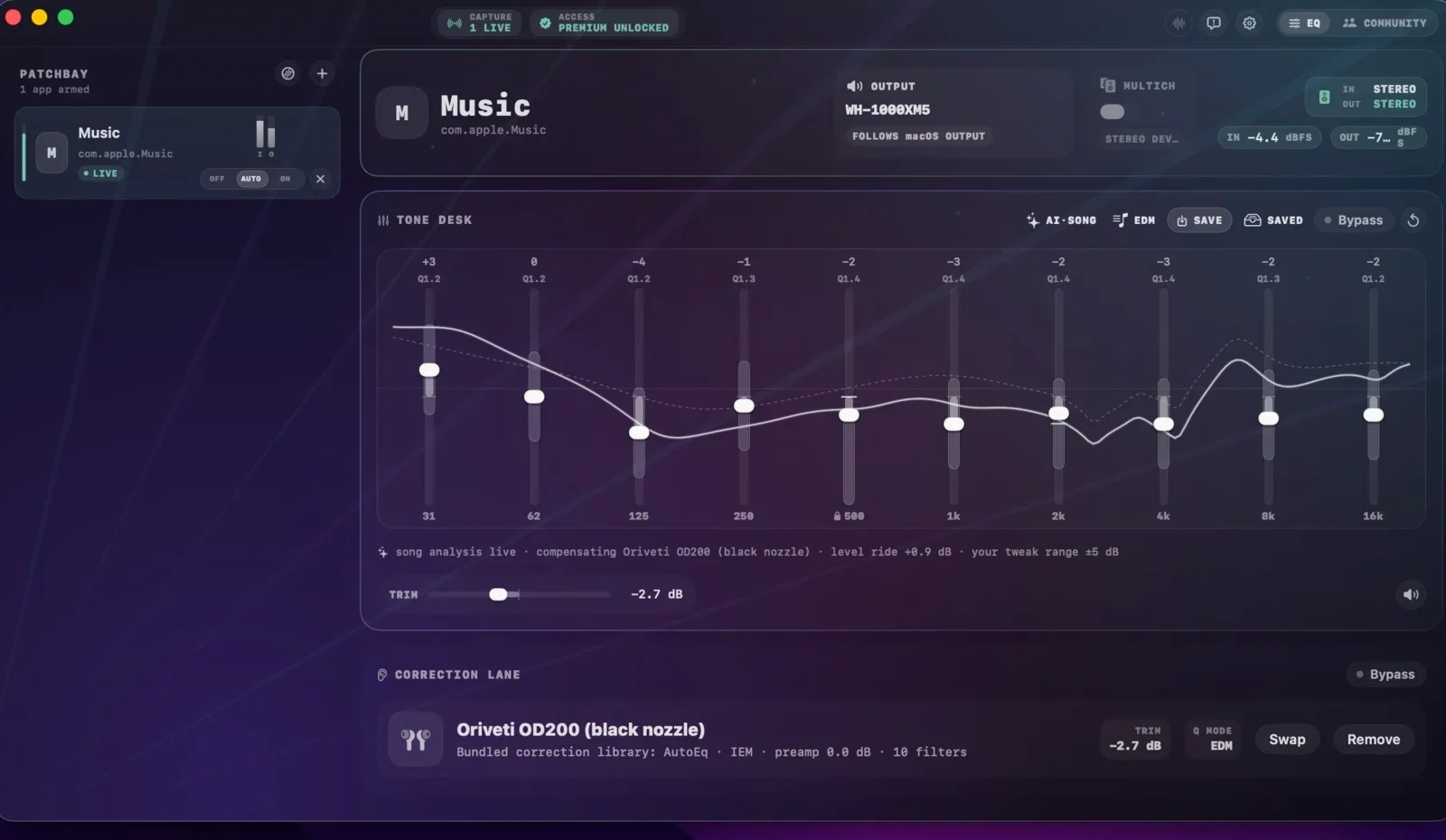
EQK is a Mac utility that gives every app its own equalizer, then layers an on-device AI Song engine on top that analyzes each song as it starts and reshapes tone in real time — always keeping the user's manual tweaks on top. A Correction lane holds 3,985 AutoEq headphone profiles so the AI understands exactly what your headphones, earphones, or IEMs under- and over-deliver. Music and video apps can be routed through independent equalizers via a Patchbay, so browsers with mixed audio never contaminate the signal. EQK is fully on-device with no cloud, accounts, or telemetry, is notarized by Apple, and requires macOS 15.6 or later. It is sold as a one-time purchase — the local player stays free forever, while Premium unlocks the full experience across up to two Macs.
Screenshots
Key Features
Use Cases



Frequently asked questions about EQK
What is EQK?
EQK is a per-app macOS equalizer that utilizes on-device AI for song analysis, offering 3,985 bundled headphone correction profiles to enhance your listening experience. Importantly, all processing occurs locally on your Mac, ensuring user privacy and data security.
Key Points
- On-Device AI Analysis: EQK uses advanced AI algorithms to analyze songs in real-time.
- Extensive Headphone Profiles: With 3,985 headphone correction profiles, EQK optimizes sound quality for a wide range of devices.
- Privacy Focused: All data processing occurs on your Mac, keeping your music preferences private.
Detailed Explanation
EQK stands out as a sophisticated audio enhancement tool designed specifically for macOS users. It features on-device AI song analysis that intelligently adjusts sound settings based on the unique characteristics of each track. This means you get a tailored audio experience, enhancing clarity and depth without needing an internet connection.
The extensive library of 3,985 bundled headphone correction profiles ensures compatibility with virtually any headphone brand or model. For instance, if you connect a pair of Sony WH-1000XM4 headphones, EQK automatically applies the optimal settings, allowing you to enjoy music as the artist intended.
Moreover, EQK prioritizes user privacy by conducting all its operations locally on your Mac. This eliminates concerns about data leaks or unauthorized access to your music preferences, making it a secure choice for audiophiles.
Best Practices / Tips
- Experiment with Presets: Take advantage of EQK's various headphone profiles to find the best sound for your specific headphones.
- Regularly Update the App: Keep EQK updated to benefit from new features and improved AI algorithms.
- Check Compatibility: Before purchasing new headphones, verify if they are included in EQK's extensive correction profile library for optimal performance.
Additional Resources
How does EQK work?
EQK operates by integrating advanced audio processing techniques, including per-app patchbay routing, real-time AI song analysis, and a vast library of headphone correction profiles. This ensures that audio remains pristine across various applications while maintaining user privacy and customizable sound preferences.
Key Points
- Per-App Patchbay Routing: Routes each audio app through independent equalizers.
- AI Song Live Analysis: Analyzes tracks in real-time for optimized sound.
- 3,985 Headphone Correction Profiles: Offers tailored EQ settings for diverse headphones.
Detailed Explanation
EQK is designed to enhance the audio experience for music enthusiasts and content creators alike. Here’s how it works:
-
Per-App Patchbay Routing: EQK allows users to route individual music and video applications through separate equalizer settings. This prevents mixed audio signals from contaminating each other, ensuring clarity and precision in sound quality.
-
AI Song Live Analysis: The smart on-device engine of EQK analyzes each track as it begins to play. It dynamically reshapes the audio tone in real-time while applying per-app equalization and headphone correction. This feature is particularly beneficial for audiophiles who want to hear music as intended.
-
3,985 Headphone Correction Profiles: EQK includes a comprehensive library of AutoEq correction curves tailored for a wide range of headphones, earphones, and in-ear monitors (IEMs). The AI uses these profiles to adjust audio output based on the specific characteristics of the user’s audio gear, enhancing the listening experience.
-
User Tweaks Stay On Top: Manual EQ adjustments made by users are prioritized, ensuring that personal sound preferences are not lost to AI corrections. This allows for a fully customized audio experience.
-
Fully On-Device Privacy: Unlike many audio processing tools, EQK operates entirely on the device without requiring user accounts or cloud connectivity. This means all listening data remains private, making it ideal for privacy-conscious users.
-
Practical Applications:
- Audiophile Listening: Music lovers can achieve a tone-matched signal tailored to their specific headphones.
- Content Creator Monitoring: Editors and streamers benefit from the ability to monitor their mixes against a corrected audio reference.
- Isolating App Audio: Users can independently tune audio from podcasts, music, or video apps, eliminating the need to re-EQ when switching applications.
- IEM and Headphone Reviewers: Reviewers can compare various audio gear against consistent AutoEq baselines while applying their personal tweaks for an accurate assessment.
Best Practices / Tips
- Always explore the extensive library of headphone correction profiles to find the best match for your audio gear.
- Regularly update EQK to benefit from new headphone profiles and improved AI analysis features.
- Experiment with manual EQ settings to discover your unique sound preferences.
- Ensure your device has sufficient processing power to run EQK smoothly without glitches.
Additional Resources
What are the main features of EQK?
EQK offers features like Per-App Patchbay Routing for independent equalization of audio applications, real-time AI Song Live Analysis for dynamic tone adjustments, and a vast library of 3,985 headphone correction profiles. Additionally, it ensures user privacy by conducting all analyses locally without requiring any account sign-ups.
Key Points
- Per-App Patchbay Routing: Individual equalizers for each app.
- AI Song Live Analysis: Real-time track analysis for optimized audio.
- 3,985 Headphone Correction Profiles: Extensive compatibility with various audio devices.
Detailed Explanation
Per-App Patchbay Routing
EQK's Per-App Patchbay Routing allows users to route audio from different music and video applications through separate equalizers. This means that if you are mixing audio from a browser with music apps, the sound quality remains pristine, as each app's signal is independently controlled. This feature is crucial for audio professionals and enthusiasts seeking to maintain clarity and avoid audio contamination.
AI Song Live Analysis
The AI Song Live Analysis feature utilizes an on-device engine that assesses the audio track as it plays. It adjusts the tonal quality in real-time, optimizing the sound output based on the per-app equalization settings and headphone correction profiles. This ensures that listeners experience the best possible sound tailored to their specific audio setup.
3,985 Headphone Correction Profiles
EQK includes 3,985 headphone correction profiles, which are AutoEq correction curves specifically designed for a wide array of headphones, earphones, and in-ear monitors (IEMs). The AI leverages these profiles to adjust the audio response based on your specific gear, ensuring you hear music as the artist intended. This extensive library enhances the listening experience across various devices.
User Tweaks Stay On Top
One unique aspect of EQK is that manual EQ adjustments always take precedence over AI and correction settings. This feature allows users to customize their audio experience without having their personal preferences overridden by automated processes, ensuring a tailored listening experience.
Fully On-Device Privacy
EQK prioritizes user privacy by ensuring that all audio analysis occurs locally on your Mac. There is no need for signups, cloud storage, or account creation, meaning that your data remains secure and confidential.
Best Practices / Tips
- Explore Profiles: Experiment with the diverse headphone correction profiles to find the best match for your audio gear.
- Adjust Manually: Don’t hesitate to make manual EQ tweaks, as these settings will maintain priority over AI adjustments.
- Keep Software Updated: Regular updates can enhance performance and introduce new features, so ensure your EQK software is current.
Additional Resources
Who is EQK for?
EQK is designed for audiophiles, content creators, privacy-conscious listeners, and reviewers. It enhances audio experiences on Mac by providing headphone correction, facilitating content monitoring, isolating app audio, ensuring data privacy, and allowing consistent comparisons for IEM and headphone reviews.
Key Points
- Audiophile Listening: Perfect for music enthusiasts seeking optimal sound quality.
- Content Creation: Ideal for editors and streamers needing accurate audio previews.
- Privacy: Appeals to users concerned about data security, with offline AI processing.
Detailed Explanation
EQK caters to a diverse audience, each with unique audio needs:
-
Audiophile Listening: Music enthusiasts can achieve a tailored listening experience. By using headphone correction combined with AI-driven song analysis, EQK ensures that the audio signal matches the specific characteristics of the user's headphones or speakers. This allows for a more immersive and accurate playback, making tracks sound as the artist intended.
-
Content Creator Monitoring: For editors and streamers, EQK is invaluable. By routing their Digital Audio Workstation (DAW) or video editing software through EQK, they can preview mixes and soundscapes against a corrected reference. This ensures that content is polished and professional, with no surprises upon final playback.
-
Isolating App Audio: EQK enables users to tune audio from different apps separately. Whether listening to a podcast, streaming music, or watching videos, users can adjust the EQ settings without having to reconfigure each time they switch applications. This flexibility is essential for those who juggle multiple audio sources regularly.
-
Privacy-Conscious Listeners: With increasing concerns about data privacy, EQK stands out by offering an AI-driven EQ solution that operates entirely on-device. This means users can enjoy personalized audio adjustments without sending any listening data to the cloud, ensuring complete privacy.
-
IEM and Headphone Reviewers: For those who review in-ear monitors (IEMs) and headphones, EQK provides a consistent baseline. Reviewers can compare various gear against established AutoEq profiles while making personalized tweaks based on their auditory preferences. This feature is crucial for delivering well-rounded and accurate reviews.
Best Practices / Tips
- Test Different Settings: Experiment with EQ settings to find the perfect balance for different genres of music or content types.
- Keep Software Updated: Ensure that EQK and your audio drivers are up to date for optimal performance and new features.
- Utilize Presets: Take advantage of built-in presets to quickly switch between common listening scenarios, saving time during setup.
Additional Resources
How much does EQK cost?
EQK offers a versatile pricing structure that includes a free tier, allowing users to access basic features without any cost. For those seeking advanced functionalities, paid plans start at competitive rates, designed to cater to various business needs and usage levels.
Key Points
- EQK provides a free tier for basic functionality.
- Paid plans are available for advanced features.
- Pricing is structured to accommodate different business sizes and needs.
Detailed Explanation
EQK has formulated its pricing model to ensure accessibility while still offering robust features for those who need more. The free tier allows users to explore basic functionalities, making it an ideal option for startups or individuals who are just getting started with the platform.
For businesses requiring advanced features, EQK's paid plans come into play. Pricing generally starts around $10 per month, depending on the specific features and services chosen. These paid plans are tiered, which means businesses can opt for a plan that best suits their operational scale and budget. For instance, larger enterprises might choose higher-tier plans that offer enhanced analytics, priority support, and increased storage options.
Example Use Cases
- Freelancers: A freelancer can utilize the free tier to manage small projects efficiently without any financial commitment.
- Small Businesses: A small business may find the mid-range paid plan beneficial, offering tools for collaboration and project management.
- Enterprises: Large organizations would benefit from the premium plans that provide extensive analytics and customer support.
Best Practices / Tips
- Evaluate Your Needs: Before selecting a plan, assess your project requirements and team size to determine which features you will actually use.
- Start with Free Tier: If you're new to EQK, begin with the free tier to familiarize yourself with the interface and capabilities.
- Upgrade Wisely: Monitor your usage regularly; consider upgrading to a paid plan only when necessary to avoid overspending.
Additional Resources
- EQK Pricing Page - For the latest updates on pricing and feature comparisons.
- EQK User Guide - Comprehensive documentation to help you navigate EQK’s features.
- EQK Community Forum - A platform for users to share experiences and ask questions.
How do I get started with EQK?
To get started with EQK, visit https://www.kuja.dev/eqk to sign up for an account. Once registered, you can explore its features, tools, and functionalities designed to enhance your experience.
Key Points
- Sign Up Process: Create an account easily on the EQK website.
- Explore Features: Familiarize yourself with the tools available.
- Community Support: Access resources and support from the EQK community.
Detailed Explanation
Getting started with EQK is straightforward. First, navigate to the EQK sign-up page. The registration form requires basic information such as your name, email address, and a password. Once you submit the form, check your email for a verification link to activate your account.
After activation, log in to your EQK dashboard. Here, you will find a user-friendly interface showcasing various features:
- Feature Overview: EQK offers tools for project management, collaboration, and AI-driven analytics. Spend some time exploring each section and understanding how they can benefit your workflow.
- Documentation: Utilize the extensive documentation provided. This includes user guides, FAQs, and troubleshooting tips to assist you as you navigate the platform.
- Tutorials and Webinars: Participate in tutorials and webinars hosted by the EQK team. These sessions provide valuable insights and practical applications of the tools.
Use Cases
- Project Management: Use EQK for managing tasks and deadlines for team projects.
- Collaboration: Leverage EQK’s collaborative features to enhance communication and productivity among team members.
- Analytics: Utilize the AI-driven analytics tools to derive insights and improve decision-making processes.
Best Practices / Tips
- Regularly Check for Updates: EQK frequently releases updates and new features, so stay informed to leverage the latest tools.
- Engage in the Community: Join online forums or social media groups related to EQK. Engaging with other users can provide insights and tips for maximizing your experience.
- Set Goals: Clearly define your objectives when using EQK. This helps in tailoring your use of the platform to meet specific needs.
Additional Resources
- EQK Documentation - Comprehensive guides and FAQs.
- EQK Community Forum - Connect with other users and share experiences.
- YouTube Tutorials - Visual guides on how to use various features of EQK.
Explore more AI Ai Tools tools
Browse all Ai Tools tools →Browse by use case: Voice & Audio
Compare EQK: vs CleanSlop · vs Kalender Sync · vs UseIt Studio · vs Woven Video