

Eden AI
AIUnified API that connects multiple leading AI providers for text, vision, speech, embeddings, and custom AI APIs.
Eden AI
Unified API that connects multiple leading AI providers for text, vision, speech, embeddings, and custom AI APIs.
About Eden AI
Eden AI provides a single, unified API that aggregates and normalizes access to many leading AI providers and engines, allowing developers to call text, vision, speech, translation, OCR, embeddings, and other services through one interface. It includes official SDKs and plugins (Python, Unity, TypeScript, etc.), open-source client libraries, and asynchronous workflow support to simplify integration and scaling. Eden AI also offers custom API development services to build tailored AI endpoints for products, reducing vendor lock-in and accelerating production deployment of multi-modal AI features.
Screenshots


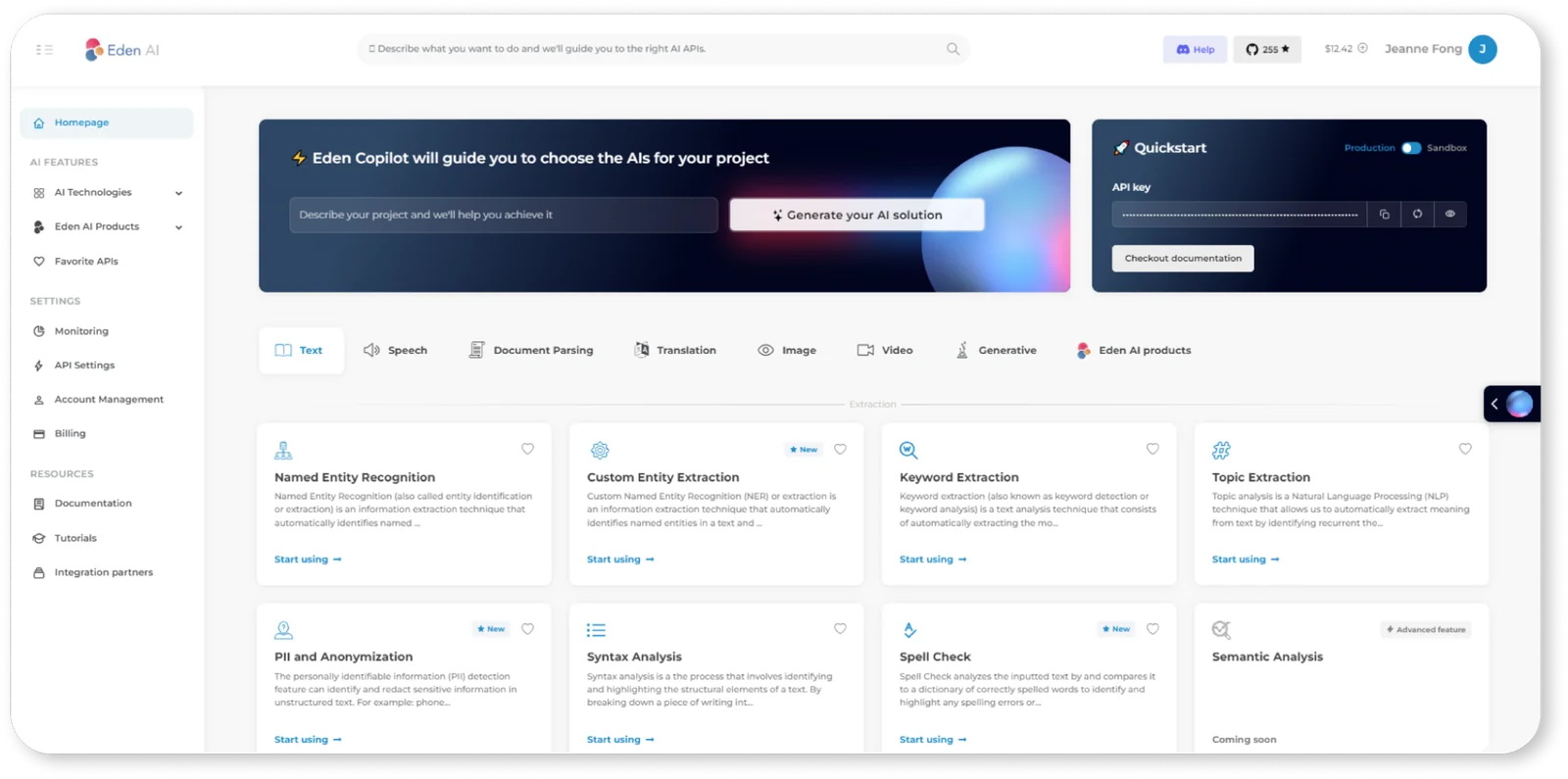
Key Features
Use Cases



Frequently asked questions about Eden AI
What is Eden AI's pricing structure?
Eden AI's pricing structure includes a freemium model with a free account for limited usage, a pay-as-you-go option, tiered plans from $0 to $99 per month, and custom enterprise solutions for larger organizations. For the most accurate and detailed pricing, visit their official website.
Key Points
- Freemium Model: Free account for limited usage.
- Pay-as-You-Go: Flexible pricing based on actual usage.
- Tiered Plans: Plans range from $0 to $99/month with varying features.
Detailed Explanation
Eden AI's pricing caters to a wide range of users, from individual developers to large enterprises. Here’s a breakdown of each pricing tier:
-
Freemium Account: This option is ideal for users who want to explore Eden AI's features without any financial commitment. The free account typically allows limited API calls and access to basic features, making it perfect for testing or small-scale projects.
-
Pay-as-You-Go: This flexible model is designed for users who need the capability to scale based on their demand. You only pay for what you use, which can be particularly beneficial for startups or businesses with variable workloads. Pricing details can vary, so checking the current rates on the website is recommended.
-
Tiered Plans: Eden AI offers tiered subscriptions with prices ranging from $0 to $99 per month. Each tier provides different levels of access, features, and support:
- Basic Tier (Free to $29/month): Suitable for small projects, this plan typically includes limited API access and basic support.
- Pro Tier ($30 to $99/month): This plan is designed for businesses needing more robust features, including increased API limits and priority support.
- Custom Enterprise Solutions: For larger organizations, Eden AI provides tailored solutions that meet specific business needs, including dedicated support and enhanced security features. Contact their sales team for personalized quotes.
Best Practices / Tips
- Evaluate Your Needs: Before committing to a plan, assess your usage patterns and select a tier that aligns with your expected needs.
- Utilize the Free Account: Start with the free account to familiarize yourself with the platform and its capabilities.
- Monitor Usage: If you choose the pay-as-you-go model, keep an eye on your usage to avoid unexpected charges.
- Contact Support: For enterprise-level solutions, don’t hesitate to reach out to Eden AI’s support team for a comprehensive understanding of potential costs and features.
Additional Resources
How do I get started with Eden AI?
To get started with Eden AI, sign up for a free account on their official website. This will provide you access to the user-friendly dashboard, comprehensive documentation, and limited onboarding credits, allowing you to explore the API's capabilities effectively.
Key Points
- Free Account Signup: Register on the Eden AI website for immediate access.
- User Dashboard: Navigate through an intuitive interface for managing your projects.
- Onboarding Credits: Utilize free credits to test the API functionalities.
Detailed Explanation
To begin using Eden AI, follow these steps:
- Visit the Eden AI Website: Go to Eden AI's official site.
- Create an Account: Click on the "Sign Up" button and fill out the required fields. You may need to verify your email to activate your account.
- Access the Dashboard: Once logged in, you’ll be directed to the dashboard, where you can manage your API keys, view usage statistics, and explore various AI services.
- Review Documentation: Familiarize yourself with the comprehensive documentation available in the dashboard. The docs cover API endpoints, usage examples, and integration guidelines.
- Utilize Onboarding Credits: Eden AI offers limited free credits for new users. Use these credits to test various features like natural language processing, image recognition, or other AI tools without incurring costs.
Use Cases: You can leverage Eden AI for applications such as chatbots, automated content generation, and data analysis. Start small to understand how the API works and gradually scale your projects.
Best Practices / Tips
- Start with Tutorials: Utilize beginner tutorials available in the documentation to understand how to integrate and use the API effectively.
- Monitor Usage: Keep an eye on your credit usage through the dashboard to avoid unexpected charges once you transition to paid plans.
- Experiment with Different Models: Take advantage of the various AI models offered by Eden AI to find the best fit for your specific needs.
- Stay Updated: Regularly check for updates or new features that the platform may introduce, enhancing your usage experience.
Additional Resources
- Eden AI Documentation - Comprehensive guides and API references.
- Eden AI Blog - Insights and updates on AI trends and features.
- Eden AI Community - Join discussions with other users and get support.
By following these steps, you will be well-equipped to harness the full potential of Eden AI for your projects.
What are the key features of Eden AI?
Eden AI offers a powerful multi-provider API that supports text, vision, and speech processing, along with open-source SDKs and options for custom API development. These features make Eden AI highly versatile and suitable for a wide range of artificial intelligence applications.
Key Points
- Unified Multi-Provider API: Seamlessly connect to various AI services.
- Support for Multiple Modalities: Process text, images, and speech in one platform.
- Open-Source SDKs: Easy integration and custom development options.
Detailed Explanation
Eden AI’s unified multi-provider API allows developers to access a diverse range of AI tools from different providers without the hassle of managing multiple integrations. This is particularly useful for businesses that want to leverage various AI capabilities, such as natural language processing (NLP), computer vision, and speech recognition.
Example Use Cases:
- Customer Support: Utilize text processing to analyze customer inquiries and automate responses, improving service efficiency.
- Content Creation: Use vision capabilities to generate images or enhance visual content for marketing campaigns.
- Voice Applications: Implement speech recognition features for voice-activated applications, enhancing user interaction.
Eden AI also provides open-source SDKs that facilitate faster and more efficient development. Developers can easily customize the SDKs to fit specific project requirements, ensuring that the integration is smooth and tailored to the business’s needs.
Best Practices / Tips
- Understand Your Needs: Before integrating Eden AI, clearly define which AI capabilities are essential for your application to maximize its potential.
- Leverage Documentation: Utilize the comprehensive documentation provided by Eden AI to troubleshoot and optimize your integration effectively.
- Test Extensively: Conduct thorough testing of the API with various datasets to ensure it meets performance expectations and handles edge cases.
Additional Resources
By leveraging these features and best practices, businesses can effectively harness the power of AI through Eden AI, enhancing their applications and user experiences.
How does Eden AI compare to other AI tools?
Eden AI distinguishes itself from other AI tools by offering a unified API that integrates multiple AI service providers, enabling effortless comparisons. Its flexible pay-as-you-go pricing model, which eliminates upfront fees, makes it a cost-effective solution for businesses seeking AI capabilities without high initial investments.
Key Points
- Unified API: Access multiple AI services through one integration.
- Flexible Pricing: Pay-as-you-go model with no upfront fees.
- Comparison Features: Easily evaluate and switch between different AI providers.
Detailed Explanation
Eden AI's unified API allows developers to easily integrate various AI services, such as natural language processing, image recognition, and machine learning, into their applications. This flexibility means businesses can choose the best AI technology for their needs without being locked into a single vendor.
For instance, if a company needs both text generation and image recognition, Eden AI enables seamless integration of those capabilities from different providers, allowing for better performance and cost efficiency. Users can switch between providers based on factors like pricing, performance, and service quality, ensuring they always get the best value.
In terms of pricing, Eden AI’s pay-as-you-go model is particularly advantageous for startups and small businesses. Instead of hefty upfront costs, users only pay for what they use, making it easier to manage budgets and scale AI capabilities as needed. This model contrasts sharply with many competitors that require long-term contracts or high initial fees, which can be a barrier to entry for many organizations.
Best Practices / Tips
- Evaluate Needs: Assess your business requirements before choosing providers to optimize costs.
- Experiment: Use the comparison features to trial different AI tools and find the best fit for your projects.
- Monitor Usage: Regularly review your usage patterns to take full advantage of the pay-as-you-go model and avoid unexpected charges.
Additional Resources
What technical requirements are needed to integrate Eden AI?
To integrate Eden AI, you need basic programming skills and familiarity with REST APIs. Official SDKs are available in Python, Unity, and TypeScript, making the integration process more straightforward. For specific technical requirements, refer to the detailed documentation provided by Eden AI.
Key Points
- Programming Skills: Basic understanding of programming is essential.
- Familiarity with REST APIs: Knowing how to interact with APIs is crucial for integration.
- Official SDKs: SDKs in Python, Unity, and TypeScript facilitate easier integration.
Detailed Explanation
Integrating Eden AI requires a foundational knowledge of programming and REST APIs. Here’s a breakdown of the requirements:
-
Programming Skills: You should be comfortable writing and debugging code. Familiarity with concepts like JSON, HTTP requests, and response handling is vital.
-
REST API Familiarity: Understanding how REST APIs work will enable you to send requests and handle responses effectively. This includes knowing how to use authentication tokens, manage endpoints, and deal with data formats.
-
Official SDKs: Eden AI provides SDKs for various programming environments:
- Python: Ideal for data science and machine learning projects, the Python SDK simplifies API calls.
- Unity: Perfect for game developers, the Unity SDK integrates AI functionalities into gaming applications.
- TypeScript: For web developers, the TypeScript SDK allows seamless integration with web applications.
-
Documentation: Always refer to the official Eden AI documentation for detailed integration guides, code snippets, and best practices.
Best Practices / Tips
- Start Simple: Begin by integrating basic functionalities before moving on to complex features. This helps in understanding the API and troubleshooting issues.
- Use Sample Projects: Leverage sample applications provided in the SDK documentation to understand how to implement features correctly.
- Testing: Regularly test your integration with tools like Postman to ensure API calls are functioning as expected.
- Error Handling: Implement robust error handling in your code to manage API response errors gracefully.
Additional Resources
By following these guidelines, you can ensure a smooth integration of Eden AI into your projects, leveraging its powerful capabilities effectively.
Explore more AI Ai Tools tools
Browse all Ai Tools tools →Browse by use case: Code Generation · Voice & Audio
Compare Eden AI: vs CleanSlop · vs Kalender Sync · vs UseIt Studio · vs Woven Video