
Crodo AI
AIVoice-first macOS assistant that dictates, answers on-screen questions, records meetings, and connects to Gmail, Calendar, and Slack.
Crodo AI
Voice-first macOS assistant that dictates, answers on-screen questions, records meetings, and connects to Gmail, Calendar, and Slack.
About Crodo AI
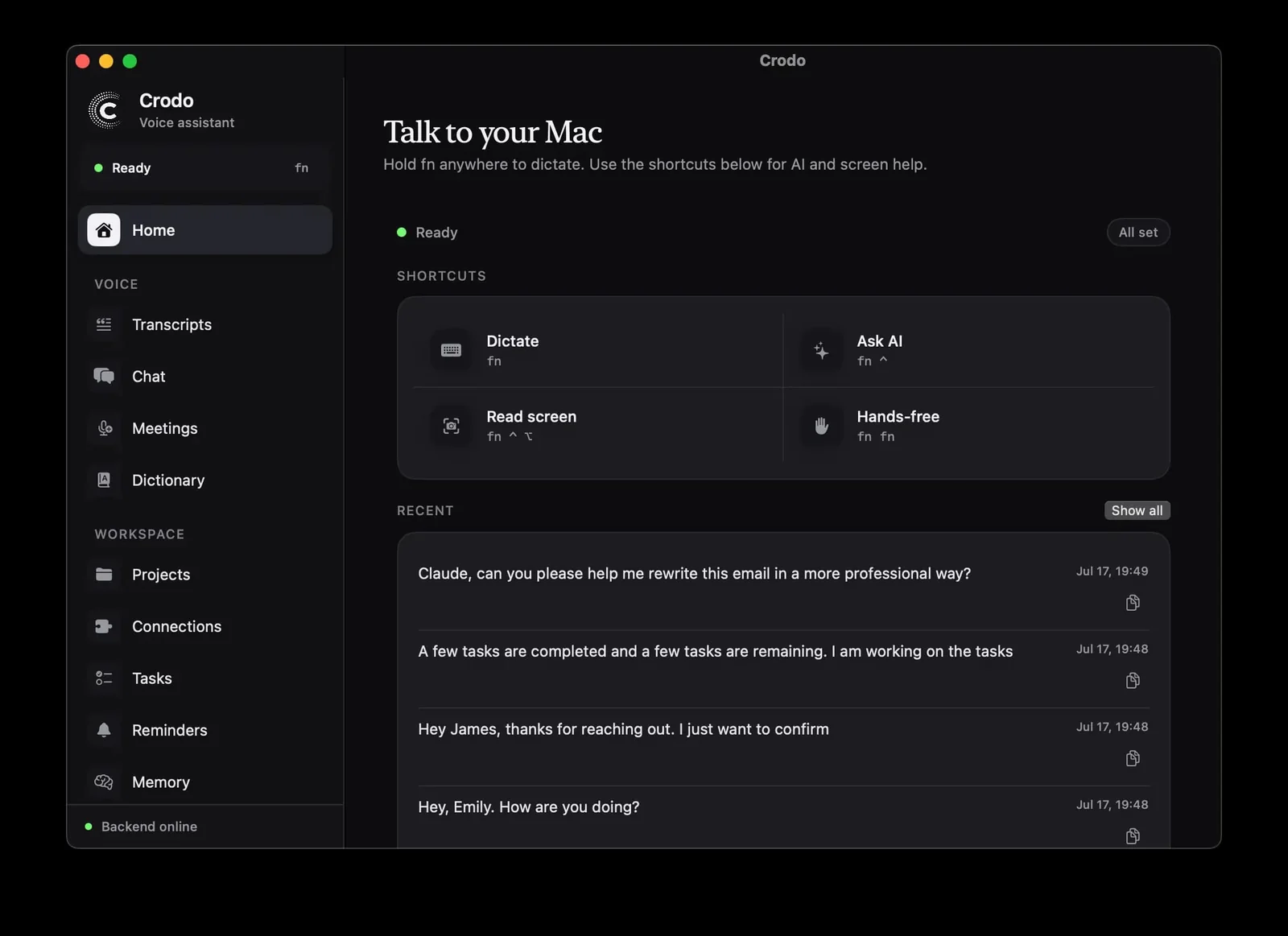
Crodo is a voice-first AI assistant built for macOS that lets you hold one hotkey to dictate, ask AI, read your screen, and turn meetings into structured notes without leaving the app you're in. Speak into any app and Crodo transcribes and pastes cleaned-up text at your cursor, or select text and ask for a shorter/warmer rewrite. A separate hotkey lets you ask questions, search the web, and get answers with sources back on your clipboard. Recorded calls are transcribed into transcripts, decisions, and action items filed under the right project. Connect Gmail, Google Calendar, and Slack via OAuth so Crodo answers from your real inbox and schedule instead of guessing, and remembers projects, people, and reminders in your timezone.
Screenshots
Key Features
Use Cases



Frequently asked questions about Crodo AI
What is Crodo AI?
Crodo AI is a voice-first macOS assistant designed to enhance productivity by dictating text, answering on-screen questions, recording meetings, and seamlessly integrating with Gmail, Calendar, and Slack. This innovative tool simplifies task management and communication, making it an essential asset for professionals.
Key Points
- Voice-first Technology: Enables hands-free operation for efficiency.
- Integration Capabilities: Connects with popular apps like Gmail and Slack.
- Meeting Management: Records and transcribes meetings for easy reference.
Detailed Explanation
Crodo AI leverages advanced voice recognition technology to facilitate a more intuitive user experience on macOS. By allowing users to dictate emails, notes, and tasks, it significantly reduces the time spent on manual typing. Here are some notable features:
-
Voice Dictation: Users can easily dictate emails or documents, which Crodo AI transcribes accurately. This functionality is particularly beneficial for users who need to generate content quickly or prefer speaking over typing.
-
On-Screen Question Responses: Crodo AI can answer questions directly based on the content displayed on your screen. For instance, if you’re reading a document and have a query, simply ask Crodo AI to clarify it, enhancing your workflow.
-
Meeting Recordings: With its ability to record meetings, Crodo AI ensures you never miss important details. It can also transcribe these recordings, making it easy to review discussions later. This feature is perfect for professionals who juggle multiple meetings.
-
Seamless Integration: Crodo AI connects with Gmail, Calendar, and Slack, allowing users to manage their emails, schedules, and team communications effortlessly. This integration makes it easier to stay organized and respond promptly without switching between apps.
Best Practices / Tips
- Optimize Voice Commands: Familiarize yourself with specific voice commands to maximize Crodo AI’s functionality. For example, use “Create a calendar event” or “Send an email to [Name]” for quick actions.
- Regular Updates: Keep Crodo AI updated to benefit from the latest features and improvements. Regular updates can enhance performance and introduce new capabilities.
- Feedback Loop: Utilize the feedback feature within Crodo AI to report inaccuracies or suggest improvements. This helps improve the tool's performance over time.
Additional Resources
How does Crodo AI work?
Crodo AI operates by leveraging innovative voice recognition technologies to enhance productivity across various applications. It enables users to dictate text, ask questions, capture screen content, and manage emails and calendars hands-free, streamlining workflows and improving efficiency in both personal and professional settings.
Key Points
- One-Hotkey Dictation allows seamless text input across applications.
- Voice-Ask AI facilitates quick information retrieval and app interactions.
- Integrated features for meeting management and email triage enhance organizational efficiency.
Detailed Explanation
Crodo AI integrates several advanced functionalities designed to optimize user experience and increase productivity. Here’s a breakdown of its main features:
-
One-Hotkey Dictation:
- Users can hold a designated hotkey and dictate text directly into any application. The AI processes the spoken words, applying punctuation and formatting before automatically pasting the cleaned-up text where the cursor is located. This feature is particularly beneficial for writing emails, documents, or messages without interrupting the flow of work.
-
Voice-Ask AI:
- By pressing a separate hotkey, users can ask questions or perform searches on the web. The AI retrieves answers, including sources, and copies them to the clipboard. This feature is ideal for quick information gathering without switching between apps.
-
Screen-Aware Answers:
- Crodo AI can capture the currently active screen content. Users may then ask questions about what they see, enabling the assistant to provide contextually relevant information. For example, if a user is viewing a spreadsheet, they can ask, "What does this data mean?" and receive insights based on the displayed content.
-
Meeting Recording & Notes:
- The AI can record audio from meetings and transcribe it into concise summaries. It highlights decisions and action items, organizing them under the respective project for easy reference. This feature is invaluable for teams needing to maintain accurate records of discussions.
-
Gmail, Calendar & Slack Connections:
- With OAuth-linked accounts, Crodo AI allows users to interact with their emails and calendars efficiently. Users can inquire about unread emails, receive summaries, or check their schedule with simple voice commands. For instance, asking, "What are my meetings for today?" retrieves real-time calendar data.
-
Text Rewriting:
- Users can select any text on their screen and request a rewritten version that is shorter or clearer. This feature enhances communication clarity, especially in professional settings where precision is crucial.
Best Practices / Tips
- Use Hotkeys Efficiently: Familiarize yourself with the hotkeys to maximize productivity. Regular practice can significantly reduce the time spent on manual text entry and information retrieval.
- Customize Settings: Tailor the AI’s settings to match your workflow. Adjust voice recognition sensitivity and shortcuts to enhance performance.
- Regularly Review Meeting Notes: Make it a habit to periodically review and share meeting summaries with your team to ensure alignment on action items.
Additional Resources
What are the main features of Crodo AI?
Crodo AI boasts several key features, including One-Hotkey Dictation for seamless text input, Voice-Ask AI for quick information retrieval, and Screen-Aware Answers that enhance user interaction with displayed content. Additionally, it offers meeting recording and note-taking capabilities, alongside Gmail, Calendar, and Slack integration for efficient workflow management.
Key Points
- One-Hotkey Dictation: Effortlessly convert speech to text.
- Voice-Ask AI: Instantly access information and perform tasks.
- Meeting Recording & Notes: Capture and summarize meetings effectively.
Detailed Explanation
Crodo AI is designed to streamline your workflow and enhance productivity through its impressive set of features:
One-Hotkey Dictation
This feature allows you to hold a designated hotkey while speaking, enabling the immediate transcription of your speech into any application. The text is not only punctuated but also cleaned up for clarity, allowing you to focus on your conversation without switching between applications. For instance, during a brainstorming session, you can speak your ideas into a document while retaining the context.
Voice-Ask AI
With a separate hotkey, you can ask Crodo AI questions, search the web, or open applications. The assistant provides answers along with their sources, which are then copied to your clipboard for easy reference. This is particularly useful for research tasks, where quick access to information is crucial.
Screen-Aware Answers
This innovative feature captures the active display, allowing you to ask questions about what you see on your screen. Whether you're viewing a website or a document, you can inquire about specific elements or data, and Crodo AI will assist you in real-time based on your visual context. For example, if you're reading an article and have a question about a term, you can simply ask without disrupting your reading flow.
Meeting Recording & Notes
Crodo AI facilitates efficient meeting management by recording audio from both your microphone and the meeting. It transcribes the conversation and summarizes key points, including decisions and action items, which are then organized under relevant projects. This feature is invaluable for professionals who need to keep track of discussions and follow-ups.
Gmail, Calendar & Slack Connections
By integrating with Gmail, Calendar, and Slack through OAuth-linked accounts, Crodo AI allows you to check your inbox, view your schedule, and draft responses using real data. For example, you can ask Crodo AI, "What meetings do I have today?" or "Draft a reply to this email," simplifying communication and task management.
Best Practices / Tips
- Utilize Hotkeys: Familiarize yourself with hotkeys for efficient use of features.
- Ask Specific Questions: The more specific your query, the better the response you’ll receive from Voice-Ask AI.
- Organize Notes: Regularly categorize and review your meeting notes to maintain clarity and follow-up on action items.
Additional Resources
Who is Crodo AI for?
Crodo AI is designed for professionals, teams, and individuals who want to enhance productivity through hands-free writing, streamlined meeting debriefs, efficient email management, real-time calendar checks, and text rewriting. It’s perfect for anyone looking to optimize communication and minimize distractions in their workflow.
Key Points
- Hands-Free Writing: Dictate various types of content directly into Mac apps.
- Meeting Debriefs: Automatically summarize recorded calls into actionable insights.
- Inbox Triage: Quickly retrieve the latest unread emails with essential details.
Detailed Explanation
Crodo AI caters to a wide audience, including remote workers, business professionals, and project managers, by simplifying key tasks. For example, with hands-free writing, users can dictate emails, documents, and Slack messages without interrupting their flow. This feature is particularly beneficial for those who find typing cumbersome or who multitask frequently.
In terms of meeting debriefs, Crodo AI can record calls and transcribe them into concise summaries that highlight decisions, key points, and action items. This ensures that team members are aligned on follow-ups without the need for manual note-taking.
Inbox triage is another crucial feature. Users can inquire about their latest unread emails, receiving a summary that includes the sender, subject, and key points in plain language. This saves time and helps prioritize responses efficiently.
For calendar management, simply ask, “Am I free tomorrow at 3?” and Crodo AI will provide an accurate response based on real-time calendar data, eliminating the guesswork often associated with scheduling.
Additionally, the text rewriting feature allows users to select any text on their screen and request a revised version, whether they need it shorter, warmer, or clearer. This is invaluable for refining communication, especially in professional settings.
Best Practices / Tips
- Utilize Voice Commands Effectively: Familiarize yourself with the voice commands to maximize efficiency. Practice dictating in a quiet environment for better recognition accuracy.
- Regularly Review Meeting Summaries: After using the meeting debrief feature, ensure that summaries are shared with all participants for clarity and accountability.
- Prioritize Emails: Use the inbox triage feature regularly to stay on top of your communications. Establish a routine to check unread emails daily.
Additional Resources
How much does Crodo AI cost?
Crodo AI is completely free to use, offering a range of features designed to enhance productivity and streamline workflows without any associated costs. Users can access its advanced tools without a subscription or hidden fees, making it an attractive option for individuals and businesses alike.
Key Points
- Crodo AI is available at no cost.
- No hidden fees or subscription requirements.
- Offers a variety of features for enhanced productivity.
Detailed Explanation
Crodo AI stands out in the competitive landscape of AI tools primarily due to its zero-cost access model. This allows users—whether freelancers, small business owners, or large organizations—to leverage its capabilities without financial barriers. The platform provides tools for tasks such as content creation, data analysis, and automation, making it versatile for various applications.
For example, a small business owner can utilize Crodo AI to generate marketing content, automate customer responses, or analyze sales data, all without incurring expenses. This is particularly beneficial for startups or freelancers who need to optimize their budgets while still accessing powerful AI resources.
Furthermore, Crodo AI frequently updates its features based on user feedback, ensuring that the platform remains relevant and effective. Users can expect regular enhancements and new tools added to the free offering, keeping them at the forefront of AI advancements.
Best Practices / Tips
- Explore Features: Take the time to familiarize yourself with all the features available on Crodo AI. This will help you maximize the tool's potential for your specific needs.
- Stay Updated: Follow Crodo AI's official channels for updates on new features and improvements, ensuring you’re always using the latest tools available.
- Community Engagement: Join forums or user communities to share experiences and tips with other Crodo AI users, enhancing your understanding and usage of the platform.
Additional Resources
How do I get started with Crodo AI?
To get started with Crodo AI, visit https://crodo.ai/ to sign up for an account. After creating your account, you can explore the platform's features, integrate it into your workflows, and access various AI tools tailored for your needs.
Key Points
- Sign Up Process: Easy registration through the website.
- Explore Features: Familiarize yourself with the tools available.
- Integration: Seamlessly incorporate Crodo AI into existing workflows.
Detailed Explanation
-
Sign Up Process:
- Go to the Crodo AI website and click on the "Sign Up" button.
- Fill out the registration form with your details, including your email and a secure password.
- Verify your email address to activate your account.
-
Explore Features:
- Once logged in, take a guided tour of the platform to understand its capabilities.
- Key features include AI-driven content creation, data analysis, and marketing automation.
- Use the dashboard to navigate through tools and resources tailored to your business needs.
-
Integration:
- Crodo AI allows for easy integration with popular tools like Google Analytics, CRM systems, and social media platforms.
- Explore the API documentation for advanced integration options if you're a developer.
- Utilize tutorials and community forums for support during the integration process.
Best Practices / Tips
- Start with Tutorials: Utilize Crodo AI’s onboarding tutorials to familiarize yourself with its functionalities.
- Set Clear Goals: Define your objectives for using Crodo AI to maximize its benefits. Whether it’s enhancing content quality or automating repetitive tasks, having clear goals helps in utilizing the platform effectively.
- Monitor Performance: Regularly review analytics to gauge how Crodo AI is impacting your business outcomes. Adjust your strategies based on data insights.
Additional Resources
Explore more AI Ai Tools tools
Browse all Ai Tools tools →Browse by use case: Chatbots & Assistants · Voice & Audio · Automation & Productivity
Compare Crodo AI: vs CleanSlop · vs Kalender Sync · vs UseIt Studio · vs Woven Video