

TensorFlow
AIOpen SourceFreeEnd-to-end open-source machine learning platform with a flexible ecosystem of tools, libraries, and deployment options for research and production.
TensorFlow
End-to-end open-source machine learning platform with a flexible ecosystem of tools, libraries, and deployment options for research and production.
About TensorFlow
TensorFlow is an open-source machine learning framework that represents computations as dataflow graphs of tensors and operations. It provides both low-level primitives for numerical computation and high-level APIs (notably Keras) for rapid model building, supports eager execution for interactive development, and a suite of tools for visualization, optimization, and deployment. TensorFlow's ecosystem includes TensorBoard for visualization, TensorFlow Serving, TensorFlow Lite for mobile/edge, and TensorFlow.js for browser/Node.js deployment, enabling users to move from research prototypes to scalable production systems. Its unique value lies in broad hardware support (CPU, GPU, TPU), distributed training capabilities, and a large community and library ecosystem enabling cross-platform production and research workflows.
Screenshots
Key Features
Use Cases


Frequently asked questions about TensorFlow
Is TensorFlow free to use for personal and commercial projects?
Yes, TensorFlow is completely free to use for both personal and commercial projects under the Apache 2.0 license. You can easily download, modify, and deploy TensorFlow without incurring any subscription fees or hidden costs, making it an ideal choice for developers and businesses alike.
Key Points
- TensorFlow is licensed under the Apache 2.0 license, allowing free use.
- It supports modification, customization, and deployment for various projects.
- The framework is suitable for beginners and professionals in AI development.
Detailed Explanation
TensorFlow is an open-source machine learning framework developed by Google. The Apache 2.0 license permits users to utilize TensorFlow without any cost for both personal and commercial endeavors. This means you can create applications, conduct research, or build products using TensorFlow without worrying about licensing fees.
Features of TensorFlow
- Flexibility and Power: TensorFlow supports various neural networks and deep learning models, making it versatile for different applications, such as image recognition, natural language processing, and reinforcement learning.
- Community Support: With a large community of developers and researchers, TensorFlow offers extensive resources, tutorials, and documentation to help users get started and troubleshoot issues.
- Cross-Platform Compatibility: TensorFlow can be run on different platforms, including CPUs, GPUs, and TPUs, and can be deployed on cloud services or local machines.
Use Cases
- Personal Projects: Individuals can create machine learning models for personal use, such as predicting stock prices or analyzing personal data.
- Commercial Applications: Businesses can develop AI-driven products like recommendation systems, chatbots, or image processing applications using TensorFlow.
- Research and Education: Academics can leverage TensorFlow to conduct experiments and teach machine learning concepts in classrooms.
Best Practices / Tips
- Stay Updated: Regularly check for TensorFlow updates to benefit from new features and improvements.
- Utilize Documentation: Make full use of the official TensorFlow documentation and tutorials to enhance your understanding and implementation skills.
- Engage with the Community: Participate in forums like TensorFlow GitHub and Stack Overflow to share experiences, ask questions, and learn from others.
Additional Resources
What are the key features of TensorFlow for machine learning?
TensorFlow is a powerful machine learning framework that features high-level APIs like Keras for rapid model development, robust support for distributed training, comprehensive model deployment tools, and extensive visualization capabilities through TensorBoard. These features make it highly suitable for diverse machine learning tasks.
Key Points
- High-Level APIs: TensorFlow provides user-friendly interfaces such as Keras.
- Distributed Training: Optimized for training models across multiple devices.
- Visualization Tools: TensorBoard offers detailed insights into model performance.
Detailed Explanation
TensorFlow's high-level APIs, especially Keras, simplify the process of building and training deep learning models. Keras allows developers to create neural networks using just a few lines of code, enabling rapid prototyping. For instance, you can quickly build a convolutional neural network (CNN) for image classification with just a few commands.
Distributed Training
TensorFlow excels in distributed training, which allows machine learning practitioners to train models on multiple GPUs or even across entire clusters. This feature significantly reduces training time and scales effectively with data size. For example, TensorFlow's tf.distribute.Strategy API helps manage and distribute training across various hardware configurations, enhancing performance and resource utilization.
Model Deployment Tools
Once a model is trained, TensorFlow offers versatile deployment options. With TensorFlow Serving, you can deploy machine learning models in production environments seamlessly. It supports serving models through RESTful APIs, making it easy to integrate with web applications or mobile devices. Additionally, TensorFlow Lite enables the deployment of lightweight models on mobile and IoT devices, ensuring efficient inference on limited-resource environments.
Visualization with TensorBoard
TensorBoard provides an extensive suite of visualization tools to track model metrics, such as loss and accuracy during training. It also allows users to visualize model graphs and performance, making it easier to debug and optimize models. For instance, TensorBoard's histogram feature helps in monitoring the distribution of weights during training, thereby providing insights into model behavior.
Best Practices / Tips
- Leverage Keras for Prototyping: Use Keras for quick model iterations and testing before moving to more complex architectures.
- Optimize Data Pipeline: Utilize TensorFlow's
tf.dataAPI to create efficient input pipelines, increasing training speed. - Monitor with TensorBoard: Regularly use TensorBoard during training to visualize metrics and make informed adjustments to hyperparameters.
Additional Resources
By utilizing these features and best practices, you can effectively harness TensorFlow's capabilities for your machine learning projects.
How do I get started with TensorFlow for machine learning projects?
To get started with TensorFlow for machine learning projects, visit the official TensorFlow website and follow the installation instructions. You can find a wealth of tutorials and example projects that will guide you in building your first machine learning model effectively.
Key Points
- Installation Process: Ensure you have the right environment setup.
- Learning Resources: Take advantage of official tutorials and community forums.
- Project Ideas: Start with simple projects to gain practical experience.
Detailed Explanation
-
Installation:
- Begin by visiting the TensorFlow installation guide. TensorFlow supports various platforms, including Windows, macOS, and Linux. You can install it using pip, Docker, or from source. For most users, a simple command like
pip install tensorflowwill suffice.
- Begin by visiting the TensorFlow installation guide. TensorFlow supports various platforms, including Windows, macOS, and Linux. You can install it using pip, Docker, or from source. For most users, a simple command like
-
Environment Setup:
- It's recommended to use a virtual environment (like venv or conda) to manage dependencies. This keeps your project isolated and avoids version conflicts. Follow these steps:
- Create a virtual environment:
python -m venv myenv - Activate it:
- On Windows:
myenv\Scripts\activate - On macOS/Linux:
source myenv/bin/activate
- On Windows:
- Install TensorFlow:
pip install tensorflow
- Create a virtual environment:
- It's recommended to use a virtual environment (like venv or conda) to manage dependencies. This keeps your project isolated and avoids version conflicts. Follow these steps:
-
Learning Resources:
- The official TensorFlow website offers a plethora of resources, including:
- Tutorials: Step-by-step guides on various topics like image classification, text processing, and reinforcement learning.
- Examples: Pre-built models you can run and modify.
- Courses: Free online courses like the "TensorFlow in Practice" specialization on Coursera.
- The official TensorFlow website offers a plethora of resources, including:
-
Building Your First Model:
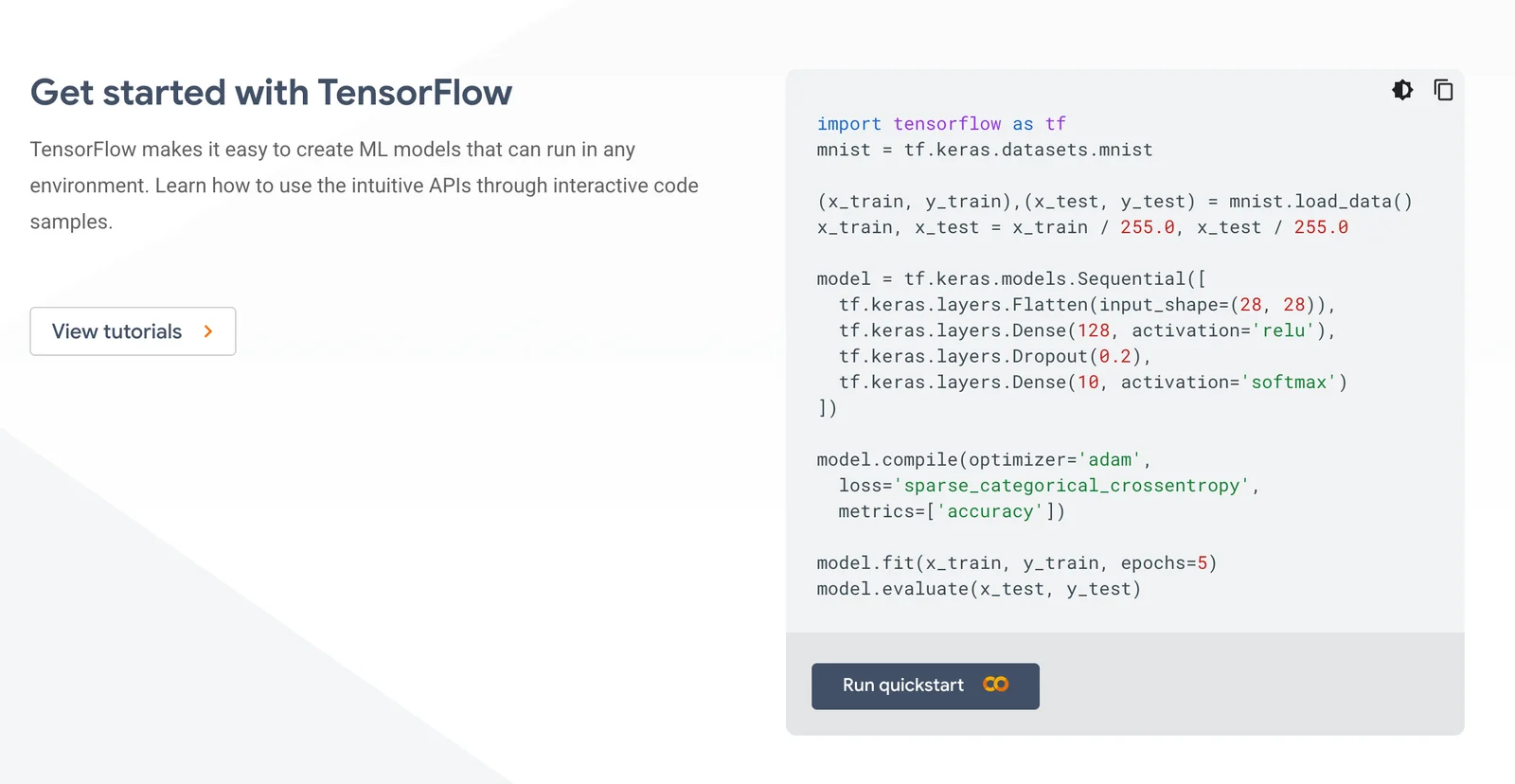
- Start with a simple model, such as linear regression or image classification using the Fashion MNIST dataset. Here’s a basic example:
import tensorflow as tf
from tensorflow import keras
from tensorflow.keras import layers

model = keras.Sequential([
  layers.Flatten(input_shape=(28, 28)),
  layers.Dense(128, activation='relu'),
  layers.Dense(10, activation='softmax')
])
- Start with a simple model, such as linear regression or image classification using the Fashion MNIST dataset. Here’s a basic example:
-
Training and Evaluating:
- Use the
model.compile,model.fit, andmodel.evaluatemethods to train and assess your model. Keep track of metrics such as accuracy and loss.
- Use the
Best Practices / Tips
- Start Small: Begin with smaller datasets and simpler models to build your confidence.
- Utilize GPU: If available, leverage GPU acceleration for faster training times.
- Stay Updated: Follow TensorFlow's blog and GitHub for the latest updates and features.
- Community Engagement: Join TensorFlow forums, Stack Overflow, or Reddit to ask questions and share knowledge.
Additional Resources
- TensorFlow Official Documentation
- TensorFlow GitHub Repository
- Coursera TensorFlow Courses
- TensorFlow YouTube Channel for video tutorials and talks.
Does TensorFlow provide API support for integration with other applications?
Yes, TensorFlow provides robust API support for multiple programming languages, including Python, JavaScript, and C++. This enables seamless integration with various applications and tools, enhancing functionality and facilitating the development of complex machine learning solutions.
Key Points
- Multi-language Support: TensorFlow APIs are available for Python, JavaScript, and C++.
- Integration Flexibility: APIs allow integration with web applications, mobile apps, and enterprise systems.
- Enhanced Functionality: Integrating TensorFlow can improve data processing, model deployment, and performance.
Detailed Explanation
TensorFlow's API support plays a crucial role in its versatility and usability across different platforms. Here’s a breakdown of its APIs:
-
Python API: The most widely used API due to its simplicity and extensive community support. Python allows developers to build, train, and deploy machine learning models effectively. For instance, TensorFlow's Keras API, which is built on top of TensorFlow, enables rapid prototyping with a user-friendly interface.
-
JavaScript API (TensorFlow.js): This API allows developers to run machine learning models in the browser or on Node.js. It is particularly beneficial for web developers looking to integrate AI features into their websites, such as image recognition or natural language processing. For example, TensorFlow.js can be used for real-time object detection in web applications.
-
C++ API: While less commonly used than the Python API, TensorFlow's C++ API is essential for performance-critical applications. It enables developers to create high-performance machine learning systems, particularly useful in environments where low latency is a priority, such as gaming or robotics.
These APIs facilitate various use cases, from research and prototyping to production-level applications, allowing developers to leverage TensorFlow's capabilities in diverse environments.
Best Practices / Tips
- Choose the Right API: Select an API based on your project's needs. For rapid development, use Python; for web applications, consider TensorFlow.js; for performance-sensitive systems, opt for C++.
- Utilize Pre-built Models: Take advantage of TensorFlow Hub to integrate pre-trained models, saving time and resources while ensuring high performance.
- Stay Updated: Regularly check TensorFlow’s official documentation for updates and new features to keep your integrations efficient and secure.
Additional Resources
With these resources, you can dive deeper into TensorFlow's capabilities and explore how to integrate its powerful APIs effectively into your applications.
How does TensorFlow compare to other machine learning frameworks like PyTorch?
TensorFlow is preferred for its scalability and robust production capabilities, making it ideal for enterprise applications. In contrast, PyTorch is favored for its intuitive design and dynamic computation graph, which enhances research flexibility. The choice between them ultimately depends on the specific goals and requirements of your machine learning project.
Key Points
- Scalability: TensorFlow is designed for large-scale applications.
- Ease of Use: PyTorch offers a more user-friendly interface for researchers.
- Community and Ecosystem: Both frameworks have strong communities, but they cater to different needs.
Detailed Explanation
TensorFlow, developed by Google, is a comprehensive open-source framework used for building machine learning models. Its architecture supports distributed training and deployment across multiple platforms, which is essential for scalable applications. For instance, TensorFlow Serving allows for seamless model deployment in production environments, making it suitable for applications requiring high reliability and performance.
In contrast, PyTorch, developed by Facebook, emphasizes flexibility and speed, particularly in research settings. Its dynamic computation graph allows developers to modify the network architecture on-the-fly, which is beneficial for experimentation. A prime example of PyTorch’s utility is in the field of natural language processing (NLP), where rapid iteration can lead to innovative solutions.
Both frameworks support various machine learning tasks, including deep learning, reinforcement learning, and more. However, TensorFlow provides more advanced tools for production, such as TensorFlow Lite for mobile and TensorFlow.js for web applications. PyTorch has made strides in this area with TorchScript and ONNX (Open Neural Network Exchange), enabling model export to production environments.
Best Practices / Tips
- Evaluate Project Needs: Assess whether you need production-grade tools (TensorFlow) or research flexibility (PyTorch).
- Experiment with Both: If unsure, try simple projects in both frameworks to understand their workflows and capabilities.
- Leverage Community Resources: Utilize forums, tutorials, and official documentation to enhance learning and problem-solving.
- Monitor Performance: Measure training times and resource usage to determine which framework meets your efficiency needs.
Additional Resources
Explore more AI Ai Models tools
Browse all Ai Models tools →- Soup CLI
- VibeVoice
- Laguna by Poolside
- Arena AI: The Official AI Ranking & LLM Leaderboard
- PromptLayer
- PHBench
Compare TensorFlow: vs Soup CLI · vs VibeVoice · vs Laguna by Poolside · vs Arena AI: The Official AI Ranking & LLM Leaderboard