

Grok Imagine API
AIAn API for Grok image generation and vision capabilities enabling prompt-driven image creation and image understanding for apps and services.
Grok Imagine API
An API for Grok image generation and vision capabilities enabling prompt-driven image creation and image understanding for apps and services.
About Grok Imagine API
Grok Imagine API exposes xAI's image generation and vision/understanding capabilities via a web API, allowing developers to generate images from text prompts, analyze and answer questions about images, and integrate multimodal reasoning into applications. It supports selection of different Grok image and vision models, configurable parameters for prompts and outputs, file uploads and URL-based image inputs, and streaming where supported. The API is commonly accessed via API keys and has multiple community SDKs and unofficial wrappers (Python, .NET, Swift) that provide conversation management, streaming responses, and tool integrations to simplify embedding Grok's image and vision features into production services.
Screenshots
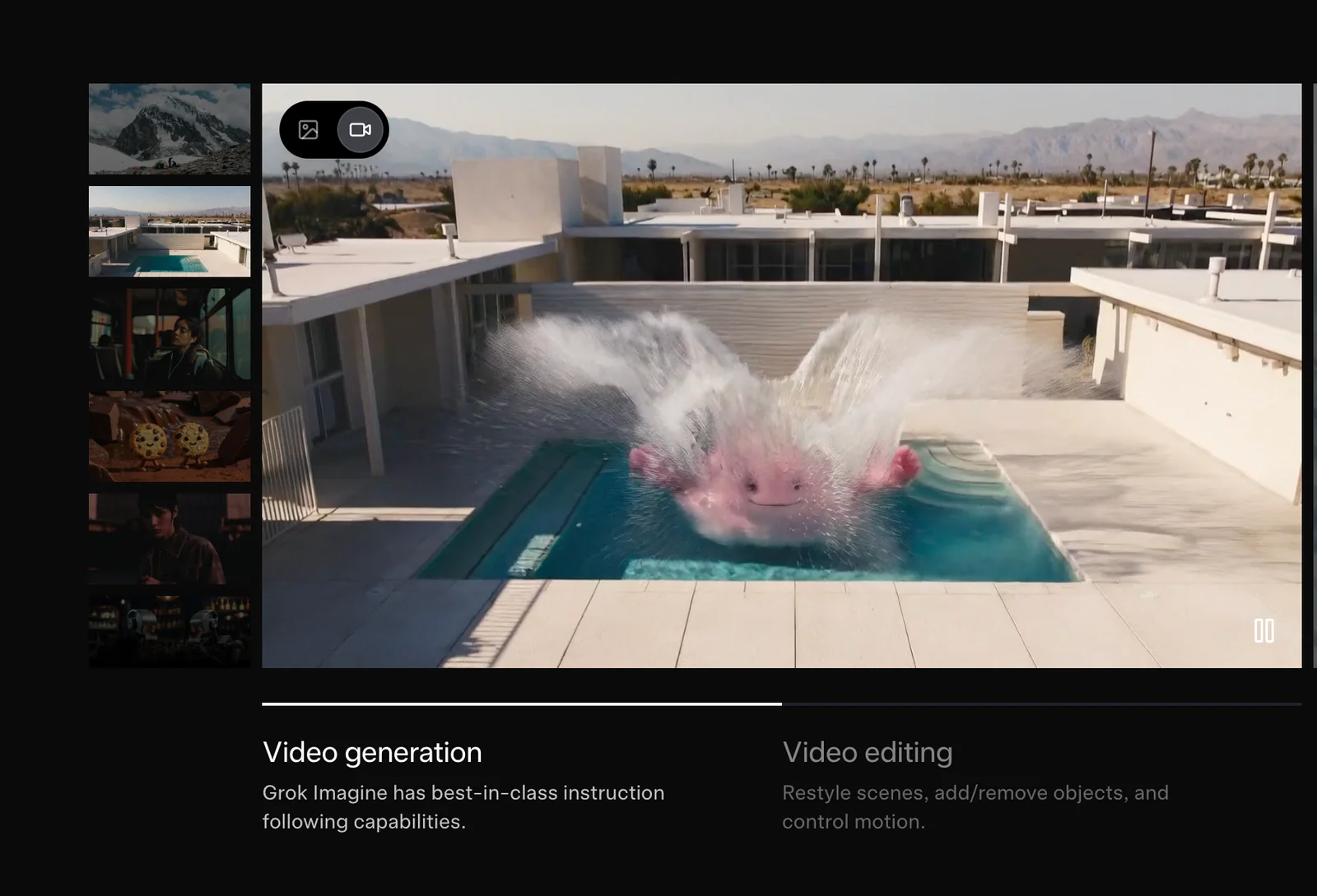
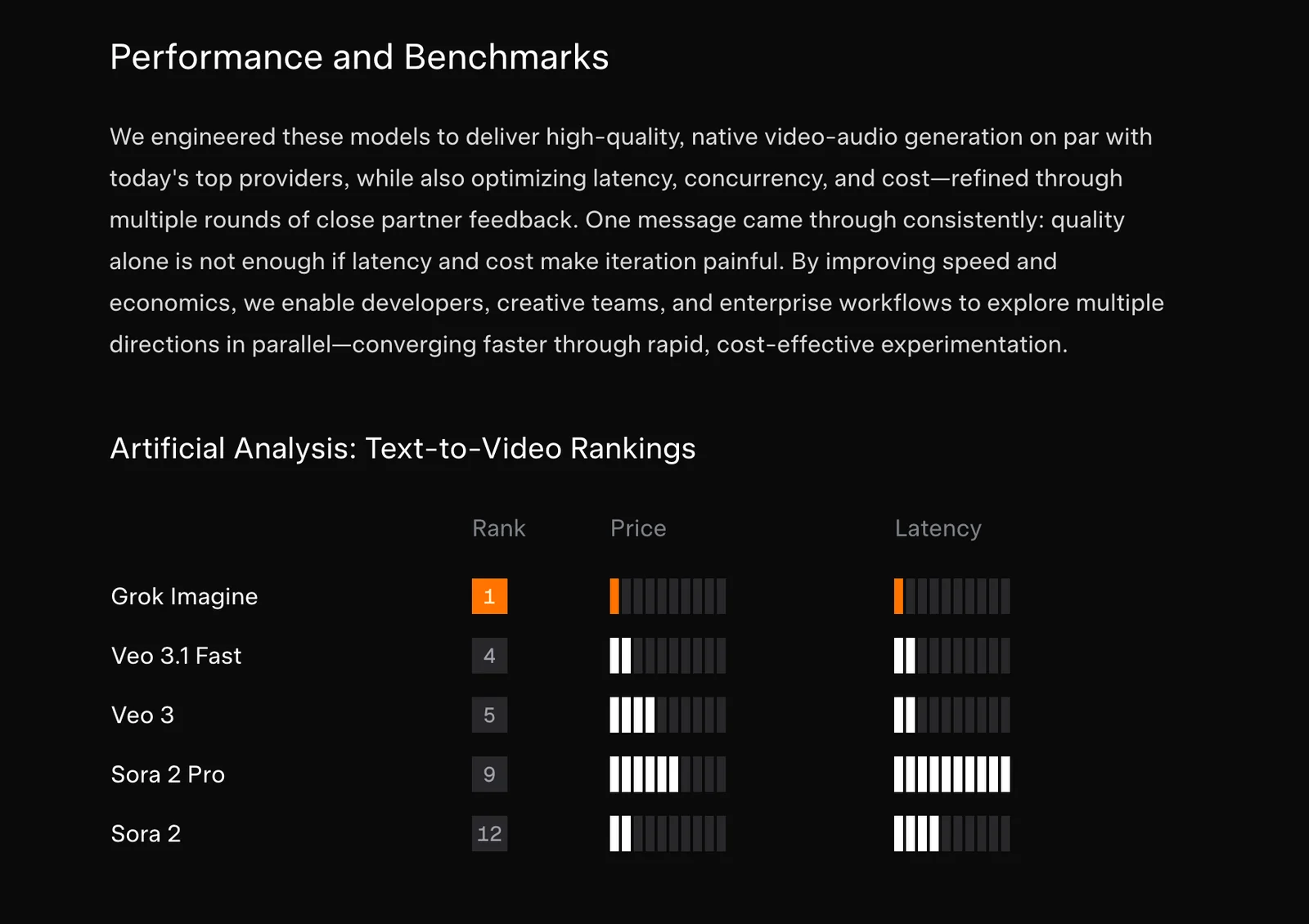
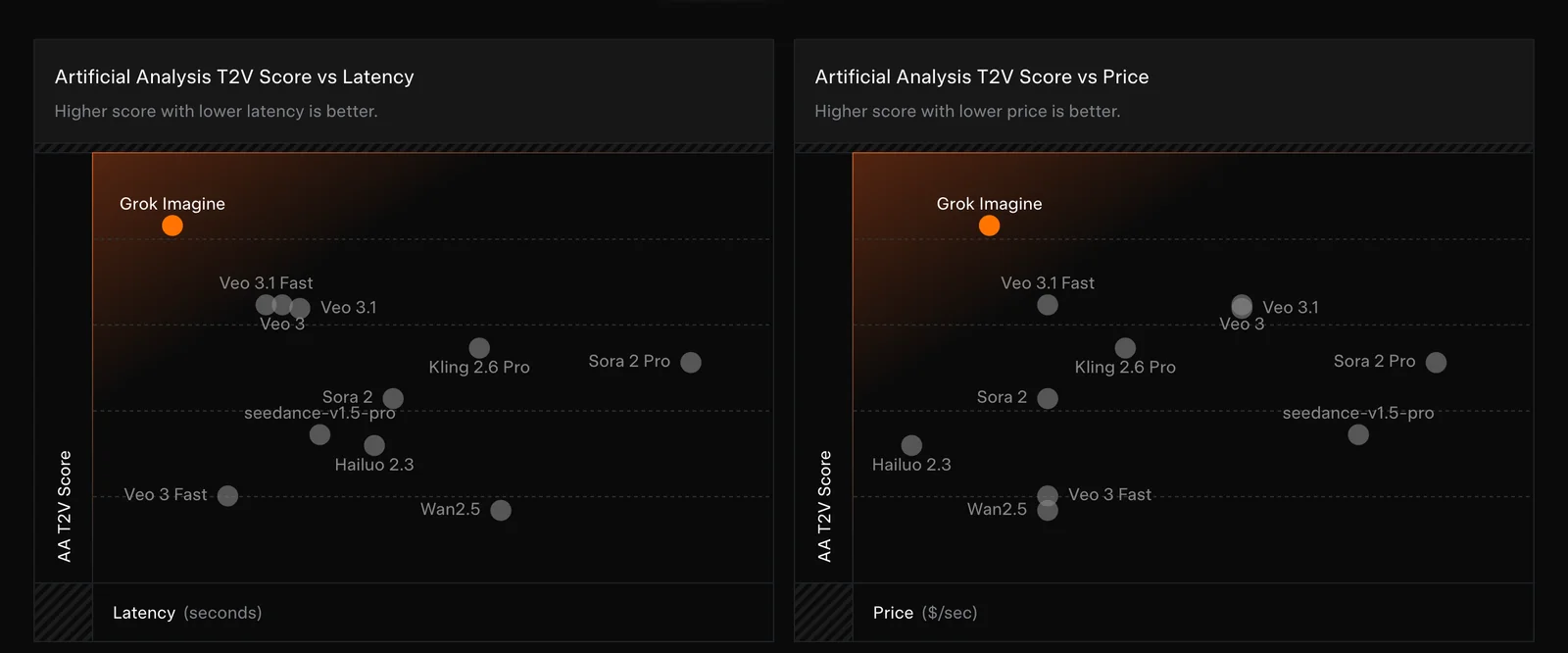
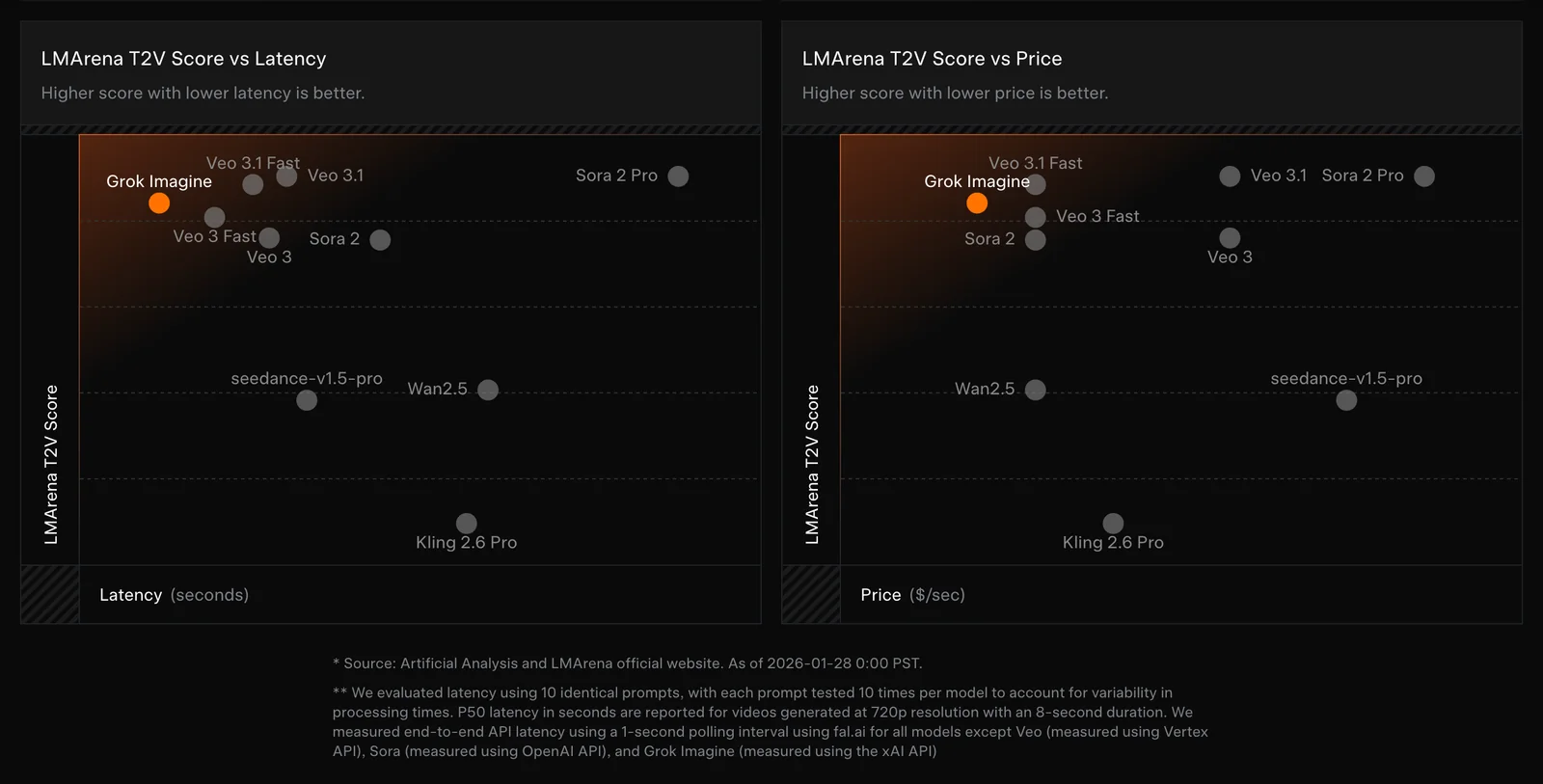
Key Features
Use Cases



Frequently asked questions about Grok Imagine API
What are the different pricing options for Grok Imagine API?
Grok Imagine API offers multiple pricing tiers tailored to different needs: a free trial with credits, a Starter plan at $10 for 100 credits, a Basic plan at $30 for 330 credits, a Professional plan at $99 for 1211 credits, and customizable Enterprise options with varying features.
Key Points
- Free Trial: Start with free credits to explore the API.
- Tiered Pricing: Several plans accommodate different usage needs and budgets.
- Enterprise Solutions: Custom options available for larger organizations.
Detailed Explanation
Grok Imagine API provides a structured pricing model that allows users to select a plan based on their requirements.
-
Free Credits: Users can sign up for a free trial that includes a certain number of credits to test the API's functionalities without any financial commitment. This is ideal for developers and businesses wanting to evaluate the service.
-
Starter Plan: Priced at $10, this plan provides users with 100 credits. It's suitable for small projects or individual developers who need limited access.
-
Basic Plan: At $30, the Basic plan offers 330 credits, making it a cost-effective choice for small businesses or teams working on short-term projects.
-
Professional Plan: For $99, users receive 1211 credits. This tier is designed for larger teams or ongoing projects that require extensive API usage.
-
Enterprise Options: Custom plans can be tailored to fit the specific needs of larger organizations, offering a scalable solution that includes additional features and support.
Best Practices / Tips
- Assess Your Needs: Before choosing a plan, evaluate your expected usage to select the most cost-effective option.
- Take Advantage of the Free Trial: Use the free credits to familiarize yourself with the API and test its capabilities.
- Plan for Scale: If you anticipate growth, consider selecting a higher tier or an Enterprise plan to accommodate increasing demands without interruptions.
Additional Resources
What unique features does Grok Imagine API provide?
The Grok Imagine API offers unique features such as prompt-driven image generation, advanced image understanding with Q&A capabilities, and the ability to handle multimodal conversations. It also supports real-time streaming responses and includes community SDKs for seamless integration into various applications.
Key Points
- Prompt-driven image generation: Create images based on user-defined prompts.
- Image understanding with Q&A: Analyze images and provide contextual answers.
- Multimodal conversation handling: Engage users through text, images, and audio simultaneously.
Detailed Explanation
The Grok Imagine API stands out with its prompt-driven image generation, allowing developers to create high-quality images based on specific textual prompts. This feature is particularly useful for applications in creative industries, such as marketing and design, where visual content is essential.
In addition to generating images, the API incorporates image understanding with Q&A capabilities. This allows users to upload an image and ask questions about its content, receiving accurate, context-aware responses. For example, a user might upload a photo of a car and ask, "What model is this?" The API will analyze the image and provide an answer, enhancing user interaction and engagement.
Another notable feature is its multimodal conversation handling, which enables the API to process and respond to different types of inputs, including text, images, and audio. This versatility allows developers to create more dynamic and engaging applications, such as virtual assistants or educational tools that can explain concepts visually and verbally.
The API also supports real-time streaming responses, which is crucial for applications that require immediate feedback, such as interactive games or live customer support. This feature ensures that users receive quick and dynamic interactions, enhancing the overall user experience.
Lastly, Grok Imagine API provides community SDKs. These software development kits make integration easier, allowing developers to implement the API in various programming environments without extensive coding knowledge. This accessibility broadens the API's usability across different platforms and applications.
Best Practices / Tips
- Start Small: Begin with simple prompts to test the image generation capabilities before moving to complex queries.
- Utilize Community SDKs: Take advantage of community-contributed SDKs for quicker integration into your projects.
- Test Real-time Features: Regularly test the real-time streaming response feature to ensure optimal performance and user satisfaction.
- Document Your Use Cases: Keep track of successful implementations and user interactions to refine your usage of the API.
Additional Resources
How can I get started with Grok Imagine API?
To get started with the Grok Imagine API, sign up on their official website to receive free credits. Familiarize yourself with the comprehensive documentation on prompt-driven image creation and image analysis to harness the full potential of the API's features effectively.
Key Points
- Sign Up for Free Credits: Create an account to start using the API.
- Explore Documentation: Understand how to utilize image creation and analysis.
- Experiment with Features: Leverage various capabilities offered by the API.
Detailed Explanation
To start using the Grok Imagine API, follow these steps:
-
Sign Up: Visit the Grok Imagine website and create an account. New users typically receive free credits that allow them to test the API without initial investment.
-
Access Documentation: After signing up, navigate to the documentation section. This resource is crucial for understanding how to work with the API effectively. The documentation covers:
- Prompt-driven Image Creation: Learn how to create images by providing specific prompts to the API. This feature is particularly useful for artists, marketers, and developers looking to generate unique visuals.
- Image Analysis: Discover how to analyze existing images. This can include features such as object detection, style recognition, and more.
-
Experiment with Examples: Utilize sample prompts available in the documentation to see how the API responds. This hands-on experience can help you understand the nuances of the technology and how best to implement it in your projects.
-
Integration: After familiarizing yourself with the API’s capabilities, consider how it can fit into your existing applications or workflows. The API can be integrated into websites, mobile apps, or creative tools, enhancing functionality with AI-generated visuals.
Best Practices / Tips
- Start Small: When first using the API, begin with simple prompts to understand its behavior before moving on to more complex requests.
- Monitor Usage: Keep track of your API usage to avoid exceeding free credit limits. This will help you manage costs if you decide to scale up later.
- Engage with Community: Join forums or communities around Grok Imagine API for tips, troubleshooting, and sharing creative ideas.
Additional Resources
By following these steps and best practices, you can effectively start using the Grok Imagine API for image creation and analysis, unlocking powerful capabilities for your projects.
What technical requirements are needed for integrating Grok Imagine API?
Integrating the Grok Imagine API requires basic programming knowledge, an understanding of API calls, and familiarity with community SDKs in Python, .NET, or Swift for seamless implementation. Additionally, developers should be aware of authentication methods and data handling practices to ensure efficient integration.
Key Points
- Basic programming knowledge is essential.
- Familiarity with API calls and community SDKs is required.
- Understanding authentication and data handling practices is crucial.
Detailed Explanation
Integrating the Grok Imagine API involves several technical requirements that developers need to meet for a successful implementation. First, you should have a foundational understanding of programming concepts, particularly in languages such as Python, .NET, or Swift. These languages have community SDKs available, which can streamline the integration process by providing pre-built functions and classes.
-
API Calls: Understanding how to make API calls is critical. The Grok Imagine API typically uses RESTful architecture, which means that you will need to be familiar with HTTP methods like GET, POST, PUT, and DELETE. For example, to retrieve data, you would use a GET request.
-
SDK Usage: Leveraging community SDKs simplifies the integration process. For instance, if you choose Python, the SDK can handle authentication, error handling, and response parsing for you. This allows you to focus on building your application's functionality rather than getting bogged down in the intricacies of API communication.
-
Authentication: The Grok Imagine API requires proper authentication, typically using API keys or OAuth tokens. Ensure you securely store and manage these credentials to prevent unauthorized access to your application.
-
Data Handling: Be prepared to manage the data returned by the API effectively. This includes parsing JSON responses and handling any errors that may arise during API calls. Proper error handling can help create a robust application that responds gracefully to issues.
Best Practices / Tips
- Study API Documentation: Always refer to the official Grok Imagine API documentation for the most accurate and detailed information regarding endpoints, parameters, and response formats.
- Use Version Control: Implement version control in your development environment to track changes and facilitate collaboration among team members.
- Test Thoroughly: Before deploying your application, conduct rigorous testing of all API integrations. This includes unit testing and integration testing to ensure that every API call performs as expected.
- Monitor Usage: Keep an eye on your API usage to avoid exceeding rate limits, which can lead to throttling or denial of service.
Additional Resources
- Grok Imagine API Documentation - Official API documentation for detailed information.
- Community SDKs on GitHub - Explore various SDKs available for different programming languages.
- API Authentication Best Practices - Learn more about securing your API integrations.
How does Grok Imagine API compare to other image generation tools?
Grok Imagine API distinguishes itself from other image generation tools through its unique blend of real-time streaming responses, advanced image understanding features, and robust community support. Its multimodal capabilities and flexible credit systems further enhance its appeal, setting it apart from competitors in the AI-driven image generation market.
Key Points
- Real-Time Streaming Responses: Offers instantaneous feedback and results.
- Multimodal Capabilities: Combines text and image generation seamlessly.
- Flexible Credit System: Provides adaptable pricing options for users.
Detailed Explanation
The Grok Imagine API is a powerful tool designed for both developers and creatives looking to generate images from text prompts. Unlike many traditional image generation tools that operate on a one-size-fits-all basis, Grok Imagine API enhances user experience by offering real-time streaming responses. This means users can see results instantly, allowing for rapid iteration and experimentation.
One of its standout features is its multimodal capabilities. Users can input both text and images to generate highly contextualized outputs. For example, a user can upload an initial sketch and provide a description, enabling the API to create a refined image based on the combined input. This feature is particularly beneficial for designers and artists who require a more nuanced understanding of their creative needs.
Moreover, Grok Imagine API offers a flexible credit system that allows users to purchase credits as needed. This adaptability is advantageous for businesses that may not require constant usage, making it a cost-effective solution compared to subscription-based models of competitors.
Best Practices / Tips
- Experiment with Prompts: To optimize results, try various combinations of text and image prompts. This flexibility can lead to more creative outputs.
- Utilize Community Support: Engaging with the Grok Imagine community can provide insights, tips, and inspiration for maximizing the API’s capabilities.
- Monitor Credit Usage: Keep track of your credit consumption to avoid unexpected costs. Plan your projects accordingly to utilize credits efficiently.
Additional Resources
Explore more AI Ai Models tools
Browse all Ai Models tools →Browse by use case: Image Generation · Chatbots & Assistants
Compare Grok Imagine API: vs Mouse-1 · vs Milliseconds.ai · vs SWE-2 · vs Desert Ant Labs