

Parallax
AIOpen SourceFreeDistributed model-serving framework to build and run your own AI inference cluster across machines and cloud environments.
Parallax
Distributed model-serving framework to build and run your own AI inference cluster across machines and cloud environments.
About Parallax
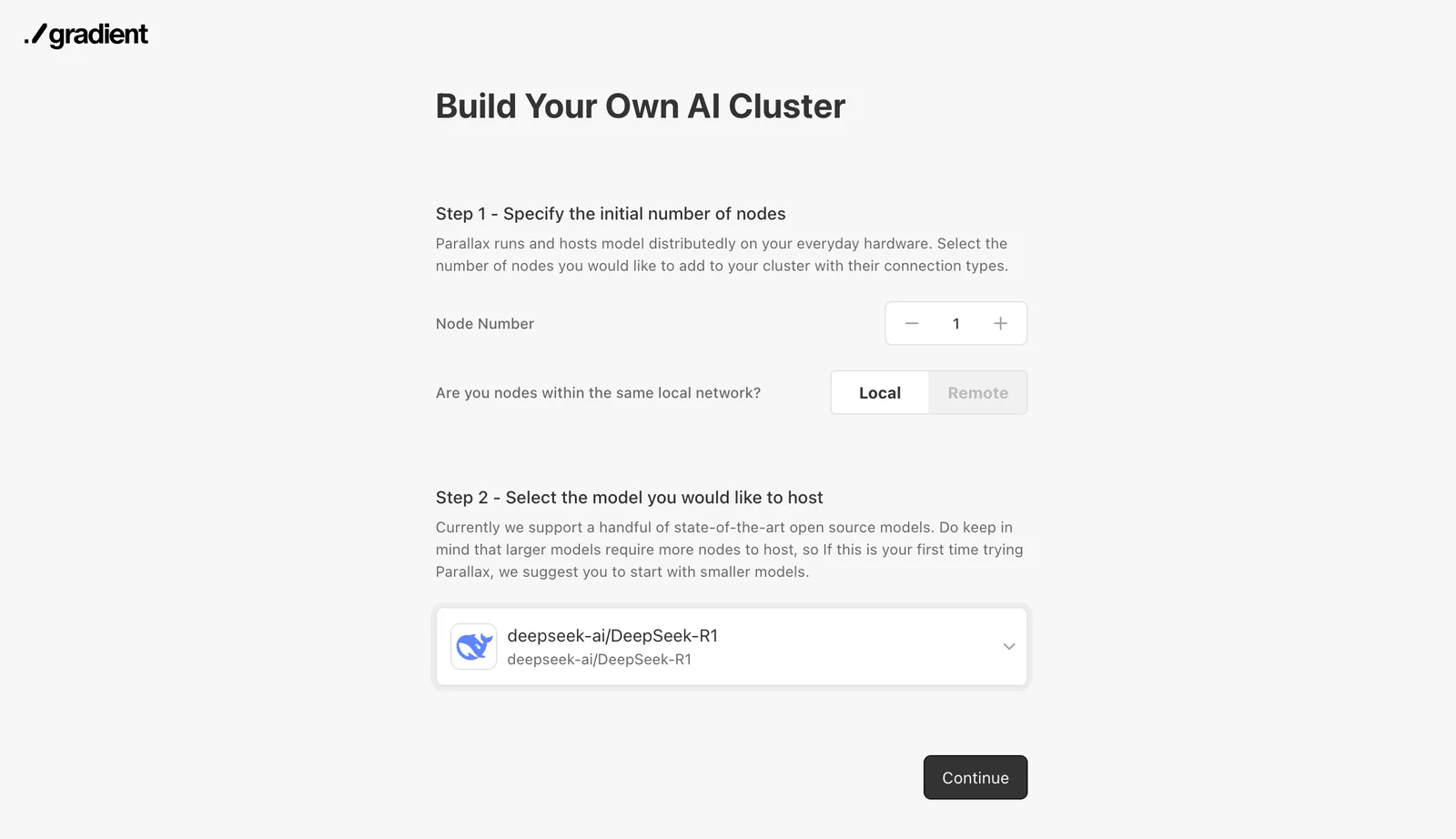
Parallax is an open-source distributed model serving framework that enables organizations to deploy, scale, and serve large machine learning models across clusters of machines. It focuses on routing inference requests, distributing model computation across multiple GPUs/nodes, and enabling deployment on cloud, on-premises, or hybrid infrastructure. Parallax's value comes from allowing teams to host and manage multi-node model inference (including large models that exceed single-GPU capacity), improving throughput and enabling flexible self-hosted model serving without relying on a single cloud vendor.
Screenshots


Key Features
Use Cases



Frequently asked questions about Parallax
What is the pricing structure for Parallax?
Parallax is available for free as an open-source project under the MIT License, enabling users to self-host without vendor-imposed usage limits. While there are no official paid plans, users can negotiate for commercial support separately, providing flexibility for various needs.
Key Points
- Open-source availability: Parallax is free to use under the MIT License.
- Self-hosting: Users can host the software independently without limitations.
- Commercial support options: Paid support can be arranged through negotiation.
Detailed Explanation
Parallax is a powerful open-source tool designed for creating visually engaging websites and applications. Being licensed under the MIT License allows developers and businesses to utilize, modify, and distribute the software without any licensing fees. This flexibility encourages widespread adoption and innovation within the developer community.
Self-Hosting
One of the key advantages of using Parallax is the ability to self-host the software. This means you have complete control over your deployment environment, ensuring that you can scale and customize as needed. Self-hosting eliminates the risk of vendor lock-in and allows for unlimited usage without any imposed restrictions.
Commercial Support
Although Parallax is primarily free, some organizations may require additional assistance, such as troubleshooting, custom features, or integration with existing systems. In these cases, users can reach out to experienced developers or consultancies that offer commercial support services. This option provides a tailored experience, ensuring that your specific needs are met while leveraging the power of Parallax.
Best Practices / Tips
- Evaluate your needs: Before choosing to self-host, assess whether you have the technical expertise and resources to manage the software.
- Explore community support: Take advantage of the extensive community forums and resources available to Parallax users for troubleshooting and best practices.
- Stay updated: Regularly check for updates and improvements to the Parallax software to ensure you are using the latest features and security patches.
- Consider performance: Optimize your hosting environment for speed and efficiency, particularly if you anticipate high traffic to your site.
Additional Resources
How do I get started with using Parallax for AI inference?
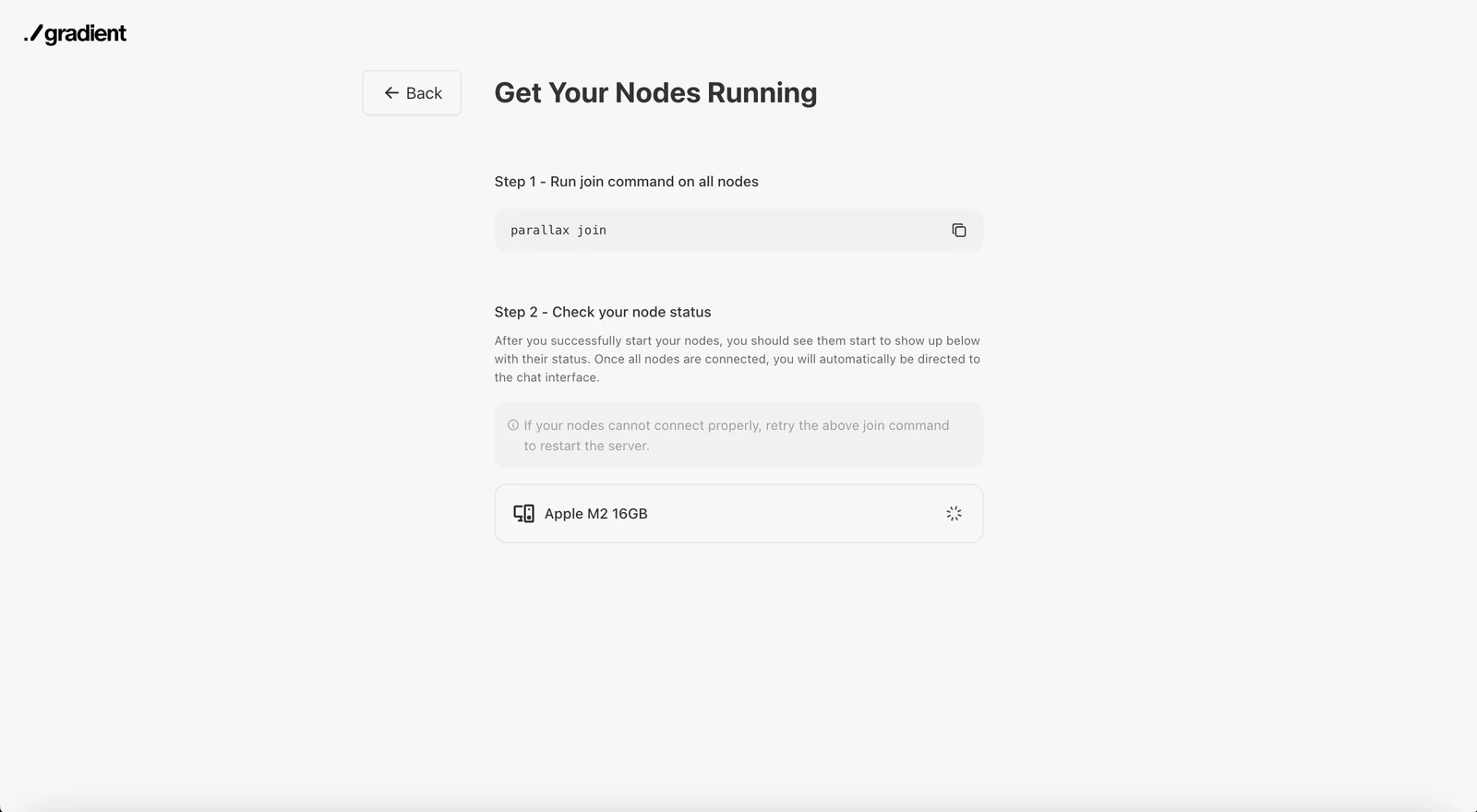
To get started with Parallax for AI inference, visit the official GitHub repository. There, you can access the source code, detailed documentation, and community support. Follow the provided setup instructions to successfully deploy your AI inference cluster and begin leveraging Parallax’s capabilities.
Key Points
- Access the official GitHub repository for Parallax.
- Follow setup instructions for deployment.
- Utilize community support for troubleshooting.
Detailed Explanation
Parallax is an innovative framework designed for AI inference, enabling scalable and efficient processing of AI models. To begin using Parallax, follow these steps:
-
Visit the GitHub Repository: Go to Parallax GitHub to find essential resources, including the source code and documentation.
-
Clone the Repository: Use Git to clone the repository to your local machine:
git clone https://github.com/parallax-ai/parallax.git -
Installation Requirements: Ensure you have the required dependencies installed, such as Python (version 3.6 or higher), pip, and any additional libraries specified in the
requirements.txtfile. -
Setup Instructions: Follow the setup guide provided in the documentation to configure your environment. This might include setting up Docker containers or virtual environments to isolate dependencies.
-
Deploy Your AI Inference Cluster: Once the environment is set up, you can deploy your AI inference cluster. The documentation includes step-by-step instructions for launching services and scaling your deployment based on your project needs.
-
Run Sample Models: Test your setup by running sample AI models included in the repository. This will help you familiarize yourself with the framework and ensure everything is functioning correctly.
Best Practices / Tips
- Stay Updated: Regularly check the GitHub repository for updates or new releases to take advantage of improvements and bug fixes.
- Documentation: Thoroughly read the documentation; it contains crucial information about configuration options and best practices.
- Engage with the Community: Join forums or the GitHub Issues page to connect with other users, share experiences, and seek help for challenges you may encounter.
Additional Resources
By following these steps and utilizing the provided resources, you'll be well on your way to successfully implementing AI inference with Parallax.
What are the key features of Parallax for distributed model serving?
Parallax is a powerful tool for distributed model serving, featuring hardware-aware scheduling, model partitioning, and scalable load balancing. These capabilities ensure high throughput and low-latency inference for large machine learning models, making it ideal for applications requiring efficient model deployment across multiple machines.
Key Points
- Distributed Model Serving: Seamlessly deploy models across multiple machines.
- Hardware-Aware Scheduling: Optimize resource allocation based on hardware capabilities.
- Scalable Load Balancing: Manage workload efficiently to maintain performance.
Detailed Explanation
Parallax stands out in the landscape of distributed model serving by offering a range of features designed to enhance performance and efficiency:
-
Distributed Model Serving: Parallax allows users to deploy machine learning models across a cluster of machines. This distribution helps in managing large models that require significant computational resources, ensuring that the inference requests are handled swiftly and reliably.
-
Hardware-Aware Scheduling: By evaluating the capabilities of the underlying hardware, Parallax intelligently schedules tasks to maximize resource utilization. For instance, if one machine has a more powerful GPU, it can be prioritized for serving heavier models, thus reducing inference time significantly.
-
Model Partitioning: Parallax facilitates the partitioning of models into smaller components. This feature allows for parallel processing, which can dramatically speed up predictions. For instance, a deep learning model can be divided into segments that are processed simultaneously by different machines, optimizing performance.
-
Scalable Load Balancing: With the ability to dynamically adjust to varying loads, Parallax ensures that no single machine is overwhelmed while others are underutilized. This scalability is crucial for applications experiencing fluctuating traffic, ensuring consistent performance regardless of demand.
Best Practices / Tips
- Assess Hardware Capabilities: Before implementing Parallax, evaluate your hardware to ensure optimal scheduling and resource allocation.
- Monitor Performance: Regularly track the performance metrics of your distributed model serving setup to identify potential bottlenecks.
- Test Model Partitioning: Experiment with different model partitioning strategies to find the best approach for your specific use case, balancing complexity and performance.
- Use Auto-Scaling: Implement auto-scaling features to automatically adjust resources in response to real-time demand, ensuring cost-efficiency.
Additional Resources
What features make Parallax stand out among AI tools?
Parallax stands out among AI tools with its advanced features such as distributed model serving, hardware-aware scheduling, and scalable load balancing. These capabilities enable users to efficiently deploy, manage, and optimize AI models across multiple machines, significantly enhancing performance and resource utilization.
Key Points
- Distributed Model Serving: Efficiently deploy AI models across various locations.
- Hardware-Aware Scheduling: Optimizes resource allocation based on hardware capabilities.
- Scalable Load Balancing: Ensures consistent performance by distributing workloads effectively.
Detailed Explanation
Parallax's unique features position it as a leader in the AI tools market, offering significant advantages for developers and data scientists:
-
Distributed Model Serving: This feature allows users to deploy AI models across multiple servers or geographical locations. For example, a machine learning model can be served from different data centers, reducing latency and improving response times for end-users. This is particularly beneficial for real-time applications like chatbots and recommendation systems.
-
Hardware-Aware Scheduling: Parallax intelligently allocates tasks based on the specific capabilities of the hardware available. For instance, if certain servers have GPUs optimized for neural network processing, Parallax will prioritize these resources for tasks requiring high computational power. This leads to increased efficiency and lower operational costs.
-
Scalable Load Balancing: Parallax automatically adjusts resource distribution based on current demand. During peak usage times, it can allocate additional resources to ensure that performance remains consistent. A practical example would be an e-commerce platform experiencing high traffic during a sale, where Parallax would dynamically allocate additional servers to handle the increased load.
Best Practices / Tips
- Optimize Model Performance: Regularly assess your models to ensure they are compatible with Parallax’s features, particularly in distributed settings. Use profiling tools to identify bottlenecks.
- Monitor Resource Utilization: Use Parallax’s built-in monitoring tools to track resource usage and adjust configurations as necessary to prevent overloading any single server.
- Test Scalability: Before deploying your AI models at scale, conduct stress tests to understand how Parallax handles load balancing and resource distribution under various conditions.
Additional Resources
How do I get started with using Parallax for AI inference?
To get started with Parallax for AI inference, download the source code from GitHub, configure your environment, and follow the provided documentation to deploy a distributed model-serving cluster that meets your infrastructure requirements effectively.
Key Points
- Download the Source Code: Access the latest version on GitHub.
- Environment Setup: Configure your system for optimal performance.
- Documentation: Follow detailed guides for deployment and scaling.
Detailed Explanation
Parallax is an advanced tool designed to enhance AI inference by facilitating distributed model serving. Here’s a step-by-step guide to help you get started:
-
Download the Source Code:
- Visit the Parallax GitHub repository and download the latest release. You can clone the repository using Git:
git clone https://github.com/your-repo-link.git
- Visit the Parallax GitHub repository and download the latest release. You can clone the repository using Git:
-
Set Up Your Environment:
- Ensure you have the required dependencies installed. This typically includes Python (version 3.6 or higher), Docker, and any necessary libraries. You can install dependencies using:
pip install -r requirements.txt - Configure your environment variables to suit your infrastructure. This includes setting paths for model storage, logging, and network configurations.
- Ensure you have the required dependencies installed. This typically includes Python (version 3.6 or higher), Docker, and any necessary libraries. You can install dependencies using:
-
Follow the Documentation:
- Navigate to the
docsdirectory in the downloaded repository. The documentation provides comprehensive details on deploying your cluster, including examples of configurations for Kubernetes or Docker Swarm. - Key aspects to focus on include:
- Cluster Configuration: Tailor settings for the number of nodes, resource allocation, and load balancing.
- Model Deployment: Instructions for uploading your AI models and configuring inference endpoints.
- Navigate to the
Best Practices / Tips
- Test Locally First: Before deploying to a production environment, test your setup locally to ensure everything functions correctly.
- Monitor Performance: Utilize built-in monitoring tools to track your model serving performance. This helps in identifying bottlenecks and optimizing resource allocation.
- Stay Updated: Regularly check the GitHub repository for updates and community contributions that can enhance functionality.
Additional Resources
- Parallax GitHub Repository
- Official Documentation
- Community Forum for support and discussions.
By following these steps and best practices, you can effectively implement Parallax for efficient AI inference tailored to your needs.
Do I need technical skills to self-host Parallax?
Yes, while you don’t need extensive technical skills to self-host Parallax, having some knowledge of deployment environments is beneficial. Familiarity with cloud infrastructure and model serving concepts will enhance your experience and help you effectively manage the setup.
Key Points
- Basic technical skills can enhance your self-hosting experience.
- Familiarity with cloud infrastructure is advantageous.
- Understanding model serving concepts is helpful for proper deployment.
Detailed Explanation
Self-hosting Parallax can be accessible for those with a basic understanding of technical concepts. While advanced programming skills are not mandatory, being comfortable with deployment environments—such as AWS, Google Cloud, or Azure—can significantly ease the process.
Deployment Environments
Parallax can be hosted on various platforms, including traditional servers and cloud services. Each has its own set of tools and interfaces. For example, using AWS Lambda for serverless deployment can save costs and simplify scaling.
Model Serving Concepts
Understanding model serving is crucial. It involves deploying machine learning models so they can be accessed via APIs. Familiarity with RESTful protocols or GraphQL will help you interact with and manage your models effectively.
Use Cases
- Personal Projects: If you're looking to experiment with AI models for personal use or academic projects, a basic understanding of how to set up cloud servers will suffice.
- Small Businesses: For startups or small businesses, having a team member who knows cloud deployment can streamline the process.
- Scaling: If your application needs to scale, knowledge of load balancing and resource management becomes essential.
Best Practices / Tips
- Start Simple: Begin with a basic setup and gradually incorporate more advanced features as you become more comfortable.
- Documentation: Regularly refer to official documentation for Parallax and the cloud service you choose. This will help you understand the requirements and configurations better.
- Community Support: Engage with the Parallax community through forums or social media groups. Sharing experiences can provide insights and solutions to common challenges.
- Test Regularly: Implement a staging environment to test changes before deploying them to production. This minimizes downtime and ensures stability.
Additional Resources
Can Parallax integrate with existing machine learning frameworks?
Yes, Parallax seamlessly integrates with existing machine learning frameworks, offering extensibility to connect with various model backends and monitoring tools. This adaptability ensures that Parallax can enhance your current machine learning infrastructure without requiring a complete overhaul.
Key Points
- Seamless Integration: Parallax supports multiple machine learning frameworks.
- Extensible Architecture: It allows for easy addition of model backends and monitoring tools.
- Enhanced Workflow: Facilitates smoother operations within existing infrastructures.
Detailed Explanation
Parallax is developed with extensibility in mind, making it an ideal choice for organizations looking to enhance their machine learning capabilities without starting from scratch. It integrates well with popular frameworks like TensorFlow, PyTorch, and Scikit-learn, allowing developers to leverage existing models and tools.
For instance, if a team is already utilizing TensorFlow for neural network training, Parallax can be easily incorporated to monitor performance metrics in real-time. This integration is facilitated through a robust API that allows seamless communication between Parallax and existing model backends.
Use Cases
- Real-time Monitoring: Companies can use Parallax alongside their existing models to gain insights into performance and predict potential issues, enabling proactive adjustments.
- Model Comparison: Data scientists can benchmark multiple models by integrating Parallax to evaluate their performance against various metrics.
- Custom Workflows: Organizations can create tailored workflows that utilize Parallax's capabilities alongside their current machine learning systems, improving overall efficiency.
Best Practices / Tips
- Assess Compatibility: Before integration, evaluate the compatibility of your current machine learning frameworks with Parallax.
- Start Small: Begin with a pilot project to test integration and identify any potential issues before rolling out across your infrastructure.
- Leverage Community Support: Utilize forums and documentation to troubleshoot and optimize your setup, ensuring the best performance from Parallax.
Additional Resources
How does Parallax compare to other AI model serving tools?
Parallax stands out among AI model serving tools due to its open-source nature, granting users complete access to modify the source code. It efficiently manages large models across multiple nodes, offering scalability that many proprietary solutions cannot match, making it ideal for businesses seeking customization and performance.
Key Points
- Open-source Advantage: Full customization and community support.
- Scalability: Efficient handling of large models across multiple nodes.
- Cost-Effectiveness: Typically lower total cost of ownership compared to proprietary tools.
Detailed Explanation
Parallax's open-source framework allows developers to tailor the software to their specific needs, enhancing flexibility and innovation. This open access fosters a vibrant community that contributes to continuous improvements and security assessments.
In contrast, many proprietary AI model serving tools lock users into rigid frameworks, limiting their ability to adapt the software for unique applications. For example, if a company needs to implement a new AI model quickly, Parallax can be modified and deployed without waiting for vendor updates, thereby accelerating time to market.
Parallax's capability to efficiently serve large models is crucial for businesses that deal with extensive datasets. It employs a distributed system architecture, enabling the workload to be spread across multiple nodes. This ensures high availability and reduced latency, which is essential for real-time applications like autonomous systems or large-scale recommendation engines.
Best Practices / Tips
- Leverage Community Support: Engage with the Parallax community for best practices and troubleshooting.
- Test Configurations: Experiment with different configurations to optimize performance for your specific use case.
- Monitor Resource Usage: Regularly check node performance and resource allocation to ensure efficient operation and scalability.
Additional Resources
How does Parallax compare to other distributed AI serving tools?
Parallax distinguishes itself from other distributed AI serving tools by being open-source, offering complete control over deployments without usage limits. It features advanced capabilities like model partitioning and hardware-aware scheduling, which are often lacking in commercial alternatives, providing users with greater flexibility and efficiency.
Key Points
- Open-Source Flexibility: Parallax allows customization without vendor lock-in.
- Advanced Features: Model partitioning and hardware-aware scheduling enhance performance.
- Cost-Efficiency: No usage limits lead to potentially lower operational costs.
Detailed Explanation
Parallax is an open-source distributed AI serving tool that enables developers and organizations to deploy machine learning models efficiently. Unlike many commercial solutions, Parallax provides users with unmatched flexibility and control.
Open-Source Flexibility
Being open-source means that developers can modify the source code to tailor the platform to specific needs. This is crucial for organizations that require unique functionalities or integrations. They can deploy Parallax on their own infrastructure, eliminating the dependency on third-party vendors.
Advanced Features
Parallax includes advanced features which significantly enhance its performance:
- Model Partitioning: This feature allows large models to be split across multiple servers, facilitating faster inference times and efficient resource utilization. For example, a natural language processing model can be divided into segments, with each segment processed concurrently.
- Hardware-Aware Scheduling: Parallax intelligently schedules tasks based on the hardware capabilities of the available resources. This ensures that resource-intensive tasks are allocated to high-performance servers, optimizing overall system efficiency.
Use Cases
Parallax is suitable for various applications, including real-time AI systems in industries like finance, healthcare, and e-commerce. For instance, a financial institution can deploy fraud detection models using Parallax to analyze transactions in real-time, ensuring swift action against potential fraud.
Best Practices / Tips
- Evaluate Your Needs: Before choosing Parallax, assess your organization's specific requirements and hardware capabilities. This ensures optimal utilization of its features.
- Monitor Performance: Regularly check the performance of your deployments to identify bottlenecks or areas for improvement.
- Community Engagement: Engage with the Parallax community for support and to share best practices. This can provide insights into optimizing your deployments and leveraging new features.
Additional Resources
- Parallax Official Documentation
- GitHub Repository for Parallax
- Comparative Analysis of Distributed AI Tools
By leveraging Parallax, organizations can take full advantage of its open-source benefits and advanced features, positioning themselves ahead in the competitive landscape of AI deployment.
Explore more AI Ai Tools tools
Browse all Ai Tools tools →Compare Parallax: vs nodeterm · vs A.I.G (AI Infra Guard) · vs Trama · vs Agents Never Sleep