

AI Subtitle Translator
AIWeb-based AI subtitle translator for SRT, VTT, ASS, SSA, and SUB that preserves timing and improves natural localization.
AI Subtitle Translator
Web-based AI subtitle translator for SRT, VTT, ASS, SSA, and SUB that preserves timing and improves natural localization.
About AI Subtitle Translator
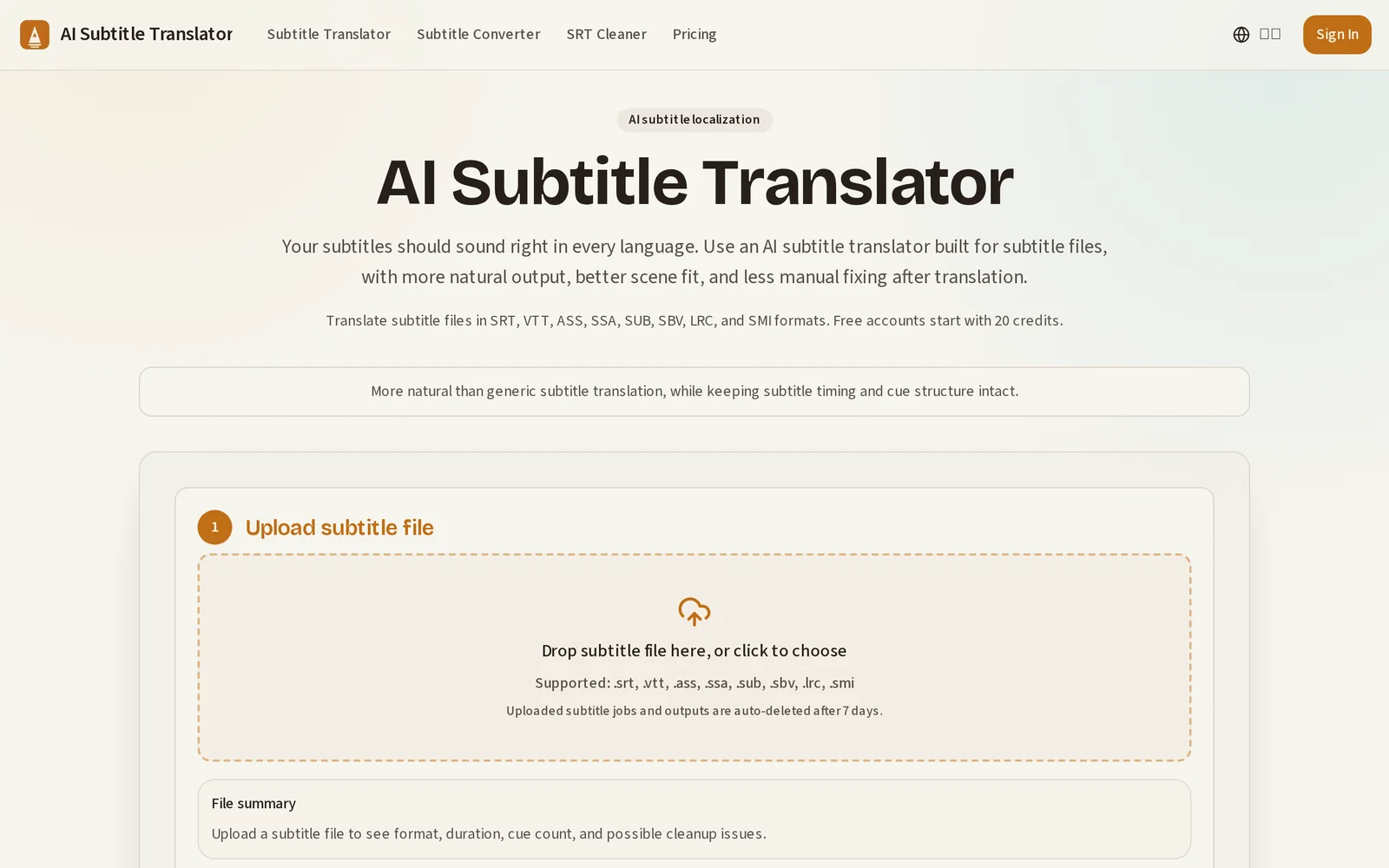
AI Subtitle Translator is a web-based tool that translates subtitle files (SRT, VTT, ASS, SSA, SUB) using AI-driven localization to produce more natural, scene-appropriate text while preserving timestamps and cue structure. The service focuses on minimizing manual editing by keeping original timing and formatting intact and producing translations that better fit conversational tone and on-screen context. Users upload subtitle files and receive translated subtitle files in the same format, enabling easy integration back into videos or workflows.
Screenshots
Key Features
Use Cases



Frequently asked questions about AI Subtitle Translator
What is AI Subtitle Translator?
An AI Subtitle Translator is a web-based tool that converts subtitle files such as SRT, VTT, ASS, SSA, and SUB into different languages while maintaining the original timing and enhancing natural localization. This technology utilizes artificial intelligence to ensure accurate translations, making it essential for global media accessibility.
Key Points
- File Format Support: Compatible with various subtitle formats including SRT, VTT, ASS, SSA, and SUB.
- Timing Preservation: Ensures that subtitles sync perfectly with the audio and video content.
- Natural Localization: Enhances translation quality to fit cultural nuances and context.
Detailed Explanation
AI Subtitle Translators leverage advanced algorithms and machine learning to convert subtitles into multiple languages seamlessly. For instance, if you have a video with English subtitles in SRT format, an AI Subtitle Translator can convert it into Spanish or Chinese without altering the timing of each subtitle.
How It Works:
- Upload Your Subtitle File: Users begin by uploading their existing subtitle files in supported formats.
- Choose Target Language: Select the language for translation. Some AI tools may offer multiple languages at once.
- Translation Process: The AI uses neural networks to analyze the text, translating it while considering context, idioms, and cultural relevance.
- Download Translated File: Once the translation is complete, users can download the new subtitle file, ready for use.
Use Cases:
- Film and TV Production: Filmmakers can reach international audiences by providing accurate subtitles in various languages.
- E-Learning: Educational content creators can make courses accessible to non-native speakers.
- Social Media Content: Marketers can enhance their video reach by adding multilingual subtitles, promoting engagement across different demographics.
Best Practices / Tips
- Check Compatibility: Ensure the subtitle translator supports the file format you are using.
- Review Translations: Although AI translators are highly accurate, always review the output for context and accuracy.
- Use Contextual Keywords: For SEO benefits, include keywords in the original subtitles that align with your target audience's search intent.
Additional Resources
How does AI Subtitle Translator work?
AI Subtitle Translator works by utilizing advanced artificial intelligence algorithms to automatically translate spoken language into subtitles in various languages. This tool streamlines the translation process, making video content accessible to diverse audiences quickly and accurately.
Key Points
- AI-Powered Translation: Leverages machine learning for accurate translation.
- Multi-Language Support: Supports numerous languages, enhancing accessibility.
- User-Friendly Interface: Simplifies workflow for content creators and businesses.
Detailed Explanation
AI Subtitle Translator employs deep learning and natural language processing (NLP) techniques to convert audio content into written text, then translates that text into the desired language. Here's how it typically functions:
- Audio Input: The user uploads a video file or provides a link to a video.
- Speech Recognition: The AI analyzes the audio track to identify spoken words accurately.
- Subtitle Generation: Once the speech is transcribed, the AI formats it into subtitles, ensuring proper timing and synchronization with the video.
- Translation: The generated subtitles are then translated into the target language using advanced translation algorithms.
- Editing and Exporting: Users can review, edit, or refine the subtitles before exporting them in various formats (like SRT or VTT) for use in their videos.
Use Case Example: A content creator producing educational videos can use an AI Subtitle Translator to reach non-English speaking audiences, increasing engagement and viewership significantly.
Best Practices / Tips
- Choose the Right Tool: Opt for an AI Subtitle Translator that supports multiple languages and has positive user reviews.
- Review Translations: Always proofread the subtitles, as AI translations may not capture idiomatic expressions perfectly.
- Use Clear Audio: Ensure your audio is clear and free from background noise to enhance the accuracy of speech recognition.
- Keep Timing in Mind: Adjust subtitle timings to enhance viewer comprehension, especially for fast-paced dialogues.
Additional Resources
By understanding how AI Subtitle Translators work and following best practices, users can significantly enhance their video content's accessibility and reach.
What are the main features of AI Subtitle Translator?
AI Subtitle Translator offers several key features, including automatic language detection, real-time translation, customizable subtitle styles, and integration with popular video platforms. These capabilities streamline the process of creating accurate and accessible subtitles for diverse audiences, enhancing viewer engagement and content reach.
Key Points
- Automatic Language Detection: Quickly identifies the source language.
- Real-Time Translation: Provides instant translations during video playback.
- Customizable Subtitle Styles: Allows users to tailor the appearance of subtitles.
Detailed Explanation
AI Subtitle Translator leverages advanced artificial intelligence to improve subtitle translation for videos. Here’s a breakdown of its main features:
-
Automatic Language Detection: This feature automatically identifies the language spoken in the video, which is crucial for accurate translation. For instance, if a video contains multiple languages, the AI can dynamically switch to provide the correct translation, ensuring that viewers receive subtitles in their preferred language without manual adjustments.
-
Real-Time Translation: Users can benefit from real-time translation capabilities that enable subtitles to be generated as the video plays. This is particularly useful for live broadcasts, webinars, or educational settings where immediate comprehension is essential. For example, during a live event, viewers can read subtitles in their language as the speaker talks, improving accessibility.
-
Customizable Subtitle Styles: AI Subtitle Translator allows users to modify subtitle appearance to match branding or personal preferences. Options may include changing font size, color, background, and positioning on the screen. Customization ensures that subtitles are not only functional but also aesthetically pleasing and consistent with the video content.
Best Practices / Tips
- Test Different Languages: Always test the automatic language detection feature with various languages to ensure accuracy.
- Review Translations: While AI is powerful, it’s advisable to review translations for nuanced or specialized content to maintain quality.
- Leverage Customization: Utilize subtitle customization to enhance readability and fit the video's theme, making sure they are easily legible against the video background.
Additional Resources
Who is AI Subtitle Translator for?
AI Subtitle Translator is designed for content creators, businesses, educators, and anyone needing to translate subtitles quickly and accurately. It streamlines the translation process, making it invaluable for video producers, online educators, and global communicators looking to enhance accessibility and reach diverse audiences.
Key Points
- Target Audience: Content creators, educators, businesses, and global communicators.
- Use Cases: Video translation, online courses, and international marketing.
- Benefits: Improved accessibility, enhanced audience engagement, and efficient workflow.
Detailed Explanation
AI Subtitle Translator is particularly beneficial for various users:
-
Content Creators: Video creators on platforms like YouTube and Vimeo can use the tool to translate subtitles, making their content accessible to non-native speakers. This not only broadens their audience but also increases engagement and viewer retention.
-
Educators: Online instructors can translate course materials, ensuring that students from different linguistic backgrounds can participate fully. For instance, translating subtitles in educational videos can enhance comprehension for international students, leading to better learning outcomes.
-
Businesses: Companies looking to expand into new markets can leverage subtitle translation for marketing videos, webinars, and training materials. By providing multilingual subtitles, businesses can build stronger connections with global customers and improve brand loyalty.
-
Global Communicators: Nonprofit organizations and international NGOs can utilize AI Subtitle Translator to make important messages accessible to diverse populations, ensuring that vital information reaches everyone, regardless of language.
Best Practices / Tips
- Quality Check: Always review AI-generated translations for accuracy and context, as automated tools may not capture nuances.
- Use Clear Language: When creating original subtitles, use simple language to facilitate better translation results.
- Consider Cultural Context: Be mindful of cultural differences when translating subtitles to avoid misunderstandings.
- Optimize for SEO: Include relevant keywords in your subtitles to improve searchability and engagement.
Additional Resources
How much does AI Subtitle Translator cost?
AI Subtitle Translator is entirely free to use, providing users with an accessible platform for translating subtitles into multiple languages without any cost. This makes it an attractive option for content creators, filmmakers, and educators looking to enhance their media accessibility.
Key Points
- Cost-Free Access: AI Subtitle Translator does not charge any fees.
- User-Friendly Interface: Designed for ease of use, suitable for all skill levels.
- Multiple Language Support: Offers translations in various languages, enhancing global reach.
Detailed Explanation
AI Subtitle Translator stands out due to its completely free service model, making it an ideal choice for those on a budget. The tool supports a wide range of languages, allowing users to translate subtitles for videos, films, and educational content seamlessly.
How It Works
- Upload Your File: Users begin by uploading their subtitle file, commonly in formats like .srt or .vtt.
- Select Target Languages: After uploading, users can choose from a list of supported languages for translation.
- Generate Translations: The AI processes the file and generates the translated subtitles quickly.
- Download Translated Files: Once completed, users can download their translated subtitle files to integrate into their videos.
This process not only saves time but also ensures high accuracy in translations, thanks to advanced AI algorithms.
Best Practices / Tips
- Review Translations: Always review the translated subtitles for accuracy, as automated tools can sometimes misinterpret context.
- Use Clear Formatting: Ensure your original subtitle files are well-formatted to avoid errors during translation.
- Explore Additional Features: Some AI Subtitle Translators may offer additional features such as timestamp adjustments or subtitle styling; utilize these for better results.
Additional Resources
How do I get started with AI Subtitle Translator?
To get started with AI Subtitle Translator, visit aisubtitletranslator.net to create your account. Once registered, you can explore the features, upload your subtitle files, and utilize the AI to translate them into multiple languages effortlessly.
Key Points
- Easy Sign-Up Process: Register for a free account to access features.
- User-Friendly Interface: Navigate through the platform with ease.
- Multi-Language Support: Translate subtitles into various languages instantly.
Detailed Explanation
AI Subtitle Translator is a powerful tool designed to simplify the process of translating subtitles for videos. Here’s how to get started:
- Visit the Website: Go to aisubtitletranslator.net.
- Create an Account: Click on the “Sign Up” button. You’ll be prompted to enter your email address and create a password. Ensure you verify your email to activate your account.
- Explore the Dashboard: After logging in, familiarize yourself with the user interface. The dashboard provides quick access to translation features, settings, and support.
- Upload Your Subtitle File: Click on the “Upload” button to select your subtitle file, which could be in formats like SRT or VTT.
- Select Target Languages: Choose the languages you want to translate your subtitles into. The AI system supports a wide range of languages, making it versatile for global audiences.
- Initiate Translation: Click the “Translate” button. The AI will process your file and provide translated subtitles.
- Download Translated Subtitles: Once the translation is complete, you can download the new subtitle file for use in your videos.
Example Use Case
For instance, if you have a video in English and want to reach Spanish-speaking audiences, simply upload your English subtitles and select Spanish as the target language. The AI will quickly provide you with accurate translations, saving you time and effort.
Best Practices / Tips
- Keep Original Subtitles Clear: Ensure that your original subtitles are well-formatted for better translation accuracy.
- Review Translations: While AI translation is efficient, it’s wise to review the output for context-specific nuances.
- Use Consistent Formatting: Maintain consistent subtitle formatting (such as timing and style) to enhance readability and viewer experience.
Additional Resources
Explore more AI Ai Tools tools
Browse all Ai Tools tools →Browse by use case: Automation & Productivity
Compare AI Subtitle Translator: vs Mise · vs BiBimba · vs VoiceCap · vs NM Signals