

ZeroSphere
AIGives an AI agent its own isolated virtual display on your Windows machine, so it can drive real desktop apps while you keep using your desktop.
ZeroSphere
Gives an AI agent its own isolated virtual display on your Windows machine, so it can drive real desktop apps while you keep using your desktop.
About ZeroSphere
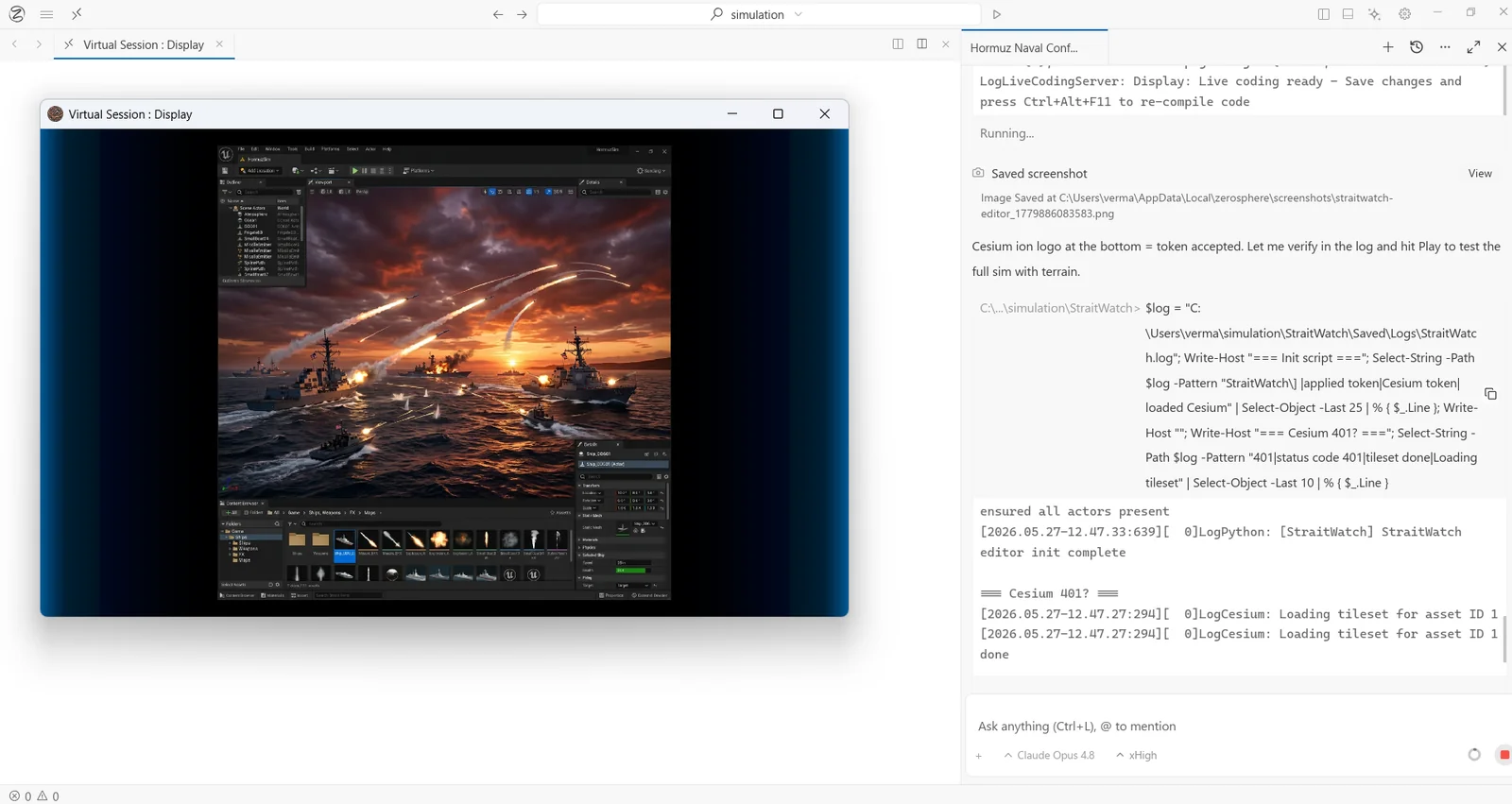
ZeroSphere creates a dedicated virtual display for AI inside an existing Windows environment, so an agent can operate real desktop software on the same machine where your files, applications and development environment already live — without taking over the screen you are actively using. It is a response to the two bad options agents normally face: control the primary desktop and risk an enormous blast radius across personal files, system dialogs and financial applications, or run in a cloud VM and be cut off from where the work actually happens. You choose which applications and resources the agent may touch, and ZeroSphere automatically blocks UAC prompts and desktop notifications from reaching the agent's workspace. The agent's display is watchable in real time, and you can take over the virtual display at any point and hand it back when you are done. Multiple workspaces can run at once, each with its own resolution, letting several AI processes work in parallel alongside you.
Screenshots
Key Features
Use Cases



Frequently asked questions about ZeroSphere
What is ZeroSphere?
Gives an AI agent its own isolated virtual display on your Windows machine, so it can drive real desktop apps while you keep using your desktop.
How does ZeroSphere work?
ZeroSphere works by combining Isolated Virtual Display: Creates a dedicated second display for AI inside your existing Windows session, so the machine is shared but the workspace is not and the agent never competes for your cursor., Scoped Application Access: You choose which applications and resources the AI can reach and what it may interact with, replacing uncontained desktop access with a boundary you draw., Automatic Prompt Blocking: UAC prompts and desktop notifications are blocked from entering the AI's workspace, keeping system dialogs and interruptions out of the agent's reach., Real-Time Observability: The agent's display can be watched live as it works, so you see what it is doing rather than reconstructing it from logs afterwards., Interactive Takeover: You can take control of the virtual display yourself at any moment and let the AI resume from where you left off when you are ready. to help users with GUI Test Automation: A developer has an agent launch the application being built, interact with its interface, inspect what happens and iterate — work a terminal-only agent cannot do., Bug Reproduction: An engineer sends an agent to reproduce a reported defect in a real running app and observe the failure, while continuing to work on their own desktop., CAD and Simulation Workflows: An engineer delegates repetitive operations in specialized engineering software that has no API surface for automation., Safe Agent Experimentation: A team trials computer-use agents without giving them access to personal files, system settings or financial applications on the primary desktop., Creative Tool Operation: A designer lets an agent perform routine steps inside visual and creative applications on the same machine where the source files live..
What are the main features of ZeroSphere?
Key features include Isolated Virtual Display: Creates a dedicated second display for AI inside your existing Windows session, so the machine is shared but the workspace is not and the agent never competes for your cursor., Scoped Application Access: You choose which applications and resources the AI can reach and what it may interact with, replacing uncontained desktop access with a boundary you draw., Automatic Prompt Blocking: UAC prompts and desktop notifications are blocked from entering the AI's workspace, keeping system dialogs and interruptions out of the agent's reach., Real-Time Observability: The agent's display can be watched live as it works, so you see what it is doing rather than reconstructing it from logs afterwards., Interactive Takeover: You can take control of the virtual display yourself at any moment and let the AI resume from where you left off when you are ready..
Who is ZeroSphere for?
ZeroSphere is useful for anyone interested in GUI Test Automation: A developer has an agent launch the application being built, interact with its interface, inspect what happens and iterate — work a terminal-only agent cannot do., Bug Reproduction: An engineer sends an agent to reproduce a reported defect in a real running app and observe the failure, while continuing to work on their own desktop., CAD and Simulation Workflows: An engineer delegates repetitive operations in specialized engineering software that has no API surface for automation., Safe Agent Experimentation: A team trials computer-use agents without giving them access to personal files, system settings or financial applications on the primary desktop., Creative Tool Operation: A designer lets an agent perform routine steps inside visual and creative applications on the same machine where the source files live..
How much does ZeroSphere cost?
ZeroSphere offers a free tier with paid plans for advanced features.
How do I get started with ZeroSphere?
Visit https://zerosphere.dev/ to sign up and explore ZeroSphere.
Explore more AI Ai Tools tools
Browse all Ai Tools tools →Browse by use case: Automation & Productivity
Compare ZeroSphere: vs CleanSlop · vs Kalender Sync · vs UseIt Studio · vs Woven Video