

tterm
AIFree macOS workspace that unites a terminal, a real Chromium browser, and Claude Code in one hot-reloadable, self-building window.
tterm
Free macOS workspace that unites a terminal, a real Chromium browser, and Claude Code in one hot-reloadable, self-building window.
About tterm
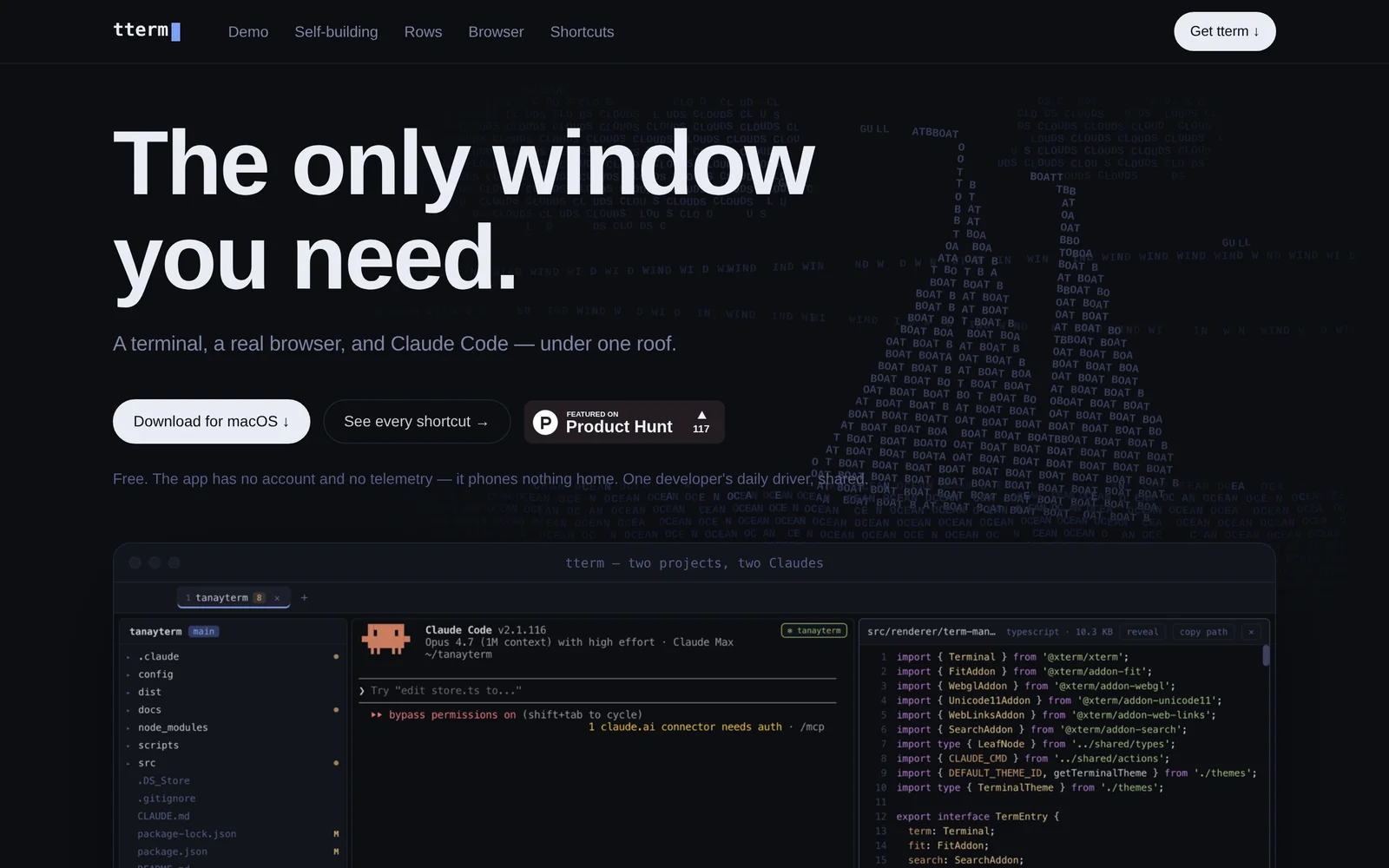
tterm is a free macOS app that combines a terminal, a real Chromium browser, and Claude Code under a single window, organized as a row per project. Its defining trick is self-building: pressing ⌘K opens Claude Code on tterm itself, and the running app hot-reloads with the requested change — most of tterm was built this way. It carries your Chrome cookies, bookmarks, and history into an embedded browser (⌘B), offers hunk-by-hunk diff review and commit (⌘G) instead of a code editor, and keeps ⌃-chords fully untouched so terminal apps behave normally while ⌘-chords drive tterm itself. It has no account, no telemetry, and nothing phones home; it is one developer's daily driver shared with hobbyists.
Screenshots
Key Features
Use Cases



Frequently asked questions about tterm
What is tterm?
tterm is a free macOS workspace that seamlessly combines a terminal, a real Chromium browser, and Claude Code into a single, hot-reloadable, self-building window. This innovative tool enhances productivity by integrating coding, browsing, and terminal commands in one unified environment.
Key Points
- Integrated Environment: Combines terminal, browser, and coding tools.
- User-Friendly: Offers a hot-reloadable interface for instant updates.
- MacOS Compatibility: Designed specifically for macOS users, ensuring optimal performance.
Detailed Explanation
tterm is designed for developers and tech enthusiasts looking for an efficient workflow. By integrating a traditional terminal with a full-fledged Chromium browser and Claude Code, tterm allows users to write, test, and run code without switching between multiple applications.
Features:
- Terminal Functionality: Users can execute shell commands directly within the tterm workspace, making it easier to manage code execution without leaving the interface.
- Chromium Browser: The real Chromium browser enables users to access web resources, documentation, and debugging tools, all within the same window. This eliminates unnecessary context-switching.
- Claude Code Integration: Claude Code provides intelligent code suggestions and completions, enhancing coding efficiency. It aids in faster development cycles, especially for web development projects.
Use Cases:
- Web Development: Developers can build and test websites in real-time, pulling resources from the web while running scripts in the terminal.
- Research and Development: Researchers can access online databases and tools while documenting their findings right in the same workspace.
- Learning Environment: Ideal for coding bootcamps and educational purposes, where students can practice coding alongside browsing for tutorials.
Best Practices / Tips
- Regularly Update tterm: Keep your application updated to benefit from the latest features and security patches.
- Utilize Keyboard Shortcuts: Familiarize yourself with keyboard shortcuts to navigate quickly between the terminal and browser functions.
- Organize Projects: Use workspaces effectively by organizing your projects into different tabs or windows within tterm for improved workflow.
Additional Resources
By leveraging tterm's unique integration of tools, users can significantly enhance their productivity and streamline their development processes.
How does tterm work?
tterm enhances coding efficiency by integrating various features, including a self-building workspace, a row-per-project layout, and an embedded real browser. It facilitates AI-paired coding, multi-project management, and focused diff reviews, allowing developers to seamlessly manage and interact with multiple projects and resources in one interface.
Key Points
- Self-Building Workspace: Quickly invoke Claude Code for real-time adjustments.
- Row-Per-Project Layout: Organize multiple projects side by side for easy navigation.
- Embedded Real Browser: Access web resources without leaving tterm.
Detailed Explanation
tterm is designed to streamline the coding experience through several innovative features:
-
Self-Building Workspace: By using the shortcut ⌘K, developers can invoke Claude Code directly on tterm's source, enabling them to make changes and hot-reload the app instantly. This feature allows for rapid development and testing without switching contexts.
-
Row-Per-Project Layout: Each project is organized in its own row, which includes an explorer, a Claude Code session, and a file viewer. This design allows you to easily manage multiple projects simultaneously, making it easy to switch between them without losing focus.
-
Embedded Real Browser: The shortcut ⌘B opens a Chromium tab within tterm, retaining your Chrome cookies, bookmarks, and history. This allows you to reference documentation or API guides while coding, enhancing productivity by keeping everything within one interface.
-
Diff-Only Review: With ⌘G, you can access a hunk-level diff reviewer to stage and commit changes. This approach emphasizes review over retyping, ensuring that you only commit what you truly want to include in your project.
-
Command-Palette Shortcuts: Navigate tterm efficiently with shortcuts such as ⌘K for the command palette, ⌘O for opening projects, and ⌘⇧F for searching. These keyboard-first shortcuts enhance speed and ease of use.
-
AI-Paired Coding: Keep your terminal, Claude Code, and documentation visible at all times. This integration allows for seamless collaboration with AI tools, making coding more efficient.
-
Multi-Project Juggling: By stacking projects as rows, you can jump between them without the need for constant alt-tabbing, which can disrupt your workflow.
-
Doc-Grounded Development: The embedded browser keeps API documentation open alongside your terminal, allowing for quick reference and diff analysis without leaving the application.
-
Focused Diff Review: Review AI-generated changes hunk by hunk rather than editing in place, ensuring that all changes are deliberate and well-considered.
-
Hobbyist macOS Tinkering: Treat tterm as a live playground, allowing developers to extend and customize the tool from within using Claude Code, catering to the curious and exploratory nature of developers.
Best Practices / Tips
- Utilize Shortcuts: Familiarize yourself with the various keyboard shortcuts to enhance your workflow.
- Organize Projects Effectively: Use the row-per-project layout to keep your workspace tidy and accessible.
- Review Changes Carefully: Always use the diff-only review feature to ensure code quality and avoid unnecessary errors.
Additional Resources
What are the main features of tterm?
tterm features a self-building workspace, a row-per-project layout, an embedded real browser, diff-only review, and command-palette shortcuts. These functionalities enhance project management, streamline coding workflows, and facilitate efficient navigation, making tterm a powerful tool for developers.
Key Points
- Self-Building Workspace: Quickly extend functionalities within tterm.
- Row-Per-Project Layout: Organize multiple projects in a visually accessible manner.
- Embedded Real Browser: Access web resources directly with inherited settings.
Detailed Explanation
Self-Building Workspace
The self-building workspace in tterm allows users to invoke Claude Code with the shortcut ⌘K. This feature enables developers to modify and extend the tool using its own source code. The hot-reload functionality instantly applies changes without needing to restart the application, promoting an efficient development cycle.
Row-Per-Project Layout
Each project in tterm is neatly organized into its own row, which includes an explorer for easy navigation, a dedicated Claude Code session for coding, and a file viewer for quick access to project files. This layout not only enhances productivity but also allows developers to work on multiple projects side by side without confusion.
Embedded Real Browser
The embedded real browser feature, accessible via the ⌘B shortcut, opens a Chromium tab inside tterm. This tab inherits your existing Chrome cookies, bookmarks, and history, making it seamless to access web resources. This integration ensures that developers can test and reference online materials without switching applications.
Diff-Only Review
With the diff-only review feature activated by ⌘G, users can perform a hunk-level review of changes before staging and committing them. Unlike traditional editors, tterm avoids retyping, allowing for a focused review process. This feature is ideal for maintaining code quality and reducing errors.
Command-Palette Shortcuts
Tterm's navigation is enhanced through a series of command-palette shortcuts, including:
- ⌘K for accessing the command palette
- ⌘O to open projects
- ⌘P for quick file opening
- ⌘⇧F to initiate a search
- ⌘F for finding specific text
- ⌘⇧M for accessing CLAUDE.md documentation
These shortcuts are designed for keyboard-first interaction, enabling faster workflow and minimizing reliance on mouse navigation.
Best Practices / Tips
- Utilize Shortcuts: Familiarize yourself with all available keyboard shortcuts to maximize productivity.
- Explore Self-Building Features: Experiment with the self-building workspace to adapt tterm to your development needs.
- Regular Code Reviews: Make it a habit to use the diff-only review feature to catch potential issues early in the coding process.
Additional Resources
Who is tterm for?
tterm is designed for developers, hobbyists, and teams who want to enhance their coding workflow with AI-powered tools. It benefits anyone involved in AI-Paired Coding, juggling multiple projects, or needing a streamlined environment for development and documentation management.
Key Points
- AI-Paired Coding: Integrate coding with AI assistance.
- Multi-Project Management: Easily switch between ongoing projects.
- Doc-Grounded Development: Access documentation alongside coding effortlessly.
Detailed Explanation
tterm is a versatile tool that optimizes the coding experience for various user types:
-
AI-Paired Coding: With features like Claude Code, developers can keep their terminal, coding environment, and documentation in one unified interface. This integration allows for real-time collaboration with a Language Learning Model (LLM), making it easier to write, test, and debug code efficiently.
-
Multi-Project Management: The ability to stack multiple projects as rows enables users to manage several tasks simultaneously. For instance, developers working on different features can switch contexts without the hassle of alt-tabbing, which enhances productivity and focus.
-
Doc-Grounded Development: The embedded browser feature allows users to keep API documentation open within the same environment. This means developers can reference documentation and code concurrently, minimizing disruptions and improving workflow speed.
-
Focused Diff Review: Users can review AI-generated changes in stages, examining each hunk before committing. This granular approach ensures that only the desired changes are implemented, reducing the risk of errors and maintaining code quality.
-
Hobbyist macOS Tinkering: For those who enjoy experimenting with software, tterm serves as a live playground. Users can extend the tool’s functionality and modify it directly within the application, promoting creativity and innovation.
Best Practices / Tips
- Leverage AI Tools: Regularly use the AI-pairing feature to enhance coding accuracy and efficiency.
- Organize Projects: Use the multi-project feature to categorize tasks logically, making it easier to track progress.
- Documentation Access: Always keep API docs open when coding to minimize context-switching.
- Commit Wisely: Take advantage of the focused diff review to ensure quality control in your commits.
Additional Resources
How much does tterm cost?
tterm is completely free to use, offering a range of features without any associated costs. Users can access its functionalities without the need for subscriptions or payment, making it an ideal choice for individuals and businesses looking for cost-effective solutions.
Key Points
- tterm is a free tool with no hidden costs.
- It provides a variety of features suitable for developers and users.
- Ideal for both personal and professional use.
Detailed Explanation
tterm is a terminal emulator that offers a versatile platform for users to execute commands and manage their systems efficiently. As a free tool, tterm allows developers and tech enthusiasts to utilize its features without any financial commitment. This makes it particularly appealing for those in education, startups, and small businesses.
The software supports various operating systems, including Windows, macOS, and Linux, ensuring broad compatibility. Users can easily download and install tterm from its official website. Once installed, users can access functionalities like command execution, script running, and real-time updates, which enhances the development workflow significantly.
For example, a developer can use tterm to connect to remote servers via SSH, execute commands, and manage files seamlessly. This efficiency can lead to increased productivity and smoother project management.
Best Practices / Tips
- Explore Features: Take the time to explore all features offered by tterm to maximize its potential.
- Stay Updated: Regularly check for updates to ensure you are using the latest version, which may include new features and security improvements.
- Utilize Community Support: Engage with the tterm community for tips, tricks, and troubleshooting advice, which can enhance your user experience.
- Custom Configurations: Customize settings to suit your workflow, such as adjusting the interface and keyboard shortcuts for improved efficiency.
Additional Resources
By leveraging tterm's functionalities without incurring costs, users can enhance their productivity and streamline their workflows effectively.
How do I get started with tterm?
To get started with tterm, visit tterm.sh to sign up for an account. After signing up, you can explore tterm's features, including its terminal emulator capabilities, customization options, and community resources for optimal usage.
Key Points
- Easy sign-up process.
- Explore terminal features and customization.
- Access community support and resources.
Detailed Explanation
Getting started with tterm is straightforward. First, navigate to tterm.sh. Click on the sign-up button and follow the prompt to create your account. Once registered, you have access to a range of functionalities:
- Terminal Emulator: tterm offers a robust terminal emulator ideal for developers. You can run commands, scripts, and manage processes efficiently.
- Customization: Personalize your terminal experience by adjusting themes, fonts, and layout settings. tterm supports various configurations to suit different workflows.
- Community Resources: Engage with the tterm community through forums and documentation. This provides valuable insights and troubleshooting tips from other users.
Use Cases
- Developers: Optimize your coding environment with customizable terminal settings.
- Sysadmins: Manage remote servers efficiently using tterm’s terminal capabilities.
- Students: Learn coding and scripting by practicing commands within the tterm environment.
Best Practices / Tips
- Explore Documentation: Familiarize yourself with tterm's official documentation to fully leverage its features.
- Join the Community: Participate in forums or Discord channels to ask questions and share experiences.
- Backup Custom Settings: Regularly save your configuration files to avoid losing your personalized setup.
Additional Resources
By following these steps and utilizing the available resources, you can maximize your experience with tterm and enhance your productivity in your terminal environment.
Explore more AI Ai Tools tools
Browse all Ai Tools tools →Browse by use case: Code Generation
Compare tterm: vs CleanSlop · vs Kalender Sync · vs UseIt Studio · vs Woven Video