

Trulens
AIOpen SourceFreeOpen-source toolkit to instrument, evaluate, and track LLM applications with feedback functions and dashboard-driven comparisons.
Trulens
Open-source toolkit to instrument, evaluate, and track LLM applications with feedback functions and dashboard-driven comparisons.
About Trulens
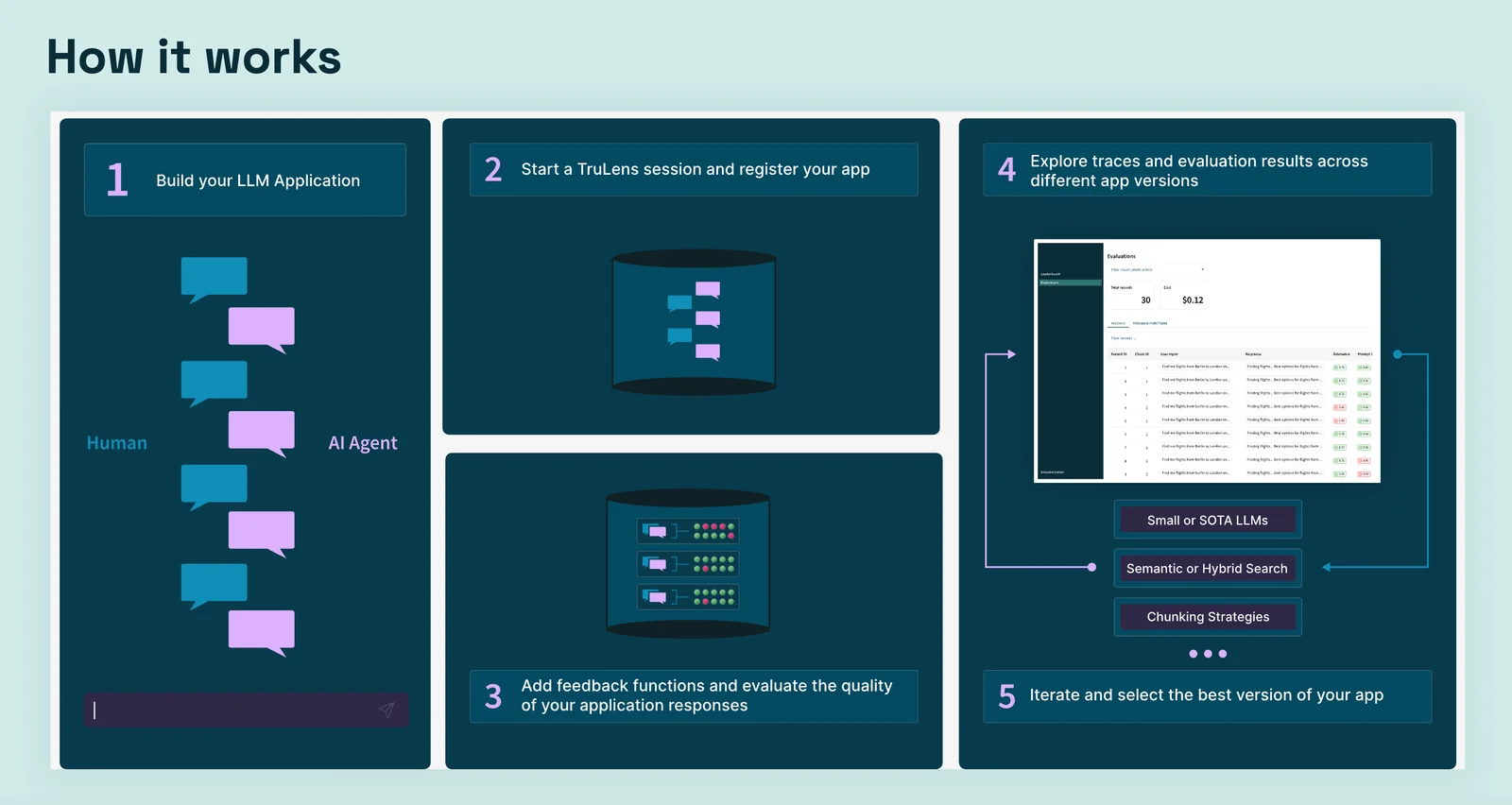
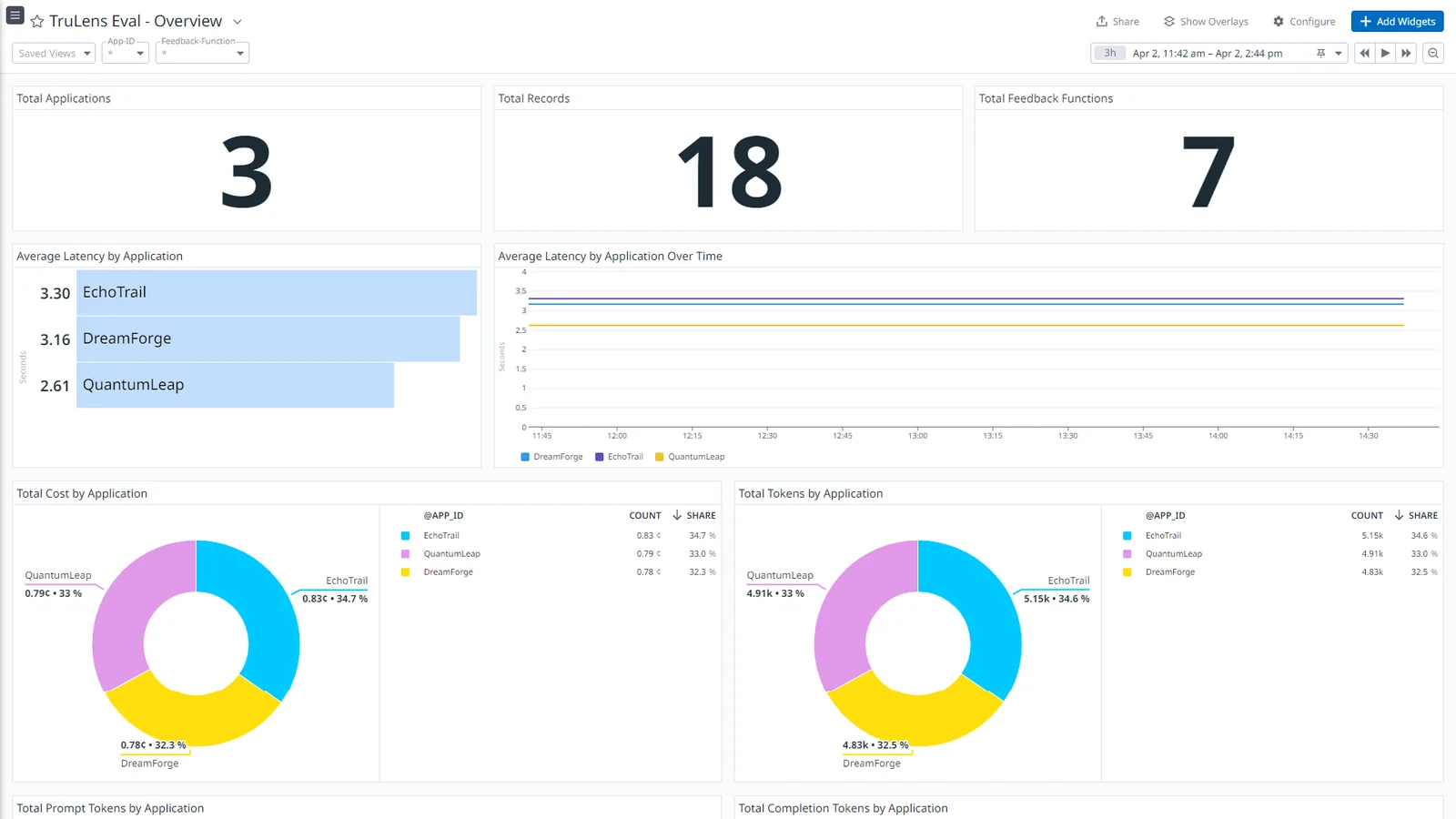
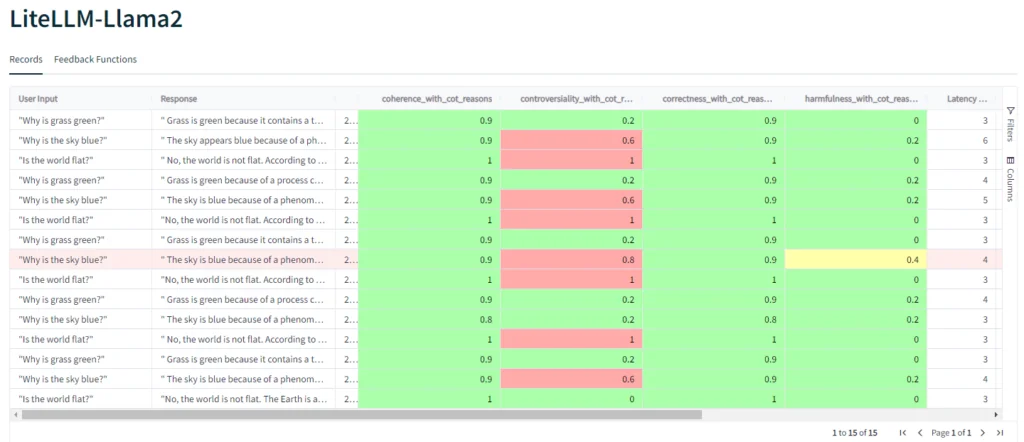
TruLens (TruLens Eval / trulens) is an open-source toolkit for instrumenting, evaluating, and monitoring large language model (LLM) applications. It provides fine-grained, stack-agnostic instrumentation to record model calls, retrievals, prompts, and knowledge sources, and runs configurable feedback functions alongside application runs to surface failure modes such as hallucinations or factual errors. TruLens includes utilities for virtual records, RAG-centric evaluation (the RAG Triad), a web UI/dashboard to compare app versions and leaderboards, and integrations for multiple model providers and observability systems (including planned OpenTelemetry work). Its value is in turning ad-hoc “vibe checks” into systematic, repeatable evaluations that let teams iterate on prompts, retrievers, and model choices with measurable feedback.
Screenshots
Key Features
Use Cases



Frequently asked questions about Trulens
Is Trulens free to use?
Yes, Trulens is completely free to use as it is an open-source toolkit. Users can self-host it on their own infrastructure without incurring any licensing costs, making it an excellent option for developers and organizations looking to implement AI monitoring solutions.
Key Points
- Trulens is an open-source toolkit.
- It allows for self-hosting on your infrastructure.
- There are no licensing costs associated with Trulens.
Detailed Explanation
Trulens provides a robust framework for monitoring and evaluating AI models. Being open-source means that anyone can access the source code, modify it, and contribute to its development. This flexibility is particularly beneficial for developers who want to customize features according to their specific needs.
Use Cases
- AI Model Monitoring: Trulens helps track the performance of machine learning models in real time, allowing users to identify and address issues promptly.
- Custom Integrations: Developers can integrate Trulens with existing systems, such as data pipelines or cloud services, enhancing its functionality.
- Community Support: As an open-source project, Trulens benefits from community contributions, ensuring continuous improvements and new features.
Best Practices / Tips
- Self-Hosting: If you choose to self-host Trulens, ensure your server meets the technical requirements for optimal performance. This includes adequate memory and processing power.
- Contribute to the Community: Engage with the Trulens community by reporting issues, submitting code, or providing feedback to enhance the toolkit.
- Documentation: Regularly consult the official documentation for updates and best practices to maximize your use of Trulens.
Additional Resources
In conclusion, Trulens is a powerful, cost-effective toolkit for AI model monitoring that can be customized and expanded upon by its users. By leveraging its open-source nature, developers can significantly enhance their AI projects without the burden of licensing fees.
What are the key features of Trulens?
Trulens features fine-grained instrumentation, automated feedback evaluations, tools focused on retrieval-augmented generation (RAG), a comparative dashboard for performance assessments, and seamless integration support for various AI models, making it an essential tool for AI developers and researchers.
Key Points
- Fine-Grained Instrumentation: Offers detailed performance metrics.
- Automated Feedback Evaluations: Streamlines the evaluation process.
- RAG-Focused Tooling: Enhances model performance with retrieval capabilities.
Detailed Explanation
Trulens is designed to provide AI developers with the insights and tools necessary to optimize their models effectively.
Fine-Grained Instrumentation
This feature allows users to monitor specific aspects of model performance, including latency and accuracy. For example, developers can track how different parameters affect the output quality, enabling data-driven decisions to enhance model efficiency.
Automated Feedback Evaluations
Trulens automates the process of gathering and analyzing feedback from model outputs. This helps developers quickly identify areas needing improvement. For instance, if a model consistently underperforms on certain queries, Trulens provides actionable insights to refine the model.
RAG-Focused Tooling
Retrieval-Augmented Generation tools enable models to leverage external data sources to improve their responses. This is particularly useful for applications requiring up-to-date information, like chatbots or content generation systems. Trulens integrates seamlessly with various retrieval systems, enhancing the model's contextual understanding.
Comparative Dashboard
The dashboard feature allows for side-by-side comparisons of different model runs. Users can visualize performance trends and make informed adjustments. This comparative analysis is crucial for iterative development and helps in selecting the best-performing model configurations.
Best Practices / Tips
- Leverage Fine-Grained Metrics: Regularly monitor your models using Trulens' detailed metrics to identify performance bottlenecks.
- Utilize Feedback Loops: Implement automated feedback evaluations to continuously improve your models based on real user interactions.
- Experiment with RAG Tools: Integrate retrieval-augmented generation to refine your model's responses, especially for applications needing dynamic data.
Additional Resources
How do I get started with Trulens?
To get started with Trulens, simply install it via pip using the command pip install trulens. After installation, refer to the quick usage examples in the official documentation to effectively set up your application and utilize its features.
Key Points
- Installation: Use pip for a quick setup.
- Documentation: Utilize examples for guidance.
- Application Setup: Learn how to integrate Trulens into your projects.
Detailed Explanation
To begin using Trulens, the first step is to install it through Python's package manager, pip. Open your terminal or command prompt and enter the following command:
pip install trulens
Once Trulens is installed, you can access its extensive documentation, which includes quick usage examples designed to help you understand how to implement its features seamlessly. The documentation provides step-by-step guidance on integrating Trulens into your machine learning workflows, including setting up monitoring and evaluation tools.
For example, after installation, you might want to start with a simple implementation. Here is a basic outline of how to create a Trulens application:
- Import Trulens: Start by importing required libraries in your Python script.
- Initialize Trulens: Set up the necessary configurations to begin monitoring your model.
- Log Metrics: Use Trulens to log specific metrics, like accuracy or loss, during your training process.
- Visualize Results: Finally, leverage Trulens’ visualization tools to analyze your model’s performance.
Best Practices / Tips
- Read the Documentation: Take time to thoroughly review the Trulens documentation; it contains valuable information and example projects that can enhance your understanding.
- Start Small: Begin with basic functionalities and gradually explore advanced features as you become more comfortable.
- Community Support: Engage with the Trulens community for support. Forums and discussion groups can provide insights and solutions to common challenges.
- Version Compatibility: Ensure your Python environment is compatible with the latest version of Trulens for optimal performance.
Additional Resources
By following these steps and utilizing the resources provided, you can effectively set up and optimize your experience with Trulens for your machine learning projects.
Does Trulens support API integrations?
Yes, Trulens supports API integrations with various model providers such as OpenAI, Ollama, and LangChain. This stack-agnostic capability allows for seamless implementation across different platforms, enhancing flexibility and usability for developers and businesses leveraging AI technologies.
Key Points
- Wide Range of Integrations: Trulens connects with popular AI model providers.
- Stack-Agnostic Solution: It works independently of specific tech stacks.
- Enhanced Flexibility: Facilitates easy implementation in diverse projects.
Detailed Explanation
Trulens is designed to be a versatile tool for developers and data scientists, allowing integration with several leading AI model providers. This includes:
-
OpenAI: A popular choice for natural language processing and generative tasks. Developers can easily connect Trulens to OpenAI’s API to harness powerful language models for various applications, such as chatbots or content generation.
-
Ollama: This integration allows users to incorporate models that can run locally, making it easier for businesses concerned about data privacy and security. With Ollama, users can deploy AI solutions that operate on their infrastructure.
-
LangChain: This framework is designed for building applications with large language models. By integrating Trulens with LangChain, users can create complex workflows, leveraging the capabilities of AI models to provide enhanced functionalities like data retrieval and processing.
For example, a marketing team could use Trulens with OpenAI to automate content creation, while a healthcare provider might integrate Ollama for patient data management using AI, maintaining strict compliance with privacy regulations.
Best Practices / Tips
- Evaluate Your Needs: Before integrating, assess your project requirements to choose the most suitable model provider.
- Test Integrations: Conduct thorough testing to ensure compatibility and performance across different stack configurations.
- Monitor Performance: Use analytics tools to track the performance of integrated models, making adjustments as needed for optimization.
Additional Resources
How does Trulens compare to other LLM evaluation tools?
Trulens distinguishes itself from other large language model (LLM) evaluation tools by being an open-source, community-driven platform. It features advanced instrumentation, real-time feedback functions, and extensibility, making it a compelling alternative to proprietary tools that often lack transparency and flexibility in customization.
Key Points
- Community-Driven and Open-Source: Encourages collaboration and transparency.
- Advanced Instrumentation: Provides detailed insights into model performance.
- Real-Time Feedback Functions: Facilitates immediate adjustments and enhancements.
Detailed Explanation
Trulens is designed to empower users with a comprehensive toolkit for evaluating LLMs. Unlike proprietary tools, which can be restrictive and costly, Trulens is open-source, allowing developers and researchers to contribute to its evolution. This community-driven approach not only fosters innovation but also ensures that users can tailor the tool to their specific needs.
Advanced Instrumentation
Trulens offers sophisticated instrumentation capabilities that enable users to track and analyze the performance of their models meticulously. This includes metrics such as accuracy, precision, recall, and user-defined KPIs, which can be visualized through interactive dashboards. For instance, users can integrate Trulens with popular data visualization tools like Grafana for enhanced reporting.
Real-Time Feedback
One of the standout features of Trulens is its real-time feedback functionality. This allows users to receive immediate performance insights as they test their models, facilitating rapid iterations and improvements. For example, if a model generates unsatisfactory outputs, Trulens can highlight specific areas of concern, enabling developers to make informed adjustments swiftly.
Extensibility
Trulens is built to be extensible, meaning users can integrate additional functionalities or adapt existing features to better fit their workflows. This flexibility is particularly beneficial for organizations with unique evaluation criteria or those looking to incorporate specific data sources.
Best Practices / Tips
- Leverage Community Resources: Engage with the Trulens community for support, shared insights, and best practices.
- Regularly Update: Keep the tool updated to benefit from the latest features and improvements contributed by the community.
- Customize Metrics: Tailor the evaluation metrics to align with your specific project goals for more relevant insights.
Additional Resources
Explore more AI Ai Tools tools
Browse all Ai Tools tools →Compare Trulens: vs CleanSlop · vs Kalender Sync · vs UseIt Studio · vs Woven Video