

Sendly
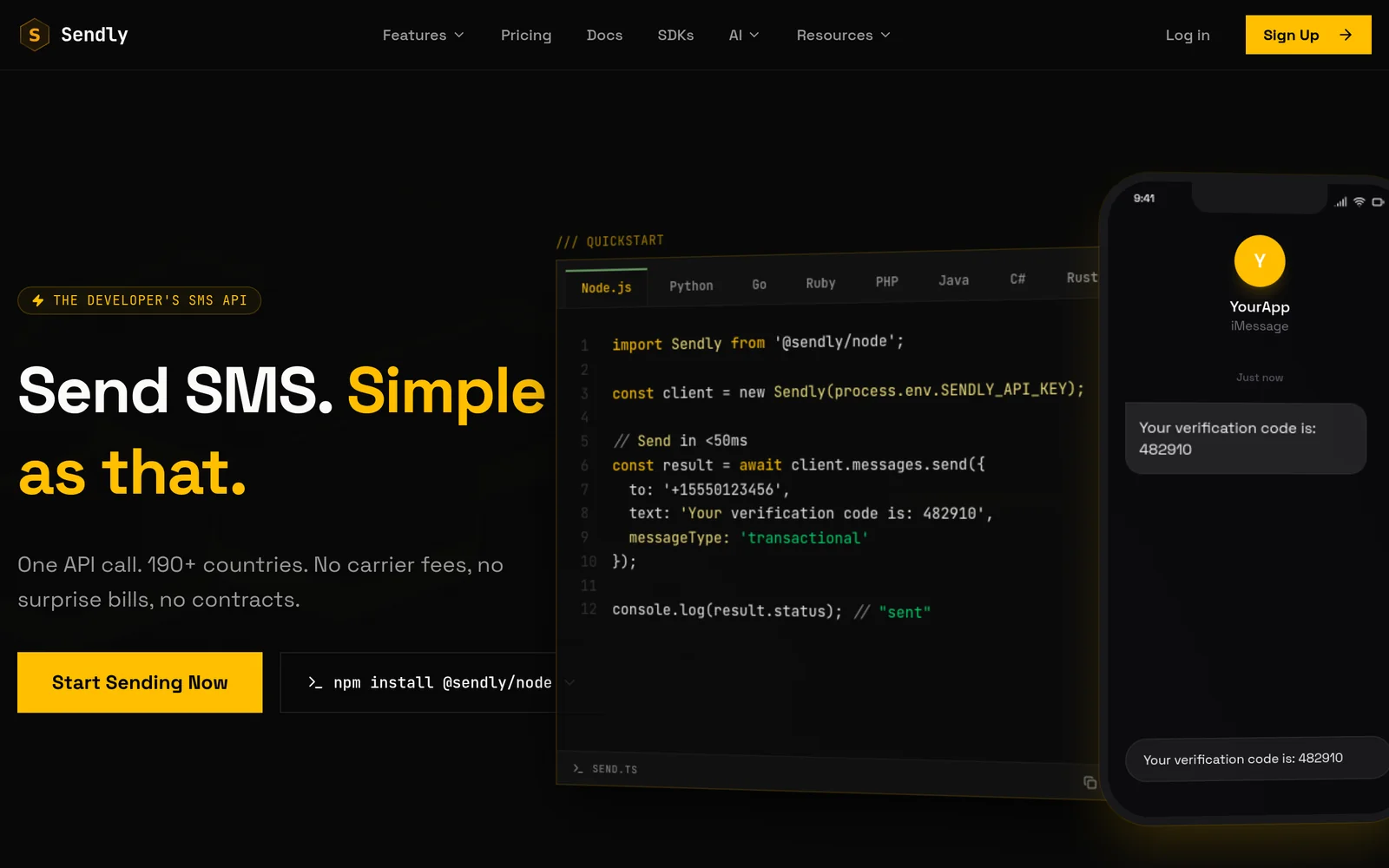
AIDeveloper-first SMS API with global infrastructure and typed SDKs that delivers OTPs, verifications, and alerts in under 50ms.
Sendly
Developer-first SMS API with global infrastructure and typed SDKs that delivers OTPs, verifications, and alerts in under 50ms.
About Sendly
Sendly is a developer-first SMS API designed to send OTP codes, verification messages, and alerts with very low latency. It combines a global SMS infrastructure with typed SDKs to simplify integration, improve reliability, and support large-scale messaging needs. The platform emphasizes sub-50ms delivery for time-sensitive transactional messages and is built to handle high throughput for applications requiring fast, dependable SMS delivery.
Screenshots
Key Features
Use Cases



Frequently asked questions about Sendly
What is Sendly?
Sendly is a robust SMS messaging platform designed for speed and scalability, enabling users to send SMS messages globally in under 50 milliseconds. It features a comprehensive global SMS infrastructure and user-friendly SDKs, making it an ideal choice for developers and businesses looking to integrate SMS capabilities seamlessly.
Key Points
- Speed: Send SMS messages in under 50 milliseconds.
- Global Reach: Extensive SMS infrastructure that supports worldwide messaging.
- Scalability: Built for large-scale applications with typed SDKs for easy integration.
Detailed Explanation
Sendly operates on a highly efficient global SMS infrastructure, allowing businesses to send messages quickly and reliably. With a response time of under 50 milliseconds, it ensures that your SMS campaigns are effective and timely. The platform is tailored for developers, featuring easy-to-use SDKs that facilitate integration into existing systems or applications.
For example, a retail company can use Sendly to send promotional messages to its customers during flash sales, receiving instant delivery confirmations. This capability enhances customer engagement and can significantly boost sales during high-traffic periods.
Sendly supports various programming languages, making it adaptable for different projects. The SDKs simplify the process of sending messages, tracking delivery status, and managing replies, which is crucial for customer service interactions.
Best Practices / Tips
- Optimize Message Content: Keep your SMS concise and clear to maximize engagement. Aim for 160 characters or less.
- Compliance: Ensure you comply with local regulations regarding SMS marketing, including obtaining consent from recipients.
- Monitor Performance: Use Sendly's analytics tools to track delivery rates and engagement metrics, allowing you to refine your messaging strategy.
Additional Resources
How does Sendly work?
Sendly works by leveraging advanced AI technologies to streamline daily tasks and enhance productivity. It helps users automate workflows, manage data, and improve communication, making it an invaluable tool for both individuals and teams looking to optimize their operations.
Key Points
- AI-Powered Automation: Sendly automates repetitive tasks to save time.
- User-Friendly Interface: Designed for ease of use, making it accessible for everyone.
- Integration Capabilities: Compatible with various platforms to centralize workflows.
Detailed Explanation
Sendly operates by utilizing artificial intelligence to simplify day-to-day activities. Users can set up automated workflows that handle tasks such as data entry, scheduling meetings, and sending notifications. For example, a marketing team can use Sendly to automatically compile reports from multiple data sources, eliminating manual data manipulation.
How It Works:
- User Registration: Users sign up for Sendly and create an account.
- Workflow Creation: Users can design workflows using a simple drag-and-drop interface, selecting tasks to automate.
- Integration: Sendly connects with tools like Google Workspace, Slack, and Trello, allowing for seamless data transfer.
- Automation Execution: Once set up, users can sit back as Sendly executes workflows, sending reminders, managing tasks, and compiling data without intervention.
Use Cases:
- Project Management: Teams can automate task assignments and track progress in real-time.
- Customer Support: Use Sendly to automatically route customer inquiries to the appropriate department.
- Data Analysis: Automate the collection of analytics data to create performance reports effortlessly.
Best Practices / Tips
- Start Small: Begin with simple workflows and gradually increase complexity as you become more familiar with the tool.
- Regularly Review Workflows: Periodically assess automated tasks to ensure they remain efficient and relevant.
- Utilize Templates: Take advantage of pre-built templates available within Sendly for common tasks.
Additional Resources
What are the main features of Sendly?
Sendly offers a variety of key features that enhance communication and productivity through its powerful AI capabilities. These include automated message responses, real-time analytics, user-friendly templates, and integration with popular platforms, all designed to streamline interactions and improve user engagement.
Key Points
- Automated Messaging: Streamlines communication by automating responses.
- Real-Time Analytics: Provides insights into user interactions and engagement metrics.
- Integration Capabilities: Seamlessly connects with popular platforms like Slack, Gmail, and more.
Detailed Explanation
Sendly's AI-driven features empower businesses to optimize their communication strategies.
-
Automated Messaging: This feature allows users to set up predefined responses to common queries. For instance, if a customer frequently asks about shipping times, Sendly can automatically reply with the relevant information, reducing response time and improving customer satisfaction.
-
Real-Time Analytics: Sendly offers in-depth analytics that track user interactions. Users can view metrics such as response times, customer satisfaction ratings, and engagement levels. This data is crucial for refining communication strategies and enhancing overall user experience.
-
Integration Capabilities: Sendly can be integrated with various platforms such as Slack, Gmail, and CRM software. This means that businesses can manage their communications from a single dashboard, ensuring consistency and efficiency across all channels.
Best Practices / Tips
- Utilize Templates: Create message templates for common inquiries to save time and maintain consistency.
- Monitor Analytics Regularly: Regularly review the analytics dashboard to identify trends and adjust your strategies accordingly.
- Test Integrations: Before fully implementing integrations, conduct tests to ensure they function seamlessly with your existing tools.
Additional Resources
Who is Sendly for?
Sendly is designed for individuals and businesses looking to streamline their daily AI workflows. It caters to professionals, teams, and anyone interested in enhancing productivity by integrating AI tools into their routine tasks, from content creation to data analysis and project management.
Key Points
- Target Audience: Individuals, teams, and businesses.
- Use Cases: Enhances productivity across various industries.
- Integration: Seamlessly works with existing workflows and tools.
Detailed Explanation
Sendly is an AI tool that simplifies daily workflows by automating repetitive tasks and enhancing efficiency. It is particularly beneficial for:
-
Professionals: Freelancers, marketers, and content creators can utilize Sendly to automate content generation, social media scheduling, and email management. For example, a marketer can automate email campaigns using Sendly, saving hours of manual work each week.
-
Teams: Collaboration becomes more effective with Sendly. Teams can use it to manage projects, track deadlines, and generate reports, streamlining communication and improving accountability. For instance, project managers can set up automated reminders for team members, ensuring everyone stays on track.
-
Businesses: Companies can benefit from Sendly by integrating it into customer service operations. AI chatbots powered by Sendly can handle common inquiries, allowing human agents to focus on more complex issues. This can lead to increased customer satisfaction and efficiency.
Best Practices / Tips
- Start Small: Begin by integrating Sendly into one area of your workflow to gauge its impact before expanding its use.
- Customize Settings: Tailor Sendly’s features to fit your specific needs, such as adjusting automation rules or setting reminders that align with your schedule.
- Monitor Performance: Regularly review how Sendly is performing in your workflow. Use analytics to understand its impact on productivity and make adjustments as necessary.
- Training: Ensure all team members are trained on how to use Sendly effectively to maximize its benefits.
Additional Resources
How much does Sendly cost?
Sendly offers various pricing plans tailored to different business needs, with costs starting around $19 per month for basic features. For detailed pricing tiers and options, visit the Sendly official website, where you can also explore any current promotions or discounts.
Key Points
- Pricing starts at approximately $19 per month.
- Offers multiple plans based on features and usage.
- Check the official website for the latest promotions.
Detailed Explanation
Sendly provides a range of pricing plans designed to accommodate different user requirements. The basic plan begins at about $19 per month, which is ideal for individuals or small businesses needing essential features like messaging and basic analytics.
-
Standard Plan: Priced around $39 per month, this plan includes additional features such as advanced analytics, integrations with other tools, and priority customer support. It's perfect for medium-sized businesses that require more comprehensive capabilities.
-
Premium Plan: For larger enterprises, the Premium Plan starts at $79 per month and offers unlimited messaging, advanced segmentation, and personalized support. This plan is suited for businesses with extensive communication needs and high-volume messaging.
-
Custom Solutions: Sendly also provides tailored pricing for organizations with unique requirements. Businesses can contact Sendly’s sales team for a customized quote based on their specific needs.
To make the most informed decision, it’s advisable to review the comparison of features across different plans on the official website.
Best Practices / Tips
- Evaluate Your Needs: Before selecting a plan, assess your messaging volume and feature requirements to avoid paying for unnecessary extras.
- Take Advantage of Free Trials: If available, utilize free trials to test out features before committing financially.
- Monitor Usage: Keep track of your messaging usage monthly to ensure you’re on the right plan and make adjustments as necessary.
Additional Resources
- Sendly Pricing Page - For the most current pricing options and features.
- Sendly Features Overview - To explore what each plan includes.
- Sendly Support - For assistance with any questions regarding plans or features.
How do I get started with Sendly?
To get started with Sendly, simply visit sendly.live to sign up for an account. Once registered, you can explore its features and functionalities tailored for effective social media management and messaging solutions.
Key Points
- Easy Sign-Up: Signing up is straightforward and quick.
- User-Friendly Interface: The platform features an intuitive design for seamless navigation.
- Feature Exploration: Discover various tools to enhance your messaging strategy.
Detailed Explanation
Starting with Sendly involves a few simple steps:
-
Visit the Website: Go to sendly.live. This is the official site where you can learn more about the platform.
-
Create an Account: Click on the sign-up button. You will need to provide your email address, create a password, and possibly verify your account through email. Ensure that you use a valid email to receive important notifications and updates.
-
Explore Features: Once logged in, you can navigate through the dashboard. Key features include:
- Message Scheduling: Plan and schedule your posts in advance for various social media platforms.
- Analytics: Access metrics to evaluate the performance of your messages.
- Integration Options: Connect Sendly with other tools like Slack or Google Analytics for enhanced functionality.
-
Set Up Your Profile: Fill out your profile information, including your social media accounts, to optimize your messaging experience.
Best Practices / Tips
- Utilize Tutorials: Take advantage of any tutorials or guides available on the Sendly platform to familiarize yourself with all its capabilities.
- Experiment with Features: Don’t hesitate to test out different functionalities, such as A/B testing for messages to see what resonates best with your audience.
- Stay Updated: Keep an eye on updates and new features released by Sendly to ensure you’re leveraging the platform to its full potential.
Additional Resources
- Sendly Official Documentation - Comprehensive guides on using Sendly effectively.
- Sendly Blog - Tips and strategies for social media management.
- Product Hunt Page for Sendly - Community discussions and user feedback on Sendly.
Explore more AI Ai Tools tools
Browse all Ai Tools tools →Browse by use case: Code Generation
Compare Sendly: vs CleanSlop · vs Kalender Sync · vs UseIt Studio · vs Woven Video