
RightNow CUDA Editor
AIAll-in-one AI-powered code editor for CUDA with hardware-aware agents, GPU emulation/virtualization, real-time profiling and enterprise benchmarking.
RightNow CUDA Editor
All-in-one AI-powered code editor for CUDA with hardware-aware agents, GPU emulation/virtualization, real-time profiling and enterprise benchmarking.
About RightNow CUDA Editor
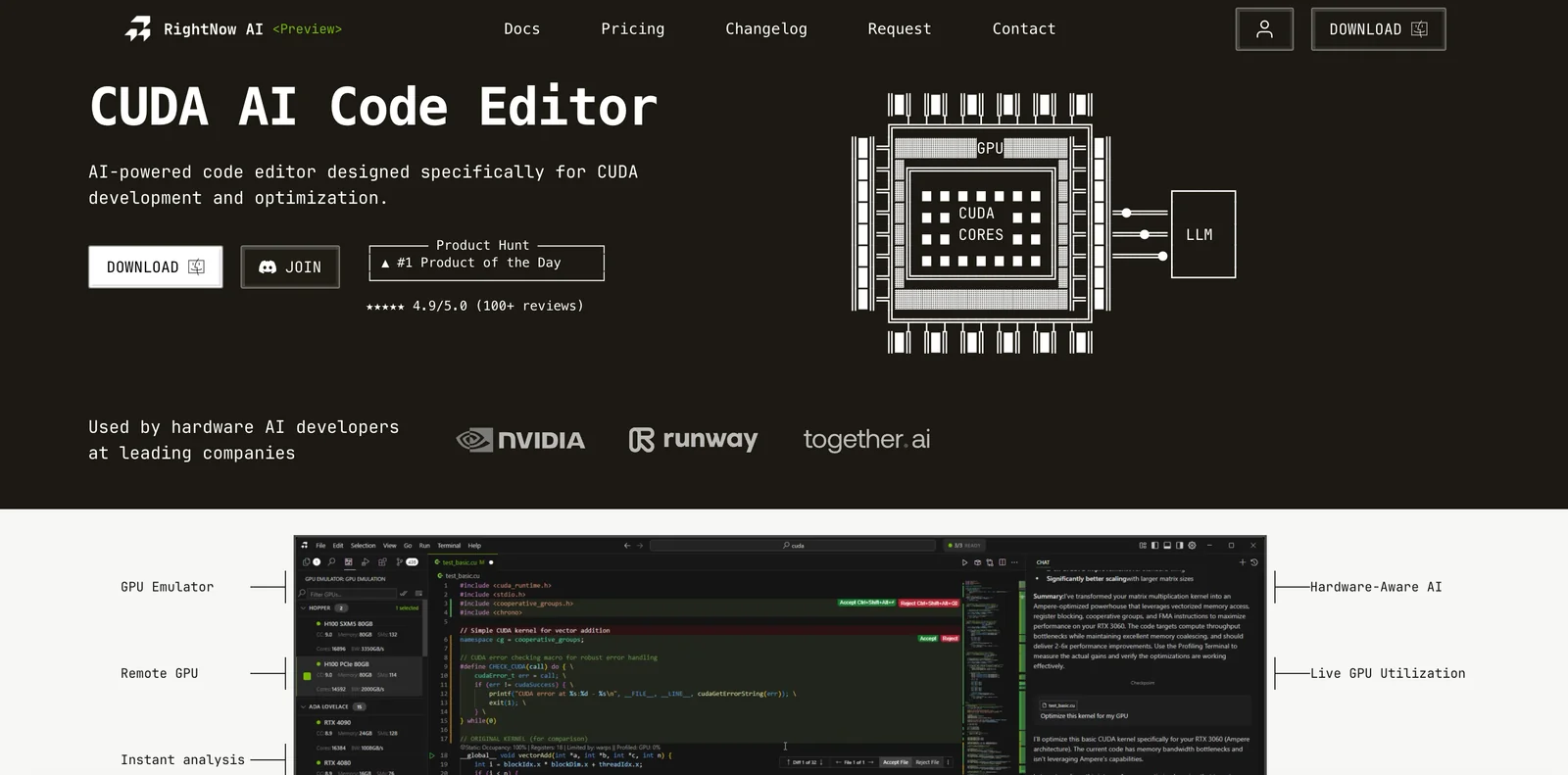
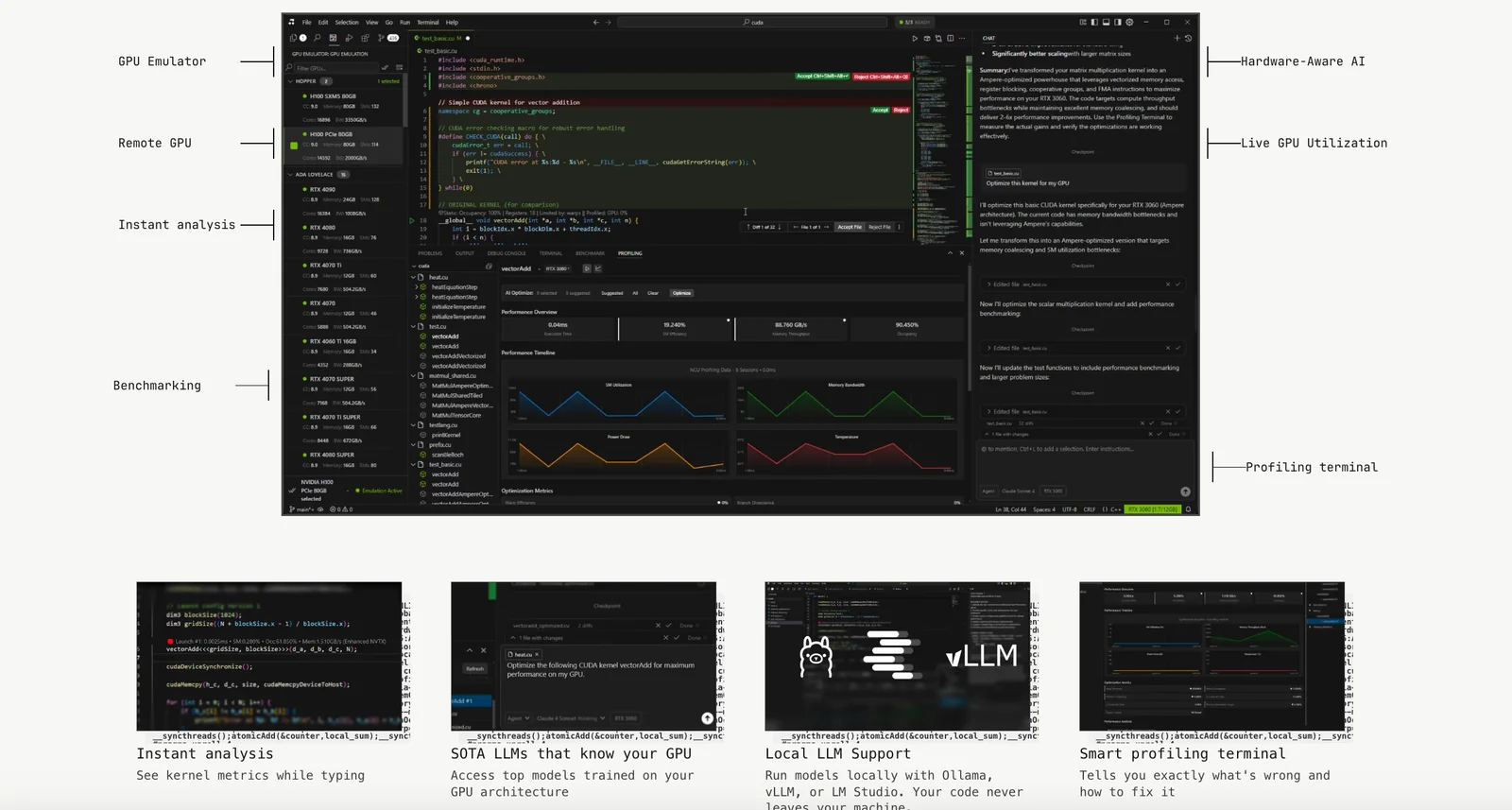
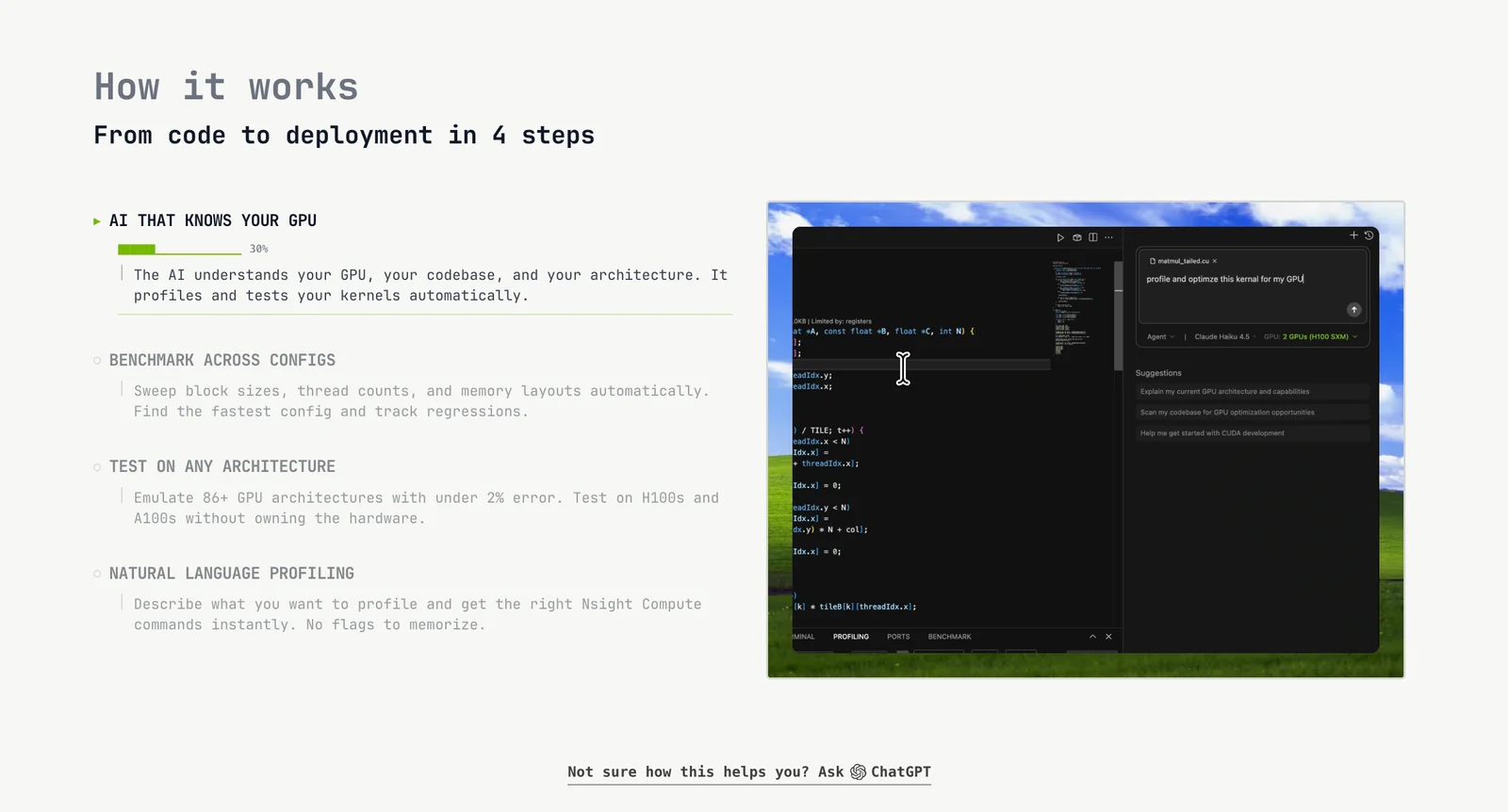
RightNow CUDA Editor (RightNow AI) is an integrated development environment and AI assistant built specifically for CUDA and NVIDIA GPU programming. It combines agentic, hardware-aware AI that reasons about GPU architecture with a GPU emulator and virtualization to allow development and testing without dedicated physical GPUs. The tool provides real-time profiling, a smart terminal, line-by-line performance analysis, and an enterprise-grade benchmarking terminal with sweep configurations for reproducible performance testing. RightNow also offers open-source CLI components, a web-based GPU profiler visualization, and workflows designed for both individual developers and teams to optimize, debug, and benchmark GPU code across cards from GTX 1060 to H100.
Screenshots
Key Features
Use Cases



Frequently asked questions about RightNow CUDA Editor
What are the pricing tiers for RightNow CUDA Editor?
RightNow CUDA Editor features three distinct pricing tiers: a free version for personal and educational use, a Pro plan priced at $20 per month for heavier usage, and custom pricing for commercial or enterprise requirements. The free tier has limitations on CUDA kernel generation and profiling capabilities.
Key Points
- Free Tier: Suitable for personal and educational use with limited features.
- Pro Plan: Cost-effective at $20/month for more extensive usage.
- Enterprise Solutions: Tailored pricing options for businesses with unique needs.
Detailed Explanation
The RightNow CUDA Editor provides flexible pricing options to cater to various users.
-
Free Tier: This option is ideal for students, educators, or hobbyists. It allows users to experiment with CUDA kernel generation and profiling but has restrictions on the number of kernels and profiling sessions available. This tier is perfect for those just starting with CUDA programming and seeking to learn the basics without any financial commitment.
-
Pro Plan: At $20 per month, the Pro plan is designed for developers and professionals who require more robust features. This subscription includes unlimited CUDA kernel generation, enhanced profiling tools, and priority support. Users can leverage advanced functionalities to optimize their CUDA applications efficiently, making it a great choice for serious developers.
-
Custom Pricing for Enterprises: For businesses or organizations that need extensive use of the CUDA Editor, RightNow offers custom pricing tailored to specific requirements. This option includes added benefits such as dedicated support, team licenses, and additional features that enhance productivity and collaboration among team members. Companies can contact RightNow directly to discuss their needs and receive a personalized quote.
Best Practices / Tips
- Evaluate Your Needs: Before selecting a tier, assess your usage requirements. If you're a beginner, start with the free tier; upgrade later if needed.
- Take Advantage of Trials: If available, utilize trial periods for the Pro plan to understand its benefits fully before committing.
- Stay Updated: Regularly check RightNow's website for any changes in pricing or features, as technology offerings can evolve rapidly.
Additional Resources
- RightNow CUDA Editor Official Website - Explore detailed features and pricing options.
- CUDA Programming Guide - Learn more about CUDA programming and its applications.
- RightNow Support Forum - Engage with other users and find solutions to common issues.
How does the GPU emulation feature work in RightNow CUDA Editor?
The GPU emulation feature in RightNow CUDA Editor allows developers to simulate GPU behavior on machines lacking physical GPUs. This capability lets users run and test CUDA code, validating kernel logic and performance efficiently before actual hardware deployment.
Key Points
- Simulates GPU behavior: The emulation mimics how actual GPUs execute code.
- Validates kernel logic: Developers can ensure their CUDA kernels function correctly.
- Reduces hardware dependency: Testing can be performed without needing physical GPUs.
Detailed Explanation
The GPU emulation feature in RightNow CUDA Editor serves as a powerful tool for developers working with CUDA (Compute Unified Device Architecture) code. When working on complex applications that utilize parallel processing, having access to physical GPUs can be costly and impractical. The emulation feature addresses this gap by providing a simulated environment to test CUDA kernels.
How It Works
-
Simulation Environment: When a developer writes CUDA code, the RightNow CUDA Editor allows them to run this code in a virtualized environment, simulating how the GPU would process the instructions.
-
Kernel Testing: Developers can execute their kernels—functions designed to run on the GPU—within this emulated setting. This enables them to identify bugs, logical errors, and performance bottlenecks without the need for a physical GPU.
-
Performance Metrics: While the emulation may not provide exact performance metrics as a physical GPU would, it allows for comparative analysis and optimization suggestions, giving developers insights into how their code might perform once deployed.
Use Cases
- Learning and Development: Ideal for students or new developers learning CUDA programming without immediate access to hardware.
- Prototyping Applications: Developers can quickly prototype applications and perform initial testing, saving time and resources.
- Cross-Platform Development: Testing code on different platforms can be facilitated without needing multiple hardware setups.
Best Practices / Tips
- Start with Simple Kernels: Begin testing with simpler CUDA kernels to understand how emulation behaves before scaling up to complex applications.
- Regular Testing: Regularly test kernels during development to catch issues early, ensuring smoother transitions to actual hardware testing.
- Profile Your Code: Use profiling tools available in the RightNow CUDA Editor to analyze performance and optimize your code effectively.
Additional Resources
How can I get started with RightNow CUDA Editor for my CUDA projects?
To get started with RightNow CUDA Editor for your CUDA projects, download the open-source CLI (rightnow-cli) from the official website and install it using pip. This tool provides a built-in GPU emulator and real-time profiling features that enhance your CUDA development experience.
Key Points
- Download and Installation: Obtain the rightnow-cli from the official site and install via pip.
- Built-in Features: Utilize the GPU emulator for testing and profiling your CUDA applications.
- Community Support: Engage with the community for troubleshooting and best practices.
Detailed Explanation
To begin using RightNow CUDA Editor, follow these steps:
-
Download the RightNow CLI: Visit the RightNow official website and locate the download section. The RightNow CLI is open-source, making it accessible for developers.
-
Installation via pip: After downloading, you can install the RightNow CLI using the Python package installer (pip). Open your terminal and run the following command:
pip install rightnow-cli -
Initialize Your Project: Once installed, you can create a new CUDA project by running:
rightnow init my_cuda_projectThis command sets up the necessary folder structure for your project.
-
Utilize Built-in Features: RightNow CUDA Editor includes a GPU emulator that allows you to run and test your CUDA code on your local machine without needing a physical GPU. It also features real-time profiling, which helps you optimize your code performance by monitoring resource usage and execution time.
-
Run Your Code: Use the command:
rightnow runThis command will execute your CUDA project within the emulator, providing immediate feedback.
Best Practices / Tips
- Stay Updated: Regularly check for updates on the RightNow CLI to benefit from new features and improvements.
- Leverage Community Forums: Engage with forums and discussion groups for insights, support, and sharing of best practices.
- Test on Real Hardware: While the emulator is useful, always test your applications on actual GPU hardware to ensure compatibility and performance.
Additional Resources
- RightNow GitHub Repository: Access the source code, issues tracker, and community contributions.
- CUDA Toolkit Documentation: Learn more about CUDA programming and best practices.
- Getting Started with CUDA: Official NVIDIA resources for CUDA setup and tutorials.
What technical requirements must be met to use RightNow CUDA Editor effectively?
RightNow CUDA Editor requires Python installed on your machine to utilize the Command Line Interface (CLI). For optimal performance, it's recommended to have a system equipped with at least 8GB of RAM and a CPU that supports virtualization, particularly for GPU emulation and profiling tasks.
Key Points
- Python Installation: Essential for CLI usage.
- System Requirements: Minimum of 8GB RAM recommended.
- CPU Specifications: Must support virtualization for enhanced functionality.
Detailed Explanation
RightNow CUDA Editor is a powerful tool for developers working with GPU programming. To use it effectively, ensure you have Python installed, as this is crucial for running the CLI commands that facilitate various functionalities within the editor.
System Specifications
- RAM: Having at least 8GB of RAM is vital for smooth performance, especially when dealing with large datasets or complex computations. Insufficient memory can lead to slow processing times or crashes.
- CPU: A CPU that supports virtualization will enable better resource management and improved performance during GPU emulation and profiling tasks. This is particularly important for developers who need to simulate various environments or test different configurations without physical hardware.
Example Use Case
For example, if you are developing a machine learning model using CUDA, a well-equipped system will allow you to efficiently compile, run, and debug your code without experiencing lag or inefficiency. This setup is particularly beneficial when working with deep learning frameworks that require extensive computational power.
Best Practices / Tips
- Upgrade Your Hardware: If possible, consider upgrading your RAM to 16GB or more for enhanced performance, especially for GPU-intensive tasks.
- Regular Updates: Keep your Python installation and RightNow CUDA Editor updated to utilize the latest features and security patches.
- Virtualization Settings: Ensure that virtualization is enabled in your BIOS settings to maximize CPU performance for CUDA applications.
Additional Resources
- RightNow CUDA Editor Official Documentation
- Python Installation Guide
- Understanding GPU Virtualization
By adhering to these technical requirements and best practices, you can optimize your experience with RightNow CUDA Editor and enhance your GPU programming capabilities.
How does RightNow CUDA Editor compare to other CUDA development tools?
RightNow CUDA Editor excels compared to other CUDA development tools due to its unique features, including an integrated AI-driven hardware-aware assistant, real-time profiling, and GPU emulation capabilities. These functionalities significantly enhance CUDA kernel optimization and debugging, making it a compelling choice for developers.
Key Points
- AI-Driven Assistant: Provides real-time suggestions tailored to hardware specifications.
- Real-Time Profiling: Allows immediate performance feedback for optimization.
- GPU Emulation: Simulates GPU environments for effective debugging without requiring physical GPU hardware.
Detailed Explanation
RightNow CUDA Editor offers a competitive edge by integrating advanced AI technology to assist developers in optimizing their CUDA applications. The AI-driven assistant analyzes the user's code and hardware specifications to provide personalized recommendations, ensuring that the optimized code runs efficiently on the intended hardware.
For example, when a developer writes a CUDA kernel, the assistant can suggest specific optimizations based on the GPU architecture, such as using shared memory effectively or minimizing memory access latency. This not only speeds up the development process but also enhances the final performance of the application.
Real-time profiling is another standout feature of RightNow CUDA Editor. Unlike many traditional tools that require manual profiling, this editor provides live feedback on how code changes impact performance. Developers can immediately see the results of their optimizations, allowing for iterative improvements without the need for extensive testing cycles.
Additionally, the GPU emulation capabilities enable developers to test their applications in a virtual environment that mimics actual GPU behavior. This is particularly useful for those without access to high-end GPU hardware, allowing them to ensure code reliability and performance before deployment.
Best Practices / Tips
- Leverage the AI Assistant: Always utilize the AI-driven suggestions to identify potential bottlenecks early in the development cycle.
- Profile Regularly: Use the real-time profiling feature consistently to track performance changes as you optimize your code.
- Test Multiple Scenarios: Use GPU emulation to simulate various hardware conditions, ensuring your application performs well across different environments.
Additional Resources
Explore more AI Ai Tools tools
Browse all Ai Tools tools →Compare RightNow CUDA Editor: vs CleanSlop · vs Kalender Sync · vs UseIt Studio · vs Woven Video