

Qursor
AIChrome extension to visually point at UI elements and copy clean, structured, code-aware context for AI coding assistants.
Qursor
Chrome extension to visually point at UI elements and copy clean, structured, code-aware context for AI coding assistants.
About Qursor
Qursor is a Chrome extension that lets developers visually inspect any website, point at exact UI elements, and copy clean, structured context that is optimized for AI coding assistants. It captures element-specific information (selectors, surrounding DOM context, and code-aware metadata) and formats it so prompts to code-focused models include precise UI context. Qursor speeds debugging, test-writing, and UI-driven code generation by removing ambiguity about which element a developer means when interacting with an AI assistant.
Screenshots
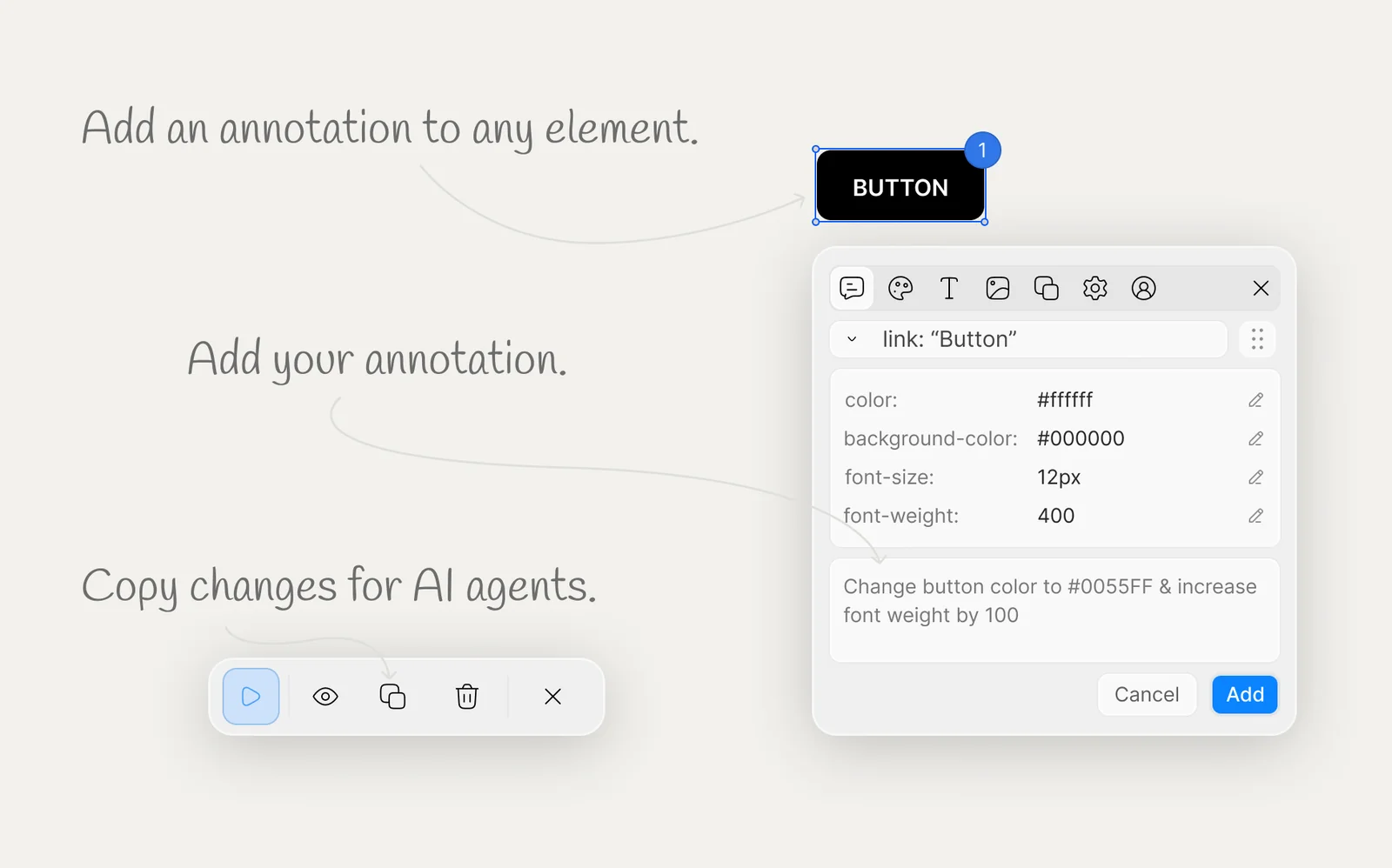
Key Features
Use Cases



Frequently asked questions about Qursor
What is Qursor | Point and copy UI context for AI coding?
Qursor is a Chrome extension that enables users to visually inspect any website, select specific UI elements, and copy precise, structured code-aware context for use with AI coding assistants. This tool simplifies the coding process by providing contextually relevant information directly from the web.
Key Points
- Visual Inspection: Allows users to see and interact with web elements.
- Contextual Code: Facilitates copying of structured code snippets.
- AI Integration: Enhances the functionality of AI coding assistants.
Detailed Explanation
Qursor revolutionizes the way developers and designers interact with web pages. By utilizing this Chrome extension, users can hover over any UI component on a website to obtain structured code snippets. For example, if you're designing a button, you can point to it and instantly get the relevant HTML and CSS.
How to Use Qursor:
- Install the Extension: Download Qursor from the Chrome Web Store.
- Navigate to a Website: Open the website you want to inspect.
- Activate Qursor: Click on the Qursor icon in your toolbar.
- Select UI Elements: Hover over elements to see their details.
- Copy Code: Use the provided options to copy clean code snippets directly to your clipboard.
This process not only saves time but also ensures that the code you use is accurate and contextually relevant, thereby reducing errors in your projects.
Best Practices / Tips
- Use for Prototyping: Leverage Qursor when creating prototypes to quickly gather UI elements.
- Check Compatibility: Ensure the copied code is compatible with your coding framework or library.
- Avoid Over-Reliance: While Qursor is a powerful tool, always validate the code for best practices and security.
Additional Resources
By integrating Qursor into your workflow, you can enhance your coding efficiency and streamline your processes, making it an invaluable tool for web developers and designers alike.
How does Qursor | Point and copy UI context for AI coding work?
Qursor | Point and copy UI context for AI coding enhances user productivity by integrating AI capabilities, allowing users to effortlessly select, copy, and utilize contextual information within their coding environments. This tool streamlines workflows, making it easier to interact with AI for coding tasks.
Key Points
- AI Integration: Seamlessly incorporates AI to assist in coding.
- Contextual Awareness: Understands the surrounding UI context for accurate suggestions.
- User Efficiency: Reduces repetitive tasks, improving overall productivity.
Detailed Explanation
Qursor functions as an AI-driven assistant designed for coding environments, enabling users to point at UI elements and copy relevant context directly into their workflows. This process simplifies the interaction between developers and AI tools, making it particularly useful for tasks like debugging, code completion, and understanding complex codebases.
For example, when a developer encounters a function they need to modify, Qursor allows them to highlight the function, copy its context, and retrieve relevant documentation or AI-generated suggestions immediately. This reduces the time spent switching between different applications or tabs, thus enhancing focus and efficiency.
Use cases for Qursor include:
- Debugging: Quickly retrieve and analyze relevant code snippets for troubleshooting.
- Code Reviews: Assist in reviewing changes by providing context-aware suggestions.
- Learning: Help new developers understand coding patterns by offering contextual explanations.
Best Practices / Tips
- Utilize Shortcuts: Familiarize yourself with keyboard shortcuts for quick access to Qursor features.
- Regular Updates: Keep the tool updated to benefit from the latest features and improvements.
- Experiment with Contexts: Take time to explore different UI elements to see how Qursor enhances your coding experience.
Common pitfalls to avoid include:
- Over-reliance: While Qursor is a powerful tool, ensure you still understand the underlying code.
- Ignoring Documentation: Use Qursor as a supplement, not a replacement for thorough documentation.
Additional Resources
By leveraging Qursor, developers can significantly enhance their coding workflow, making it a valuable addition to any programmer's toolkit.
What are the main features of Qursor | Point and copy UI context for AI coding?
Qursor is a powerful AI coding tool that features a unique point-and-copy UI, allowing users to efficiently extract code snippets and context from their development environment. Its core capabilities include intelligent code suggestions, real-time collaboration, and seamless integration with popular IDEs, enhancing productivity for developers.
Key Points
- Point-and-Copy UI: Easily extract code snippets with contextual awareness.
- AI-Powered Suggestions: Receive real-time coding assistance tailored to your project.
- Collaboration Features: Work simultaneously with team members on coding tasks.
Detailed Explanation
Qursor's point-and-copy UI allows developers to interactively select code snippets directly from their integrated development environment (IDE). This feature streamlines the process of gathering context around code, ensuring that developers can efficiently reference and utilize existing code without manual searching.
Key Features
-
AI-Powered Suggestions: Qursor analyzes your coding style and provides intelligent suggestions and auto-completions based on the context of your project. This reduces the time spent on repetitive coding tasks and minimizes errors.
-
Real-Time Collaboration: With built-in collaboration tools, Qursor enables multiple developers to work on the same project simultaneously. This is particularly beneficial for remote teams, as it maintains a consistent workflow and enhances communication through shared code contexts.
-
Integration with Popular IDEs: Qursor seamlessly integrates with widely-used IDEs like Visual Studio Code, JetBrains, and others, allowing developers to implement its features without disrupting their existing workflow. This flexibility enhances user experience and adoption rates.
Use Cases
- Rapid Prototyping: Developers can quickly prototype ideas by leveraging Qursor’s AI suggestions and context-aware code snippets.
- Team Projects: In collaborative environments, team members can point to specific code segments, making it easier to discuss and refine features without losing track of context.
- Learning and Development: New developers can use Qursor to learn from established code patterns and receive guidance on best practices in real-time.
Best Practices / Tips
- Utilize AI Suggestions: Regularly engage with Qursor's AI suggestions to enhance your coding efficiency. This can lead to cleaner code and fewer bugs.
- Leverage Collaboration Tools: Make the most of real-time collaboration features to foster team synergy and maintain productivity.
- Stay Updated: Keep an eye on updates from Qursor to benefit from new features and improvements that can enhance your coding experience.
Additional Resources
Who is Qursor | Point and copy UI context for AI coding for?
Qursor | Point and copy UI context for AI coding is designed for developers, data scientists, and AI enthusiasts looking to streamline their coding processes. It enhances productivity by allowing users to easily reference and copy contextual information while coding, making it an invaluable tool for anyone involved in AI workflows.
Key Points
- Target Users: Developers, data scientists, AI enthusiasts.
- Functional Benefits: Streamlines coding processes, enhances productivity.
- Use Cases: Quick reference for coding tasks, improved collaboration, better learning.
Detailed Explanation
Qursor is a powerful tool that simplifies the coding process by providing a user-friendly interface where you can point to UI elements and copy relevant context. This is particularly beneficial for:
-
Developers: They can quickly grab snippets of code or documentation related to UI elements, reducing the time spent searching for information. For example, while working on a front-end project, a developer can point to a button and instantly access its properties and relevant code.
-
Data Scientists: Data scientists can use Qursor to efficiently reference datasets and their characteristics while coding algorithms. This assists in maintaining accuracy in data manipulation and analysis.
-
AI Enthusiasts: Those learning about AI can benefit from Qursor’s ability to provide context as they go through tutorials or documentation. This real-time access to information helps reinforce learning and improves retention.
By integrating Qursor into daily workflows, users can significantly cut down on time spent transitioning between coding environments and documentation, leading to a more efficient programming experience.
Best Practices / Tips
- Familiarize Yourself: Take time to explore Qursor's interface and features to maximize productivity.
- Use Shortcuts: Learn keyboard shortcuts for quicker access to features, enhancing workflow efficiency.
- Collaborate Effectively: Share snippets and contexts with team members easily, facilitating collaboration on projects.
- Stay Updated: Regularly check for updates to Qursor for new features that could further enhance your workflow.
Additional Resources
By leveraging Qursor, users can simplify their coding processes effectively, improve collaboration, and enhance their overall efficiency in AI coding workflows.
How much does Qursor | Point and copy UI context for AI coding cost?
Pricing for Qursor | Point and Copy UI context for AI coding varies based on the subscription plan you choose. For the most accurate and up-to-date pricing details, visit the official Qursor website directly.
Key Points
- Qursor offers multiple subscription plans to cater to different user needs.
- Pricing may include a free trial or tiered options based on features.
- Discounts may be available for annual subscriptions or bulk purchases.
Detailed Explanation
Qursor provides a unique tool for enhancing AI coding through its Point and Copy UI context feature. Understanding the pricing structure is essential for users considering integration into their workflow.
-
Subscription Plans: Qursor typically offers several plans, including monthly and annual subscriptions. Users can choose a plan based on their budget and required features. For example, a basic plan might offer essential features at a lower cost, while premium plans include advanced functionalities like custom integrations and enhanced support.
-
Free Trials: Many software tools, including Qursor, often provide a free trial period. This allows users to test the platform and its capabilities before committing financially. Check the official website for current trial offerings and conditions.
-
Discounts and Promotions: Be on the lookout for seasonal promotions or discounts for annual subscriptions. These can significantly reduce overall costs. Additionally, students, educators, or startups may qualify for special pricing.
-
Upgrades and Add-ons: Depending on your needs, you may find that certain features are available as add-ons. This means you can start with a basic plan and only pay for additional functionalities as required.
Best Practices / Tips
- Evaluate Your Needs: Before selecting a plan, assess your specific requirements. Consider how often you will use the tool and which features are essential for your workflow.
- Test the Free Trial: Always make use of the free trial to evaluate the tool’s effectiveness without financial commitment. This helps in understanding if the tool meets your coding needs.
- Stay Updated: Check the Qursor website regularly for updates on pricing, features, and any promotional offers that may provide better value.
- Read Reviews: User reviews can provide insight into the tool's performance and customer support, helping you make a more informed decision.
Additional Resources
By exploring these resources, you can make a well-informed decision on whether Qursor fits your AI coding needs and budget.
How do I get started with Qursor | Point and copy UI context for AI coding?
To get started with Qursor, visit qursor.xyz to sign up for an account. Once registered, explore the user-friendly interface that allows you to point and copy UI context for AI coding, enhancing your coding efficiency and collaboration.
Key Points
- User-Friendly Sign-Up: Easy registration process.
- UI Context Pointing: Efficiently capture UI elements.
- AI Coding Integration: Streamlined coding assistance.
Detailed Explanation
Qursor is an innovative tool designed to improve the coding experience by allowing users to point and copy UI context directly into their coding environment.
Step-by-Step Guide to Getting Started with Qursor:
- Sign Up: Navigate to qursor.xyz and create your account. This process is straightforward, requiring only basic information.
- Explore the Dashboard: After signing in, familiarize yourself with the dashboard. The interface is designed to be intuitive, making it easy to access various features.
- Point and Copy Feature: Use the point-and-copy functionality to select UI components from your project. This allows you to quickly capture elements such as buttons, text fields, and layouts, streamlining your development process.
- Integrate with Your Coding Environment: Qursor supports integration with popular coding platforms, enhancing your AI coding capabilities. Simply follow the integration instructions provided in the dashboard.
- Experiment with Features: Take advantage of additional features such as AI suggestions and context-aware coding tips to maximize your productivity.
Best Practices / Tips
- Utilize Tutorials: Qursor offers tutorials and guides within the platform. Make use of these resources to get the most out of the tool.
- Stay Updated: Regularly check for updates or new features that can further enhance your coding experience.
- Engage with the Community: Join forums or discussion groups related to Qursor to share tips, ask questions, and learn from other users.
Additional Resources
What is Qursor?
Qursor is a powerful Chrome extension designed for web developers and designers. It enables users to visually inspect any website, target specific UI elements, and extract clean, structured code-ready context for AI coding assistants, streamlining the process of web development and enhancing productivity.
Key Points
- Visual Inspection: Easily analyze website design elements.
- Element Targeting: Point and click on specific UI components.
- Code Extraction: Copy structured code snippets for AI integration.
Detailed Explanation
Qursor enhances the web development experience by providing a user-friendly interface for inspecting websites. With its visual inspection feature, developers can hover over any element to see detailed information about its styling, positioning, and underlying code. This is particularly beneficial for front-end developers looking to replicate or adapt design elements.
How to Use Qursor:
- Install the Extension: Add Qursor from the Chrome Web Store.
- Navigate to a Website: Open the website you want to inspect.
- Activate Qursor: Click on the Qursor icon in your toolbar.
- Inspect Elements: Hover over elements to see live details.
- Copy Code: Use the extension to copy structured code snippets that can be integrated into your projects or shared with AI coding assistants like ChatGPT or Codeium.
Qursor is particularly useful for creating responsive designs and debugging issues in real-time. It allows for quick experimentation, making it easy for designers to test how different styles affect the overall look and feel of a website.
Best Practices / Tips
- Use Keyboard Shortcuts: Familiarize yourself with Qursor's keyboard shortcuts to speed up your workflow.
- Combine with Other Tools: Use Qursor alongside developer tools for a more comprehensive inspection and debugging experience.
- Experiment Freely: Don't hesitate to explore different elements and styles; Qursor allows for safe experimentation without affecting live sites.
Additional Resources
By utilizing Qursor, developers can save time, enhance their design capabilities, and create more efficient workflows. This Chrome extension is a must-have for anyone involved in web development or design.
How does Qursor work?
Qursor operates by integrating advanced AI functionalities to streamline everyday workflows for users. It leverages machine learning, natural language processing, and automation tools, allowing individuals and teams to efficiently manage tasks, analyze data, and enhance productivity.
Key Points
- AI-Powered Automation: Qursor automates repetitive tasks, saving time and reducing errors.
- Natural Language Processing: Users can interact with Qursor using conversational language, making it intuitive.
- Data Integration: It seamlessly connects with various data sources for comprehensive analysis.
Detailed Explanation
Qursor simplifies daily operations by harnessing the power of artificial intelligence. Here's how it works:
-
AI-Powered Automation: Qursor automates tasks such as data entry, report generation, and email responses. For example, if a user needs to compile sales reports, Qursor can pull data from spreadsheets and generate a comprehensive report in minutes, freeing users to focus on strategy rather than manual tasks.
-
Natural Language Processing (NLP): With its NLP capabilities, Qursor allows users to interact naturally. For instance, a user can type or speak, "Show me last month's sales," and Qursor will understand and process the request, presenting the necessary data without complex commands.
-
Data Integration: Qursor connects with various platforms like Google Sheets, CRM systems, and databases. This integration ensures that all relevant data is accessible in one place, facilitating better decision-making and analysis.
Best Practices / Tips
- Utilize Templates: Leverage Qursor’s pre-built templates for common tasks to maximize efficiency.
- Regular Training: Continuously train the AI by providing feedback on its outputs to improve accuracy over time.
- Explore Integrations: Take advantage of Qursor's ability to connect with other tools you use, enhancing overall productivity and data flow.
Additional Resources
What are the main features of Qursor?
Qursor offers a suite of advanced AI features, including real-time data analysis, natural language processing, and automated reporting. These capabilities empower users to optimize workflows, enhance decision-making, and gain valuable insights from data efficiently.
Key Points
- Real-time Data Analysis: Instant insights from large datasets.
- Natural Language Processing (NLP): Understand and generate human-like text.
- Automated Reporting: Streamline report generation and distribution.
Detailed Explanation
Qursor stands out in the realm of AI tools with its robust features designed for data-driven decision-making.
-
Real-time Data Analysis: This feature allows users to analyze vast amounts of data instantly. By leveraging machine learning algorithms, Qursor identifies trends and anomalies that can inform strategic decisions. For example, businesses can track sales performance in real-time, enabling them to adjust marketing strategies promptly.
-
Natural Language Processing (NLP): With Qursor's NLP capabilities, users can interact with the system using everyday language. This feature not only facilitates easier data querying but also helps in generating text-based insights. For instance, a marketing team can ask Qursor to summarize customer feedback, making it easier to understand public sentiment.
-
Automated Reporting: Qursor automates the tedious process of report generation. Users can set parameters for the type of reports they need, and the system will compile and distribute these reports at scheduled intervals. This significantly reduces the time spent on manual report creation, allowing teams to focus on analysis and strategy.
Best Practices / Tips
- Utilize Templates: Take advantage of customizable report templates in Qursor to save time.
- Regularly Update Data Sources: Ensure that your data inputs are current to maximize the accuracy of insights generated.
- Engage with NLP Features: Regularly practice using the NLP functionalities to become proficient and extract deeper insights from your data.
- Monitor Performance Metrics: Track the effectiveness of Qursor’s recommendations to refine your approach and improve outcomes.
Additional Resources
Who is Qursor for?
Qursor is designed for professionals, businesses, and individuals looking to streamline their daily AI workflows. It serves anyone from marketers and content creators to data analysts and software developers, enabling them to improve productivity, automate routine tasks, and enhance decision-making with AI-powered tools.
Key Points
- Target Audience: Professionals across various industries.
- Use Cases: Streamlining workflows and automating tasks.
- Benefits: Increased productivity and better decision-making through AI.
Detailed Explanation
Qursor is particularly beneficial for a diverse range of users including:
-
Marketers: Qursor can help marketers analyze trends and optimize content strategies via AI-driven insights. For example, it can automate social media postings and analyze audience engagement, allowing marketers to focus on creative strategies instead of repetitive tasks.
-
Content Creators: Writers and designers can utilize Qursor to generate ideas, create drafts, or even design visuals with AI assistance. This can significantly reduce the time spent on brainstorming and content production, leading to faster project completions.
-
Data Analysts: Qursor helps data professionals by automating data collection and analysis through AI algorithms. Users can leverage its capabilities to generate reports quickly, identify patterns in data, and make informed decisions based on real-time insights.
-
Software Developers: Developers can use Qursor to automate code reviews and testing processes. By integrating AI into their development workflows, they can increase efficiency in debugging and accelerate project timelines.
By catering to these varied roles, Qursor demonstrates its versatility in enhancing productivity across multiple sectors.
Best Practices / Tips
- Leverage Integrations: Use Qursor with other tools like Google Analytics or CRM systems to maximize its functionality.
- Stay Updated: Regularly check for new features or updates within Qursor to ensure you’re utilizing the latest capabilities.
- Experiment with Workflows: Test different automation workflows to find what best suits your needs, as every user may have unique requirements.
Additional Resources
How much does Qursor cost?
Qursor is completely free to use, making it an accessible tool for everyone interested in enhancing their productivity and workflow. Users can take advantage of its features without incurring any costs, promoting widespread adoption and ease of use.
Key Points
- Qursor is entirely free for all users.
- No hidden fees or premium subscriptions.
- Ideal for individuals and teams looking to improve efficiency.
Detailed Explanation
Qursor offers a range of functionalities, including customizable workflows and collaborative features that cater to both individual users and teams. By being free, Qursor eliminates barriers to entry, allowing anyone to leverage its capabilities without financial strain.
For instance, users can track their cursor movements, which can be beneficial for presentations or remote collaborations. Educational institutions and startups can particularly benefit from using Qursor, as they often operate on tight budgets. The tool's complete free usage encourages experimentation and exploration of its features, leading to increased productivity.
Additionally, Qursor continually updates its platform to ensure users have access to the latest functionality and improvements, all at no cost. This commitment to innovation, combined with zero pricing, makes Qursor a highly appealing option in the realm of productivity tools.
Best Practices / Tips
- Utilize All Features: Take full advantage of Qursor's features like cursor tracking and collaboration tools to maximize productivity.
- Regular Updates: Keep an eye on new updates and features that may be released, as Qursor is continually evolving.
- Community Engagement: Join forums or user groups to share experiences and tips on maximizing the use of Qursor.
Additional Resources
How do I get started with Qursor?
To get started with Qursor, visit https://qursor.xyz/?ref=producthunt to create an account. Once registered, you can explore the platform's features, tools, and resources tailored for enhancing your productivity and collaboration.
Key Points
- Easy Sign-Up Process: Quick registration to access features.
- User-Friendly Interface: Intuitive design for seamless navigation.
- Powerful Collaboration Tools: Enhance teamwork with integrated features.
Detailed Explanation
To begin using Qursor, follow these steps:
-
Visit the Website: Go to Qursor's official site. This link includes a referral that may provide you with benefits or discounts.
-
Create an Account: Click on the 'Sign Up' button. You will be prompted to enter your email and create a password. Alternatively, you can sign up using social media accounts for faster access.
-
Explore the Dashboard: Once registered, you will be directed to the main dashboard. This is where you will find various tools and features designed to optimize your workflow.
-
Set Up Your Profile: Personalize your account by adding your name, profile picture, and preferences. This helps in customizing your user experience.
-
Utilize Features: Begin exploring Qursor's features such as real-time collaboration, project management tools, and integrations with other applications like Google Drive and Trello.
-
Engage with Tutorials: Qursor offers tutorials and guides within the platform. These resources can help you understand how to effectively use the tools available.
Best Practices / Tips
- Leverage Tutorials: Take full advantage of Qursor's tutorials to maximize your understanding and use of the platform.
- Integrate with Other Tools: Connect Qursor with tools you already use for improved efficiency, such as email and task management systems.
- Stay Updated: Regularly check for updates and new features as Qursor evolves to meet user needs.
Additional Resources
- Qursor Official Documentation - A comprehensive guide to all features.
- Qursor Blog - Insights and tips for getting the most out of Qursor.
- Community Forum - Engage with other users for advice and collaboration ideas.
Explore more AI Ai Tools tools
Browse all Ai Tools tools →Compare Qursor: vs Humanizer · vs Worktrunk · vs Mise · vs BiBimba