
Paper
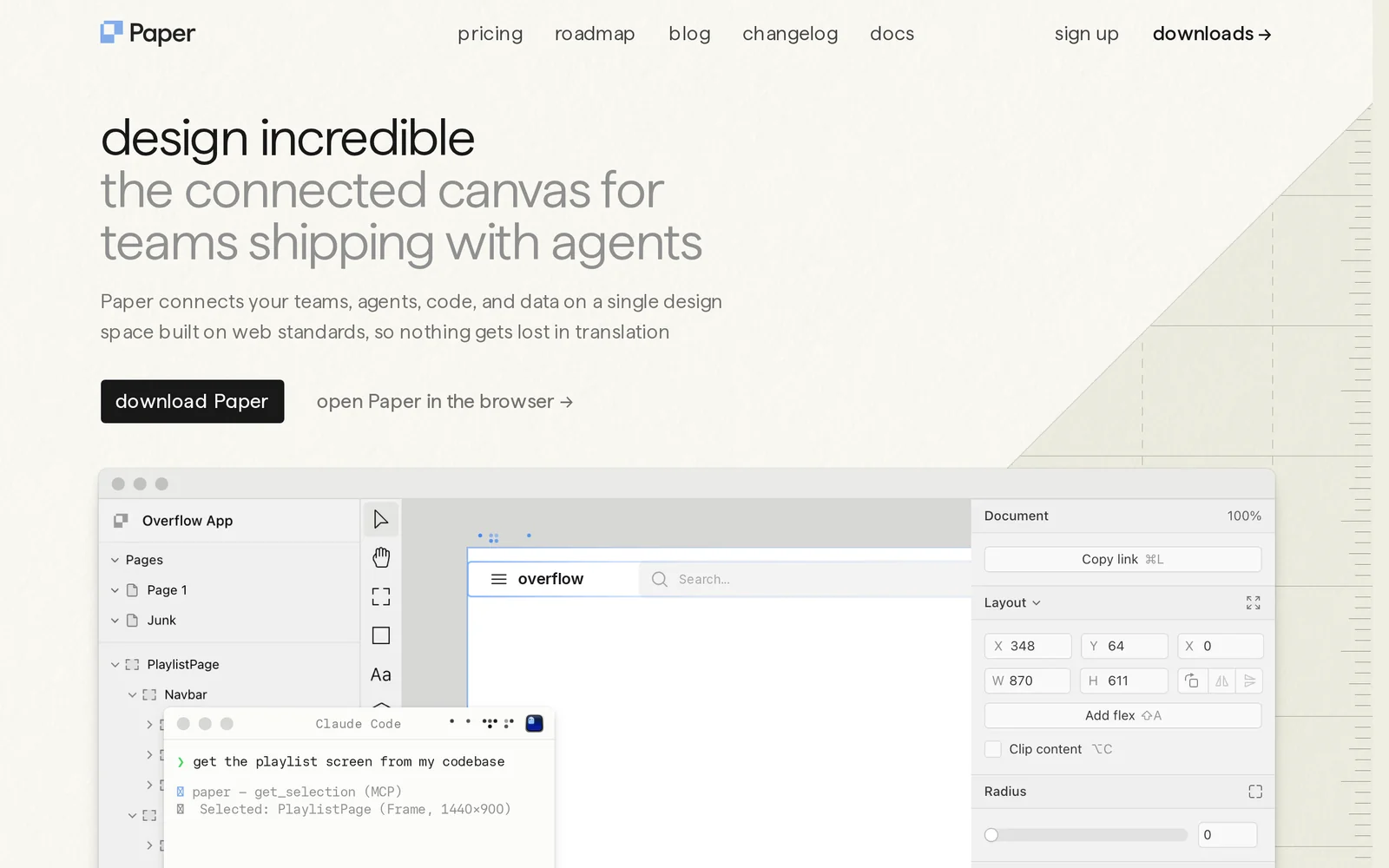
AIModern design tool to create, share, and ship designs with exportable web assets, shaders, fonts, and developer-focused integrations.
Paper
Modern design tool to create, share, and ship designs with exportable web assets, shaders, fonts, and developer-focused integrations.
About Paper
Paper is a modern design application for creating, sharing, and shipping visual work with a strong focus on web-ready exports and developer integrations. It includes a visual shader designer that produces zero-dependency canvas shaders exportable as lightweight code or React components, font tooling (Paper Mono) and forks of typographic tooling (opentype.js) to produce production-ready assets. The project is accompanied by open-source libraries and plugins (shaders, agent-plugins, fonts) that let designers hand off interactive, performant assets directly to engineering teams and package them via npm for use in web projects. Paper emphasizes lightweight runtime performance, visual quality, and a designer-to-code workflow that reduces friction when embedding animated backgrounds, masked textures, and typographic assets into production sites and apps.
Screenshots
Key Features
Use Cases

Frequently asked questions about Paper
What is Paper?
Paper is a modern design tool that allows users to create, share, and ship designs seamlessly. It provides exportable web assets, shaders, fonts, and integrations tailored for developers, making it an essential resource for collaborative design projects.
Key Points
- User-Friendly Interface: Paper's intuitive design simplifies the creative process.
- Exportable Assets: Easily export designs as web-ready files.
- Developer Integrations: Streamlined tools for developers enhance workflow efficiency.
Detailed Explanation
Paper is an innovative design application developed to facilitate the design process for both designers and developers. With its user-friendly interface, designers can create visually appealing graphics, websites, and applications without extensive technical knowledge. The primary features of Paper include:
-
Design Creation: Users can create stunning visuals using a variety of tools, such as vector shapes, brushes, and text options. Paper supports multiple layers, allowing for complex designs that can be easily manipulated.
-
Collaboration Features: Paper enables real-time collaboration, making it ideal for teams. Multiple users can work on the same design project simultaneously, with changes visible in real-time. This feature enhances teamwork and accelerates the design process.
-
Export Options: Once designs are complete, Paper allows users to export them in various formats, such as PNG, SVG, or JPEG. This flexibility is crucial for web development, where specific formats are often required.
-
Integrations for Developers: Paper offers developer-focused integrations that streamline the handoff process between designers and developers. These integrations may include features like code snippets, design specs, and asset delivery, ensuring that the final product matches the original design intent.
-
Asset Management: Users can organize their design assets within Paper, making it easy to manage fonts, colors, and other design elements. This organization helps maintain consistency across projects.
Best Practices / Tips
- Utilize Templates: Start with pre-designed templates available in Paper to save time and kickstart your projects.
- Collaborate Effectively: Use the commenting feature within Paper to provide feedback directly on designs, ensuring clear communication among team members.
- Regular Backups: Always save your work periodically to avoid losing any progress, especially in collaborative environments.
- Optimize for Web: When exporting assets, choose formats that ensure fast loading times for websites, such as SVG for scalable graphics.
Additional Resources
- Official Paper Documentation for in-depth tutorials and guides.
- Design Collaboration Best Practices to enhance teamwork.
- Exporting Assets in Paper for detailed export guidelines.
How does Paper work?
Paper integrates advanced AI technologies to streamline daily workflows, offering users tools for efficient project management, task automation, and data analysis. By leveraging machine learning and natural language processing, it enhances productivity and collaboration in various professional environments.
Key Points
- AI Integration: Utilizes machine learning and NLP to assist users.
- Workflow Automation: Streamlines repetitive tasks for efficiency.
- Collaboration Tools: Enhances team communication and project management.
Detailed Explanation
Paper operates by harnessing the power of AI to improve everyday workflows. It incorporates features like:
-
Task Automation: Users can automate routine tasks, such as scheduling, reminders, and data entry. For instance, a marketing team can automate social media posts, freeing up time to focus on strategy.
-
Intelligent Assistance: With natural language processing, Paper enables users to interact using conversational language, making it easier to generate reports, summaries, or insights. For example, a project manager can ask, "What are the current statuses of my tasks?" and receive an instant overview.
-
Data Analysis: Paper can analyze large datasets, providing visualizations and insights that help users make informed decisions. For instance, sales teams can track performance metrics and forecast trends, improving sales strategies.
-
Collaboration Features: Paper includes tools for team collaboration, allowing multiple users to work on documents simultaneously, leave comments, and manage project timelines effectively. This is particularly useful in remote work scenarios.
Best Practices / Tips
- Start with Templates: Utilize pre-built templates for common tasks to save time.
- Leverage Customization: Tailor the AI settings to fit your specific industry needs, ensuring relevant outputs.
- Monitor User Feedback: Regularly collect feedback from team members to refine workflows and improve efficiency.
- Educate Your Team: Provide training sessions on how to maximize the use of Paper's features for better adoption and productivity.
Additional Resources
What are the main features of Paper?
Paper offers a range of key features including advanced AI capabilities for content generation, collaboration tools for team projects, and integrations with various platforms. These features enhance productivity, streamline workflows, and foster creativity, making it a powerful tool for individuals and businesses alike.
Key Points
- Advanced AI Capabilities: Paper utilizes AI to assist in content creation, brainstorming, and research.
- Collaboration Tools: Real-time editing and commenting features enable seamless teamwork.
- Integrations: Connects with popular tools like Google Drive and Slack for enhanced functionality.
Detailed Explanation
Paper stands out with its advanced AI capabilities, allowing users to generate content quickly and efficiently. For instance, it can suggest topics based on keywords, summarize lengthy texts, or even generate outlines based on user prompts. This feature is particularly useful for writers, marketers, and educators who need to create content swiftly.
The collaboration tools in Paper facilitate teamwork by allowing multiple users to edit documents in real-time. This means that teams can work together on projects without the hassle of sending files back and forth. Users can comment directly on text, making feedback immediate and actionable. For example, during a project brainstorming session, team members can contribute ideas and revisions as they occur, significantly speeding up the workflow.
Additionally, Paper's integrations with tools like Google Drive, Slack, and Trello allow users to streamline their processes. By integrating these platforms, users can easily import files, share documents, and stay updated on project developments without switching applications. This interconnectedness enhances productivity and ensures that all team members are on the same page.
Best Practices / Tips
- Utilize AI Features: Take advantage of Paper’s AI to enhance your writing process. Experiment with different prompts to see how it can assist you.
- Encourage Team Collaboration: Make it a habit to use commenting features for feedback, which can reduce the time spent in meetings.
- Integrate Wisely: Choose integrations that align with your workflow. For example, if your team relies heavily on Slack, ensure you set up notifications for Paper updates.
Additional Resources
Who is Paper for?
Paper is designed for a diverse range of users, including students, educators, researchers, and professionals seeking to enhance their daily AI workflows. It helps optimize productivity by streamlining tasks such as note-taking, brainstorming, and project management through AI-driven tools and features.
Key Points
- Target Audience: Students, educators, and professionals.
- Enhanced Productivity: Streamlines day-to-day tasks.
- AI Integration: Utilizes AI tools for effective workflows.
Detailed Explanation
Paper is particularly beneficial for various users:
-
Students: Paper aids students in enhancing their learning experience. Features like interactive note-taking, collaborative project management, and quick access to AI-generated summaries make studying more efficient. For example, students can use the platform to organize their research and collaborate with peers in real-time.
-
Educators: Teachers can leverage Paper to create engaging lesson plans and track student progress. The AI tools can assist in generating customized quizzes, grading assignments, and providing analytics on student performance. This allows educators to focus more on teaching and less on administrative tasks.
-
Professionals: In a corporate environment, Paper serves as a robust platform for project management and team collaboration. Its AI capabilities help in brainstorming sessions, content creation, and organizing workflows. For instance, teams can use Paper to develop marketing strategies, track campaign performance, and share insights seamlessly.
Best Practices / Tips
- Utilize Templates: Make use of Paper’s pre-built templates for faster project setup.
- Collaborate in Real-Time: Encourage team members to use the collaboration features to enhance communication and productivity.
- Leverage AI Tools: Take advantage of AI-driven suggestions for content creation and task management to optimize your workflow.
- Regular Updates: Stay updated with Paper’s latest features and tools to maximize its benefits.
Additional Resources
How much does Paper cost?
Paper offers a free tier with additional paid plans starting at $10 per month for advanced features. These plans provide enhanced functionalities such as personalized support, increased storage, and premium tools for users seeking more comprehensive solutions.
Key Points
- Free tier available for basic use.
- Paid plans start at $10 per month.
- Advanced features include personalized support and enhanced tools.
Detailed Explanation
Free Tier: Paper's free tier allows users to access basic functionalities ideal for individuals or small teams. This includes essential collaboration tools and document sharing capabilities, making it a great starting point for users just getting acquainted with the platform.
Paid Plans: The entry-level paid plan starts at $10 per month, designed for users who require more robust features. This plan typically includes:
- Increased Storage: Users can save more documents and files without restrictions.
- Enhanced Collaboration Tools: Features like advanced commenting and version history are available.
- Priority Support: Users receive faster responses to inquiries and technical issues.
Higher-tier plans offer even more features for larger teams or organizations, including integrations with other tools and customizability options. For example, the $20 per month plan may provide additional analytics and team management capabilities, essential for larger projects.
Best Practices / Tips
- Evaluate Your Needs: Before committing to a paid plan, assess your requirements. If the free tier meets your needs, you can save costs.
- Try Before You Buy: Utilize the free tier to familiarize yourself with Paper's interface and features before transitioning to a paid plan.
- Monitor Usage: Keep track of your document storage and collaboration needs to determine if upgrading is necessary.
Additional Resources
How do I get started with Paper?
To get started with Paper, visit https://paper.design/ to sign up for an account. Once registered, you can explore the platform's features, collaborate with others, and enhance your design workflows.
Key Points
- Easy Sign-Up: Register effortlessly and start using Paper immediately.
- User-Friendly Interface: Navigate through a clean and intuitive design layout.
- Collaborative Features: Work with teams in real-time on design projects.
Detailed Explanation
Paper is an innovative design and collaboration tool created by InVision. To begin your journey with Paper, follow these steps:
-
Sign Up: Head to Paper's website and click on the "Sign Up" button. You'll need to provide your email address and create a password. If you have an InVision account, you can use those credentials to log in.
-
Explore the Dashboard: After signing up, you’ll land on the Paper dashboard. Here, you can create new documents or explore templates tailored for various design needs, including brainstorming sessions, wireframing, and project planning.
-
Create and Collaborate: Start a new project by selecting a template or creating a blank document. You can invite teammates by sharing a link, allowing for real-time collaboration. Utilize features like sticky notes, comments, and drawing tools to enhance your creative process.
-
Integrate with Other Tools: Paper integrates seamlessly with tools like Slack and Google Drive, enabling you to streamline your workflow and keep all your resources accessible.
Best Practices / Tips
- Use Templates: Take advantage of the pre-designed templates available in Paper to jumpstart your projects and save time.
- Leverage Collaboration: Invite team members early in the design process to gather diverse ideas and feedback, fostering a creative environment.
- Regular Updates: Keep your projects updated by reviewing and revising designs based on team feedback and evolving project goals.
Additional Resources
Explore more AI Ai Tools tools
Browse all Ai Tools tools →Compare Paper: vs Ito · vs Kin Health · vs Caveman · vs BearDrive