

nodeterm
AIA node-based terminal manager that puts real terminals and coding agents as draggable nodes on an infinite canvas, with tmux-backed persistent sessions.
nodeterm
A node-based terminal manager that puts real terminals and coding agents as draggable nodes on an infinite canvas, with tmux-backed persistent sessions.
About nodeterm
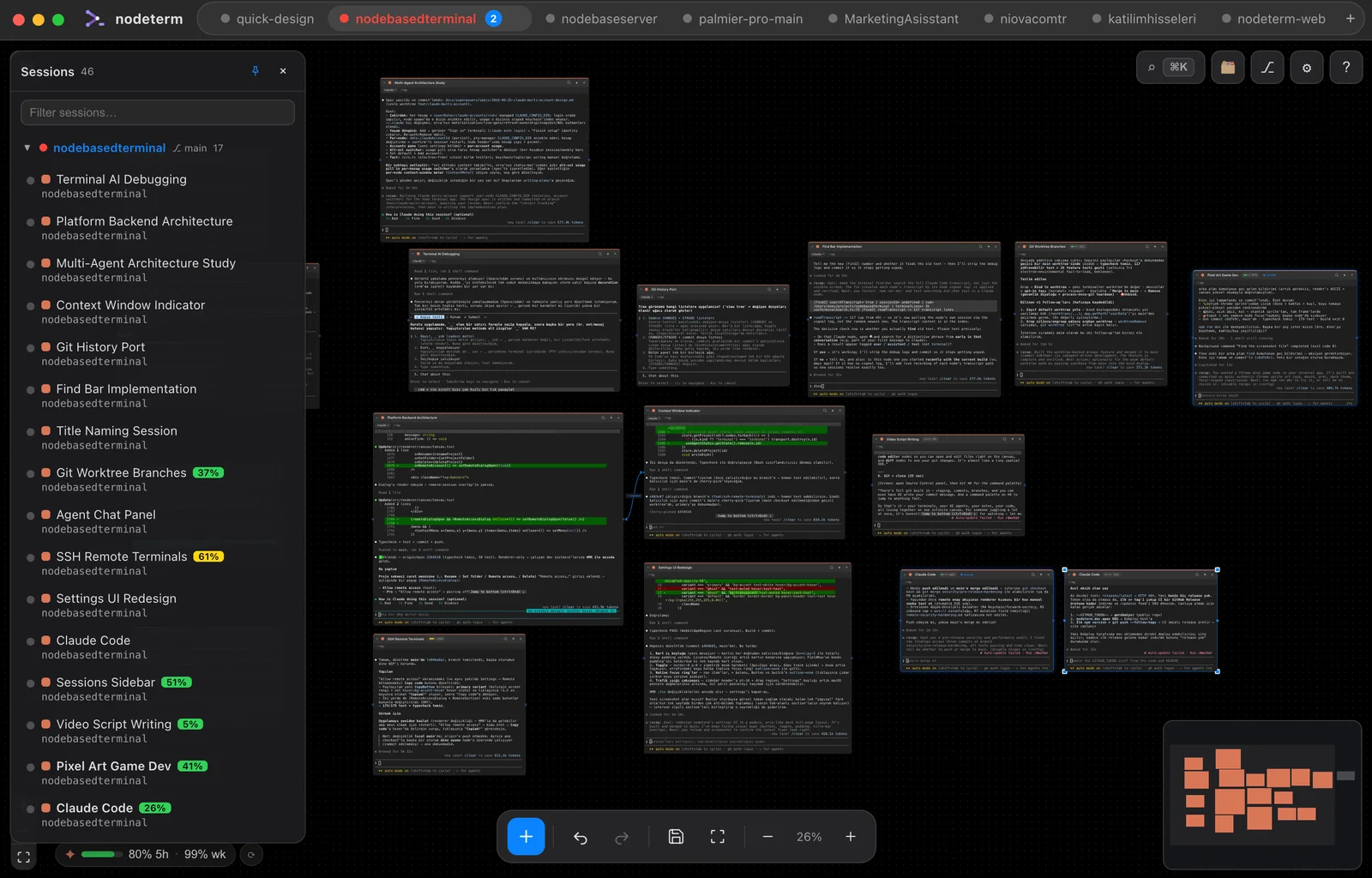
nodeterm replaces stacked terminal tabs with an infinite pan-and-zoom canvas where every shell, coding agent, sticky note, Monaco editor, diff view and web node is a draggable object you can place, group and label. Each terminal runs in its own persistent tmux session, so quitting the app or restarting the machine brings every session back exactly where it was. Coding agents such as Claude Code, Codex and Gemini run as live nodes with hook-driven RUNNING and NEEDS YOU badges rather than output scraping, subagent cards with live transcripts, a per-node context meter and OS notifications, so you can answer a permission prompt inside the node the moment an agent blocks. Every project doubles as a Trello-style kanban board whose cards are the live sessions themselves — drag a card between columns while its agent keeps running, or open it into the real terminal with members, due dates and comments. Because the app is built around a clean service seam, the same canvas runs as a macOS and Linux desktop app, as a self-hosted Server Edition you reach from a browser, and as an iOS companion that attaches to the same live sessions. The maker states it was designed for people with ADHD and scattered workflows, favouring a spatial map over hidden tabs.
Screenshots
Key Features
Use Cases



Frequently asked questions about nodeterm
What is nodeterm?
A node-based terminal manager that puts real terminals and coding agents as draggable nodes on an infinite canvas, with tmux-backed persistent sessions.
How does nodeterm work?
nodeterm works by combining Everything Is a Node: Right-click the infinite canvas to open a terminal, an AI agent, a sticky note, a Monaco editor, a diff view or a web/video node, then arrange them spatially like a map instead of stacking tabs., Persistent tmux Sessions: Every node runs in its own tmux session, so quitting the app or restarting the machine restores each terminal and agent exactly where it left off., Hook-Driven Agent Status: Pulsing RUNNING and NEEDS YOU badges come from agent hooks rather than output scraping, with subagent cards showing live transcripts, a per-node context meter, OS notifications and MacBook notch presence., In-Node Permission Prompts: Click the notification when an agent blocks, answer the permission prompt directly in the node, and get told the moment the turn completes., Kanban View of Live Sessions: Toggle any project between canvas and a Trello-style board with a keyboard shortcut; cards are the running sessions and open into the real terminal with members, due dates, priority and comments. to help users with Parallel Agent Supervision: Run Claude, Codex and Gemini side by side as canvas nodes and see at a glance which one is working and which one is waiting on you., Long-Running Session Recovery: Keep multi-hour agent runs and build shells alive across app restarts and machine reboots without rebuilding your terminal layout., Multi-Project Context Switching: Give each project its own canvas of grouped terminals, notes and diffs so switching projects restores the whole mental model rather than a tab bar., Agent Work Tracking: Manage in-flight agent tasks on a kanban board where each card is a real running session, moving work across columns without interrupting it., Remote Development Access: Self-host Server Edition and reach the same live sessions from a browser or the iOS companion when away from the main machine..
What are the main features of nodeterm?
Key features include Everything Is a Node: Right-click the infinite canvas to open a terminal, an AI agent, a sticky note, a Monaco editor, a diff view or a web/video node, then arrange them spatially like a map instead of stacking tabs., Persistent tmux Sessions: Every node runs in its own tmux session, so quitting the app or restarting the machine restores each terminal and agent exactly where it left off., Hook-Driven Agent Status: Pulsing RUNNING and NEEDS YOU badges come from agent hooks rather than output scraping, with subagent cards showing live transcripts, a per-node context meter, OS notifications and MacBook notch presence., In-Node Permission Prompts: Click the notification when an agent blocks, answer the permission prompt directly in the node, and get told the moment the turn completes., Kanban View of Live Sessions: Toggle any project between canvas and a Trello-style board with a keyboard shortcut; cards are the running sessions and open into the real terminal with members, due dates, priority and comments..
Who is nodeterm for?
nodeterm is useful for anyone interested in Parallel Agent Supervision: Run Claude, Codex and Gemini side by side as canvas nodes and see at a glance which one is working and which one is waiting on you., Long-Running Session Recovery: Keep multi-hour agent runs and build shells alive across app restarts and machine reboots without rebuilding your terminal layout., Multi-Project Context Switching: Give each project its own canvas of grouped terminals, notes and diffs so switching projects restores the whole mental model rather than a tab bar., Agent Work Tracking: Manage in-flight agent tasks on a kanban board where each card is a real running session, moving work across columns without interrupting it., Remote Development Access: Self-host Server Edition and reach the same live sessions from a browser or the iOS companion when away from the main machine..
How much does nodeterm cost?
nodeterm is free to use.
How do I get started with nodeterm?
Visit https://nodeterm.dev/ to sign up and explore nodeterm.
Explore more AI Ai Tools tools
Browse all Ai Tools tools →Browse by use case: Code Generation
Compare nodeterm: vs CleanSlop · vs Kalender Sync · vs UseIt Studio · vs Woven Video