

mpai
AITerminal-native, open-source tool that lets a teammate join your live Claude Code or Codex session over a private tailnet.
mpai
Terminal-native, open-source tool that lets a teammate join your live Claude Code or Codex session over a private tailnet.
About mpai
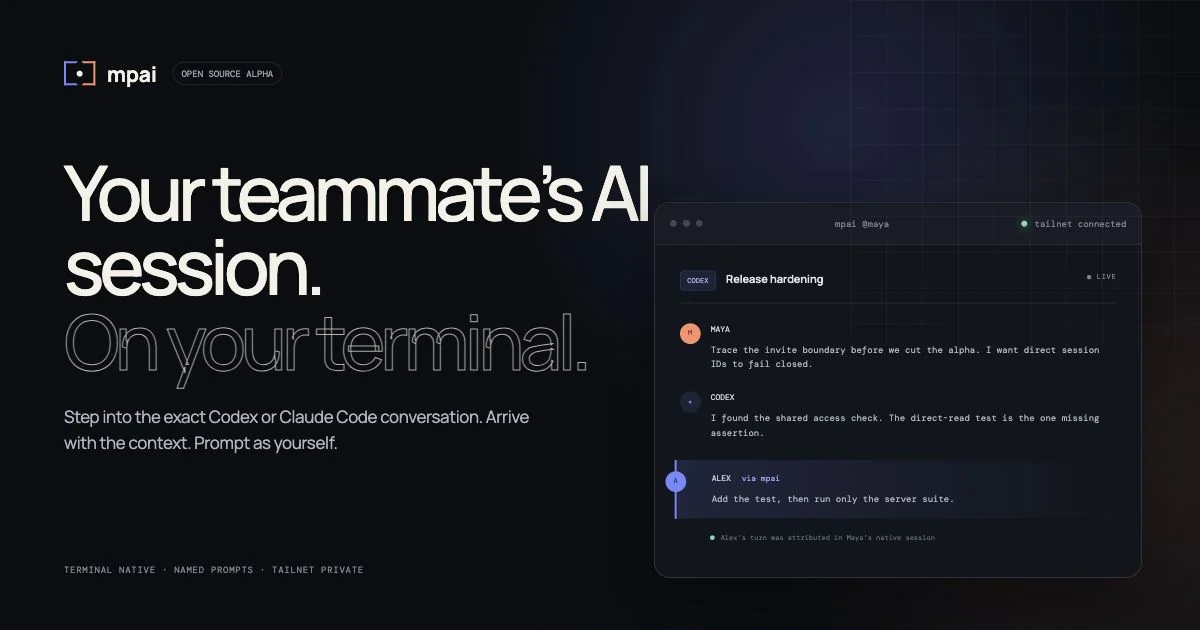
mpai (multiplayer-ai) makes existing AI coding sessions multiplayer without introducing a new IDE, mystery prompts, or a public relay. One person installs the host, then invites a named teammate whose terminal drops directly into the same Codex or Claude Code conversation already in motion — full context intact, prompting under the teammate's own identity. Sessions are exchanged over a private tailnet (Tailscale-style overlay) rather than a hosted service, so transcripts never leave the two machines. It is open source and terminal-native, aimed at pair-debugging, code review, and safe hand-offs of long-running agent work.
Screenshots
Key Features
Use Cases

Frequently asked questions about mpai
What is mpai?
MPAI, or Multi-Purpose Artificial Intelligence, is a terminal-native, open-source tool that enables team members to join live coding sessions using Claude Code or Codex over a private tailnet. It facilitates real-time collaboration, enhancing productivity and communication in software development.
Key Points
- Open-source collaboration: MPAI is designed for seamless teamwork in coding environments.
- Live sessions: Supports real-time interaction, allowing for instant feedback and troubleshooting.
- Private tailnet: Ensures secure connections between team members without exposing the code to the public.
Detailed Explanation
MPAI stands for Multi-Purpose Artificial Intelligence, which is specifically designed to enhance the collaborative coding experience. This tool allows developers to invite teammates to join their coding sessions directly from the terminal. The main advantage of MPAI is its ability to facilitate live collaboration on projects using Claude Code or Codex.
Key Features:
- Terminal-native: MPAI operates directly within the terminal, making it lightweight and easy to integrate into existing workflows.
- Open-source: Being open-source, it allows developers to customize and enhance the tool according to their specific needs, fostering community-driven improvements.
- Real-time collaboration: Team members can join coding sessions instantly, share insights, and resolve issues collaboratively, significantly speeding up the development process.
Use Cases:
- Pair programming: Developers can work together in real-time, sharing screens and code, which enhances learning and knowledge transfer.
- Debugging sessions: Teams can quickly address bugs by collaborating on the same codebase, leading to faster resolutions.
- Code reviews: MPAI allows multiple team members to contribute to code reviews simultaneously, improving the quality of the code before deployment.
Best Practices / Tips
- Set clear roles: Define who is responsible for coding and reviewing to maximize efficiency during live sessions.
- Use version control: Integrate MPAI with version control systems like Git to track changes and maintain code integrity.
- Secure your tailnet: Ensure that your private tailnet is secured to protect sensitive code and maintain confidentiality among team members.
Additional Resources
- MPAI GitHub Repository - Explore the source code and documentation.
- Getting Started with MPAI - A comprehensive guide to set up and use MPAI effectively.
- Best Practices for Remote Collaboration - Tips for enhancing teamwork in a virtual environment.
How does mpai work?
mpai operates by facilitating real-time collaboration on coding tasks through features like Live Session Join, Named Identity Prompting, and Private Tailnet Transport. This tool enhances pair debugging, code reviews, onboarding, and secure teamwork, allowing users to work seamlessly without disrupting existing workflows or compromising data security.
Key Points
- Live Session Join: Enables teammates to access ongoing conversations without losing context.
- Named Identity Prompting: Tracks contributions by attributing prompts to individual users for accountability.
- Private Tailnet Transport: Ensures secure communication over a private network without third-party involvement.
Detailed Explanation
mpai enhances collaborative coding through several innovative features:
-
Live Session Join: This functionality allows team members to join ongoing Codex or Claude Code sessions directly from their terminals. For instance, if a developer is debugging code, a colleague can join the session seamlessly, contributing to the discussion without the need to replicate the context or environment.
-
Named Identity Prompting: Each input is linked to the user who provided it, creating an audit trail. This is particularly useful for teams that need to review contributions for accountability. For example, during a code review, managers can easily identify who made specific changes or suggestions.
-
Private Tailnet Transport: Sessions are transmitted over a secure overlay network, similar to Tailscale, eliminating reliance on public relays or third-party servers. This feature is vital for security-conscious teams that prioritize data privacy while collaborating on sensitive projects.
-
Terminal-Native, No New IDE: mpai integrates with existing command-line interface (CLI) tools, meaning developers do not need to change their current setup or learn a new integrated development environment (IDE). This minimizes friction and allows teams to focus on coding rather than adapting to new software.
-
Ephemeral Rooms: Users can create short-lived rooms for quick sessions that automatically close after a defined period (like 5 minutes). This is perfect for urgent debugging or brainstorming sessions, allowing for swift collaboration without lingering sessions.
Use Cases
- Pair Debugging: If a developer encounters a bug, they can invite a teammate to join their session, allowing for immediate assistance without losing context.
- Code Review: Reviewers can engage directly with the code being worked on, providing real-time feedback rather than relying solely on written comments.
- Onboarding New Developers: Senior engineers can walk new team members through real-time coding sessions, providing hands-on experience and guidance.
Best Practices / Tips
- Maintain Context: Encourage team members to summarize the current state before inviting others into a session to ensure everyone is on the same page.
- Leverage Named Identity Prompting: Use this feature to foster accountability within the team, making it clear who contributed what during collaborative tasks.
- Create Clear Guidelines for Ephemeral Rooms: Establish best practices for when and how to use short-lived sessions to maximize efficiency and minimize disruptions.
Additional Resources
What are the main features of mpai?
MPAI’s main features include Live Session Join, Named Identity Prompting, Private Tailnet Transport, Terminal-Native functionality, and Ephemeral Rooms. These features enhance collaboration and security while maintaining the existing tools developers are familiar with, making it a unique solution for coding environments.
Key Points
- Live Session Join: Collaborate in real-time without losing context.
- Named Identity Prompting: Track contributions with clear audit trails.
- Private Tailnet Transport: Ensure secure communication over a private network.
Detailed Explanation
MPAI (Multi-Purpose AI) offers a range of features designed to improve collaborative coding experiences.
-
Live Session Join: This functionality allows team members to join ongoing coding sessions seamlessly. For instance, if a developer is working on a Codex or Claude Code conversation, a teammate can join from their terminal without interrupting the flow. This real-time collaboration ensures that no critical information or context is lost.
-
Named Identity Prompting: Each prompt is linked to the individual who typed it. This feature is particularly beneficial for accountability and transparency, as it provides an audit trail. If a team is working on a project and decisions need to be traced back, Named Identity Prompting makes it easy to understand who contributed to specific interactions.
-
Private Tailnet Transport: MPAI operates over a secure, Tailscale-style overlay network, ensuring that sessions do not travel through public relays or third-party servers. This enhances the security of sensitive coding discussions and data exchange, making it a reliable choice for organizations concerned about data privacy.
-
Terminal-Native, No New IDE: MPAI integrates seamlessly with existing command-line interfaces (CLI). Developers do not need to adopt new integrated development environments (IDEs) or alter their workflows, making it easier to implement without a steep learning curve.
-
Ephemeral Rooms: This feature allows users to create temporary collaboration spaces, such as a five-minute room for quick pair programming. Once the session is over, the room closes automatically, ensuring that the workspace remains uncluttered.
Best Practices / Tips
- Utilize Live Session Join for effective pair programming. Ensure all team members are familiar with how to join sessions to maximize productivity.
- Encourage Named Identity Prompting to foster accountability within your team. This can help track contributions and clarify responsibilities.
- Leverage Private Tailnet Transport for secure discussions, particularly when handling sensitive code or proprietary information.
- Embrace Terminal-Native functionality to maintain your team’s existing workflow, reducing friction in adoption.
- Use Ephemeral Rooms for short, focused collaboration sessions, keeping discussions concise and goal-oriented.
Additional Resources
- MPAI Official Documentation
- Understanding Named Identity Prompting
- Secure Networking with Tailnet Transport
Explore these resources for deeper insights into maximizing MPAI’s features in your coding projects.
Who is mpai for?
mpai is designed for software engineers and teams involved in Pair Debugging, Code Review, Onboarding, Long-Running Task Hand-offs, and for Security-Conscious Teams. It enables real-time collaboration, allowing team members to interact with agent sessions without losing context, enhancing productivity and security.
Key Points
- Pair Debugging: Collaborate effectively during stuck agent sessions.
- Code Review: Engage in live reviews to enhance agent work quality.
- Onboarding: Facilitate real-time training between senior and junior engineers.
Detailed Explanation
mpai serves a diverse range of users in the software development field.
-
Pair Debugging: When a developer encounters a challenging issue, they can seamlessly hand off the session to a teammate. This allows the new user to prompt from their terminal, ensuring that context is preserved without needing to clone the session. For example, if a developer is stuck on a bug in an AI model, their colleague can take over and provide immediate assistance.
-
Code Review: Instead of traditional code review methods, mpai allows reviewers to join live sessions. This interactive approach enables reviewers to challenge and steer the agent's decisions in real-time, leading to more effective feedback and collaboration. This is particularly useful for complex codebases where understanding the context is crucial.
-
Onboarding: Senior engineers can onboard junior team members by guiding them through real agent sessions. This hands-on experience helps junior developers grasp concepts quickly and gain confidence in using the tools, making the process more efficient than conventional training methods.
-
Long-Running Task Hand-off: For tasks that span several hours, mpai allows teams to hand off ongoing sessions without interrupting the workflow. This is especially beneficial for projects requiring continuous agent interaction, ensuring that no progress is lost between shifts.
-
Security-Conscious Teams: mpai supports teams that prioritize data security by allowing collaboration without routing traffic through a hosted SaaS relay. This feature is essential for organizations handling sensitive information or working in regulated industries.
Best Practices / Tips
- Foster Collaboration: Encourage team members to utilize mpai's features for real-time debugging and reviews to boost learning and productivity.
- Train Effectively: Use the onboarding capabilities to create structured training sessions that can be recorded for future reference.
- Maintain Security: Always assess your team's security requirements and leverage mpai's direct collaboration without third-party relays.
Additional Resources
How much does mpai cost?
mpai is completely free to use, making it an accessible choice for developers and organizations looking to implement machine learning solutions. There are no hidden fees or subscription costs associated with mpai, allowing users to leverage its capabilities without financial barriers.
Key Points
- MPAI is free for all users.
- No subscription or hidden fees.
- Open-source nature encourages community collaboration.
Detailed Explanation
MPAI (Multimodal Artificial Intelligence) is a framework designed to promote the development and deployment of AI technologies. Its primary advantage lies in its cost-free model, which invites users from various backgrounds, including startups, researchers, and enterprises, to experiment with and utilize advanced AI tools without incurring expenses.
By being open-source, MPAI not only allows users to access its features for free but also fosters a collaborative environment where developers can contribute to its growth. This can lead to continuous improvements, new features, and a vibrant community around the technology.
For instance, organizations can implement MPAI for tasks like data processing, AI model training, and deploying AI solutions in products without worrying about licensing fees. This democratization of technology can significantly accelerate innovation and research in the AI space.
Best Practices / Tips
- Explore Documentation: Familiarize yourself with the official documentation to understand the capabilities and limitations of MPAI.
- Community Engagement: Join forums or communities related to MPAI to share experiences and learn from other users.
- Stay Updated: Regularly check for updates or new features that may enhance your use of MPAI, as community contributions can lead to rapid advancements.
Additional Resources
How do I get started with mpai?
To get started with MPAI, visit the official MPAI website to sign up. Once registered, you can explore various AI tools and capabilities designed for multiplayer applications, enhancing your development projects with cutting-edge technology.
Key Points
- MPAI offers a range of AI tools for multiplayer applications.
- The sign-up process is straightforward and user-friendly.
- Access to documentation and community support is available.
Detailed Explanation
MPAI, or Multimedia and AI for Interactive Applications, provides a platform where developers can integrate AI functionalities into multiplayer environments. To begin:
- Visit the MPAI Website: Go to MPAI's official page.
- Sign Up: Click on the sign-up button to create an account. You may need to provide an email address and create a password.
- Explore the Dashboard: After signing in, familiarize yourself with the dashboard, which features various tools and resources tailored for multiplayer AI development.
Features
- AI Tools: MPAI hosts an array of AI models that can be used for tasks like natural language processing, computer vision, and game mechanics.
- Documentation: Comprehensive guides and tutorials are available to help you implement and optimize these tools effectively.
- Community Support: Join forums and discussions with other developers to share insights and solutions.
Best Practices / Tips
- Start Small: Begin with basic projects to understand the tools before diving into complex applications.
- Utilize Documentation: Read the provided documentation thoroughly; it often contains valuable tips and examples.
- Engage with the Community: Participate in forums and discussions to learn from others' experiences and troubleshoot common issues.
Additional Resources
By following these steps and utilizing available resources, you can effectively integrate MPAI into your projects and harness the power of AI in multiplayer applications.
Explore more AI Ai Tools tools
Browse all Ai Tools tools →Compare mpai: vs Ito · vs Kin Health · vs Caveman · vs BearDrive