

MashuPack
AIBrowser-based tool that converts local code repositories into one clean, structured text file optimized for ChatGPT and Claude.
MashuPack
Browser-based tool that converts local code repositories into one clean, structured text file optimized for ChatGPT and Claude.
About MashuPack
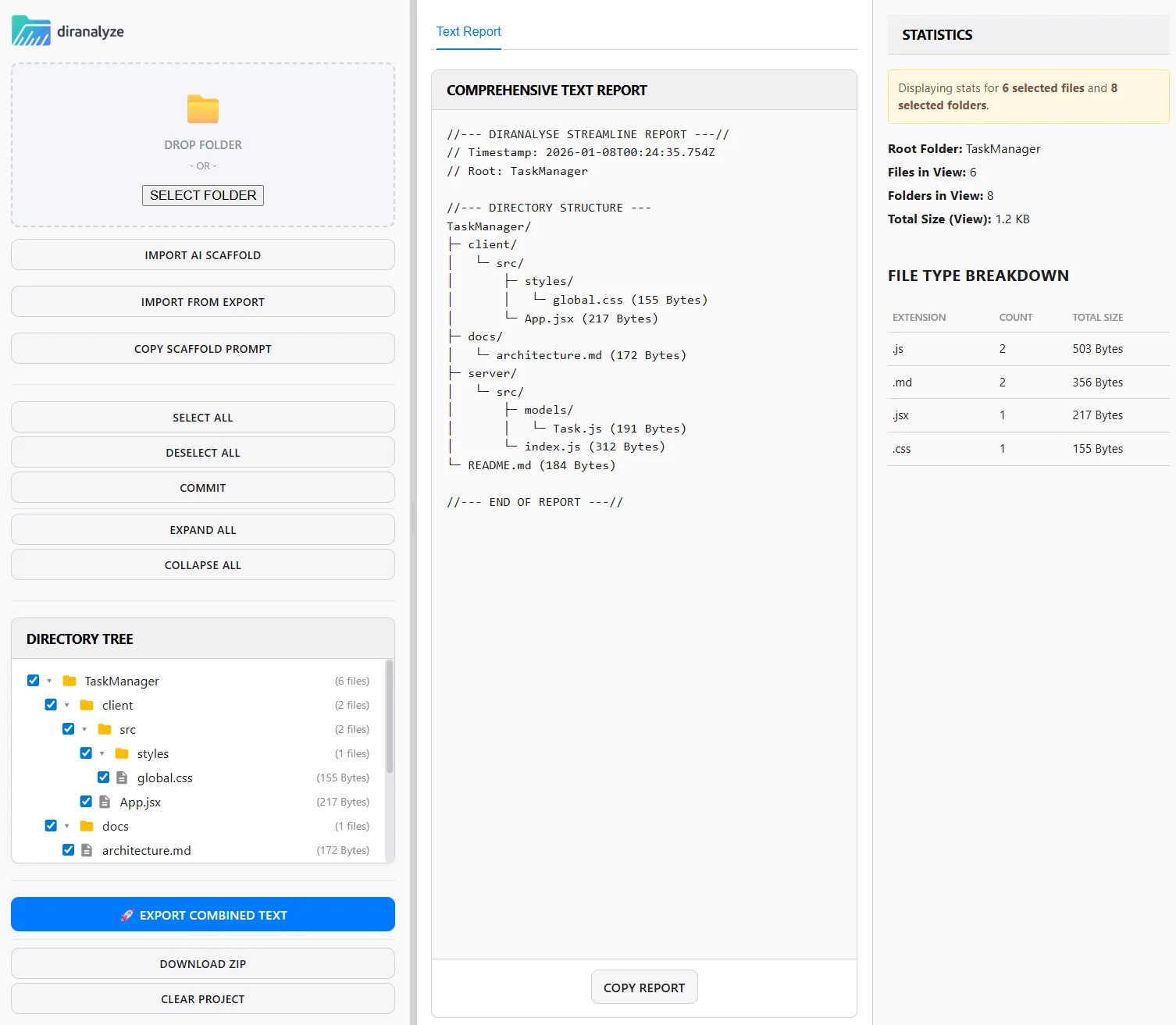
MashuPack lets developers select exact files or subsystems from local repositories and compile them into a single, structured text file formatted for large language models (notably ChatGPT and Claude). It operates entirely in the browser with no backend, account, or repo upload required, keeping code local and private while producing an LLM-friendly representation. The tool includes intelligent file merging that preserves structure and dependency context so models receive concise, coherent inputs instead of fragmented files. Its value is reducing context-window fragmentation and simplifying the process of feeding targeted, relevant code context to LLMs for review, summarization, or generation tasks.
Screenshots
Key Features
Use Cases



Frequently asked questions about MashuPack
What is MashuPack?
MashuPack is a tool that transforms local code repositories into clean, structured text for AI models like ChatGPT and Claude. Users can select specific files or subsystems, export them as a single structured text file, and access their code directly in the browser for enhanced productivity and clarity.
Key Points
- Code Transformation: Converts local repositories into structured text.
- File Selection: Users can choose exact files or subsystems for export.
- Browser Accessibility: Keeps code readily available in an easy-to-use format.
Detailed Explanation
MashuPack simplifies the interaction between developers and AI tools by converting complex code repositories into a format that AI models can understand. This transformation allows developers to leverage AI for insights, code reviews, or even documentation generation.
How It Works:
-
File Selection: Users can navigate their local repositories and select specific files or subsystems they wish to convert. This targeted approach ensures that only relevant code is transformed, making the process efficient.
-
Export Process: Once the desired files are selected, MashuPack compiles them into a single structured text file. This file is formatted for optimal readability and usability, ensuring that AI models can interpret it correctly.
-
Accessing in Browser: The resulting structured text file is stored in a way that allows easy access through a web browser. This feature enables developers to quickly retrieve and review their code without needing to switch between different applications or tools.
Use Cases:
- Documentation Generation: Create comprehensive documentation for projects by utilizing AI insights based on structured text.
- Code Reviews: Facilitate more efficient code reviews by providing clear and concise code representations to team members.
- AI Training: Use the structured text to train AI models on specific coding patterns or frameworks relevant to the project.
Best Practices / Tips
- Select Relevant Files: Focus on exporting only the necessary files to avoid clutter and enhance clarity.
- Review the Output: Always check the structured text for accuracy and completeness before using it with AI tools.
- Utilize AI Features: Experiment with various AI functionalities to get the most out of the structured text, such as code suggestions or improvements.
Additional Resources
How does MashuPack work?
MashuPack operates by integrating advanced AI technologies to streamline various daily workflows. It helps users automate tasks, enhance productivity, and improve efficiency by leveraging machine learning, natural language processing, and data analysis, making it a versatile tool for both individuals and businesses.
Key Points
- AI Integration: Combines multiple AI technologies for efficiency.
- Workflow Automation: Streamlines everyday tasks to save time.
- User-Friendly Interface: Designed for easy navigation and quick adoption.
Detailed Explanation
MashuPack works by utilizing a blend of core AI capabilities. Here’s how it functions:
-
AI Integration: MashuPack incorporates machine learning algorithms and natural language processing to analyze user needs. For instance, it can understand user queries and provide tailored responses or suggestions.
-
Workflow Automation: By automating repetitive tasks, MashuPack allows users to focus on more strategic aspects of their work. For example, it can automate data entry processes, generate reports, and even manage scheduling. This not only saves time but also reduces the risk of human error.
-
User-Friendly Interface: The platform is designed to be intuitive, allowing users with varying levels of technical expertise to navigate effortlessly. Clear dashboards and straightforward controls help users leverage the AI tools without extensive training.
Use Cases
- Small Businesses: Automate customer service inquiries using AI chatbots.
- Content Creation: Generate blog posts or marketing materials by inputting keywords, allowing for quick content development.
- Data Analysis: Analyze large datasets to extract actionable insights without the need for advanced data science skills.
Best Practices / Tips
- Start Small: Begin with automating simple tasks to understand MashuPack's capabilities.
- Regular Updates: Keep the AI models updated to enhance accuracy and performance.
- User Feedback: Encourage users to provide feedback on the AI's performance to facilitate improvements.
- Explore Documentation: Familiarize yourself with all features and functionalities through official documentation to maximize usage.
Additional Resources
This comprehensive approach ensures that users can effectively harness the power of MashuPack to optimize their workflows and enhance productivity.
What are the main features of MashuPack?
MashuPack offers a range of advanced features designed to enhance packaging solutions using AI technology. Key features include intelligent automation, real-time analytics, and customizable templates, which streamline the packaging process and improve operational efficiency for businesses of all sizes.
Key Points
- Intelligent Automation: Automates repetitive tasks to save time.
- Real-Time Analytics: Provides insights into packaging performance and trends.
- Customizable Templates: Offers flexible designs tailored to specific needs.
Detailed Explanation
MashuPack leverages artificial intelligence to revolutionize packaging processes.
-
Intelligent Automation: By automating repetitive tasks such as label printing and order processing, MashuPack significantly reduces the time required for packaging operations. This feature is particularly beneficial for businesses facing high order volumes, allowing them to scale efficiently without increasing labor costs.
-
Real-Time Analytics: The platform provides robust analytics tools that track the performance of packaging materials and processes in real time. Businesses can monitor key metrics such as packaging speed, material usage, and error rates, enabling them to make informed decisions and optimize their production lines. For example, a company can identify bottlenecks in their packaging workflow and adjust operations accordingly.
-
Customizable Templates: MashuPack includes a library of customizable packaging templates, allowing businesses to create packaging designs that align with their branding and product specifications. This flexibility is essential for businesses that require unique packaging for different product lines or seasonal promotions.
Best Practices / Tips
- Leverage Automation: Utilize the intelligent automation features to minimize manual tasks, focusing human resources on quality control and customer engagement instead.
- Monitor Analytics Regularly: Regularly review the real-time analytics provided by MashuPack to identify trends and areas for improvement, ensuring that your packaging processes remain efficient.
- Explore Template Options: Take advantage of the customizable templates to enhance brand visibility and create a cohesive look across various products, which can boost customer recognition and loyalty.
Additional Resources
Who is MashuPack for?
MashuPack is designed for a diverse audience, including business professionals, content creators, marketers, and educators who seek to enhance their daily workflows using AI tools. It streamlines tasks, automates processes, and boosts productivity, making it ideal for anyone looking to leverage AI in their everyday operations.
Key Points
- Target Audience: Business professionals, marketers, educators, and content creators.
- Workflow Enhancement: Streamlines daily tasks and automates repetitive processes.
- Productivity Boost: Designed to improve efficiency and effectiveness in various industries.
Detailed Explanation
MashuPack caters to a variety of users by providing AI-driven solutions tailored to different needs.
For Business Professionals
Business professionals can use MashuPack to automate routine tasks such as data entry, report generation, and customer follow-ups. For example, a sales team can utilize AI to analyze customer data, predict purchasing behavior, and personalize outreach. This not only saves time but also allows sales representatives to focus on closing deals.
For Content Creators
Content creators benefit from MashuPack by streamlining content generation and management. AI tools can assist in drafting articles, creating social media posts, and optimizing content for SEO. For instance, a blogger can use MashuPack to generate topic ideas and outlines, ensuring a steady flow of fresh content without the usual writer's block.
For Marketers
Marketers can leverage MashuPack to enhance their advertising strategies through AI-driven analytics. This includes optimizing ad campaigns based on real-time data and audience behavior. A digital marketing agency might use MashuPack to track campaign performance and adjust strategies accordingly, maximizing ROI.
For Educators
Educators can incorporate MashuPack to create customized learning experiences. AI tools can help in developing personalized lesson plans and grading assignments quickly. For example, teachers can use AI to analyze student performance data and tailor their teaching methods to individual learning needs.
Best Practices / Tips
- Identify Specific Needs: Assess your daily tasks and identify areas where AI can add value.
- Start Small: Begin with one or two AI tools in MashuPack to avoid overwhelming yourself.
- Monitor Performance: Regularly review the outcomes of using AI tools to ensure they meet your expectations and make adjustments as necessary.
- Stay Updated: Keep an eye on new features or updates within MashuPack to continuously enhance your workflow.
Additional Resources
How much does MashuPack cost?
MashuPack is completely free to use, providing users with a range of packaging solutions without any associated costs. This makes it an ideal choice for individuals and businesses looking for accessible packaging tools without financial barriers.
Key Points
- Cost-Free Access: MashuPack offers its services at no cost.
- User-Friendly Interface: Designed for easy navigation, suitable for all skill levels.
- Variety of Features: Includes various packaging tools and templates.
Detailed Explanation
MashuPack serves as a versatile tool for those in need of packaging solutions, offering a completely free platform that allows users to create, customize, and implement packaging designs effortlessly. The primary focus is on accessibility; by eliminating costs, MashuPack attracts a diverse user base, including small businesses, startups, and freelancers.
Features Overview:
- Design Templates: Users can choose from a wide array of pre-designed templates, making it easier to kickstart their packaging projects.
- Customization Tools: The platform allows for significant customization, enabling users to adjust colors, sizes, and materials to fit their specific needs.
- User Support: While it’s free, MashuPack provides resources and community support for users, ensuring help is readily available.
Use Cases:
- Small Businesses: Ideal for entrepreneurs looking to create unique packaging without incurring costs.
- Freelancers: Designers can leverage MashuPack to present prototypes to clients.
- Event Organizers: Create custom packaging for promotional items or gifts.
Best Practices / Tips
- Explore All Features: Take the time to familiarize yourself with all the tools available on MashuPack. This can maximize the potential of your packaging designs.
- Utilize Templates Wisely: Start with templates and then modify them to suit your brand's identity. This saves time and maintains a professional appearance.
- Seek Feedback: Share your designs with peers or clients for constructive criticism before finalizing your packaging.
Additional Resources
By leveraging these resources, you can enhance your experience with MashuPack and create outstanding packaging solutions without any cost.
How do I get started with MashuPack?
To get started with MashuPack, visit mashupack.com to sign up for an account. Once registered, you can explore the platform's features, integrate various apps, and take advantage of MashuPack's automation capabilities to streamline your workflow.
Key Points
- User-friendly registration process
- Integration with popular applications
- Automation tools to enhance productivity
Detailed Explanation
Getting started with MashuPack is straightforward. First, navigate to mashupack.com and click on the "Sign Up" button. You'll need to provide basic information such as your name, email address, and a secure password. After registering, you will receive a confirmation email. Click the link in the email to verify your account.
Upon logging in, you will find a dashboard that guides you through the platform's features. MashuPack enables you to connect various applications, such as Google Sheets, Slack, and Trello. This integration allows you to automate tasks and create workflows that save time. For example, you could set up a workflow that automatically updates a Google Sheet whenever a new task is added in Trello.
To begin using MashuPack effectively, explore its templates and pre-built automations. These templates provide a great starting point for common tasks, enabling you to customize them for your specific needs. You can also create your own workflows from scratch, giving you full control over your automation processes.
Best Practices / Tips
- Start with Templates: Use pre-built templates to familiarize yourself with the platform and quickly set up automations.
- Explore Integrations: Take advantage of the wide range of integrations available on MashuPack to connect your favorite tools seamlessly.
- Test Your Workflows: After creating a new automation, run tests to ensure everything works as expected before relying on it for critical tasks.
- Stay Updated: Regularly check for new features and updates on the MashuPack website to leverage the latest tools and improvements.
Additional Resources
- MashuPack Official Documentation
- MashuPack Blog for Tips and Updates
- Community Forums for User Support
By following these steps and tips, you can effectively harness the power of MashuPack to improve your productivity and streamline your workflows.
Explore more AI Ai Tools tools
Browse all Ai Tools tools →Browse by use case: Code Generation
Compare MashuPack: vs CleanSlop · vs Kalender Sync · vs UseIt Studio · vs Woven Video