

LocaleX
AILocaleX is a web-based, open-source project template for managing localized web projects, documentation, and legal pages.
LocaleX
LocaleX is a web-based, open-source project template for managing localized web projects, documentation, and legal pages.
About LocaleX
LocaleX is a client-side web project template and demo focused on localization and project presentation. It provides a static, responsive website structure that loads project metadata from JSON, supports per-project detail pages, and includes legal pages (terms and privacy) for each app. The code is published in a public GitHub repository, making it easy for developers to reuse, customize, and host as a lightweight localization/project showcase without server infrastructure.
Screenshots
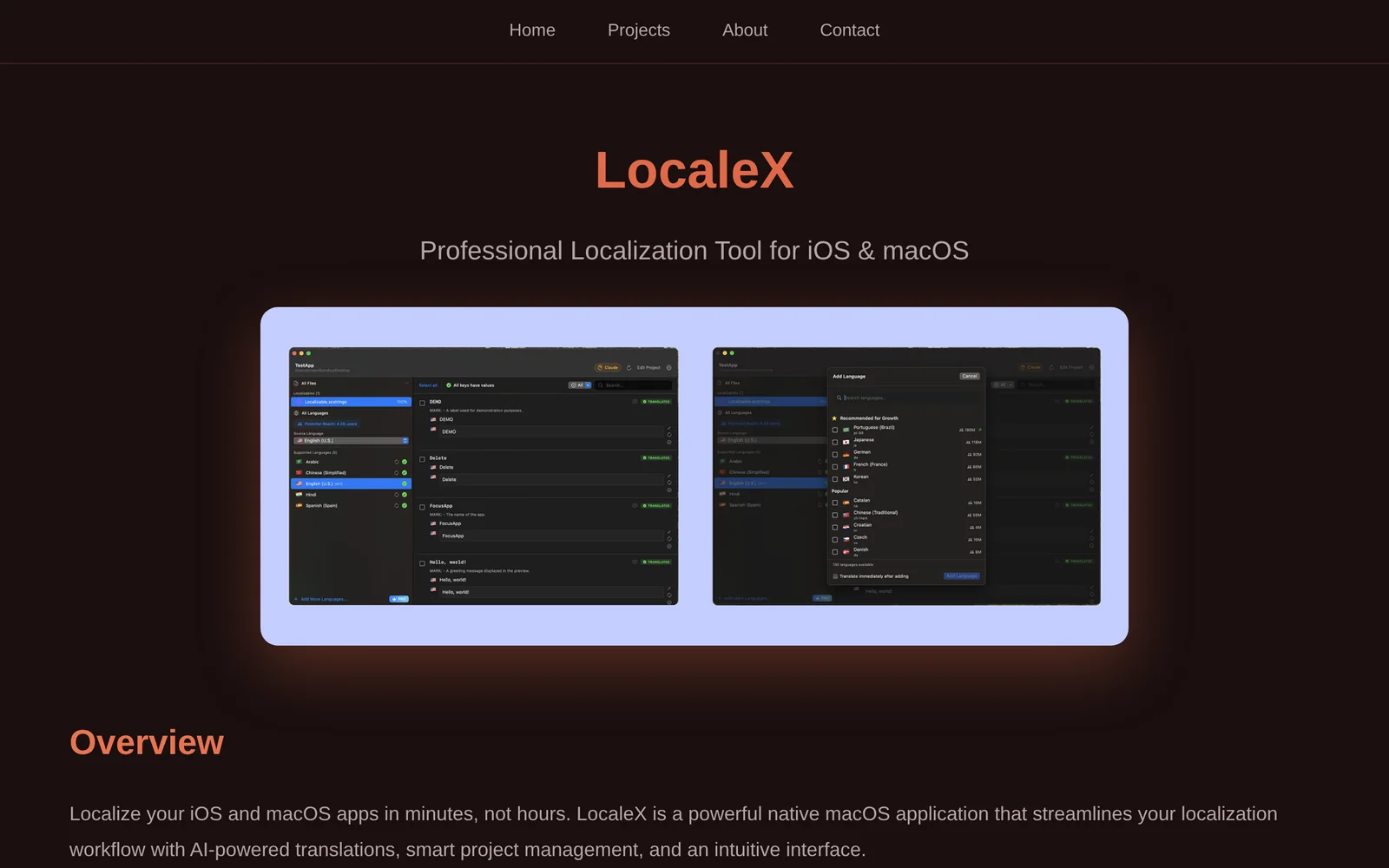
Key Features
Use Cases



Frequently asked questions about LocaleX
What is LocaleX?
LocaleX is an innovative, web-based, open-source project template designed to streamline the management of localized web projects, documentation, and legal pages. It provides an efficient framework for teams aiming to enhance their web presence in multiple languages and regions.
Key Points
- Open-Source Flexibility: LocaleX is a community-driven platform, allowing modifications and customizations.
- Localization Management: It simplifies the process of adapting content for different languages and cultures.
- Legal Compliance: Helps ensure that documentation and legal pages meet regional requirements.
Detailed Explanation
LocaleX serves as a foundational tool for businesses and developers looking to manage localized content effectively. By leveraging this template, teams can create a cohesive strategy for translating and adapting their websites to suit various cultural nuances.
Features of LocaleX:
- User-Friendly Interface: The platform boasts an intuitive interface that allows users to easily navigate through project settings and localization options.
- Version Control: LocaleX supports versioning, enabling teams to track changes and revert to previous versions if necessary.
- Integration Capabilities: It can integrate seamlessly with other web tools and platforms, enhancing its functionality.
Use Cases:
- E-commerce Websites: Businesses targeting international customers can use LocaleX to manage product descriptions and legal terms in multiple languages.
- Corporate Documentation: Companies can maintain consistent legal pages across different regions while ensuring compliance with local laws.
Best Practices / Tips
- Regular Updates: Keep your LocaleX installation up to date to benefit from the latest features and security patches.
- Engage the Community: Participate in forums and discussions around LocaleX to share insights and gain knowledge from other users.
- Test Localized Content: After implementation, always test localized content to ensure it resonates with the target audience.
Additional Resources
How does LocaleX work?
LocaleX utilizes advanced AI technologies to streamline daily workflows by automating tasks, enhancing productivity, and providing intelligent insights. By integrating natural language processing and machine learning, LocaleX helps users efficiently manage their work, making it easier to focus on high-value activities.
Key Points
- AI Integration: Employs cutting-edge AI tools to automate routine tasks.
- User-Friendly Interface: Designed for ease of use, catering to both tech-savvy and novice users.
- Workflow Optimization: Enhances productivity by simplifying complex processes.
Detailed Explanation
LocaleX functions by leveraging various AI capabilities such as natural language processing (NLP) and machine learning algorithms. Here’s how it works:
-
Automation of Tasks: LocaleX automates repetitive tasks. For instance, it can handle data entry, schedule management, and email sorting, allowing users to allocate their time to more strategic initiatives.
-
Smart Insights: The platform analyzes user data to provide actionable insights. For example, it can identify trends in your work habits and suggest optimizations, such as the best times to schedule meetings or deadlines to prioritize.
-
Customizable Workflows: Users can tailor LocaleX to their specific needs. This includes creating personalized workflows that adapt to individual preferences, which makes it suitable for various industries—be it marketing, project management, or customer service.
-
Collaboration Tools: LocaleX includes features that facilitate team collaboration. It allows team members to share insights and updates seamlessly, ensuring that everyone is on the same page.
-
Integration with Other Tools: LocaleX can connect with other software platforms (like CRM systems or project management tools), enhancing its utility by creating a cohesive ecosystem.
Best Practices / Tips
- Start with a Trial: If available, take advantage of a trial period to explore how LocaleX can fit into your workflows.
- Leverage AI Features: Regularly utilize the AI-driven insights to refine your strategies and improve efficiency.
- Regular Updates: Keep abreast of updates and new features in LocaleX to maximize the benefits as the platform evolves.
- Training and Support: Utilize available tutorials and customer support to ensure you are making the most out of the tool’s capabilities.
Additional Resources
By understanding how LocaleX works and implementing these best practices, users can significantly enhance their productivity and streamline their daily tasks.
What are the main features of LocaleX?
LocaleX offers a range of powerful features, including advanced AI capabilities for data analysis, user-friendly interface, customizable dashboards, and seamless integration with other tools. These features empower businesses to enhance their localization strategies and improve user engagement across various markets.
Key Points
- Advanced AI capabilities for data analysis
- User-friendly interface for easy navigation
- Customizable dashboards tailored to specific needs
- Seamless integration with other software tools
Detailed Explanation
LocaleX is designed to streamline the localization process for businesses aiming to expand their global reach. Here are its main features in detail:
1. Advanced AI Capabilities
LocaleX utilizes cutting-edge AI algorithms to analyze large datasets efficiently. This feature helps businesses identify trends in user behavior and preferences across different regions. For example, AI-driven insights can reveal which languages or cultural nuances resonate best with target audiences, allowing for more effective marketing strategies.
2. User-Friendly Interface
The intuitive layout of LocaleX ensures that users, regardless of their technical expertise, can easily navigate the platform. Key functionalities are readily accessible, making it simple to set up projects, manage tasks, and monitor progress. The drag-and-drop functionality enhances the user experience, saving time and reducing learning curves.
3. Customizable Dashboards
LocaleX offers customizable dashboards that allow users to personalize their workspace according to their specific needs. Users can select the metrics and KPIs that matter most to their projects, enabling them to focus on what drives performance. This feature is particularly useful for teams that handle multiple projects simultaneously.
4. Seamless Integration
LocaleX integrates smoothly with a variety of other software tools, such as content management systems (CMS) and project management software. This interoperability ensures that data flows seamlessly between systems, enhancing collaboration and efficiency. For instance, integrating LocaleX with a CMS can automate the localization of web content, reducing manual effort.
Best Practices / Tips
- Leverage AI Insights: Regularly use the AI analysis features to stay updated on market trends and user preferences.
- Customize Your Dashboards: Tailor your dashboard to highlight metrics that align with your business goals for better focus and decision-making.
- Utilize Integrations: Explore the integration capabilities of LocaleX to streamline workflows across your existing tools, maximizing efficiency.
Additional Resources
Who is LocaleX for?
LocaleX is designed for a diverse audience, including businesses, content creators, marketers, and anyone looking to enhance their daily workflows using AI. It streamlines tasks like data analysis, content generation, and project management, making it an essential tool for both professionals and individuals interested in AI-driven efficiency.
Key Points
- Target Audience: Businesses, marketers, and content creators.
- Functionality: Enhances day-to-day workflows through AI.
- Versatility: Applicable in various industries and use cases.
Detailed Explanation
LocaleX is a versatile AI tool that caters to various users, making it invaluable for different sectors.
-
Businesses: Companies can leverage LocaleX for tasks like automating customer service responses, analyzing market trends, and generating reports. For instance, a retail business can use LocaleX to analyze customer feedback and optimize product offerings accordingly.
-
Content Creators: Writers, bloggers, and social media managers can utilize LocaleX to brainstorm content ideas, draft articles, and schedule posts. By using AI to generate outlines or even full drafts, creators can save time and focus on refining their work.
-
Marketing Professionals: Marketers can benefit from LocaleX's capabilities in creating targeted campaigns based on data insights. By analyzing consumer behavior, they can personalize marketing strategies, improving engagement and conversion rates.
LocaleX's user-friendly interface and integration capabilities with other tools make it easy for users to adopt into their existing workflows.
Best Practices / Tips
- Identify Your Needs: Assess your specific needs before integrating LocaleX. This ensures that you maximize its potential for your particular use case.
- Regular Training: Regularly train the AI model with relevant data to improve its accuracy and relevance to your business or content goals.
- Monitor Performance: Keep track of how LocaleX enhances your workflows. Use analytics to measure improvements in productivity and adapt strategies as necessary.
Additional Resources
- LocaleX Official Documentation - Comprehensive user guide and tutorials.
- AI in Business - Explore how AI tools like LocaleX can transform business operations.
- Content Creation Tools - Discover other tools to complement LocaleX for content creation.
How much does LocaleX cost?
LocaleX is completely free to use, offering various features and tools without any associated costs. Users can access its capabilities without needing to subscribe or pay for premium services, making it an ideal choice for businesses and individuals looking for cost-effective solutions.
Key Points
- LocaleX is a free platform with no hidden fees.
- Users can access all features without a subscription.
- Ideal for individuals and businesses seeking budget-friendly solutions.
Detailed Explanation
LocaleX is a geo-marketing platform designed to help businesses optimize their local presence. Its core offerings include location intelligence, data visualization, and market analysis tools. Since LocaleX is free, users can leverage these features without financial commitment, allowing them to analyze local markets, target specific demographics, and improve their marketing strategies effectively.
For instance, a small business can use LocaleX to identify high-traffic areas for potential store locations, analyze customer behavior in those areas, and tailor their marketing campaigns accordingly. The platform also provides insights into competitor activities, helping businesses to stay competitive without incurring costs.
Best Practices / Tips
- Maximize Features: Explore all the available tools to gain comprehensive insights into your market and audience.
- Regular Updates: Keep your data updated to ensure accuracy in your analyses and decision-making processes.
- Community Engagement: Participate in LocaleX forums or communities to learn best practices and share experiences with other users.
Additional Resources
How do I get started with LocaleX?
To get started with LocaleX, visit LocaleX Sign-Up where you can create an account and explore its features. LocaleX offers a user-friendly interface designed for efficient localization and project management.
Key Points
- Simple Sign-Up Process: Easy account creation.
- User-Friendly Interface: Intuitive design for efficient navigation.
- Comprehensive Features: Tools for effective localization and project management.
Detailed Explanation
LocaleX is an innovative platform for localization that supports users in managing their projects efficiently. To begin, go to the LocaleX Sign-Up page.
-
Creating Your Account: Once on the sign-up page, fill out the required fields, including your email address and a secure password. Ensure your password is strong to protect your account.
-
Exploring Features: After signing up, take a tour of the dashboard. LocaleX offers various features like translation memory, glossary management, and collaboration tools. Familiarize yourself with tools that suit your localization needs.
-
Setting Up Your First Project: Start by creating a new project. You can import files, set language preferences, and invite team members. Use the drag-and-drop functionality for easy file management.
Example Use Case
For businesses looking to localize their website content, LocaleX allows users to upload documents in multiple formats. You can set deadlines for translations and track progress in real-time, ensuring timely project delivery.
Best Practices / Tips
- Optimize Your Profile: Complete your profile with relevant information to enhance collaboration with team members.
- Utilize the Help Center: Don’t hesitate to access the help center for tutorials and FAQs to make full use of the platform’s features.
- Regular Backups: Consistently back up your projects to prevent data loss and ensure a smooth workflow.
Additional Resources
By following these steps, you can effectively leverage LocaleX for your localization projects, enhancing productivity and collaboration.
Explore more AI Ai Tools tools
Browse all Ai Tools tools →Browse by use case: Code Generation
Compare LocaleX: vs CleanSlop · vs Kalender Sync · vs UseIt Studio · vs Woven Video