

Inbox Zero
AIOpen-source AI email assistant that organizes your inbox, drafts replies in your voice, blocks cold emails, and bulk-unsubscribes for Gmail and Outlook.
Inbox Zero
Open-source AI email assistant that organizes your inbox, drafts replies in your voice, blocks cold emails, and bulk-unsubscribes for Gmail and Outlook.
About Inbox Zero
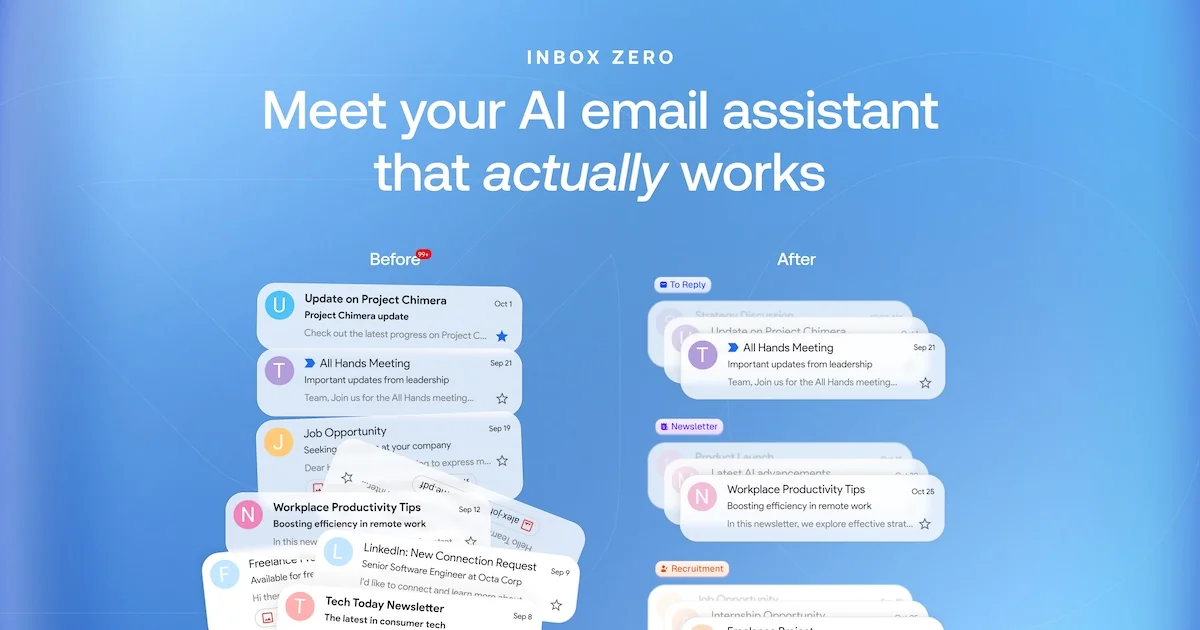
Inbox Zero is an open-source AI email assistant for Gmail and Outlook that automatically labels incoming mail into categories such as To Reply, Newsletter and Cold Email. It pre-drafts replies in your tone using your email history and calendar, and can be configured in plain English. Beyond the assistant it offers bulk unsubscribe, cold email blocking, email analytics and pre-meeting briefings, and it can be used from Slack, Telegram, mobile or web. It also ships a free email app positioned as a cheaper alternative to Superhuman, is SOC 2 Type 2 certified, and can be self-hosted.
Screenshots
Key Features
Use Cases



Frequently asked questions about Inbox Zero
What is Inbox Zero?
Open-source AI email assistant that organizes your inbox, drafts replies in your voice, blocks cold emails, and bulk-unsubscribes for Gmail and Outlook.
How does Inbox Zero work?
Inbox Zero works by combining Automatic Inbox Organization: Labels every email into smart categories like To Reply, Newsletter, Marketing and Urgent., Pre-Drafted Replies: Writes replies in your voice from your email history and calendar so responses wait for you in the inbox., Cold Email Blocking: Filters out unsolicited cold outreach automatically., Bulk Unsubscribe: Shows which emails you never read and unsubscribes or archives them in one click., Email Analytics: Reveals who emails you most and what clogs your inbox. to help users with Executive Inbox Triage: Keep leaders at inbox zero with automatic sorting and drafts., Cold Email Defense: Cut sales spam from founder and exec inboxes., Newsletter Cleanup: Mass-unsubscribe from subscriptions you never read., Scheduling Replies: Draft responses that respect your calendar availability., Team Email Insights: Use team-wide analytics to understand workload..
What are the main features of Inbox Zero?
Key features include Automatic Inbox Organization: Labels every email into smart categories like To Reply, Newsletter, Marketing and Urgent., Pre-Drafted Replies: Writes replies in your voice from your email history and calendar so responses wait for you in the inbox., Cold Email Blocking: Filters out unsolicited cold outreach automatically., Bulk Unsubscribe: Shows which emails you never read and unsubscribes or archives them in one click., Email Analytics: Reveals who emails you most and what clogs your inbox..
Who is Inbox Zero for?
Inbox Zero is useful for anyone interested in Executive Inbox Triage: Keep leaders at inbox zero with automatic sorting and drafts., Cold Email Defense: Cut sales spam from founder and exec inboxes., Newsletter Cleanup: Mass-unsubscribe from subscriptions you never read., Scheduling Replies: Draft responses that respect your calendar availability., Team Email Insights: Use team-wide analytics to understand workload..
How much does Inbox Zero cost?
Inbox Zero offers a free tier with paid plans for advanced features.
How do I get started with Inbox Zero?
Visit https://www.getinboxzero.com/ to sign up and explore Inbox Zero.
Explore more AI Ai Tools tools
Browse all Ai Tools tools →Browse by use case: Chatbots & Assistants · Automation & Productivity
Compare Inbox Zero: vs CleanSlop · vs Kalender Sync · vs UseIt Studio · vs Woven Video