

Evlat
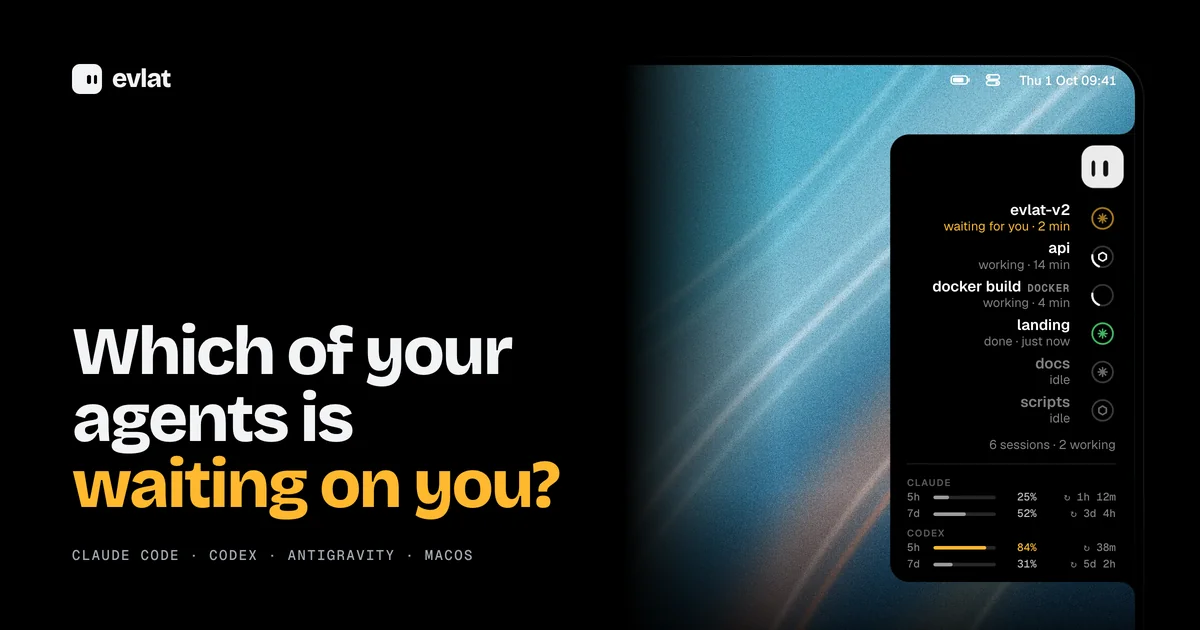
AIMac menu-bar strip that shows one ring per Claude Code, Codex or Antigravity session and pulses amber when an agent needs your answer.
Evlat
Mac menu-bar strip that shows one ring per Claude Code, Codex or Antigravity session and pulses amber when an agent needs your answer.
About Evlat
Evlat is a native macOS app that docks a thin black strip to the edge of your screen, showing one ring per coding-agent session or long-running command. It tracks Claude Code, Codex and Antigravity through hooks it installs for you, and pulses amber the moment an agent stops and needs your answer. Anything else, such as a build, training run or deploy, can be tracked by prefixing it with `evlat watch` or reporting progress from your own scripts with `evlat signal`. Servers reached over ssh show up on the same strip tagged with the machine name. It is built in Swift with AppKit and SwiftUI, runs entirely locally with no account or telemetry, and is source-available under the Functional Source License.
Screenshots
Key Features
Use Cases



Frequently asked questions about Evlat
What is Evlat?
Mac menu-bar strip that shows one ring per Claude Code, Codex or Antigravity session and pulses amber when an agent needs your answer.
How does Evlat work?
Evlat works by combining Agent status rings: One ring per Claude Code, Codex or Antigravity session, with an amber pulse when an agent is waiting on your answer., Process tracking with evlat watch: Prefix any long command to keep a ring on the bar that turns green on exit 0 or red with the exit code, while the command runs unchanged., evlat signal for scripts: Scripts can report --progress, --waiting, --done or --failed so the ring fills and changes state as work advances., Remote machines over ssh: Jobs and agents on servers appear on your Mac's bar tagged with the machine name, using your existing ssh with no account or relay., Hover cards and Go to session: Hovering expands every session's name, activity and duration, shows the exact command an agent is stuck on, and jumps to the owning terminal or editor. to help users with Developer running several Claude Code and Codex sessions in parallel sees at a glance which one is blocked on approval., Engineer starts a long e2e suite or Docker build with evlat watch and gets a green or red ring without watching the terminal., ML practitioner tracks a training run on a remote GPU box alongside local agents on one strip., Team lead working across a devbox and build server sees each machine's agent state on their Mac., Script author reports progress from custom automation with evlat signal to fill a ring as work completes..
What are the main features of Evlat?
Key features include Agent status rings: One ring per Claude Code, Codex or Antigravity session, with an amber pulse when an agent is waiting on your answer., Process tracking with evlat watch: Prefix any long command to keep a ring on the bar that turns green on exit 0 or red with the exit code, while the command runs unchanged., evlat signal for scripts: Scripts can report --progress, --waiting, --done or --failed so the ring fills and changes state as work advances., Remote machines over ssh: Jobs and agents on servers appear on your Mac's bar tagged with the machine name, using your existing ssh with no account or relay., Hover cards and Go to session: Hovering expands every session's name, activity and duration, shows the exact command an agent is stuck on, and jumps to the owning terminal or editor..
Who is Evlat for?
Evlat is useful for anyone interested in Developer running several Claude Code and Codex sessions in parallel sees at a glance which one is blocked on approval., Engineer starts a long e2e suite or Docker build with evlat watch and gets a green or red ring without watching the terminal., ML practitioner tracks a training run on a remote GPU box alongside local agents on one strip., Team lead working across a devbox and build server sees each machine's agent state on their Mac., Script author reports progress from custom automation with evlat signal to fill a ring as work completes..
How much does Evlat cost?
Evlat is free to use.
How do I get started with Evlat?
Visit https://evlat.kalaomer.com/ to sign up and explore Evlat.
Explore more AI Ai Tools tools
Browse all Ai Tools tools →Compare Evlat: vs CleanSlop · vs Kalender Sync · vs UseIt Studio · vs Woven Video