

ElevenLabs Agent Workflows
AIVisual graph-based editor to design sophisticated conversational agent workflows and connect them to ElevenLabs SDKs and tools.
ElevenLabs Agent Workflows
Visual graph-based editor to design sophisticated conversational agent workflows and connect them to ElevenLabs SDKs and tools.
About ElevenLabs Agent Workflows
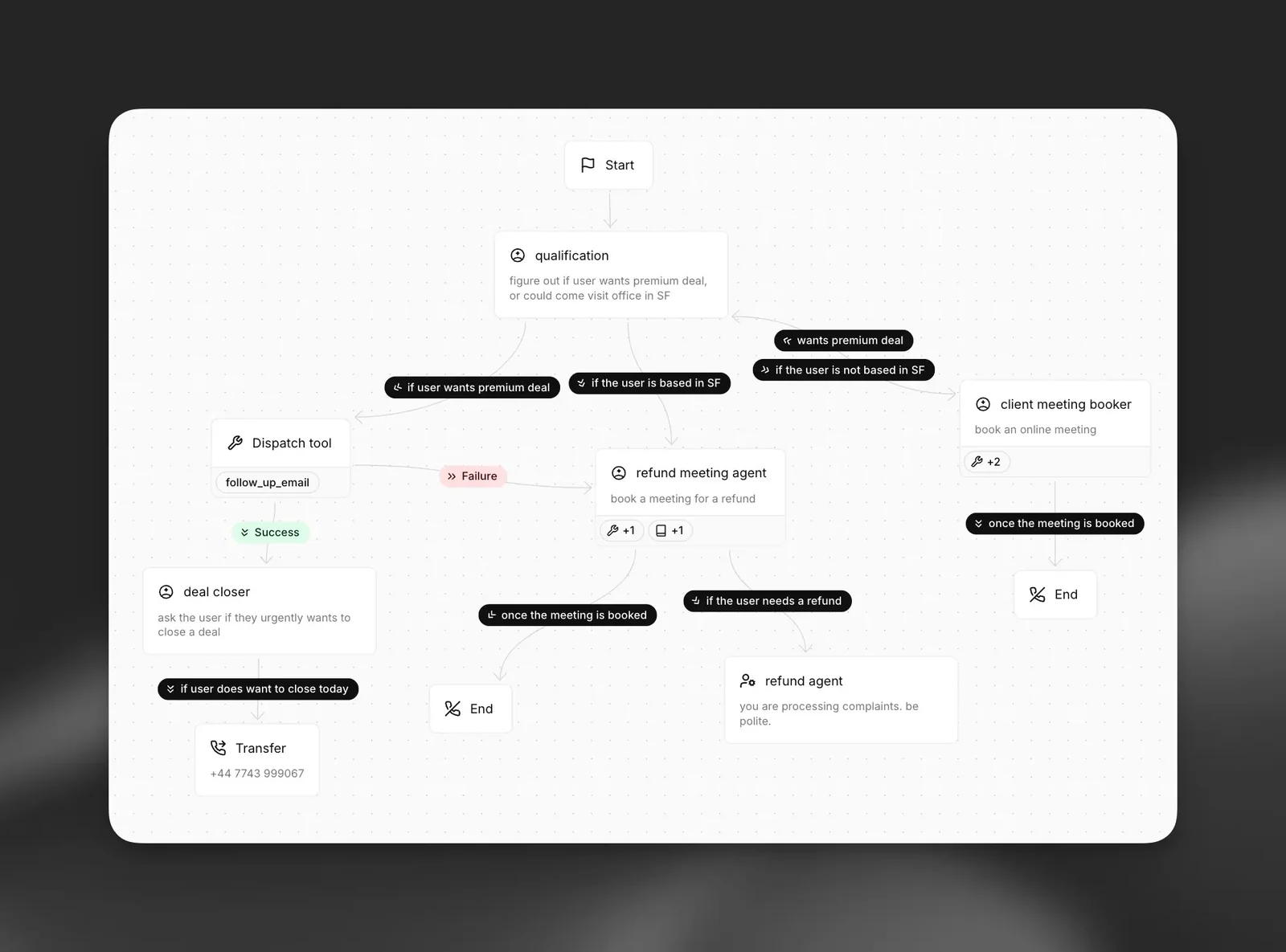
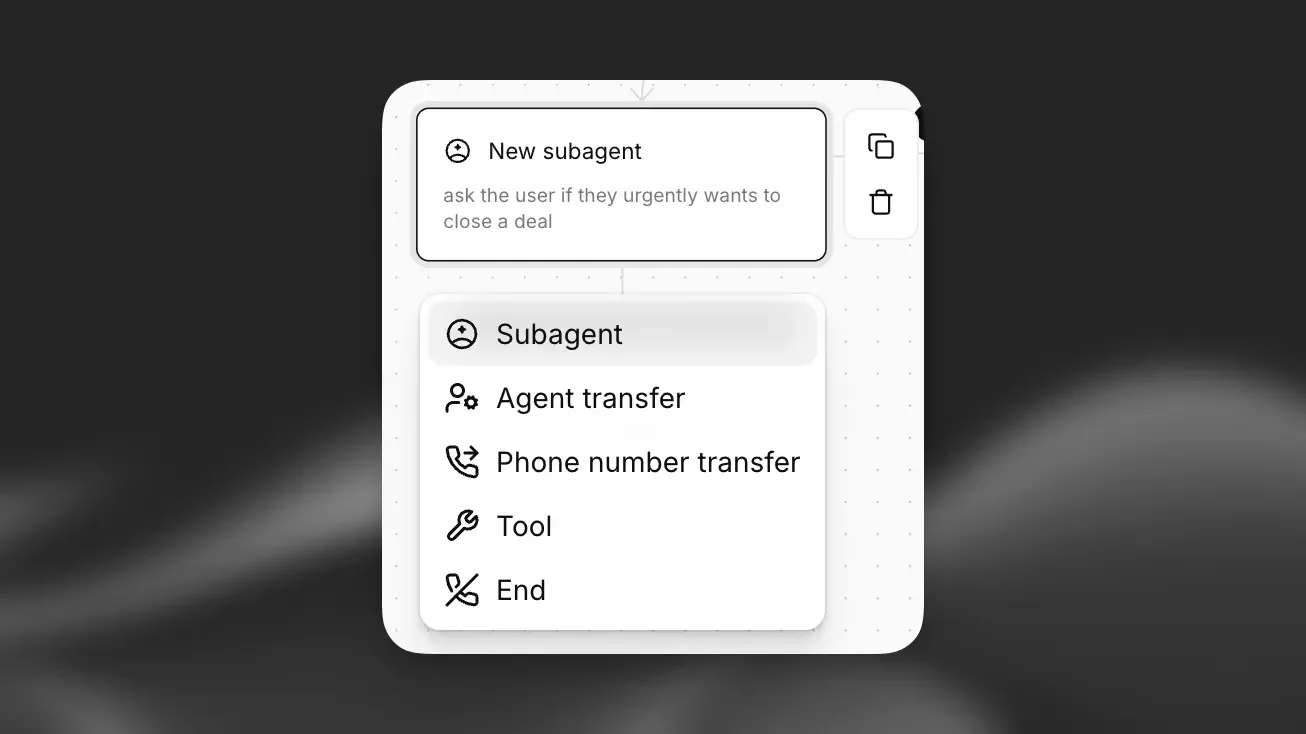
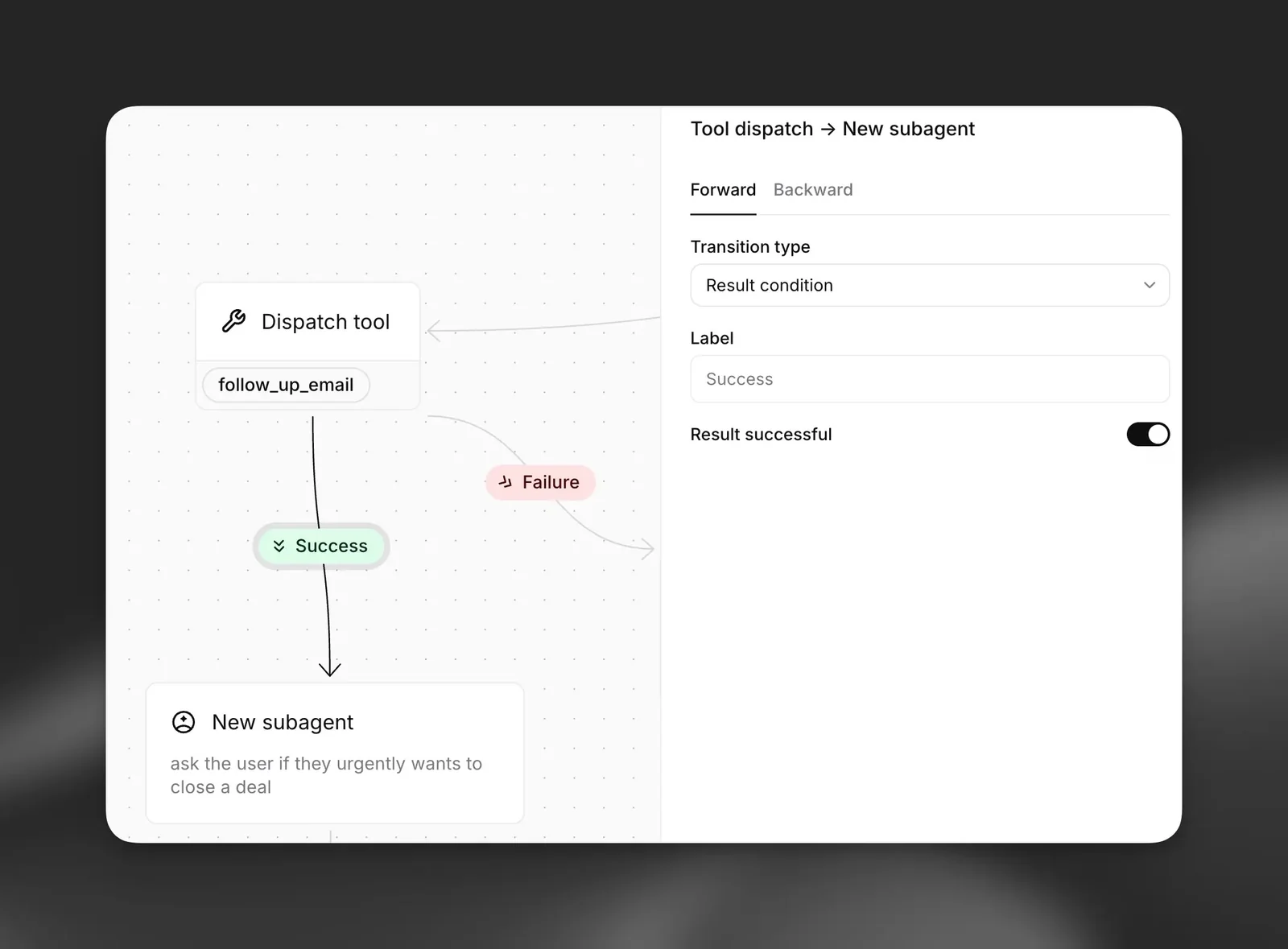
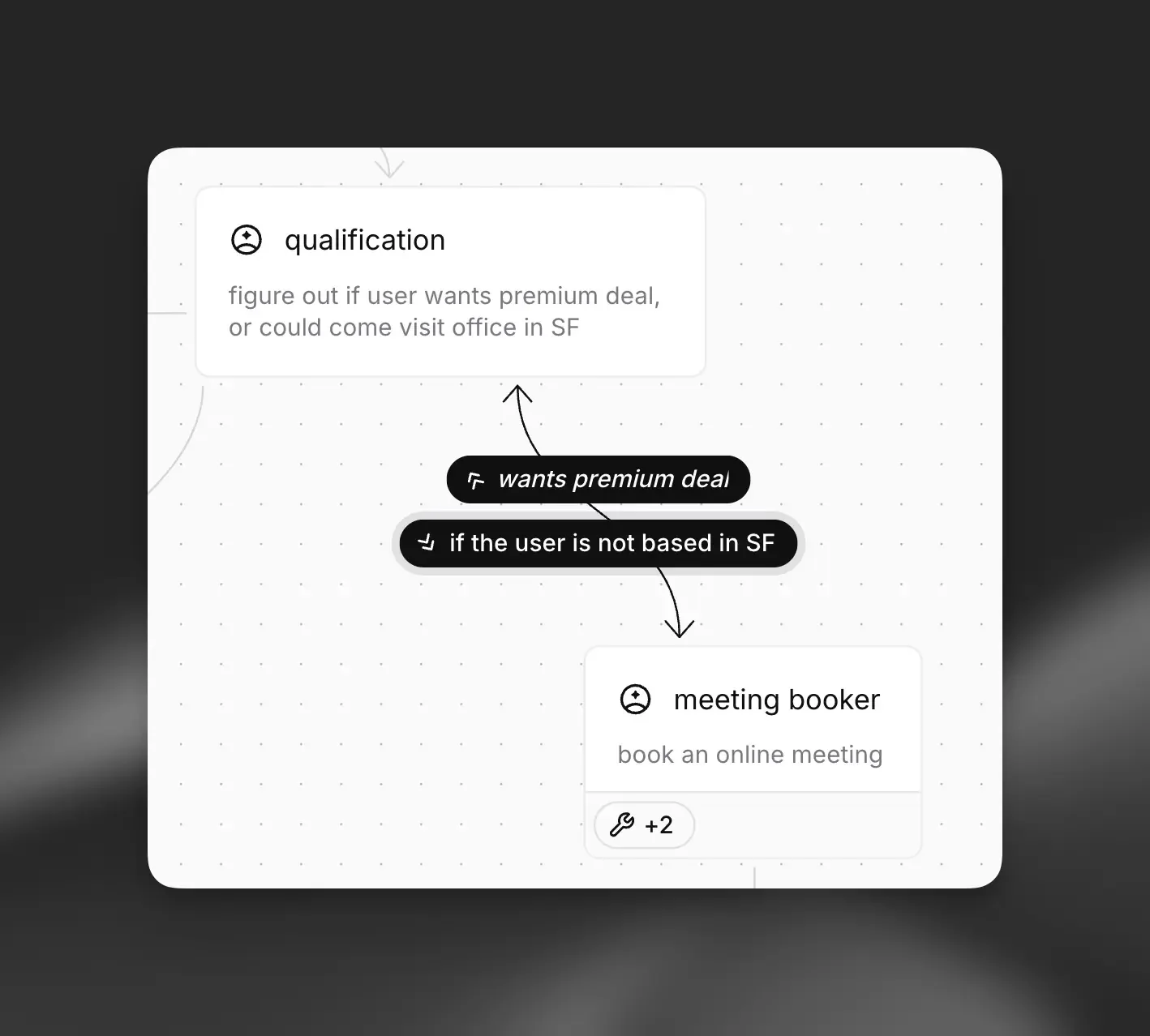
Agent Workflows is a visual, graph-based tool for designing conversation flows and orchestration for ElevenLabs agents. It lets teams compose branching dialogues, tool calls, and stateful transitions in a node-based editor, then run those workflows through ElevenLabs Agents SDKs (TypeScript, Swift, etc.) in apps. The feature is built to integrate multimodal capabilities (audio input/output, tool integrations, and conversation tokens), enabling rapid prototyping and deployment of interactive voice/chat agents while reducing engineering work required to wire conversation logic and external tool calls.
Screenshots
Key Features
Use Cases



Frequently asked questions about ElevenLabs Agent Workflows
What are the pricing options for ElevenLabs Agent Workflows?
ElevenLabs Agent Workflows offers a freemium pricing model with several tiers to accommodate different usage needs. Pricing options include Free ($0), Starter ($5/month), Creator ($22/month), Pro ($99/month), Scale ($330/month), Business ($1,320/month), and Custom plans, each providing varying minutes for agent calls and distinct features.
Key Points
- Freemium Model: Offers a zero-cost entry point.
- Tiered Pricing: Six distinct paid plans cater to different user needs.
- Feature Variability: Each tier includes different features and minutes for agent calls.
Detailed Explanation
ElevenLabs Agent Workflows provides various pricing options designed to cater to both individual users and businesses looking for scalable solutions.
-
Free Tier: This is ideal for users who want to explore the platform without any financial commitment. It includes basic features suitable for small-scale applications.
-
Starter Plan: At $5/month, this plan is perfect for casual users who require additional functionality and more minutes for agent calls.
-
Creator Plan: At $22/month, users get more comprehensive features, making it suitable for small businesses that need more robust capabilities.
-
Pro Plan: For $99/month, this plan is tailored for professional users who require extensive access to advanced features and higher monthly call minutes.
-
Scale Plan: Priced at $330/month, this plan is designed for larger organizations that need significant call minutes and additional resources.
-
Business Plan: At $1,320/month, this tier is for enterprises with extensive needs, offering maximum features and call minutes.
-
Custom Plans: For organizations with unique requirements, ElevenLabs offers custom plans tailored to specific needs and budgets.
Each plan is designed with scalability in mind, allowing users to upgrade as their needs grow.
Best Practices / Tips
- Evaluate Needs: Before choosing a plan, assess your specific requirements for call minutes and features.
- Start with Free: Utilize the free tier to familiarize yourself with the platform before committing to a paid plan.
- Consider Future Growth: If you anticipate scaling your operations, opt for a plan that allows easy upgrades.
Additional Resources
With these pricing options, ElevenLabs Agent Workflows aims to empower users with flexible solutions to fit their specific needs while enhancing their communication capabilities.
What are the key features of ElevenLabs Agent Workflows?
ElevenLabs Agent Workflows offers key features such as a visual graph editor for creating conversation flows, seamless SDK integration across platforms, multimodal support for audio interactions, and advanced session management. These capabilities enable users to design sophisticated dialogues without any coding experience, streamlining the development process.
Key Points
- Visual Graph Editor: Easily design and modify conversation flows.
- SDK Integration: Integrates with various platforms for enhanced functionality.
- Multimodal Support: Handles audio and text interactions seamlessly.
- Session Management: Manages user sessions effectively for better engagement.
Detailed Explanation
ElevenLabs Agent Workflows provides a user-friendly interface through its visual graph editor, allowing users to visually design conversation flows. This intuitive tool helps in mapping out various dialogue paths, making it easier to visualize how users will interact with the agent.
The SDK integration feature supports multiple platforms, such as web, mobile, and messaging apps, allowing developers to implement their workflows seamlessly. This flexibility enables businesses to deploy their agents where their customers are most active, enhancing user experience.
With multimodal support, ElevenLabs allows for audio inputs, enabling voice interactions alongside traditional text-based dialogues. This is particularly useful for industries like customer service or healthcare, where users may prefer voice communication.
Session management capabilities ensure that users have a consistent experience throughout their interactions. By tracking user sessions, businesses can maintain context and provide personalized responses, thereby increasing user satisfaction and retention.
Best Practices / Tips
- Utilize the visual graph editor to brainstorm and test various conversation pathways before finalizing your design.
- Leverage SDK integrations to connect with existing systems, such as CRMs or databases, to enrich the conversational context.
- Test multimodal interactions thoroughly to ensure a smooth user experience across both audio and text formats.
- Monitor session management metrics to identify patterns and improve user engagement over time.
Additional Resources
How do I get started with ElevenLabs Agent Workflows?
To get started with ElevenLabs Agent Workflows, sign up on the ElevenLabs website and choose a suitable pricing plan. Utilize the intuitive visual editor to design your agent workflows and make use of the provided SDKs for seamless integration into your applications.
Key Points
- Sign Up and Pricing: Choose a plan that suits your needs.
- Visual Workflow Editor: Create workflows easily with drag-and-drop functionality.
- SDK Integration: Implement workflows into applications using available SDKs.
Detailed Explanation
Starting with ElevenLabs Agent Workflows involves a few simple steps:
-
Sign Up: Visit the ElevenLabs website and create an account. Select a pricing plan that aligns with your project requirements. Plans vary based on features and usage limits. For instance, the basic plan may include essential features, while premium tiers offer advanced functionalities.
-
Using the Visual Editor: Once registered, access the visual workflow editor. This intuitive tool allows you to design agent workflows without coding expertise. Drag and drop elements like triggers, actions, and conditions to create a flow that meets your specific needs. For example, you can set up a customer support agent that responds to inquiries based on user inputs.
-
SDK Integration: After designing your workflow, leverage the software development kits (SDKs) provided by ElevenLabs. These SDKs enable integration of your workflows into existing applications, whether for web, mobile, or desktop environments. Documentation is available to guide you through the integration process.
Best Practices / Tips
- Explore Templates: Utilize pre-built templates to speed up workflow creation. This can save time and provide inspiration for your projects.
- Test Thoroughly: Before deploying your workflows, conduct extensive testing to ensure they function as intended. Use the testing features in the visual editor to simulate various scenarios.
- Monitor Performance: After launching, continuously monitor the performance of your workflows. Adjust based on user feedback and analytics to improve efficiency and effectiveness.
Additional Resources
What are the API integration requirements for ElevenLabs Agent Workflows?
ElevenLabs Agent Workflows require integration via TypeScript or Swift SDKs. To successfully implement API calls, ensure your application adheres to the technical requirements for authentication methods and data security, enabling secure interactions with the agents.
Key Points
- Integration SDKs: Use TypeScript or Swift.
- API Calls: Adhere to technical requirements.
- Authentication: Implement secure methods for agent interactions.
Detailed Explanation
To integrate ElevenLabs Agent Workflows into your application, you must utilize either the TypeScript or Swift SDKs. These SDKs facilitate seamless communication between your application and the ElevenLabs API, ensuring efficient workflows.
Technical Requirements
- Environment Setup: Ensure your development environment supports TypeScript or Swift. This might include installing Node.js for TypeScript or Xcode for Swift.
- API Authentication: Use OAuth 2.0 or API keys to authenticate API requests. This authentication is crucial for securing data and ensuring that only authorized applications can interact with ElevenLabs’ services.
- Data Format: Be prepared to handle JSON data structures, as most API responses will be in this format.
Example Use Case
For instance, if you are developing a voice assistant application, you can use the ElevenLabs API to process voice inputs. The TypeScript SDK allows you to call the API with a simple function that handles user queries, while Swift SDK provides similar capabilities for iOS apps.
Best Practices / Tips
- Test API Calls: Utilize tools like Postman to test API endpoints before integrating them into your application.
- Error Handling: Implement robust error handling to manage API response errors gracefully. This will improve user experience and reduce frustration.
- Monitor API Usage: Keep track of your API call limits to avoid reaching the maximum allowed, which can disrupt service.
Additional Resources
How does ElevenLabs Agent Workflows compare to other conversational AI tools?
ElevenLabs Agent Workflows stands out among conversational AI tools due to its unique visual graph editor, which simplifies workflow design, and its strong SDK integration. Additionally, its competitive pricing, including a freemium model, makes it an attractive option for developers seeking flexible solutions.
Key Points
- Visual Workflow Design: The graphical interface streamlines complex processes.
- Robust SDK Integration: Easy integration with existing applications and systems.
- Competitive Pricing: Offers a freemium model suitable for developers.
Detailed Explanation
ElevenLabs Agent Workflows differentiates itself from other conversational AI tools through several key features:
-
Visual Graph Editor: Unlike many AI platforms that rely on text-based configurations, ElevenLabs provides a user-friendly visual graph editor. This feature allows users to design workflows by dragging and dropping elements, making it accessible even for those with limited coding skills. For instance, users can visually map out conversation flows, decision trees, and integrations, enhancing clarity and reducing setup time.
-
SDK Integration: The platform’s Software Development Kit (SDK) enables seamless integration with various programming environments. This flexibility allows developers to incorporate ElevenLabs’ capabilities into existing applications effortlessly. For example, a developer can integrate ElevenLabs into a mobile app to enhance user engagement through conversational interfaces without extensive rewrites.
-
Pricing Structure: ElevenLabs offers a competitive pricing model that includes a freemium option. This feature allows developers to test the platform’s capabilities without initial investment, making it an ideal choice for startups and small businesses. The freemium model includes basic features, while premium plans unlock advanced functionalities, catering to diverse needs and budgets.
Best Practices / Tips
- Leverage the Visual Editor: Spend time mastering the visual graph editor to maximize workflow efficiency. Create templates for common tasks to streamline future projects.
- Explore SDK Documentation: Familiarize yourself with the SDK documentation to fully utilize integration capabilities. This ensures that you can enhance your applications effectively.
- Monitor Usage: If using the freemium model, keep track of feature usage to determine when upgrading to a paid plan is beneficial based on your project’s growth.
Additional Resources
- ElevenLabs Documentation
- Getting Started with ElevenLabs
- Comparative Analysis of Conversational AI Tools
By focusing on these aspects, developers can effectively utilize ElevenLabs Agent Workflows to create sophisticated conversational experiences while enjoying the benefits of a flexible and user-friendly platform.
Explore more AI Ai Agents tools
Browse all Ai Agents tools →Browse by use case: Chatbots & Assistants · Voice & Audio · Automation & Productivity
Compare ElevenLabs Agent Workflows: vs Playad · vs Concierge by Juniors AI · vs Scout by Fini · vs Ruflo