

Drafted
AIGenerate custom home floor plans in seconds and download free PDF and CAD files from a library of 85,000+ AI-created house plans.
Drafted
Generate custom home floor plans in seconds and download free PDF and CAD files from a library of 85,000+ AI-created house plans.
About Drafted
Drafted is an AI-powered home floor plan design platform that generates custom house layouts instantly and provides free downloadable PDF and CAD files for every plan. Users can explore a large library of over 85,000 AI-created plans, generate tailored layouts in seconds, and obtain technical downloads for further editing or use with CAD software. The service streamlines early-stage design by converting high-level inputs into usable plan files, accelerating concepting for homeowners, designers, and builders.
Screenshots
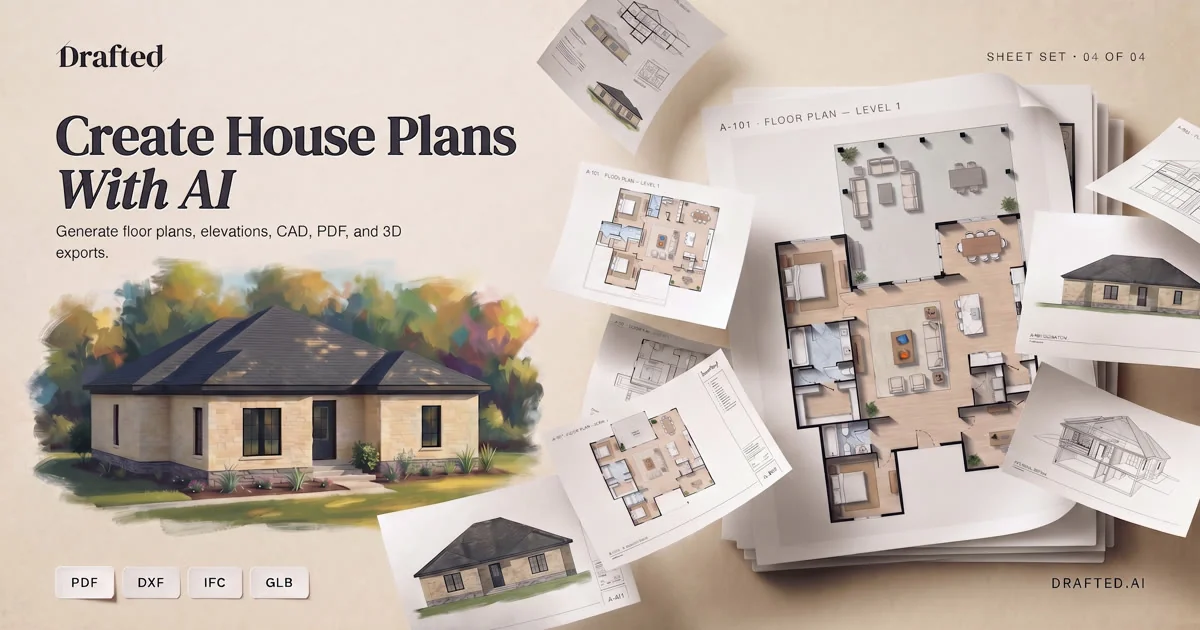
Key Features
Use Cases


Frequently asked questions about Drafted
What is Drafted?
Drafted is an innovative AI tool that enables users to design their dream house plans swiftly and efficiently. With the ability to generate custom home layouts in seconds, users can explore over 85,000 AI-created house plans and download free PDF and CAD files for their projects.
Key Points
- AI-Driven Customization: Create personalized house designs effortlessly.
- Extensive Library: Access a vast selection of over 85,000 house plans.
- Free Downloads: Get high-quality PDF and CAD files at no cost.
Detailed Explanation
Drafted utilizes advanced artificial intelligence to streamline the home design process. By entering specific parameters such as square footage, number of bedrooms, and architectural styles, users can generate unique house plans tailored to their preferences. This feature not only saves time but also provides a creative platform for aspiring homeowners and architects.
How to Use Drafted
- Visit the Drafted Website: Access the platform directly from your browser.
- Input Your Requirements: Fill in details like dimensions, style, and any specific features you desire.
- Generate Plans: Click on the design button to explore a variety of layouts that meet your criteria.
- Download Your Favorites: Choose your preferred plans and download them in PDF or CAD format for further use.
This tool is ideal for individuals looking to build custom homes, architects seeking inspiration, or real estate developers needing quick design solutions.
Best Practices / Tips
- Be Specific: When entering your requirements, provide as much detail as possible to generate the best results.
- Explore Variants: Don’t hesitate to experiment with different styles and configurations to find the most suitable design.
- Utilize Filters: Use the filtering options to narrow down your choices based on budget, size, and architectural style.
Common pitfalls include overlooking essential features or dimensions. Always double-check your inputs to ensure the generated plans meet your needs.
Additional Resources
How does Drafted work?
Drafted functions by leveraging advanced AI technologies to streamline everyday workflows for users. It automates tasks, enhances productivity, and integrates seamlessly with existing tools, making it easier for teams to collaborate and manage their projects efficiently.
Key Points
- AI-Powered Automation: Automates repetitive tasks and processes.
- Seamless Integration: Works with popular applications for enhanced workflow.
- User-Friendly Interface: Designed for ease of use by all team members.
Detailed Explanation
Drafted utilizes cutting-edge artificial intelligence to provide a robust platform for managing daily workflows. It offers features such as task automation, project management, and real-time collaboration. For instance, users can set up automated reminders for deadlines or generate reports from data inputs without extensive manual work.
Key Features:
-
Automated Task Management: Users can create workflows that automatically assign tasks based on pre-set criteria, reducing bottlenecks and ensuring timely project completion.
-
Integration with Tools: Drafted connects with tools like Google Workspace, Slack, and Trello. This integration allows users to pull and push data seamlessly across platforms, enhancing overall productivity.
-
Collaboration Tools: Built-in chat and feedback options enable team members to communicate effectively, ensuring everyone is on the same page.
Use Cases:
- Marketing Teams: Automate campaign reporting, schedule social media posts, and manage content calendars without manual intervention.
- HR Departments: Streamline onboarding processes by automating document collection and task assignments for new hires.
- Project Managers: Utilize Drafted to monitor project progress in real-time, adjusting workflows as needed to meet deadlines.
Best Practices / Tips
- Start Small: Implement Drafted in one department before rolling it out company-wide. This allows for troubleshooting and adjustments.
- Train Your Team: Ensure that all users receive proper training to maximize the platform's potential and minimize resistance to change.
- Regularly Review Workflows: Periodically assess and refine workflows to adapt to changing needs or improve efficiency.
Additional Resources
What are the main features of Drafted?
Drafted is an innovative AI-powered tool designed to streamline various writing tasks. Its main features include intelligent content generation, collaborative editing, and customizable templates, making it an essential resource for writers seeking efficiency and creativity in their projects.
Key Points
- Intelligent Content Generation: Generates high-quality text based on prompts.
- Collaborative Editing: Allows multiple users to edit and comment in real-time.
- Customizable Templates: Offers a range of templates for different writing needs.
Detailed Explanation
Drafted utilizes advanced AI algorithms to assist users in creating compelling content across various formats.
-
Intelligent Content Generation: This feature allows users to input prompts and receive coherent and contextually relevant text suggestions. For example, a marketing professional can generate blog posts or social media content in seconds, significantly reducing the time spent on writing tasks.
-
Collaborative Editing: Drafted supports real-time collaboration, enabling teams to work together seamlessly. Users can share documents, leave comments, and make edits simultaneously, which is particularly useful for remote teams. This feature enhances productivity by eliminating back-and-forth emails and version control issues.
-
Customizable Templates: Drafted provides a library of templates tailored for different writing tasks, such as resumes, reports, and business proposals. Users can easily customize these templates to fit their specific needs, saving time and ensuring consistency in formatting.
Best Practices / Tips
- Utilize AI Suggestions: Make the most of Drafted’s AI-generated suggestions to enhance your writing. Review and refine these suggestions to maintain your voice.
- Leverage Templates: Start with a template that closely matches your project requirements to save time. Customize as needed to fit your style.
- Engage in Collaborative Features: Take advantage of the collaborative editing tools to gather feedback from peers. This can improve the quality of your work through diverse perspectives.
Additional Resources
By utilizing Drafted's powerful features, users can enhance their writing efficiency and creativity, ensuring they meet their content goals effectively.
Who is Drafted for?
Drafted is designed for professionals, teams, and organizations who want to enhance their daily AI workflows, automate repetitive tasks, and improve productivity. It’s especially beneficial for marketers, content creators, and project managers looking to integrate AI into their operations.
Key Points
- Target Audience: Professionals and teams in various industries.
- Functionality: Automates workflows and tasks using AI technology.
- Benefits: Increases efficiency and productivity in daily operations.
Detailed Explanation
Drafted caters to a wide array of users, including marketers, content creators, and project managers. By integrating AI, Drafted streamlines everyday tasks such as content generation, data analysis, and project management. For instance, marketers can automate the creation of social media posts, while project managers can utilize AI to track project progress and deadlines effectively.
Use Cases
- Content Creation: Drafted can generate blog posts, articles, and social media updates, allowing content creators to focus on strategy rather than execution.
- Data Analysis: Businesses can analyze customer data more efficiently to derive actionable insights, leading to better decision-making.
- Project Management: Teams can use Drafted to automate reminders, updates, and task assignments, ensuring that everyone stays on track.
Best Practices / Tips
- Understand Your Needs: Identify the specific tasks you want to automate before implementing Drafted to maximize its effectiveness.
- Start Small: Begin with one or two workflows to test the tool’s capabilities, then gradually expand its use across your organization.
- Regular Updates: Keep the software updated to benefit from new features and improvements that enhance functionality.
Additional Resources
How much does Drafted cost?
Drafted offers a variety of pricing plans tailored to different needs, starting from $99 per month for basic features. For exact details and the latest updates, it's best to visit the official Drafted website.
Key Points
- Pricing Tiers: Drafted offers multiple pricing tiers to cater to various user needs.
- Monthly and Annual Plans: Users can choose between monthly and annual subscriptions, often with discounts for annual payments.
- Feature Access: Different plans provide varying levels of access to features.
Detailed Explanation
Drafted's pricing structure is designed to accommodate businesses of all sizes, from startups to enterprises. The basic plan starts at $99 per month, which includes essential features such as candidate sourcing and collaboration tools.
For businesses that need more advanced functionalities, such as automated candidate matching or analytics, higher-tier plans are available. The Professional plan generally costs around $199 per month, while the Enterprise plan can vary based on specific needs and scale, often requiring a custom quote.
Use Cases
- Small Businesses: The basic plan allows small businesses to streamline their hiring processes without a significant financial commitment.
- Mid-Sized Companies: The Professional plan suits mid-sized companies looking for enhanced features to manage larger candidate pools effectively.
- Large Enterprises: The Enterprise plan offers tailored solutions for organizations with specific hiring challenges, including integration with existing HR systems.
Best Practices / Tips
- Evaluate Your Needs: Before choosing a plan, assess your hiring needs and volume to select the most cost-effective option.
- Take Advantage of Free Trials: If available, utilize free trials to test the platform's features before committing to a subscription.
- Consider Annual Payments: Opting for annual payment plans can often save you money in the long run, as many services provide discounts for upfront payments.
Additional Resources
How do I get started with Drafted?
To get started with Drafted, visit Drafted's official website and sign up for an account. After signing up, you can explore its features, connect with others in your industry, and leverage the platform to enhance your professional network and job opportunities.
Key Points
- Sign up easily using the Drafted website.
- Explore networking opportunities and job listings.
- Utilize AI-powered tools to enhance your job search.
Detailed Explanation
Drafted is a unique platform that combines networking and job searching, powered by artificial intelligence. To begin, navigate to Drafted's homepage. Here’s a step-by-step guide to getting started:
-
Sign Up: Click on the "Sign Up" button. You can register using your email or existing social media accounts like LinkedIn.
-
Complete Your Profile: Once registered, fill out your profile with relevant information such as your skills, experience, and career interests. A complete profile increases your chances of connecting with potential employers.
-
Explore Features: After setting up your profile, explore Drafted’s features, which include:
- Networking: Connect with industry professionals and join communities related to your field.
- Job Listings: Browse a wide range of job postings tailored to your skills and preferences.
- AI Tools: Use AI-driven features to get personalized job recommendations based on your profile.
-
Engage with the Community: Participate in discussions and events to broaden your professional network. Engaging with others can lead to referrals and job opportunities.
Best Practices / Tips
- Optimize Your Profile: Use keywords that reflect your skills and experience to enhance your visibility in searches.
- Stay Active: Regularly log in to check new job postings and networking opportunities. The more active you are, the better your chances of finding relevant connections.
- Utilize AI Features: Take advantage of Drafted’s AI tools to receive tailored job alerts and connections that suit your career goals.
Additional Resources
- Drafted Help Center for FAQs and troubleshooting.
- Blog on Networking Strategies to enhance your networking skills.
- LinkedIn Optimization Guide to improve your professional presence.
Explore more AI Ai Tools tools
Browse all Ai Tools tools →Compare Drafted: vs Decode · vs LibreChat · vs AppGrowthKit · vs Humanizer