

DesignLumo
AICreate editable social media posts, banners, and ads in seconds by chatting and editing on a full canvas.
DesignLumo
Create editable social media posts, banners, and ads in seconds by chatting and editing on a full canvas.
About DesignLumo
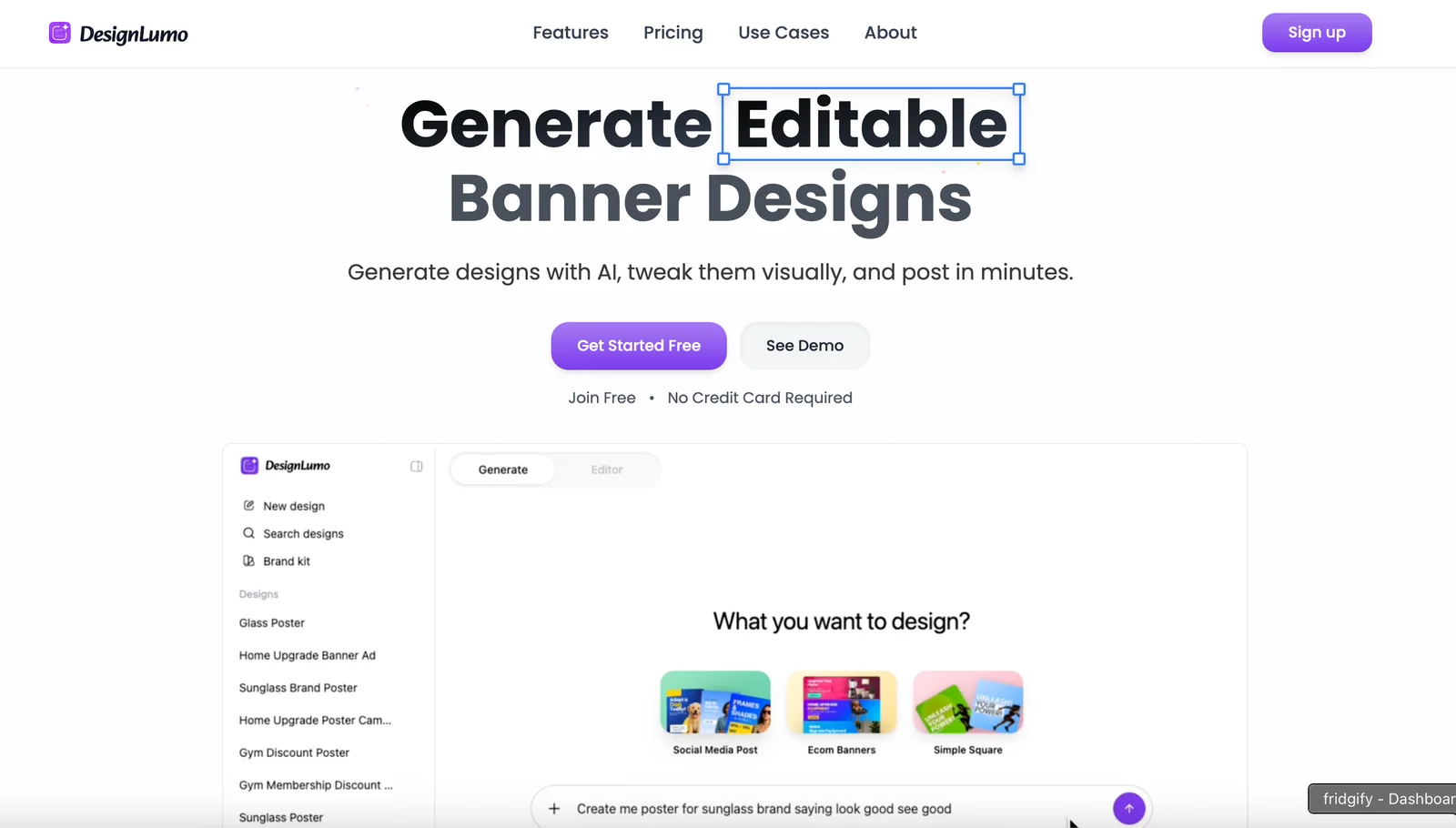
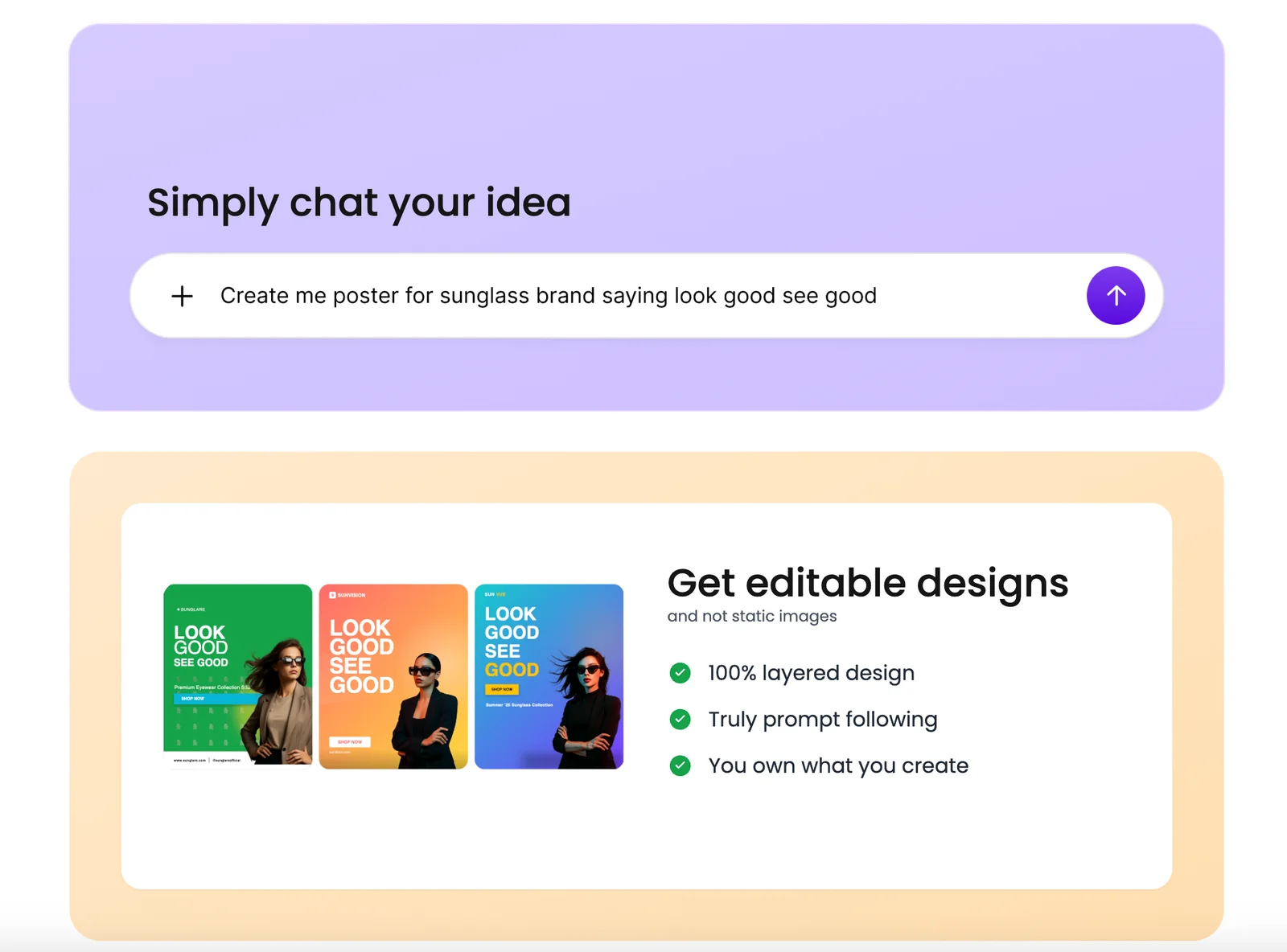
DesignLumo is a chat-driven design tool that generates editable social media posts, banners, and ad creatives in seconds. Users describe the desired asset via conversational prompts and receive ready-made designs that are placed on a full, editable canvas for direct customization. The platform’s value is in combining natural-language prompting with a free-form design workspace to accelerate content production and rapid iteration without needing advanced design skills.
Screenshots
Key Features
Use Cases


Frequently asked questions about DesignLumo
What pricing options are available for DesignLumo?
DesignLumo provides a freemium pricing model, allowing users to create editable social media posts and banners for free. Paid plans offer enhanced features, with pricing details available on their official website. For enterprise solutions, contacting DesignLumo directly is recommended for personalized quotes.
Key Points
- Freemium Model: Basic features available for free.
- Paid Plans: Enhanced functionalities for a monthly or annual fee.
- Enterprise Solutions: Custom pricing for larger teams and businesses.
Detailed Explanation
DesignLumo’s freemium model allows users to access basic features without any cost. This includes creating and editing social media posts and banners, making it an excellent option for individuals or small businesses starting their online marketing journey.
For users looking for more advanced capabilities, DesignLumo offers various paid plans. These plans typically unlock features such as premium templates, advanced editing tools, and collaboration options for teams. Pricing for these plans generally ranges from $10 to $30 per month, depending on the features included. Annual subscriptions may offer additional savings.
For businesses with specific needs or larger teams, DesignLumo provides customized enterprise solutions. These plans can include tailored features, dedicated support, and integration with other tools. Prospective users are encouraged to contact DesignLumo’s sales team directly for a personalized quote that aligns with their business requirements.
Best Practices / Tips
- Start with Freemium: Utilize the free version to familiarize yourself with DesignLumo's features before committing to a paid plan.
- Evaluate Needs: Assess the features you require for your social media strategy to choose the most suitable plan.
- Contact Sales for Enterprise Solutions: If you’re part of a larger organization, reaching out to DesignLumo can help you understand the best options available and negotiate pricing.
Additional Resources
Is DesignLumo suitable for non-designers?
Yes, DesignLumo is indeed suitable for non-designers. Its intuitive interface and pre-designed templates empower individuals, including small business owners and teams, to create high-quality visuals effortlessly, even without any formal design training.
Key Points
- User-Friendly Interface: Designed for ease of use.
- Pre-Designed Templates: Offers a variety of customizable options.
- Accessible for All: No design experience required.
Detailed Explanation
DesignLumo stands out as a powerful tool for non-designers by providing an intuitive user interface that simplifies the design process. Users can easily navigate the platform, access a library of pre-designed templates, and customize them to fit their branding needs.
For instance, a small business owner can select a template for social media graphics and personalize it with their logo, colors, and text. This capability allows users to produce polished visuals in minutes without needing any graphic design skills. The drag-and-drop functionality ensures that even the most novice users can create engaging content quickly.
Additionally, DesignLumo provides tutorials and resources to guide users through the design process, making it easier for them to understand design principles and apply them effectively. This feature is particularly beneficial for users who may feel overwhelmed by traditional design software.
Best Practices / Tips
- Start with Templates: Choose a template that aligns with your project to save time.
- Utilize Tutorials: Take advantage of the available tutorials to enhance your design skills.
- Keep It Simple: Avoid cluttering your visuals. Stick to a few key elements to maintain focus.
- Regularly Update Content: Refresh your designs periodically to keep your branding relevant and engaging.
Additional Resources
What are the key features of DesignLumo?
DesignLumo offers innovative features such as chat-driven design, an editable full canvas, rapid asset generation, and iterative revision support. These tools empower users to create, refine, and collaborate on designs efficiently, making it an ideal choice for designers seeking a streamlined workflow.
Key Points
- Chat-Driven Design: Interactive design conversations for real-time feedback.
- Editable Full Canvas: A flexible workspace for comprehensive design adjustments.
- Rapid Asset Generation: Quick creation of design elements to enhance productivity.
- Iterative Revision Support: Easy modifications to refine designs based on feedback.
Detailed Explanation
DesignLumo stands out in the design software landscape with its user-centric features:
-
Chat-Driven Design: This feature allows users to communicate directly within the design interface. By facilitating real-time discussions, designers can get immediate feedback from team members or clients, ensuring that the design process aligns with expectations and vision.
-
Editable Full Canvas: The editable canvas provides a dynamic space where users can manipulate elements freely. This flexibility allows for creative experimentation—users can resize, reposition, and modify objects without constraints, making it easier to visualize concepts.
-
Rapid Asset Generation: Users can generate design assets quickly, cutting down on time spent on routine tasks. This feature is particularly beneficial for teams working on tight deadlines or for those needing to produce multiple design variations rapidly.
-
Iterative Revision Support: DesignLumo simplifies the revision process by enabling users to track changes and revert to previous versions easily. This capability is crucial for maintaining design integrity and ensuring that all feedback is captured without losing original ideas.
Best Practices / Tips
- Leverage Chat Features: Use the chat-driven design feature to streamline communication with stakeholders, making sure to document feedback for future reference.
- Explore Canvas Flexibility: Take advantage of the editable full canvas by experimenting with multiple layouts before settling on a final design. This can lead to more innovative outcomes.
- Utilize Asset Generation: Regularly use the rapid asset generation tool to create templates for recurring design elements, saving time in future projects.
- Embrace Iteration: Don't hesitate to iterate; use feedback loops to refine designs continually. Set specific timelines for revisions to keep projects moving forward.
Additional Resources
Does DesignLumo offer an API for integration?
Currently, DesignLumo does not offer a publicly documented API or developer documentation on their website. Instead, the platform focuses on providing user-friendly design tools tailored for general users without the need for complex integrations.
Key Points
- No public API available for DesignLumo.
- Emphasis on user-friendly design tools.
- Targeted towards general users rather than developers.
Detailed Explanation
DesignLumo is primarily designed to cater to non-technical users who want to create visually appealing designs without needing extensive programming knowledge. This focus means that the platform does not provide an API for integration with other software or platforms, which is often sought after by developers looking to automate workflows or enhance functionality.
For businesses and designers looking for integration options, the absence of an API may pose limitations. However, DesignLumo compensates for this by offering a straightforward user interface, allowing users to create graphics, presentations, and other design materials quickly and effectively without needing to write code.
If you're specifically looking for integrations, consider using tools that work alongside DesignLumo. For instance, you might use export options to transfer designs to other software or platforms manually, such as Adobe Creative Cloud or social media management tools.
Best Practices / Tips
- Explore Alternatives: If API integration is crucial for your workflow, explore alternative design tools that offer robust APIs, such as Canva or Adobe Creative Cloud.
- Utilize Export Features: Make the most of DesignLumo's export functions to share your designs with other platforms easily.
- Stay Updated: Keep an eye on DesignLumo’s updates, as they may introduce API features in the future based on user demand.
Additional Resources
Explore more AI Ai Tools tools
Browse all Ai Tools tools →Browse by use case: Automation & Productivity
Compare DesignLumo: vs Decode · vs LibreChat · vs AppGrowthKit · vs Humanizer