
CTRL Micro
AITurns an iPhone or iPad into a haptic control deck for your Mac and for AI coding agents like Claude, Codex and Cursor.
CTRL Micro
Turns an iPhone or iPad into a haptic control deck for your Mac and for AI coding agents like Claude, Codex and Cursor.
About CTRL Micro
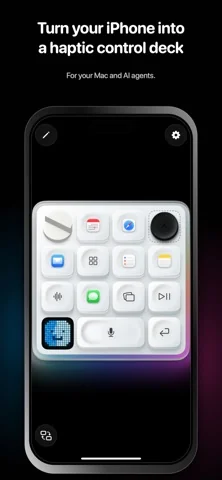
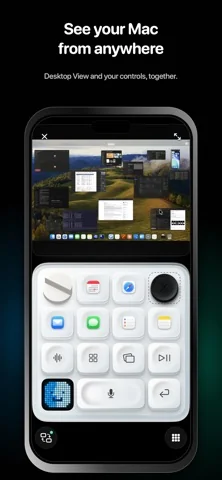
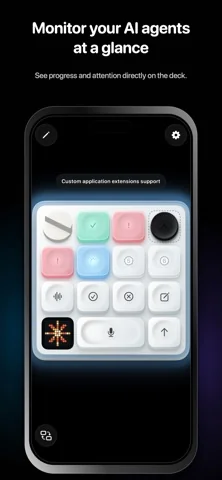
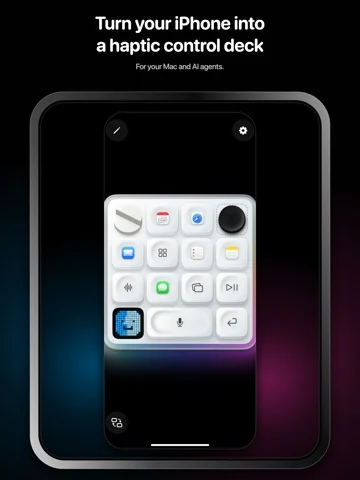
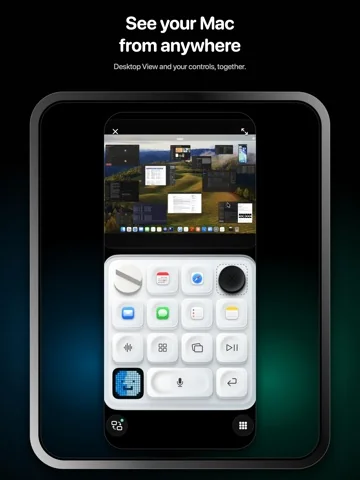
CTRL Micro is a free iOS and iPadOS app that converts an iPhone or iPad into a tactile remote control deck for a paired Mac and for the AI coding agents running on it. Controls are arranged on a customisable board that responds with haptics, sound and visual feedback, and the deck can switch between controlling macOS directly and controlling Codex, Claude or Cursor sessions. Beyond launching apps and adjusting volume, brightness, media and windows, it monitors agent tasks: progress and attention states are visible at a glance, recent tasks can be reopened, and new ones started from the deck. A Desktop View streams the Mac screen above the controls with pinch, pan and double-tap inspection, available over a nearby connection or end-to-end encrypted Remote Anywhere. Dictation is transcribed locally by the companion CTRL Micro Host app on the Mac, no account is required, and screen frames, keystrokes, commands and dictation are not recorded or stored.
Screenshots
Key Features
Use Cases



Frequently asked questions about CTRL Micro
What is CTRL Micro?
Turns an iPhone or iPad into a haptic control deck for your Mac and for AI coding agents like Claude, Codex and Cursor.
How does CTRL Micro work?
CTRL Micro works by combining Haptic Control Deck: A customisable board of controls that responds with haptics, sound and visual feedback so actions can be triggered without looking., Agent Task Monitoring: Shows progress and attention states for Codex, Claude and Cursor tasks at a glance, and lets you reopen recent tasks or start new ones., Client-Specific Controls: Switches the deck between Mac control and per-agent control surfaces tailored to Codex, Claude and Cursor., Full Mac Control: Launches applications, adjusts volume, brightness, media and windows, moves the pointer, scrolls, clicks, runs Shortcuts and invokes Siri., Local Dictation: Dictates into desktop apps from the deck with transcription processed locally by CTRL Micro Host on the Mac rather than in the cloud. to help users with Agent Babysitting: Keep an eye on long-running Claude Code or Codex tasks from a second screen and step in the moment one needs attention., Hands-Free Dictation: Dictate prompts or documentation into Mac apps from the iPad while keeping the keyboard free for other work., Desk Ergonomics: Move frequently used Mac shortcuts and media controls onto a physical-feeling deck instead of hunting through menus., Remote Mac Access: Check on and control a Mac at the office from elsewhere over an end-to-end encrypted Remote Anywhere session., Multi-Agent Workflows: Switch between Codex, Claude and Cursor sessions from one deck when several agents are working in parallel..
What are the main features of CTRL Micro?
Key features include Haptic Control Deck: A customisable board of controls that responds with haptics, sound and visual feedback so actions can be triggered without looking., Agent Task Monitoring: Shows progress and attention states for Codex, Claude and Cursor tasks at a glance, and lets you reopen recent tasks or start new ones., Client-Specific Controls: Switches the deck between Mac control and per-agent control surfaces tailored to Codex, Claude and Cursor., Full Mac Control: Launches applications, adjusts volume, brightness, media and windows, moves the pointer, scrolls, clicks, runs Shortcuts and invokes Siri., Local Dictation: Dictates into desktop apps from the deck with transcription processed locally by CTRL Micro Host on the Mac rather than in the cloud..
Who is CTRL Micro for?
CTRL Micro is useful for anyone interested in Agent Babysitting: Keep an eye on long-running Claude Code or Codex tasks from a second screen and step in the moment one needs attention., Hands-Free Dictation: Dictate prompts or documentation into Mac apps from the iPad while keeping the keyboard free for other work., Desk Ergonomics: Move frequently used Mac shortcuts and media controls onto a physical-feeling deck instead of hunting through menus., Remote Mac Access: Check on and control a Mac at the office from elsewhere over an end-to-end encrypted Remote Anywhere session., Multi-Agent Workflows: Switch between Codex, Claude and Cursor sessions from one deck when several agents are working in parallel..
How much does CTRL Micro cost?
CTRL Micro is free to use.
How do I get started with CTRL Micro?
Visit https://apps.apple.com/us/app/ctrl-micro/id6801026497 to sign up and explore CTRL Micro.
Explore more AI Ai Tools tools
Browse all Ai Tools tools →Browse by use case: Automation & Productivity
Compare CTRL Micro: vs Juggler · vs Elva · vs GhostWriter by MyHandler · vs Neopress