

Backplanes Spotlight
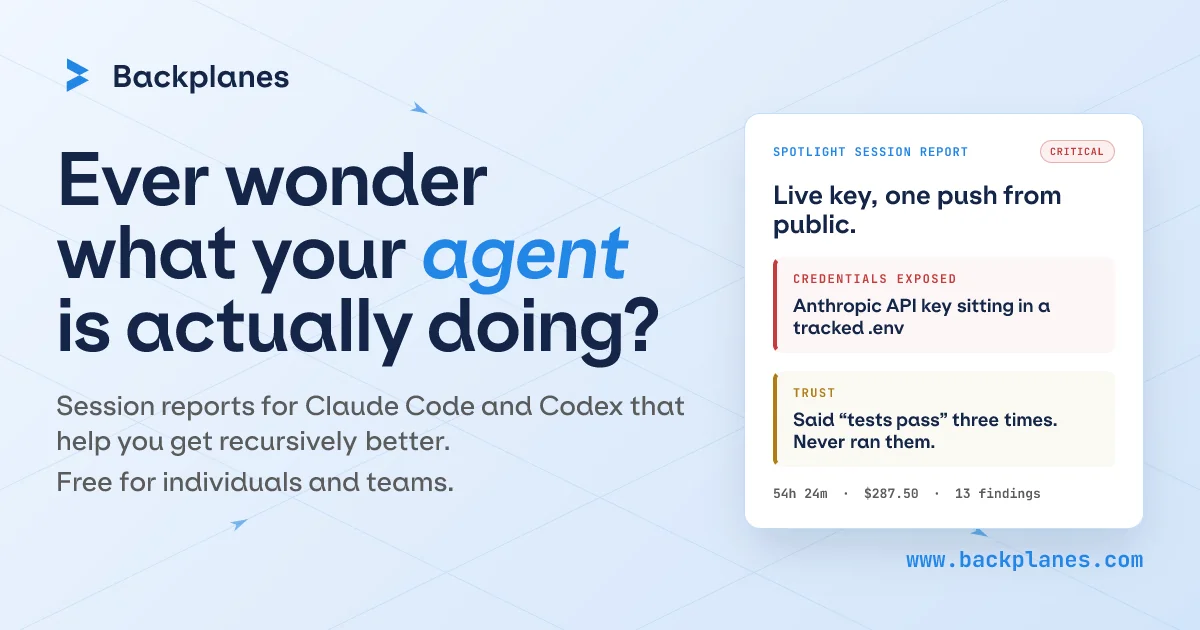
AIAutomatic session reports for Claude Code and Codex agents showing files touched, commands run, external tools reached, scope drift, and review items.
Backplanes Spotlight
Automatic session reports for Claude Code and Codex agents showing files touched, commands run, external tools reached, scope drift, and review items.
About Backplanes Spotlight
Backplanes Spotlight generates automatic, human-readable reports of AI agent sessions (notably Claude Code and Codex), surfacing what files were touched, which commands ran, external tools or services reached, scope drift, and items that deserve human review. It provides visibility and traceability across agent activity so organizations can monitor, audit, and shape agent behavior across teams, vendors, and projects. By turning opaque agent interactions into prioritized reviewables and timelines, Spotlight helps engineering, security, and compliance teams detect risky actions, reproduce agent workflows, and enforce governance policies. The product was offered free at launch.
Screenshots
Key Features
Use Cases


Frequently asked questions about Backplanes Spotlight
What is Backplanes Spotlight — See what your agent actually did?
Backplanes Spotlight is a tool that generates automatic reports for Claude Code and Codex sessions, detailing files accessed, commands executed, external tools utilized, and any scope drift. This feature helps users understand agent activity and highlights aspects that require review. It is available for free at launch.
Key Points
- Automatic reporting for Claude Code and Codex sessions.
- Detailed insights on files touched and commands run.
- Highlights scope drift and areas needing review.
Detailed Explanation
Backplanes Spotlight provides a comprehensive view of interactions during Claude Code and Codex sessions. By automatically generating reports, it allows users to see exactly what their AI agents are doing. This includes:
-
Files Accessed: Users can view which files were opened or modified during a session, ensuring transparency and accountability in the AI's operations.
-
Commands Executed: The tool logs all commands run by the agent, giving users insight into the decision-making process of the AI and the actions taken based on those commands.
-
External Tools Used: Spotlight tracks any external tools the agent interfaces with, providing a holistic view of how the AI is functioning within the broader tech ecosystem.
-
Scope Drift: This crucial feature identifies any deviations from the original task parameters, allowing users to monitor whether the AI remains aligned with project goals.
-
Review Highlights: The reports pinpoint specific areas that warrant further review, helping teams focus their attention on critical issues.
For example, in a software development project, if a codex agent modifies a file that was not part of the original task scope, Backplanes Spotlight would flag this for review, ensuring that project integrity is maintained.
Best Practices / Tips
- Regularly review Spotlight reports to stay informed about AI activities and potential issues.
- Use the insights from reports to adjust AI parameters or commands for better alignment with project goals.
- Document any scope drift occurrences to refine project specifications and improve future AI interactions.
- Take advantage of the free launch offer to familiarize yourself with the tool and maximize its utility in your workflows.
Additional Resources
How does Backplanes Spotlight — See what your agent actually did work?
Backplanes Spotlight — See what your agent actually did utilizes advanced AI capabilities to provide users with a transparent view of their agent's actions. This feature enhances daily workflows by enabling users to track and analyze interactions, ensuring optimized performance and accountability.
Key Points
- Transparency: Users can see detailed logs of agent activities.
- AI Integration: Combines machine learning for insightful data analysis.
- Workflow Optimization: Streamlines daily tasks by highlighting areas for improvement.
Detailed Explanation
Backplanes Spotlight enhances the user experience by offering insights into the actions taken by AI agents. By leveraging built-in AI capabilities, users can view a chronological log of interactions, which includes specific tasks completed, decisions made, and responses generated. This level of transparency allows users to understand how their agents operate, identify potential issues, and make data-driven adjustments to enhance performance.
For instance, if a customer service AI agent handled inquiries, users can review the specific questions addressed and the effectiveness of the responses. This feature not only fosters accountability but also helps in training the AI for better future performance by highlighting successful strategies and areas needing improvement.
Use Cases:
- Customer Support: Monitor chatbots to ensure they provide accurate and helpful responses.
- Sales Automation: Track automated outreach efforts to evaluate lead engagement.
- Project Management: Review task assignments and follow-ups executed by virtual assistants.
Best Practices / Tips
- Regular Monitoring: Frequently check agent activity logs to stay informed about performance.
- Set Clear Goals: Define what success looks like for your agents to measure their effectiveness accurately.
- Feedback Loop: Use insights from Spotlight to provide constructive feedback to improve AI capabilities.
Common Pitfalls to Avoid:
- Neglecting Data: Failing to review agent logs may result in missed opportunities for improvement.
- Over-Reliance on AI: Use agent insights as a supplement to human oversight, not a replacement.
Additional Resources
What are the main features of Backplanes Spotlight — See what your agent actually did?
Backplanes Spotlight offers key features that enhance agent performance visibility, including real-time activity tracking, comprehensive analytics, and AI-driven insights. These functionalities allow organizations to understand agent behavior, improve customer interactions, and optimize workflows, ultimately leading to better service delivery.
Key Points
- Real-Time Activity Tracking: Monitor agent actions in real-time.
- Comprehensive Analytics: Access detailed reports and performance metrics.
- AI-Driven Insights: Utilize artificial intelligence to gain actionable recommendations.
Detailed Explanation
Backplanes Spotlight is designed to provide organizations with in-depth visibility into their agents' activities. The main features include:
-
Real-Time Activity Tracking: This feature allows supervisors to see what agents are doing at any given moment. By tracking actions such as calls, chats, and email responses in real-time, organizations can quickly identify performance bottlenecks and areas for improvement. For example, if an agent is spending excessive time on a specific task, managers can step in to provide support or resources.
-
Comprehensive Analytics: Backplanes Spotlight provides robust analytics that offer insights into agent performance over time. Users can view historical data, such as average handling times, customer satisfaction scores, and resolution rates. These metrics are crucial for assessing individual and team performance, helping to pinpoint training needs or successful strategies.
-
AI-Driven Insights: Leveraging advanced AI algorithms, Backplanes Spotlight analyzes trends and patterns in agent behavior. It can suggest best practices based on successful interactions, enabling agents to refine their techniques and improve customer experience. For instance, if the AI identifies that agents who use specific phrasing achieve higher satisfaction scores, it can recommend that language to other agents.
Best Practices / Tips
- Regular Monitoring: Frequently review agent activity logs to identify trends and areas needing attention.
- Utilize AI Recommendations: Encourage agents to adopt the AI-driven best practices provided, as these can lead to improved performance metrics.
- Feedback Loops: Establish a system for agents to provide feedback on the insights received, ensuring continuous improvement and adaptation.
Additional Resources
Who is Backplanes Spotlight — See what your agent actually did for?
Backplanes Spotlight allows users to see detailed insights into their agents' daily activities and workflows, enhancing productivity and transparency. This tool is particularly beneficial for those who want to understand and optimize their AI-assisted operations in real-time.
Key Points
- Transparency: Provides clear visibility into agent activities.
- Productivity Insights: Helps identify workflow bottlenecks.
- User-Friendly Interface: Simple navigation for better user experience.
Detailed Explanation
Backplanes Spotlight is a powerful tool designed for businesses leveraging AI in customer service and operations. It offers a comprehensive view of what your agents are doing daily. Key features include:
-
Activity Tracking: Users can monitor tasks completed by agents, such as emails sent, calls made, and customer interactions handled. This feature helps stakeholders understand agent performance in real-time.
-
Workflow Analysis: The tool breaks down workflows, allowing managers to identify which processes are efficient and which are causing delays. For instance, if a certain type of inquiry takes longer than average, this insight can lead to optimized training or resource allocation.
-
Performance Metrics: Backplanes Spotlight generates reports on various key performance indicators (KPIs), such as response time, resolution rate, and customer satisfaction. Businesses can use this data to make informed decisions and improve overall service quality.
Use Case Example
For a customer support center using AI agents, Backplanes Spotlight might reveal that agents are spending too much time on repetitive inquiries. By analyzing this data, managers can decide to implement automated responses for common questions, freeing up agents to handle more complex issues.
Best Practices / Tips
- Regularly Review Reports: Schedule weekly or monthly reviews of the data to stay on top of agent performance and workflow efficiency.
- Set Clear Objectives: Define what success looks like for your team, and use Backplanes Spotlight to track progress toward those goals.
- Encourage Feedback: Use insights from Backplanes Spotlight to gather feedback from agents on workflow challenges. This can lead to continuous improvement.
Additional Resources
How much does Backplanes Spotlight — See what your agent actually did cost?
Backplanes Spotlight — See what your agent actually did is completely free to use. This powerful tool allows users to track their agents' activities without any associated costs, making it an excellent choice for businesses looking to enhance their operational transparency and productivity.
Key Points
- No Cost: Backplanes Spotlight is available at no charge.
- Transparency: Enables users to see detailed agent activities.
- User-Friendly: Designed for easy access and navigation.
Detailed Explanation
Backplanes Spotlight is a tool designed to provide real-time insights into agent performance and activities. As a free resource, it empowers businesses to monitor how agents interact with customers or engage in other essential tasks. This feature is particularly beneficial for customer service departments, sales teams, and other operational areas where tracking performance is critical.
Use Cases
- Customer Support: Teams can analyze how agents handle queries, ensuring quality service.
- Sales Monitoring: Sales managers can assess which strategies are most effective by reviewing agent interactions.
- Training: New hires can learn from the recorded actions of experienced agents.
The platform's user-friendly interface allows for quick navigation, making it easy for managers and team leaders to access and interpret data. By utilizing Backplanes Spotlight, organizations can significantly improve accountability and enhance overall team performance.
Best Practices / Tips
- Regular Monitoring: Schedule regular reviews of agent activities to identify trends and areas for improvement.
- Feedback Loop: Use insights gained from the tool to provide constructive feedback to agents.
- Integrate with Other Tools: Consider integrating Backplanes Spotlight with customer relationship management (CRM) systems for a more comprehensive view of performance.
Additional Resources
For more information about Backplanes Spotlight, visit the official Backplanes website. You may also explore related topics like agent performance metrics and best practices for team management to enhance your understanding and application of this tool.
How do I get started with Backplanes Spotlight — See what your agent actually did?
To get started with Backplanes Spotlight, visit Backplanes.com and sign up for an account. This tool allows you to monitor and analyze the actions of your agents, providing insights into their performance and interactions.
Key Points
- User-Friendly Interface: Backplanes Spotlight offers an intuitive dashboard for easy navigation.
- Real-Time Monitoring: Track agent activities instantly to improve response times and service quality.
- Performance Insights: Gain actionable analytics to enhance team productivity and customer satisfaction.
Detailed Explanation
Backplanes Spotlight is designed to enhance transparency and accountability within your team. Here’s how you can get started:
-
Sign Up: Go to Backplanes.com and click the “Sign Up” button. Fill out the required fields, including your name, email, and a secure password.
-
Set Up Your Environment: Once registered, you’ll receive a confirmation email. Follow the link to activate your account. Log in to the Spotlight dashboard, where you can customize your settings and preferences.
-
Integrate Your Tools: Backplanes Spotlight can be integrated with various CRM and communication tools. Follow the provided guides to connect your existing systems, enabling seamless data flow and monitoring.
-
Explore Features: Familiarize yourself with the dashboard. Key features include:
- Activity Log: View a chronological list of actions performed by agents.
- Performance Metrics: Analyze response times, successful resolutions, and customer feedback.
- Custom Reports: Generate tailored reports to present insights to your team or management.
-
Train Your Team: Educate your agents about how to utilize Spotlight effectively. Encourage them to engage with the platform for self-improvement and to understand performance metrics.
Best Practices / Tips
- Regular Check-Ins: Schedule routine reviews of the performance data to identify trends and areas for improvement.
- Encourage Feedback: Use insights from Spotlight to foster open discussions with your team about their challenges and successes.
- Optimize Settings: Tailor notifications and alerts to ensure you are promptly informed about significant activities or performance dips.
Additional Resources
- Backplanes Spotlight Documentation
- Getting Started with Backplanes Spotlight
- Customer Support for troubleshooting and advanced features.
What is Backplanes Spotlight?
Backplanes Spotlight is an automated reporting tool designed for Claude Code and Codex sessions. It provides insights into files accessed, commands executed, external tools utilized, scope drift, and items requiring review. Currently, this tool is available for free during its initial launch phase.
Key Points
- Automated Reporting: Spotlight generates reports automatically, saving time and effort.
- Detailed Insights: It tracks various aspects of coding sessions including file interactions and command executions.
- Free Launch Offer: Users can access the tool without charge during its launch period.
Detailed Explanation
Backplanes Spotlight simplifies the process of monitoring and auditing coding sessions in applications like Claude Code and Codex. By automatically generating detailed reports, it allows developers to focus on coding rather than documentation.
Key Features:
- Files Accessed: The tool logs which files were touched during a coding session, providing clarity on the resources used.
- Commands Executed: It tracks the commands run, giving developers insights into their workflow and efficiency.
- External Tools Used: Spotlight identifies any external tools accessed, which can be crucial for debugging and integration analysis.
- Scope Drift Monitoring: It highlights any deviations from the planned scope, ensuring projects stay on track.
- Review Recommendations: By analyzing the session data, Spotlight suggests areas that may need further review, enhancing code quality.
Use Cases:
- Development Teams: Teams can use Spotlight to streamline their code review process by providing clear insights into changes made.
- Project Management: Project managers can track scope drift and ensure that development aligns with project goals.
- Quality Assurance: QA teams can identify potential issues early through the insights provided by the automated reports.
Best Practices / Tips
- Regular Review: Make it a habit to review Spotlight reports regularly to catch any potential issues early.
- Integrate with Workflow: Incorporate the tool into your development process for better visibility and control over coding sessions.
- Educate Team Members: Ensure that all team members understand how to utilize Spotlight effectively for maximum benefit.
Additional Resources
- Backplanes Official Documentation for more detailed insights into features and usage.
- Claude Code and Codex Guides for best practices in using these coding environments.
How does Backplanes Spotlight work?
Backplanes Spotlight utilizes advanced AI technologies to streamline and enhance daily workflows. By integrating machine learning and data analytics, it empowers users to automate tasks, improve decision-making, and optimize productivity across various applications.
Key Points
- AI Integration: Combines machine learning and analytics.
- Workflow Automation: Streamlines repetitive tasks.
- Enhanced Decision-Making: Provides data-driven insights.
Detailed Explanation
Backplanes Spotlight is designed to simplify everyday operations for users by leveraging the power of artificial intelligence. Here’s how it works:
-
AI Integration: The platform employs machine learning algorithms that analyze user behavior and preferences. This allows it to adapt to individual workflows, making it more intuitive over time.
-
Workflow Automation: Users can automate repetitive tasks, such as data entry, report generation, and email responses. This feature saves time and reduces the likelihood of human error. For instance, a marketing team could set up Spotlight to automatically generate performance reports every week.
-
Enhanced Decision-Making: Spotlight provides actionable insights based on data analysis. For example, if a sales team uses the tool, it can analyze customer interactions to suggest the best approaches for engagement, increasing the chances of closing deals.
This combination of features enables users from various sectors—like marketing, sales, and customer service—to improve efficiency and focus on strategic tasks rather than mundane ones.
Best Practices / Tips
- Start Small: Begin by automating one or two workflows to gauge effectiveness before scaling up.
- Leverage Data: Regularly review the insights provided by Spotlight to refine your strategies.
- Stay Updated: Keep an eye on updates and new features that Backplanes may introduce to enhance functionality.
Common pitfalls include trying to automate too many processes at once, which can lead to confusion and inefficiency. Focus on optimizing high-impact areas first.
Additional Resources
What are the main features of Backplanes Spotlight?
Backplanes Spotlight features advanced AI capabilities, including real-time data processing, intuitive user interface, and seamless integration with various platforms. These features empower users to harness data insights effectively, enhancing decision-making and operational efficiency across multiple industries.
Key Points
- Real-time Data Processing: Enables instant analysis and insights.
- User-Friendly Interface: Simplifies navigation and enhances user experience.
- Integration Capabilities: Connects effortlessly with existing systems and applications.
Detailed Explanation
Backplanes Spotlight is designed to optimize data handling and analysis through its core AI functionalities.
1. Real-time Data Processing
This feature allows users to process large volumes of data in real-time, which is crucial for businesses that rely on timely information for decision-making. For example, financial institutions can monitor market trends instantaneously to make informed trading decisions.
2. User-Friendly Interface
The intuitive interface minimizes the learning curve for new users. With drag-and-drop features and customizable dashboards, users can easily visualize data, making it accessible for team members with varying technical expertise. This feature significantly enhances collaboration across departments.
3. Integration Capabilities
Backplanes Spotlight can seamlessly integrate with other enterprise systems like CRM, ERP, and data visualization tools. This capability ensures that users can leverage existing data infrastructure while enhancing overall operational efficiency. For instance, a marketing team can integrate the tool with their CRM to analyze customer data and improve targeted campaigns.
Best Practices / Tips
- Maximize Real-time Features: Utilize real-time data processing for critical business operations to stay ahead of competitors.
- Customize Dashboards: Tailor your dashboards to reflect key performance indicators relevant to your team’s goals.
- Leverage Integration: Take advantage of the integration capabilities to connect with tools you already use, ensuring a streamlined workflow.
Additional Resources
Who is Backplanes Spotlight for?
Backplanes Spotlight is ideal for professionals, teams, and individuals who want to enhance their AI workflows. It caters to anyone from data scientists to marketing specialists, providing tools and insights to streamline daily tasks and improve productivity through AI-driven automation.
Key Points
- Target Audience: Professionals in various fields including data science, marketing, and project management.
- Functionality: Enhances daily AI workflows through automation and insights.
- User Benefits: Increases efficiency and productivity in task management and collaboration.
Detailed Explanation
Backplanes Spotlight is designed for a diverse audience interested in leveraging AI to optimize their daily operations.
-
Data Scientists: They can utilize Backplanes Spotlight to analyze large datasets efficiently and gain insights through AI algorithms, allowing for quicker decision-making and enhanced model performance.
-
Marketing Professionals: Marketers can automate their daily reporting and campaign management tasks. By integrating AI, they can predict customer behavior and tailor their strategies accordingly, maximizing engagement and conversion rates.
-
Project Managers: For project managers, Backplanes Spotlight streamlines task assignments and monitoring, making it easier to track project progress and team performance. The tool can help identify bottlenecks early, promoting efficient project execution.
The platform’s user-friendly interface allows for easy integration with existing tools, ensuring that users can adopt it without significant disruptions to their workflows.
Best Practices / Tips
- Define Clear Goals: Before implementing Backplanes Spotlight, outline specific objectives you want to achieve, such as reducing task completion time or improving data accuracy.
- Integrate with Existing Tools: Ensure Backplanes Spotlight connects seamlessly with your current software ecosystem for maximum efficiency.
- Regular Training: Stay updated with the latest features and updates through ongoing training sessions to maximize the tool's potential.
- Monitor Performance: Regularly assess how Backplanes Spotlight impacts your workflows to identify areas for further optimization.
Additional Resources
- Backplanes Official Documentation
- AI Workflow Automation Best Practices
- Case Studies on Backplanes Spotlight
Incorporating Backplanes Spotlight into your daily operations can significantly enhance your efficiency and productivity, making it an essential tool for anyone looking to harness the power of AI in their workflows.
How much does Backplanes Spotlight cost?
Backplanes Spotlight is completely free to use, making it an accessible tool for users looking to enhance their digital experience. Users can leverage its features without any financial commitment, allowing for seamless integration and utilization in various projects.
Key Points
- Backplanes Spotlight is free to use with no hidden fees.
- It offers a variety of features for enhancing user experience.
- Perfect for individuals and small teams seeking budget-friendly solutions.
Detailed Explanation
Backplanes Spotlight is a powerful tool designed to streamline workflows, improve productivity, and enhance collaboration. As a free service, it provides users with access to a plethora of features without the burden of subscription fees.
Features of Backplanes Spotlight
- User-Friendly Interface: Its intuitive design allows users to navigate easily, making it suitable even for those who are not tech-savvy.
- Integration Capabilities: Spotlight seamlessly integrates with various platforms, enhancing its utility in diverse projects. This means users can incorporate it into existing workflows without disruption.
- Real-Time Collaboration: Teams can collaborate in real time, making it ideal for remote work environments.
Use Cases
- Project Management: Teams can use Spotlight to manage tasks, set deadlines, and monitor progress without incurring costs.
- Content Creation: Writers and creators can utilize Spotlight to organize their ideas and drafts effectively.
Best Practices / Tips
- Explore All Features: Take time to familiarize yourself with all available tools within Spotlight to maximize its potential.
- Stay Updated: Regularly check for updates or new features that may enhance your experience.
- Engage with the Community: Join forums or user groups to share tips and learn from others’ experiences with Spotlight.
Additional Resources
Utilizing Backplanes Spotlight for free can significantly enhance your productivity and collaboration efforts, making it a valuable resource for individuals and teams alike.
How do I get started with Backplanes Spotlight?
To get started with Backplanes Spotlight, visit Backplanes.com and sign up for an account. Once registered, you can explore its features, tools, and integrations designed to enhance your productivity and collaboration in various projects.
Key Points
- Easy Registration: Sign up online in minutes.
- Feature Exploration: Access tools tailored for project management.
- Integration Options: Connect with various applications seamlessly.
Detailed Explanation
Backplanes Spotlight is a powerful tool designed to streamline project management and enhance team collaboration. To begin your journey, follow these steps:
- Visit the Sign-Up Page: Go to Backplanes.com and click the "Sign Up" button.
- Create Your Account: Fill in your details, including your email and password. You may also choose to sign up using your Google account for a quicker process.
- Explore Features: After registration, navigate through the dashboard to familiarize yourself with Spotlight's features, such as task management, file sharing, and real-time collaboration tools.
- Set Up Your Workspace: Customize your workspace by adding team members, creating projects, and integrating with other tools like Slack, Trello, or Google Drive.
- Utilize Tutorials: Access the help center and tutorials available on the platform to maximize your use of Backplanes Spotlight.
Spotlight's intuitive interface makes it easy for both individuals and teams to enhance their productivity and streamline workflows.
Best Practices / Tips
- Regularly Update Your Projects: Keep your projects up-to-date to ensure all team members are aligned.
- Use Tags and Labels: Organize tasks using tags and labels for better visibility and tracking.
- Integrate with Other Tools: Take advantage of integration options to create a seamless workflow between different applications.
- Participate in Community Forums: Engage with other users to learn tips, tricks, and best practices.
Additional Resources
By following these guidelines, you can effectively leverage Backplanes Spotlight to enhance your project management experience and boost team collaboration.
Explore more AI Ai Agents tools
Browse all Ai Agents tools →Compare Backplanes Spotlight: vs jcode · vs HarnessRouter · vs AgentLoop · vs ACME.BOT