

AgentLoop
AIAgentLoop turns a single ChatGPT plan into unattended Codex worker + independent-critic cycles that build against your local rubric until the work passes.
AgentLoop
AgentLoop turns a single ChatGPT plan into unattended Codex worker + independent-critic cycles that build against your local rubric until the work passes.
About AgentLoop
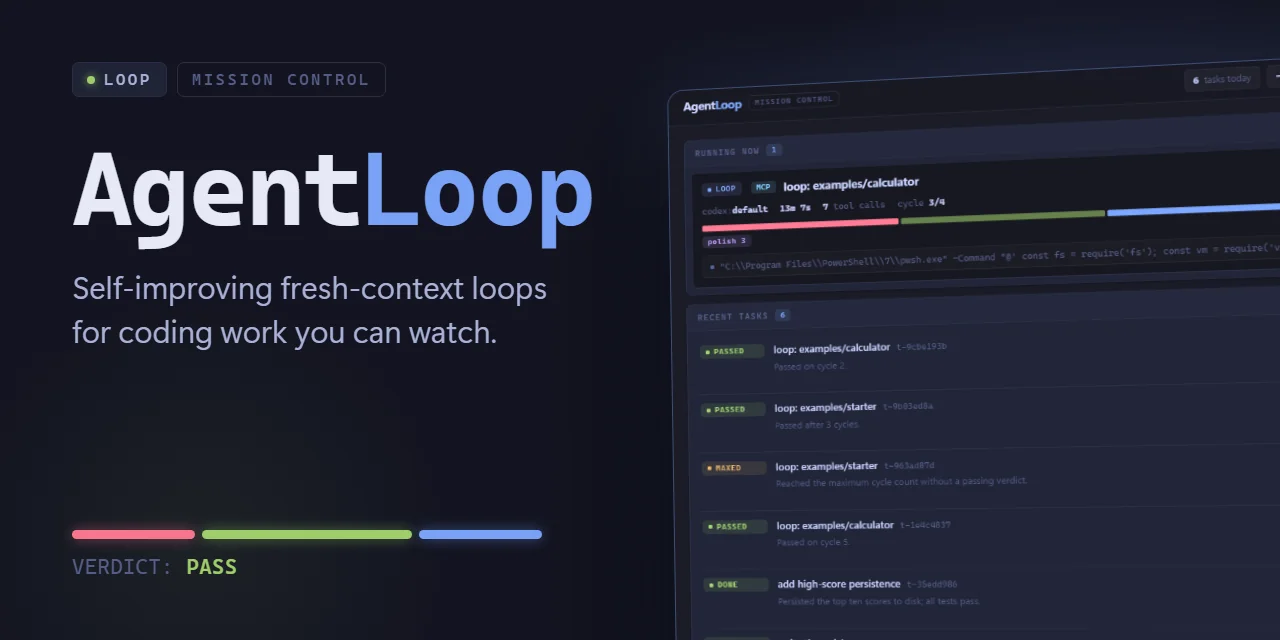
AgentLoop is a local-first daemon that closes the loop between planning and shipping code. You define the finish line once in ChatGPT and drop a rubric into GUIDELINES.md, then AgentLoop launches a fresh Codex worker per cycle to build against a bounded goal, followed by an independent critic in a separate fresh process that grades the result against your rubric. Failing cycles feed concrete fixes into the next worker so evidence accumulates in project files until the critic returns VERDICT: PASS. It runs where your code lives (macOS, Linux, or Windows with Node.js 18+, Git, and an authenticated Codex CLI), needs no hosted workspace or npm install, and exposes an MCP interface so you can check status from ChatGPT while it runs unattended. The engine boundary is pluggable, with Codex shipping first and more engines and research loops on the roadmap.
Screenshots
Key Features
Use Cases



Frequently asked questions about AgentLoop
What is AgentLoop?
AgentLoop is a powerful AI tool that transforms a single ChatGPT plan into an autonomous Codex worker, implementing independent-critic cycles. This process focuses on developing projects that adhere to your local rubric, ensuring that the final work meets designated standards before passing.
Key Points
- Autonomous Codex Worker: AgentLoop utilizes ChatGPT to function as a self-operating Codex worker.
- Independent-Critic Cycles: It employs cycles of critique and improvement for continuous enhancement.
- Local Rubric Adherence: The tool builds projects in line with predefined standards or rubrics.
Detailed Explanation
AgentLoop is designed to enhance productivity in coding and project development by leveraging AI capabilities. Here’s how it works:
-
Autonomous Codex Worker: By utilizing a single ChatGPT plan, AgentLoop operates as an independent Codex worker. This allows users to automate coding tasks without constant supervision, freeing up time for more complex problem-solving.
-
Independent-Critic Cycles: The tool employs a unique cycle of critique and construction. After generating a piece of code or content, AgentLoop reviews it against established criteria. If it doesn’t meet the standards, the system refines the work until it passes, ensuring high-quality output consistently.
-
Local Rubric Adherence: Users can set specific guidelines or rubrics that the output must adhere to. This localization ensures that the work produced is not only technically accurate but also contextually relevant, aligning with project goals.
Example Use Case: A developer looking to create a web application can use AgentLoop to generate code snippets. The tool will autonomously produce code, critique it, and revise it until the code meets the developer's local standards, making the process efficient and reliable.
Best Practices / Tips
- Define Clear Rubrics: To maximize AgentLoop’s effectiveness, set clear and detailed rubrics for evaluation. The more specific you are, the better the output will align with your expectations.
- Monitor Output Regularly: Even though AgentLoop operates autonomously, regular checks can help identify areas for improvement in the rubrics or the coding process.
- Iterate on Feedback: Use the independent-critic cycles as a learning tool. Analyze the critiques to enhance both your rubrics and your understanding of the coding processes involved.
Additional Resources
How does AgentLoop work?
AgentLoop operates by utilizing a fresh worker per cycle, an independent critic process, and a clearly defined rubric in Markdown. These features ensure efficient task execution, maintain high standards, and preserve project states across cycles, allowing for predictable and effective feature shipping and migration tasks.
Key Points
- Fresh Worker Per Cycle: Each build cycle starts with a new Codex worker, preventing stale states.
- Independent Critic Process: A separate process evaluates results against a predefined rubric.
- Clear Rubric in GUIDELINES.md: Standards are stored in Markdown for consistency across cycles.
Detailed Explanation
AgentLoop enhances productivity by implementing a systematic approach to task management and execution. Here’s how it works:
-
Fresh Worker Per Cycle: Each cycle generates a new Codex worker, ensuring that no stale memory or context is carried over from previous cycles. This helps maintain the quality and integrity of ongoing tasks.
-
Independent Critic Process: Each outcome is evaluated by a separate critic process. This additional layer of assessment guarantees that passing tests are not considered final, promoting continuous improvement and vigilance in the coding process.
-
Rubric in GUIDELINES.md: The definition of done is stored as plain Markdown in the project repository. This approach allows every cycle to reference the same standards, ensuring consistency and clarity in project expectations.
-
Evidence Carried in Files: All outputs from the workers, critic evaluations, and any necessary fixes are documented in project files. This architecture allows the next cycle to inherit the current state, making transitions smoother and more efficient.
-
Bounded Goal + Cycle Budget: Users can set a specific goal and budget for cycles using goal.md and cycle budget features. This prevents uncontrolled iterations and helps manage project timelines effectively.
-
Use Cases:
- Shipping a Bounded Feature: For instance, when adding a CSV export feature, AgentLoop can validate the UI, API, and regression suite, ensuring that all aspects meet the defined criteria while adhering to edge cases.
- Migration Work: During migrations, fresh workers apply changes step-by-step, with the critic verifying each one against the established rubric, ensuring that the migration is smooth and error-free.
- Hardening Pass: When issues are identified in the existing test suite, users can give AgentLoop a hardening goal to iteratively address defects, such as improper handling of malformed inputs.
Best Practices / Tips
- Define Clear Acceptance Criteria: Always set explicit standards in your GUIDELINES.md to ensure team alignment on project goals.
- Monitor Cycle Verdicts: Regularly check the outcomes of cycles and be ready to intervene if results deviate from expectations.
- Use the Dashboard Effectively: The AgentLoop dashboard provides insights into cycle performance; utilize it for real-time monitoring and adjustments.
Additional Resources
What are the main features of AgentLoop?
AgentLoop features a Fresh Worker Per Cycle, an Independent Critic Process, a Markdown-based Rubric in GUIDELINES.md, Evidence Carried in Files, and a Bounded Goal with Cycle Budget. These elements ensure efficient project management, maintain consistent quality, and allow for effective monitoring of long-term AI tasks.
Key Points
- Fresh Worker Per Cycle: Generates a new Codex worker for each build cycle.
- Independent Critic Process: A separate process evaluates results against predefined criteria.
- Rubric in GUIDELINES.md: Project standards documented in Markdown, ensuring consistency.
Detailed Explanation
AgentLoop is designed to enhance the efficiency and quality of AI-driven projects through its innovative features:
-
Fresh Worker Per Cycle: Each build cycle creates a new Codex worker, which prevents issues like memory drift and stale states. This means that every cycle starts with a clean slate, ensuring that the performance remains optimal without being affected by previous iterations.
-
Independent Critic Process: This feature involves a separate process that independently assesses every result based on a defined rubric. This dual-layer evaluation ensures that even successful tests are scrutinized, promoting continuous improvement and preventing complacency.
-
Rubric in GUIDELINES.md: The project's "definition of done" is stored as plain Markdown in the repository. By being accessible in every cycle, it ensures that quality standards are consistently applied, regardless of the changes in prompts or tasks.
-
Evidence Carried in Files: Output from workers, verdicts from critics, and any corrective actions are systematically documented in project files. This inheritance allows the next cycle to access the most relevant information, facilitating smoother transitions and decision-making based on previous results.
-
Bounded Goal + Cycle Budget: Each project can set specific goals and cycle budgets using goal.md. This feature prevents uncontrolled runs and ensures that even unattended cycles have a predictable endpoint, enhancing project management and resource allocation.
Best Practices / Tips
- Regularly Update the Rubric: Ensure that the guidelines in GUIDELINES.md are regularly reviewed and updated to reflect any changes in project requirements or standards.
- Monitor Cycle Budgets: Keep track of the cycle budgets to avoid exceeding resources, which can lead to inefficiencies.
- Utilize Evidence Effectively: Regularly analyze the evidence generated in project files to refine processes and inform future cycles.
- Encourage Feedback: Engage team members in reviewing the independent critic outputs to foster a culture of continuous learning and improvement.
Additional Resources
Who is AgentLoop for?
AgentLoop is designed for software developers, QA engineers, and product teams seeking to enhance their testing and migration processes. It streamlines feature shipping, automates migrations, and improves product robustness by identifying edge cases and defects, making it ideal for teams aiming for continuous integration and deployment.
Key Points
- Feature Shipping: Facilitates seamless deployment with CSV export capabilities.
- Automated Migration: Streamlines data migration with unattended processes.
- Continuous Improvement: Enhances product quality through iterative testing and defect identification.
Detailed Explanation
AgentLoop serves a diverse audience in software development, particularly those involved in quality assurance and product management. Here’s how it adds value:
-
Feature Shipping: AgentLoop simplifies the process of shipping bounded features by integrating a CSV export across the user interface, API, and regression suite. This functionality ensures that teams can easily share and analyze data, enhancing collaboration and transparency during the development lifecycle.
-
Automated Migration: With AgentLoop, teams can run unattended migrations where new workers apply changes autonomously. The built-in critic verifies each step against predefined rubrics, ensuring that data integrity is maintained. This is particularly useful for companies transitioning to new platforms or updating their existing systems without manual oversight.
-
Continuous Improvement: The tool allows for a hardening pass where users can set specific goals to identify defects that traditional tests may overlook, such as malformed input handling. By iterating on these defects, teams can ensure that their applications are robust and user-ready.
-
Product Polish Loop: Users can point AgentLoop at a polish goal with clear acceptance criteria, enabling the tool to converge towards a final verdict of "PASS." This ensures that the product not only functions correctly but also meets high-quality standards before release.
-
Unattended Overnight Runs: AgentLoop can initiate long-running processes overnight, allowing teams to monitor verdicts and make real-time decisions from the dashboard or via the MCP interface. This capability is crucial for ensuring that deployments occur smoothly without requiring constant human oversight.
Best Practices / Tips
- Define Clear Goals: Set specific acceptance criteria for features to maximize the effectiveness of AgentLoop.
- Monitor Regularly: Regularly check cycle verdicts, especially during unattended runs, to catch any anomalies early.
- Leverage Collaboration: Use CSV exports to facilitate discussions among team members and stakeholders, ensuring everyone is on the same page.
Additional Resources
How much does AgentLoop cost?
AgentLoop is completely free to use, making it an accessible option for individuals and businesses looking to streamline their workflow without incurring any costs. This no-cost model is ideal for users who seek efficient solutions without budget constraints.
Key Points
- Cost-Free Usage: AgentLoop does not charge users for its services.
- User-Friendly Features: The platform offers a variety of tools and features to enhance productivity.
- Ideal for All Users: Suitable for freelancers, small businesses, and larger enterprises.
Detailed Explanation
AgentLoop provides a robust suite of features without any associated costs, making it an attractive choice for users of all backgrounds. This platform is designed to facilitate project management, enhance team collaboration, and optimize workflow efficiency.
Features Overview
- Task Management: Users can create, assign, and track tasks seamlessly.
- Collaboration Tools: Integrated chat and file-sharing options allow teams to communicate effectively.
- Analytics Dashboard: Gain insights into project performance with built-in analytics tools.
Use Cases
- Freelancers: Manage multiple clients and projects without worrying about subscription fees.
- Small Businesses: Utilize AgentLoop to coordinate team efforts and track productivity efficiently.
- Large Enterprises: Implement the platform for team-wide communication and project oversight.
Best Practices / Tips
- Explore All Features: Familiarize yourself with all available tools to maximize your use of the platform.
- Regular Updates: Keep an eye on any updates or new features that may enhance your experience.
- Feedback Loop: Provide feedback to the development team to help improve the platform.
Additional Resources
By utilizing AgentLoop, you can take advantage of a powerful, cost-free tool that helps optimize your workflow, regardless of your professional level or industry.
How do I get started with AgentLoop?
To get started with AgentLoop, visit agentloop.tools to sign up for a free account. Once registered, you can explore its features, including AI-driven agent support and customizable workflows, to optimize your productivity and enhance your engagement strategies.
Key Points
- Easy Sign-Up: Registration is straightforward and free.
- Feature Exploration: Access a variety of tools to improve efficiency.
- User-Friendly Interface: Navigate the platform easily, even for beginners.
Detailed Explanation
Getting started with AgentLoop is simple. First, navigate to AgentLoop's official website. Click on the “Sign Up” button to create your account. You’ll need to provide basic information such as your name, email address, and a password. Once you complete the sign-up process, you’ll receive a confirmation email to verify your account.
After logging in, take some time to explore the dashboard. AgentLoop offers an intuitive user interface that allows you to easily access its powerful features, including:
- AI-Driven Support: Leverage AI tools designed to assist agents in handling inquiries more efficiently.
- Customizable Workflows: Tailor the workflow to suit your team's specific needs, ensuring tasks are streamlined effectively.
- Analytics and Reporting: Utilize built-in analytics to track performance and gather insights for continuous improvement.
For optimal use, consider scheduling a walkthrough or tutorial session available on the platform to familiarize yourself with its capabilities.
Best Practices / Tips
- Start with Tutorials: Utilize any available tutorials or guides to maximize your understanding of the platform.
- Explore Community Forums: Join AgentLoop's community forums or groups to share insights and ask questions.
- Customize Early: Take the time to set up your workflows and tools from the start for a smoother experience.
- Monitor Regularly: Regularly check the analytics dashboard to assess performance and adapt your strategies accordingly.
Additional Resources
- AgentLoop Official Documentation
- Getting Started with AgentLoop Video Guide
- AgentLoop Community Forums
By following these steps and tips, you’ll be well on your way to effectively utilizing AgentLoop to enhance your productivity and engagement strategies.
Explore more AI Ai Agents tools
Browse all Ai Agents tools →Browse by use case: Code Generation · Automation & Productivity
Compare AgentLoop: vs Playad · vs Concierge by Juniors AI · vs Scout by Fini · vs Ruflo