

Atlaso
AIShared AI memory layer that lets Claude Code, Cursor, Codex, Claude Desktop, OpenCode, and Antigravity read and write from one persistent memory.
Atlaso
Shared AI memory layer that lets Claude Code, Cursor, Codex, Claude Desktop, OpenCode, and Antigravity read and write from one persistent memory.
About Atlaso
Atlaso is an AI memory layer that gives every AI tool you use one persistent, shared memory instead of forcing each session to start from zero. Tell it once in Claude Code and the fact is instantly available in Cursor, Codex, Claude Desktop, OpenCode, and Antigravity — no manual re-explaining across tools. Memories are automatically captured, sorted into helpful / caution / open / warnings, weighed for confidence, and reconciled when they conflict, giving you a live dashboard of what your AI actually 'knows' about your work. Secrets are scrubbed before storage, memories sync to the cloud and web dashboard, and personal plus per-project scopes keep contexts separated. Atlaso installs from a single shell command on macOS, Linux, and Windows Terminal.
Screenshots
Key Features
Use Cases



Frequently asked questions about Atlaso
What is Atlaso?
Atlaso is a shared AI memory layer that enables various AI tools, including Claude Code, Cursor, Codex, Claude Desktop, OpenCode, and Antigravity, to read and write from a single, persistent memory. This integration enhances collaboration and efficiency across different AI applications.
Key Points
- Shared Memory Functionality: Atlaso allows multiple AI tools to access and modify a common memory layer.
- Enhanced Collaboration: Facilitates seamless interaction between different AI applications, improving workflow.
- Persistent Data Storage: Ensures that data remains available for future use, allowing for continuity in tasks and projects.
Detailed Explanation
Atlaso operates as a centralized memory repository that stores data accessible by various AI systems. By integrating tools like Claude Code and Codex, Atlaso allows these systems to share insights and learnings dynamically. For instance, a project initiated in Claude Code can be extended or modified using Antigravity without losing context, as all changes are saved in the shared memory layer.
Use Cases
- Software Development: Developers can use Claude Code for writing initial code, and then switch to Cursor for testing, all while retaining access to the same project context.
- Content Creation: Writers can draft articles in Claude Desktop and enhance them with insights from OpenCode, ensuring a cohesive narrative.
- Data Analysis: Analysts can gather insights using Codex and then share findings with Antigravity for further visualization, all accessing the same data set.
Best Practices / Tips
- Regularly Update Memory: Ensure that the persistent memory is frequently updated to reflect ongoing changes across tools.
- Utilize Version Control: Implement version control methods to track changes made by different AI applications using Atlaso.
- Leverage Integration Features: Take full advantage of Atlaso's integration capabilities to streamline processes and enhance productivity.
Additional Resources
How does Atlaso work?
Atlaso operates by utilizing Cross-Tool Shared Memory, enabling multiple AI tools to automatically share and recall information. It captures facts and preferences during your workflow, resolves conflicts in data, and maintains a dashboard for memory health, ensuring seamless collaboration among tools, especially for multi-tool developers.
Key Points
- Cross-Tool Shared Memory: Multiple AI tools access a unified memory source.
- Automatic Capture & Recall: Information is captured and recalled as needed.
- Conflict Resolution: Tracks repeated facts to manage contradictions.
Detailed Explanation
Atlaso enhances productivity for developers by integrating several advanced features:
-
Cross-Tool Shared Memory: Atlaso creates a singular, persistent memory that Claude Code, Cursor, Codex, Claude Desktop, OpenCode, and Antigravity utilize. This minimizes the need for developers to repeat themselves across different platforms, fostering a more efficient workflow.
-
Automatic Capture & Recall: As users work, Atlaso automatically captures critical facts, decisions, and personal preferences. For instance, if a developer notes that "the launch date has moved from January to March," this information is stored and can be recalled by any AI tool involved in the project, eliminating confusion.
-
Conflict Resolution: Atlaso continuously monitors for contradictions in the shared memory. If a developer updates a detail about the pricing model, Atlaso flags any outdated information, such as an "old pricing deck still in circulation," preventing tools from using incorrect data.
-
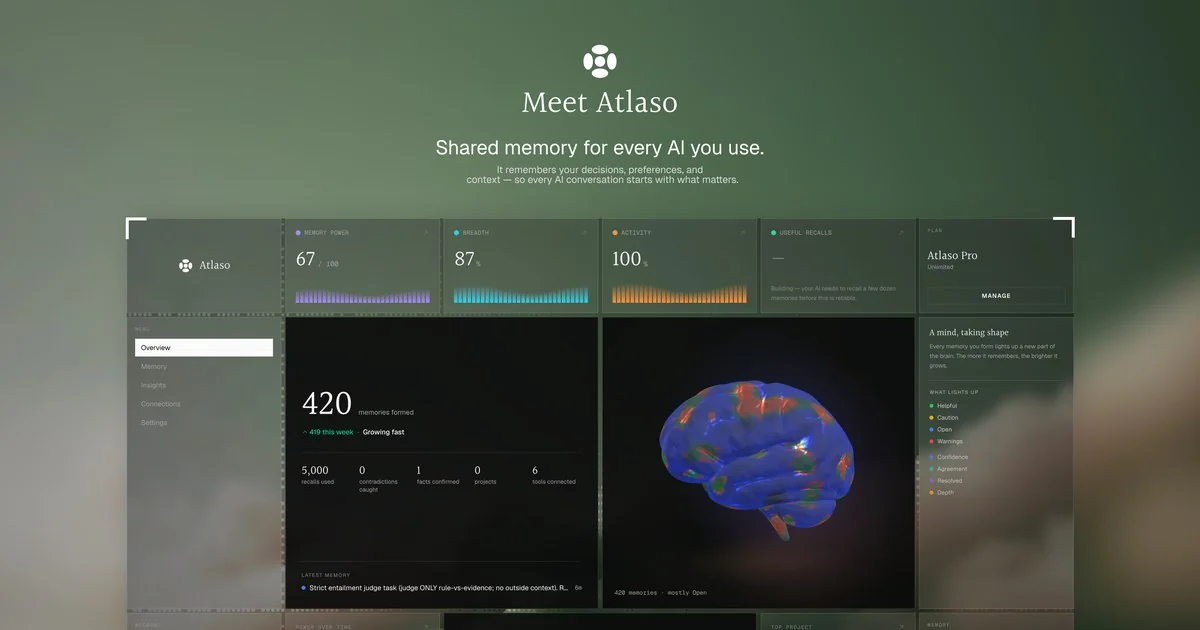
Memory Health Dashboard: This web dashboard provides a visual representation of memory efficacy, showing metrics such as memory power, breadth, and agreement percentages. Users can categorize memories into Helpful, Caution, Open, or Warnings, allowing for easy navigation and management.
-
Personal + Per-Project Scopes: Atlaso distinguishes between personal and project-specific memory scopes, ensuring that unrelated contexts do not interfere with one another. This is particularly useful for developers juggling multiple projects and contexts.
-
Onboarding New Tools: When a new AI tool is introduced to the workflow, it automatically inherits the memory and context established by other tools, streamlining the onboarding process.
Best Practices / Tips
- Regularly Update Memory: Regularly review and update the shared memory to ensure accuracy.
- Utilize the Dashboard: Frequently check the Memory Health Dashboard to understand the status of your shared memory and address any flagged issues.
- Set Clear Preferences: Clearly outline and set personal preferences in Atlaso to enhance collaboration and reduce misunderstandings across tools.
Additional Resources
What are the main features of Atlaso?
Atlasso features Cross-Tool Shared Memory, Automatic Capture & Recall, Conflict Resolution, a Memory Health Dashboard, and Personal + Per-Project Scopes. These capabilities enhance collaboration among various AI tools, streamline workflows, and maintain context, ensuring efficient project management and decision-making.
Key Points
- Cross-Tool Shared Memory: Facilitates seamless data sharing across AI tools.
- Automatic Capture & Recall: Records and retrieves essential information automatically.
- Conflict Resolution: Tracks discrepancies and agreements in data for clarity.
Detailed Explanation
Atlasso is designed to improve collaboration and efficiency in workflows by integrating multiple AI tools.
Cross-Tool Shared Memory
This feature allows tools like Claude Code, Cursor, Codex, Claude Desktop, OpenCode, and Antigravity to access a single, persistent memory. For example, if you make a decision in Claude Code, that information is immediately available to Cursor and Codex without needing manual input. This integration avoids redundancy and enhances productivity.
Automatic Capture & Recall
As you work, Atlaso automatically logs facts, decisions, and preferences. For instance, if you specify a project deadline during a session, Atlaso keeps that information handy for any tool that requires it later. This ensures that critical details are not lost and can be efficiently retrieved when needed.
Conflict Resolution
Atlasso intelligently tracks repeated facts and contradictions. If two tools reference varying data, Atlaso identifies what's settled and what remains in dispute. This feature is crucial for maintaining accuracy, especially when collaborating on complex projects that require consensus.
Memory Health Dashboard
The Memory Health Dashboard provides a web interface showcasing the overall memory status. It includes metrics such as memory power, breadth, and agreement percentage. Users can categorize memories into Helpful, Caution, Open, or Warnings, helping to maintain the integrity of the information across projects.
Personal + Per-Project Scopes
Atlasso allows users to maintain separate memory scopes for personal and project-specific contexts. This prevents unrelated information from mixing, ensuring that users can focus on the relevant details for each task.
Best Practices / Tips
- Utilize the Memory Health Dashboard: Regularly check the dashboard to ensure the accuracy and reliability of your captured memories.
- Leverage Personal and Project Scopes: Make use of separate scopes to enhance focus and reduce confusion, especially in multi-project environments.
- Stay Updated on Conflicts: Regularly review conflict resolutions to ensure all team members are aligned and informed.
Additional Resources
Who is Atlaso for?
Atlaso is designed for multi-tool developers, teams managing long-term projects, and individuals looking to streamline AI tool onboarding. It enhances collaboration by maintaining project context, personal preferences, and reducing misinformation across different AI tools, making it ideal for engineers, project managers, and businesses seeking efficiency.
Key Points
- Multi-Tool Developers: Ideal for engineers using various AI tools.
- Long-Running Projects: Keeps crucial project decisions visible across tools.
- Personal Preferences: Saves individual preferences for seamless integration.
Detailed Explanation
Atlaso serves a diverse audience, including:
-
Multi-Tool Developers: Engineers often switch between tools like Claude Code, Cursor, and Codex. Atlaso eliminates the need for repetitive context explanations, allowing developers to focus on coding rather than reiterating project details. By maintaining a shared context, teams can collaborate more effectively.
-
Long-Running Projects: For teams handling ongoing projects, Atlaso ensures that critical decisions (like moving a launch date from January to March) are consistently visible across all AI tools. This transparency helps maintain alignment and reduces the risk of miscommunication, particularly in larger teams.
-
Personal Preferences: Atlaso allows users to set one-time personal preferences—such as preferred meeting formats or deadlines—that can be retained across multiple tools. This feature enhances user experience and reduces the time spent reconfiguring settings when switching between platforms.
-
Onboarding New Tools: When integrating a new AI tool, Atlaso ensures it inherits all knowledge from existing tools. This means that new team members can hit the ground running without needing to relearn past decisions and preferences, significantly speeding up the onboarding process.
-
Reducing Hallucinated Facts: Atlaso helps track contradictions and outdated facts (like old pricing documents still circulating), preventing misuse of incorrect information in AI outputs. This is crucial for maintaining accuracy in decision-making and communications.
Best Practices / Tips
- Consistency is Key: Regularly update project decisions in Atlaso to ensure all tools reflect the most current information.
- Leverage Personal Preferences: Take advantage of the personal preferences feature to customize your experience across tools.
- Educate Your Team: Train your team on how to use Atlaso effectively, emphasizing the importance of maintaining updated and accurate project contexts.
Additional Resources
How much does Atlaso cost?
Atlaso offers a free tier with basic functionalities, while its paid plans start at $15 per month, providing advanced features and enhanced support. Pricing may vary based on the selected plan and additional services, making it suitable for both individual users and teams.
Key Points
- Free Tier: Access basic features without any cost.
- Paid Plans: Start at $15 per month for advanced functionalities.
- Flexible Pricing: Options available for individuals and teams.
Detailed Explanation
Atlaso provides users with a free tier, which includes essential tools for basic project management, team collaboration, and reporting. This is ideal for individuals or small teams needing fundamental features without financial commitment.
For users seeking more advanced functionalities, Atlaso's paid plans begin at $15 per month. These plans include additional capabilities such as enhanced analytics, priority customer support, and integrations with other productivity tools. Depending on the features you select, pricing can vary, with options available for larger teams that may require more comprehensive solutions.
For instance, a team of five might choose a plan that offers collaborative project tracking and resource management, making it easier to stay organized and productive. If you are an individual freelancer, the free version may be sufficient for managing smaller projects.
Best Practices / Tips
- Evaluate Your Needs: Start with the free tier to assess whether Atlaso meets your project management needs before upgrading.
- Consider Team Size: If you're part of a growing team, consider a paid plan to leverage collaboration features that enhance productivity.
- Utilize Free Trials: Take advantage of any trial periods for paid plans to experience advanced features firsthand before making a financial commitment.
Additional Resources
- Atlaso Pricing Page - Check the latest pricing and plans.
- Atlaso Features Overview - Explore all features available in both free and paid versions.
- User Guides - Access comprehensive guides to help you navigate Atlaso effectively.
How do I get started with Atlaso?
To get started with Atlaso, visit https://www.atlaso.ai/ to create your account. Once signed up, you can explore its features, tutorials, and resources to maximize your use of this AI-driven platform for data analysis and visualization.
Key Points
- User-Friendly Signup: Easily create an account on Atlaso's website.
- Explore Features: Access various tools for data analysis and visualization.
- Educational Resources: Utilize tutorials and guides for effective use.
Detailed Explanation
Atlaso is an AI-powered platform designed to simplify data analysis and visualization. To begin, navigate to Atlaso's official website and click on the "Sign Up" button. You’ll need to provide basic information such as your name, email address, and a password.
Step-by-Step Guide:
- Create an Account: Fill out the registration form and verify your email to activate your account.
- Dashboard Overview: After logging in, familiarize yourself with the dashboard where you can upload datasets, create visualizations, and access analytical tools.
- Tutorials and Demos: Atlaso offers a variety of tutorials that guide you through the functionalities of the platform. Check the "Help" or "Resources" section for video tutorials and step-by-step guides tailored for beginners and advanced users alike.
- Community Engagement: Join the Atlaso community by participating in forums or webinars to connect with other users and share insights.
Best Practices / Tips
- Experiment with Datasets: Upload sample datasets to practice using different features without the pressure of real data.
- Utilize Templates: Take advantage of pre-built templates for common analysis tasks to save time and get started quickly.
- Stay Updated: Regularly check for updates or new features in Atlaso, as the platform frequently enhances its tools based on user feedback.
Additional Resources
- Atlaso Official Documentation: Comprehensive guides and FAQs.
- Atlaso YouTube Channel: Video tutorials and user experiences.
- Community Forum: Engage with other users for tips and troubleshooting.
Explore more AI Ai Tools tools
Browse all Ai Tools tools →Browse by use case: Chatbots & Assistants
Compare Atlaso: vs CleanSlop · vs Kalender Sync · vs UseIt Studio · vs Woven Video