

Assistly
AIA live meeting assistant for Mac and Windows that reads call audio locally and shows guidance in an overlay excluded from screen shares.
Assistly
A live meeting assistant for Mac and Windows that reads call audio locally and shows guidance in an overlay excluded from screen shares.
About Assistly
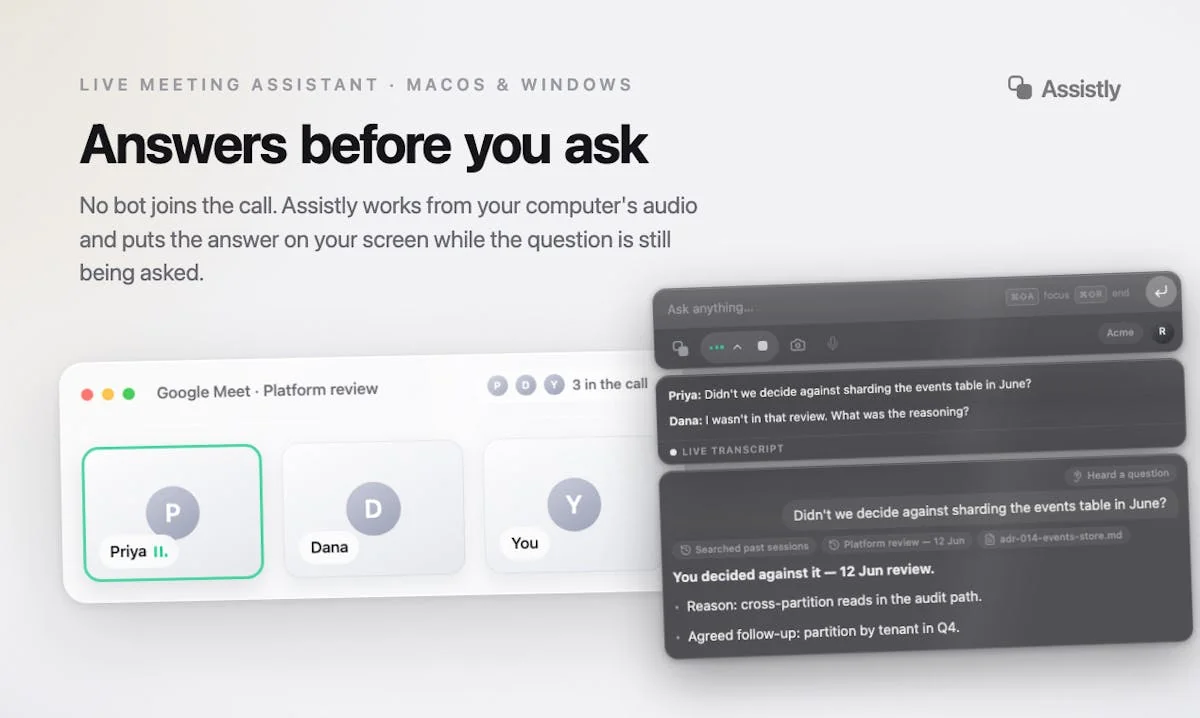
Assistly is a desktop meeting assistant that helps during the call rather than only summarising it afterwards. Instead of sending a notetaker bot into the meeting, it captures the computer's own system audio, so nothing joins the participant list and there is no plugin or calendar integration to wire up — which is why it works with Zoom, Google Meet, Teams, Webex, Slack huddles and ordinary phone calls alike. It transcribes both your microphone and the call audio, tracks who said what across multiple speakers, auto-detects dozens of languages, and streams talking points into a floating overlay the moment a question lands, with no hotkey needed. That overlay is excluded from screen capture at the OS level, so it never appears in a share or a recording. Assistly connects to Google Calendar, Notion, Linear or any MCP server to ground its guidance in your real documents, and exposes your meeting history back through MCP so Claude, ChatGPT or Cursor can query past calls. When the call ends, a summary with owned action items is already written and filed to the right project.
Screenshots
Key Features
Use Cases



Frequently asked questions about Assistly
What is Assistly?
A live meeting assistant for Mac and Windows that reads call audio locally and shows guidance in an overlay excluded from screen shares.
How does Assistly work?
Assistly works by combining Bot-Free System Audio Capture: Works from your computer's audio rather than joining the meeting, so nothing appears in the participant list and there is nothing to integrate with the call app., Screen-Capture-Excluded Overlay: The assistant window is excluded from screen capture at the OS level, so it stays visible to you and invisible in shares and recordings., Auto-Assist Without Prompting: Detects when a question lands or when you think out loud and streams structured talking points into your thread automatically, with no hotkey and no break in eye contact., Multi-Speaker Language Tracking: Separates your voice from other participants and follows who said what across dozens of auto-detected languages, even when the call switches language mid-sentence., Two-Way MCP Context: Pulls context from Google Calendar, Notion, Linear or any MCP server during the call, and exposes your meeting history back over MCP so Claude, ChatGPT or Cursor can query it later. to help users with Live Sales Calls: Surfacing objection handling and product detail the instant a prospect asks, without breaking eye contact to search a doc., Client Account Reviews: Recalling what was committed to a specific client in a previous session, with the source call cited, while the review is still running., Non-Native Language Meetings: Following a call that switches language mid-sentence and receiving guidance in clear English., Customer Success Handoffs: Leaving every call with a written summary and assigned action items instead of reconstructing notes afterwards., Meetings Where Bots Are Unwelcome: Getting live assistance on calls with clients or legal teams who object to a recording bot joining the room..
What are the main features of Assistly?
Key features include Bot-Free System Audio Capture: Works from your computer's audio rather than joining the meeting, so nothing appears in the participant list and there is nothing to integrate with the call app., Screen-Capture-Excluded Overlay: The assistant window is excluded from screen capture at the OS level, so it stays visible to you and invisible in shares and recordings., Auto-Assist Without Prompting: Detects when a question lands or when you think out loud and streams structured talking points into your thread automatically, with no hotkey and no break in eye contact., Multi-Speaker Language Tracking: Separates your voice from other participants and follows who said what across dozens of auto-detected languages, even when the call switches language mid-sentence., Two-Way MCP Context: Pulls context from Google Calendar, Notion, Linear or any MCP server during the call, and exposes your meeting history back over MCP so Claude, ChatGPT or Cursor can query it later..
Who is Assistly for?
Assistly is useful for anyone interested in Live Sales Calls: Surfacing objection handling and product detail the instant a prospect asks, without breaking eye contact to search a doc., Client Account Reviews: Recalling what was committed to a specific client in a previous session, with the source call cited, while the review is still running., Non-Native Language Meetings: Following a call that switches language mid-sentence and receiving guidance in clear English., Customer Success Handoffs: Leaving every call with a written summary and assigned action items instead of reconstructing notes afterwards., Meetings Where Bots Are Unwelcome: Getting live assistance on calls with clients or legal teams who object to a recording bot joining the room..
How much does Assistly cost?
Assistly offers a free tier with paid plans for advanced features.
How do I get started with Assistly?
Visit https://tryassistly.com/ to sign up and explore Assistly.
Explore more AI Ai Tools tools
Browse all Ai Tools tools →Compare Assistly: vs CleanSlop · vs Kalender Sync · vs UseIt Studio · vs Woven Video