
Replay QA
AIAutonomous QA agent for AI-built web apps — connect a GitHub repo or drop in a URL and get real bugs with root cause and a fix.
Replay QA
Autonomous QA agent for AI-built web apps — connect a GitHub repo or drop in a URL and get real bugs with root cause and a fix.
About Replay QA
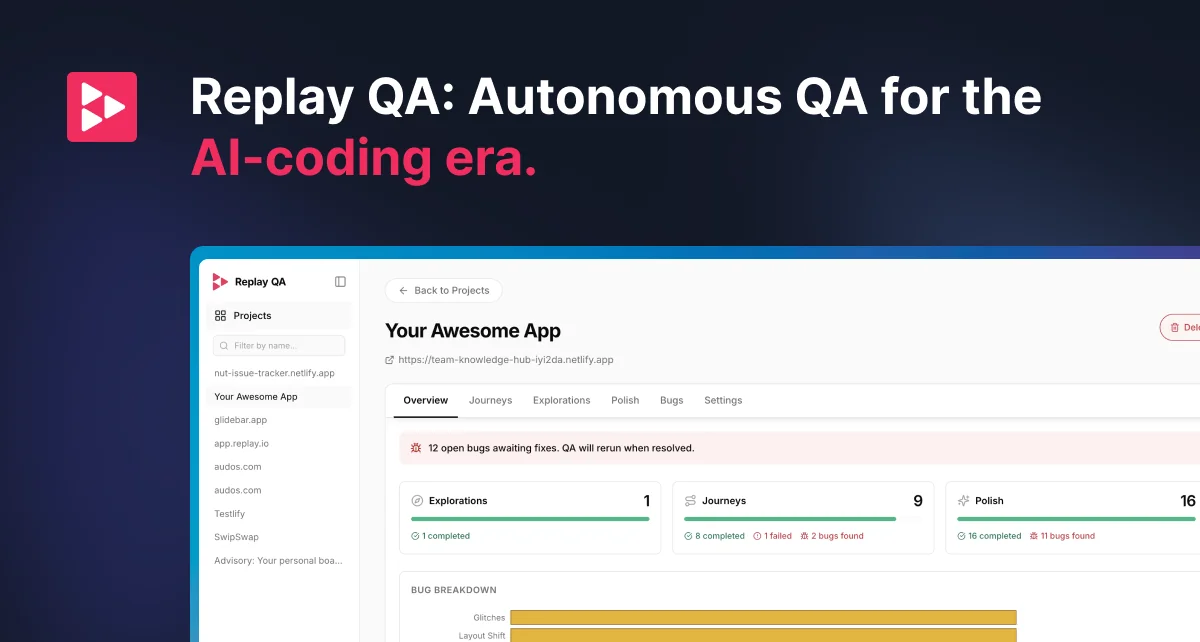
Replay QA is an autonomous QA layer for the AI-coded era, where solo founders and small teams can ship full apps in a day and traditional test suites can't keep up. Point it at any live URL or connect a GitHub repo and Replay QA explores the app on its own, discovers user journeys, writes its own Playwright tests, records every session with the same time-travel debugger used by Vercel, Glide, and Pantheon, and files structured bug reports with a root-cause explanation and a suggested fix. In continuous mode it acts as a quality gate that runs on every PR or main-branch push and posts findings straight to the PR; in one-off mode it produces a bug report in minutes for whatever you just shipped, including localhost via a reverse proxy. An API is also available so AI coding platforms can embed Replay QA as a quality gate for every generated app.
Screenshots
Key Features
Use Cases



Frequently asked questions about Replay QA
What is Replay QA?
Replay QA is an autonomous quality assurance agent designed for AI-built web applications. By connecting a GitHub repository or simply entering a URL, users can identify real bugs along with their root causes and suggested fixes, streamlining the debugging process and enhancing application reliability.
Key Points
- Autonomous Operation: Functions independently to identify bugs.
- Integration Options: Connects easily with GitHub or accepts URLs.
- Root Cause Analysis: Provides insights into the underlying issues of bugs.
Detailed Explanation
Replay QA leverages AI technology to automate the quality assurance process for web applications, particularly those built with artificial intelligence. This tool is beneficial for developers and QA teams looking to optimize their workflows.
How it Works:
- Integration: Users can connect their GitHub repositories or input direct URLs of their web applications. This flexibility allows for easy setup and immediate testing.
- Bug Detection: Once integrated, Replay QA runs a series of tests to detect bugs. It simulates user interactions to uncover issues that may not be evident through manual testing.
- Root Cause Identification: Unlike traditional testing tools, Replay QA doesn’t just highlight bugs; it analyzes the source of the problem, aiding developers in understanding why the bug occurred.
- Suggested Fixes: After diagnosing the issues, Replay QA offers potential solutions, making it easier for developers to implement fixes quickly.
Use Cases:
- Web Application Development: Ideal for developers building AI-driven web apps who want to ensure functionality and reliability.
- Continuous Integration/Continuous Deployment (CI/CD): Can be integrated into CI/CD pipelines to automate testing and improve deployment cycles.
- Team Collaboration: Facilitates collaboration between development and QA teams by providing clear insights into bugs and fixes.
Best Practices / Tips
- Regular Testing: Incorporate Replay QA into your development cycle to catch bugs early.
- Review Fixes: Always review suggested fixes to ensure they align with your coding standards and do not introduce new issues.
- Monitor Performance: Use Replay QA analytics to track the performance of your application over time, adjusting your testing strategies as needed.
Additional Resources
How does Replay QA work?
Replay QA automates quality assurance by utilizing autonomous URL testing, continuous integration with GitHub, and detailed bug reporting directly on pull requests. This system captures session recordings for easy debugging and supports local development testing, making it ideal for teams and solo founders shipping AI-generated web applications.
Key Points
- Autonomous URL Testing: Automatically generates tests and bug reports.
- GitHub Continuous Mode: Integrates with repositories for ongoing quality checks.
- Detailed Bug Reports: Provides root causes and solutions directly on pull requests.
Detailed Explanation
Replay QA revolutionizes the testing landscape for web applications by streamlining the quality assurance process. Here's how it works:
-
Autonomous URL Testing: Users can paste any web-app URL into Replay QA. The tool autonomously navigates through the application, identifying potential issues. It then generates Playwright tests and files comprehensive bug reports in minutes, eliminating the need for manual setup. This feature is especially beneficial for solo founders using AI-generated web apps, as they receive detailed reports without writing tests.
-
GitHub Continuous Mode: Replay QA connects seamlessly to GitHub repositories, functioning as a persistent quality gate. Every pull request (PR) or main-branch update triggers the testing process, ensuring that no bugs slip through unnoticed. By automating this quality check, teams can focus more on development rather than manual testing.
-
PR-native Bug Reports: When a bug is detected, Replay QA posts a detailed report directly to the corresponding PR. This includes the root cause and suggested fixes, allowing developers to address issues swiftly. This immediate feedback loop enhances collaboration between coding agents and human developers.
-
Session Recording & Time-Travel Debugging: Every test run is captured with Replay's recording engine, which is used by prominent platforms like Vercel and Pantheon. This feature enables developers to reproduce failures easily, making debugging straightforward and efficient.
-
Localhost via Reverse Proxy: Developers can test against a local development server without needing to deploy their applications. This is particularly useful for internal builders and agencies, allowing them to ensure code quality before going live.
Best Practices / Tips
- Leverage the GitHub Integration: Take full advantage of the GitHub Continuous Mode by configuring it to run on all branches, ensuring comprehensive test coverage.
- Utilize Session Recordings: Regularly review session recordings to understand failure patterns better and improve your app's stability.
- Monitor Bug Reports: Act on PR-native bug reports promptly to maintain workflow efficiency and prevent bottlenecks in development.
Additional Resources
What are the main features of Replay QA?
Replay QA features autonomous URL testing, GitHub continuous mode, PR-native bug reports, session recording with time-travel debugging, and localhost testing via reverse proxy. These capabilities streamline testing processes, enhance collaboration, and simplify debugging for developers and QA teams, ensuring high-quality web applications.
Key Points
- Autonomous URL Testing: Effortlessly tests any web app.
- GitHub Continuous Mode: Integrates seamlessly with GitHub for continuous quality checks.
- PR-native Bug Reports: Provides immediate feedback on pull requests.
Detailed Explanation
Replay QA revolutionizes the testing landscape with its innovative features:
-
Autonomous URL Testing: Users can simply paste a URL of any web application, and Replay QA automatically navigates through the app. It generates Playwright tests and files bug reports in mere minutes, eliminating the need for manual setup. This feature is particularly beneficial for teams looking to accelerate their testing cycles without sacrificing quality.
-
GitHub Continuous Mode: By connecting to a GitHub repository, Replay QA runs automated tests on every pull request or main branch update. This mode acts as a persistent quality gate, ensuring that every piece of code meets the set quality standards before being merged. Developers no longer need to write extensive test suites or configure complex pipelines, making this feature a major time-saver.
-
PR-native Bug Reports: When bugs are detected, Replay QA posts detailed reports directly on the pull request. These reports include root cause analysis and suggested fixes, allowing developers to address issues promptly. This immediate feedback loop enhances collaboration between coding agents and testers, fostering a more agile development process.
-
Session Recording & Time-Travel Debugging: Every test run is captured with Replay's advanced recording engine, which is utilized by leading companies like Vercel and Pantheon. This feature allows teams to reproduce failures effortlessly by simply clicking on the recorded sessions, significantly reducing the time spent on diagnosing issues.
-
Localhost via Reverse Proxy: Replay QA enables testing against local development servers without the need for deployment. This is particularly advantageous for internal builders and agencies that require quick testing iterations without impacting live environments.
Best Practices / Tips
- Leverage Continuous Integration: Integrate Replay QA with your CI/CD pipeline to automate testing and improve deployment efficiency.
- Utilize Session Recordings: Regularly review session recordings to identify recurring issues and improve your application’s stability.
- Encourage Team Collaboration: Share PR-native bug reports with your team to enhance communication and expedite the resolution of issues.
Additional Resources
Who is Replay QA for?
Replay QA is designed for various users in software development and quality assurance. It's ideal for solo founders creating AI-generated web apps, engineering teams needing PR quality gates, ops teams managing internal tools, and companies utilizing coding platforms that require continuous quality checks.
Key Points
- Solo Founders: Efficient bug reporting without manual testing.
- Engineering Teams: Automated PR quality gates for better code validation.
- Ops Teams: Enhanced coverage for internal tools lacking testing.
Detailed Explanation
Replay QA serves multiple user bases by addressing specific needs in software development and quality assurance:
-
Solo Founders: For entrepreneurs creating AI-generated web applications, Replay QA offers a streamlined solution by generating detailed bug reports automatically, eliminating the need for writing tests. This allows solo founders to focus on building and deploying their projects rapidly.
-
Engineering Teams: Small engineering teams can integrate Replay QA as a GitHub application to enforce a quality gate on every pull request (PR). This feature autonomously explores the code changes and identifies issues, automatically posting fixes back to the PR. This not only speeds up the review process but also enhances code quality.
-
Ops Teams: Operational teams can incorporate Replay QA into their workflow to add essential testing coverage to internal tools. These tools often go live without adequate testing, leading to potential bugs. Replay QA mitigates this risk by ensuring that every deployment is backed by comprehensive QA.
-
Playwright/Cypress Debugging: Replay QA can also enhance existing Continuous Integration (CI) suites by transforming flaky test failures into clear recordings with diagnosed root causes. This makes troubleshooting and fixing issues more efficient and reduces downtime.
-
AI Coding Platforms: Companies developing agentic coding products can embed the Replay QA API as a real-time quality gate for their generated applications. This ensures that applications meet quality standards continuously, reducing the likelihood of bugs in production.
Best Practices / Tips
- Integrate Early: Incorporate Replay QA early in the development process to catch bugs before they escalate.
- Monitor Performance: Regularly review the bug reports and feedback provided by Replay QA to identify patterns and improve coding practices.
- Train Teams: Provide training sessions for team members on how to utilize Replay QA effectively for enhanced collaboration and efficiency.
- Use in Conjunction: Combine Replay QA with other testing frameworks like Playwright or Cypress for comprehensive coverage.
Additional Resources
How much does Replay QA cost?
Replay QA offers a free tier for users to test its features, while paid plans start at approximately $49 per month for advanced functionalities. Pricing can vary based on user requirements, including team size and specific features needed.
Key Points
- Replay QA provides a free tier for basic use.
- Paid plans begin at around $49 per month.
- Pricing varies based on features and user needs.
Detailed Explanation
Replay QA is a quality assurance tool designed to streamline testing processes for software development. The free tier allows users to access essential features, making it an excellent option for individuals or small teams looking to evaluate its capabilities without initial investment.
For teams requiring advanced features, Replay QA offers paid plans that begin at approximately $49 per month. These plans include enhanced functionalities such as comprehensive reporting, team collaboration tools, and integration with other software development tools like Jira and Slack.
Choosing the right plan depends on your team's size and specific needs. For instance, larger teams may benefit from customized plans that include additional users, while smaller teams might find the free tier sufficient for their initial testing requirements.
Best Practices / Tips
- Start with the Free Tier: If you're new to Replay QA, begin with the free tier to familiarize yourself with the platform's capabilities before committing to a paid plan.
- Assess Your Needs: Evaluate your team's size and specific testing needs to determine which paid plan offers the best value.
- Monitor Usage: Keep track of how many features you are actually using during your free trial. This can help you decide if you need to upgrade to a paid plan.
Additional Resources
How do I get started with Replay QA?
To get started with Replay QA, visit Replay.io to sign up for an account. Once registered, you can explore its features, including recording and analyzing user interactions to enhance your app's quality assurance processes.
Key Points
- Sign Up: Create an account on Replay.io.
- Explore Features: Familiarize yourself with tools for user interaction analysis.
- Integration: Learn how to integrate Replay QA with your existing workflows.
Detailed Explanation
Replay QA is a powerful tool designed for developers and QA teams to improve application quality through detailed user interaction recordings. Here’s how to get started:
-
Visit Replay.io: Navigate to the official website and click on the “Sign Up” button. You can choose a free trial or select a subscription plan that fits your needs.
-
Create Your Account: Fill out the required information, including your name, email, and a secure password. Confirm your email address to activate your account.
-
Explore the Dashboard: After logging in, take a tour of the dashboard. Familiarize yourself with features like session recordings, user playback, and analytics.
-
Recording Sessions: Start recording user sessions to gather insights on user behavior. This feature helps identify usability issues and bugs that may not be evident during standard testing.
-
Analyzing Data: Use the analytics tools to review recorded sessions. Look for patterns in user interactions, and focus on areas with high drop-off rates.
-
Collaboration Tools: Replay QA allows you to share recordings with your team. Utilize this feature for effective collaboration and troubleshooting.
Best Practices / Tips
- Utilize Free Trials: Take advantage of free trials to experiment with different features before committing to a paid plan.
- Set Clear Goals: Define what you want to achieve with Replay QA, such as improving user retention or reducing bugs.
- Regular Reviews: Schedule regular sessions to analyze user recordings and iterate on your product based on findings.
- Integrate with Existing Tools: Look into how Replay QA can complement your current development tools for a seamless workflow.
Additional Resources
- Replay QA Documentation: Comprehensive guides and tutorials.
- Support Center: Access technical support and FAQs.
- Community Forum: Join discussions with other users for tips and best practices.
Explore more AI Ai Tools tools
Browse all Ai Tools tools →Browse by use case: Automation & Productivity
Compare Replay QA: vs Agnost AI · vs Assistly · vs Memoria · vs nodeterm