
iOrchestra Vibe Engineering
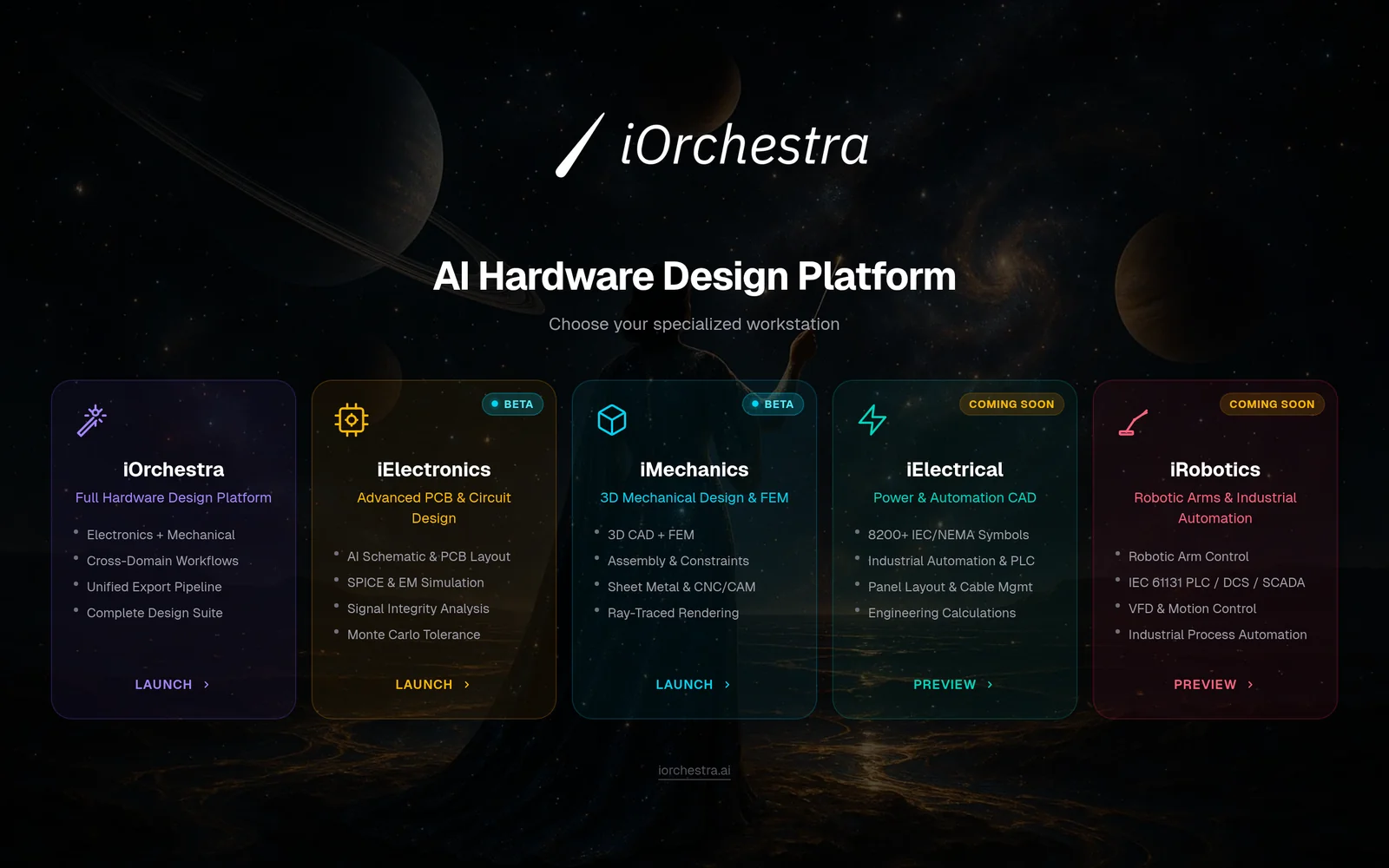
AIDesign hardware from text or voice prompts to production-ready mechanical CAD, PCB layouts, schematics, and manufacturing files.
iOrchestra Vibe Engineering
Design hardware from text or voice prompts to production-ready mechanical CAD, PCB layouts, schematics, and manufacturing files.
About iOrchestra Vibe Engineering
Vibe Engineering by iOrchestra converts text or voice prompts into production-ready hardware design artifacts, including mechanical CAD, PCB layouts, schematics, and manufacturing files (e.g., Gerber). The platform streamlines the end-to-end hardware design workflow so teams can go from concept to manufacturable outputs faster, reducing manual layout and drafting work. Subscription tiers provide differing monthly quotas (PLUS: 100 designs/month; MAX: unlimited) and include a 7-day free trial to evaluate automated design capabilities.
Screenshots
Key Features
Use Cases



Frequently asked questions about iOrchestra Vibe Engineering
What is iOrchestra Vibe Engineering?
iOrchestra Vibe Engineering is a cutting-edge platform that enables users to design real hardware products using AI. By converting text or voice prompts into production-ready mechanical CAD, PCB layouts, schematics, and manufacturing files, it streamlines the product development process. Subscription options include iOrchestra PLUS at $50/month or iOrchestra MAX at $150/month, both offering a 7-day free trial.
Key Points
- AI-Driven Design: Leverage artificial intelligence for hardware product creation.
- Subscription Plans: Choose between iOrchestra PLUS and MAX for different levels of access.
- Free Trial: Both plans come with a 7-day free trial to explore features.
Detailed Explanation
iOrchestra Vibe Engineering revolutionizes the hardware design process by utilizing AI to translate user inputs—either through text or voice—into viable engineering outputs. This includes:
- Mechanical CAD: Users can create detailed 3D models of their products using intuitive design tools.
- PCB Layouts and Schematics: The platform automates the design of printed circuit boards, ensuring that all electrical components are correctly placed and connected.
- Manufacturing Files: After design completion, iOrchestra generates all necessary files for manufacturing, significantly reducing time and errors in the prototyping phase.
For instance, an entrepreneur with an idea for a smart device can simply describe it to the platform. iOrchestra will generate a complete set of engineering files, ready for prototyping and production.
Best Practices / Tips
- Start with Clear Prompts: The quality of the output is directly related to the clarity of your initial input. Be specific about your hardware requirements.
- Utilize the Free Trial: Take full advantage of the 7-day free trial to explore features and assess if the tool meets your design needs.
- Iterate on Designs: Use the platform's capabilities to refine your designs iteratively based on feedback or testing results.
Additional Resources
How does iOrchestra Vibe Engineering work?
iOrchestra Vibe Engineering works by integrating advanced AI capabilities to streamline users' daily workflows. By automating routine tasks and enhancing decision-making processes, it empowers users to optimize their productivity and focus on strategic objectives.
Key Points
- AI Integration: Combines multiple AI technologies for efficiency.
- Workflow Automation: Automates repetitive tasks to save time.
- Enhanced Decision-Making: Provides data-driven insights for better outcomes.
Detailed Explanation
iOrchestra Vibe Engineering leverages state-of-the-art artificial intelligence to enhance productivity in various business processes. It incorporates machine learning, natural language processing, and data analytics to create a seamless workflow experience.
For example, a marketing team can use iOrchestra to analyze consumer behavior data and tailor campaigns accordingly. The AI-driven insights help identify trends, enabling the team to make informed decisions quickly. Additionally, iOrchestra automates mundane tasks such as report generation and data entry, allowing users to focus on high-value activities.
Moreover, iOrchestra features customizable workflows, which means users can adapt the tool to meet their specific needs. This flexibility is crucial for businesses in different sectors, from finance to healthcare, as it allows for the integration of industry-specific data and requirements.
Best Practices / Tips
- Customize Workflows: Tailor the iOrchestra tool to fit your specific business needs for maximum efficiency.
- Regular Training: Ensure your team is well-trained to utilize all features of iOrchestra, maximizing the tool's potential.
- Monitor Performance: Regularly assess the performance of automated tasks to identify areas for improvement and optimization.
Additional Resources
What are the main features of iOrchestra Vibe Engineering?
iOrchestra Vibe Engineering features advanced AI capabilities, user-friendly interfaces, and customizable solutions designed to optimize workflow efficiency in various industries. Key offerings include data analytics, real-time monitoring, and seamless integration with existing systems, making it a powerful tool for enhancing productivity and decision-making.
Key Points
- Advanced AI Capabilities: iOrchestra leverages machine learning for predictive analytics.
- User-Friendly Interface: Designed for easy navigation and accessibility.
- Customizable Solutions: Tailored features to meet specific industry needs.
Detailed Explanation
iOrchestra Vibe Engineering stands out in the realm of AI tools with its robust features that cater to diverse business environments.
-
Advanced AI Capabilities: The platform harnesses machine learning algorithms to analyze large datasets, providing businesses with actionable insights. For example, companies can use these capabilities to forecast sales trends, optimize resource allocation, and enhance customer service through predictive models.
-
User-Friendly Interface: One of the standout features of iOrchestra is its intuitive interface. Users can navigate seamlessly through the dashboard, access data visualizations, and generate reports without extensive training. This ease of use is vital for teams that need to quickly adapt to new technologies.
-
Customizable Solutions: iOrchestra offers tailored solutions that can be adjusted to suit various industries, from manufacturing to healthcare. These customizations allow organizations to implement specific features that align with their unique operational requirements, enhancing overall productivity.
Best Practices / Tips
- Maximize AI Utilization: Regularly update your data input to ensure the AI models are working with the most current information, enhancing accuracy.
- Training and Onboarding: Invest time in training staff to fully utilize the platform’s features, ensuring that everyone can benefit from its capabilities.
- Monitor Performance: Use the real-time monitoring tools to track KPIs and adjust strategies accordingly, ensuring that your organization remains agile and responsive.
Additional Resources
Who is iOrchestra Vibe Engineering for?
iOrchestra Vibe Engineering is designed for individuals and businesses looking to streamline their AI workflows. It caters to professionals in various sectors, including marketing, data analysis, and software development, who want to harness AI technology for improved productivity and efficiency in their daily tasks.
Key Points
- Target Audience: Professionals in diverse fields such as marketing, analytics, and IT.
- Functionality: Enhances day-to-day AI workflows by automating repetitive tasks.
- Benefits: Increases efficiency, reduces errors, and saves time in project execution.
Detailed Explanation
iOrchestra Vibe Engineering is particularly beneficial for anyone engaged with artificial intelligence and machine learning, including:
-
Marketing Professionals: They can leverage iOrchestra to automate data analysis, customer segmentation, and campaign optimization. For instance, using AI algorithms, marketers can analyze consumer behavior patterns, enabling tailored marketing strategies that drive engagement and conversion rates.
-
Data Analysts: Data scientists and analysts can utilize iOrchestra to process large datasets efficiently. By automating data cleaning and analysis, they can focus on deriving insights rather than getting bogged down in manual data manipulation. For example, they can set up workflows that automatically update reports as new data comes in.
-
Software Developers: Developers can integrate iOrchestra into their development cycles to enhance testing and deployment processes. By automating routine tasks such as code reviews or bug tracking, developers can allocate more time to innovation and feature development.
Overall, iOrchestra Vibe Engineering helps users to minimize manual intervention in their workflows, thereby increasing efficiency and accuracy across various projects.
Best Practices / Tips
- Start Small: Begin with automating simple tasks before scaling to more complex workflows. This gradual approach helps in understanding the tool's capabilities.
- Regular Updates: Keep the tool updated to benefit from the latest features and optimizations.
- Training Resources: Utilize available tutorials and training materials to better understand the platform’s functionalities.
- Feedback Loop: Establish a system to gather user feedback on workflow efficiency to continuously refine processes.
Additional Resources
How much does iOrchestra Vibe Engineering cost?
iOrchestra Vibe Engineering pricing varies based on the specific services and packages chosen. For the most accurate and up-to-date pricing details, please visit the official iOrchestra Vibe Engineering website or contact their sales team directly.
Key Points
- Pricing is tiered based on service requirements.
- Custom solutions may incur additional costs.
- Discounts and packages could be available for long-term commitments.
Detailed Explanation
iOrchestra Vibe Engineering offers a range of services, including AI-driven analytics, data management, and cloud solutions. Pricing typically varies depending on the complexity and scope of the project. For instance, basic packages may start at a lower monthly fee, while comprehensive services involving extensive data integration and custom AI models may cost significantly more.
-
Basic Packages: Often designed for small businesses, these packages may include standard features suitable for less complex needs. Prices can range from $500 to $1,500 monthly.
-
Advanced Solutions: For medium to large enterprises, advanced packages that encompass tailored features, enhanced support, and advanced analytics can be priced between $2,000 to $10,000 per month, depending on the required functionality and scale.
-
Custom Solutions: If your organization needs a unique approach, iOrchestra provides custom solutions. The costs for these can vary widely, starting from $5,000 and going up based on the intricacies involved.
It’s also essential to inquire about any additional costs, such as setup fees, training, or ongoing support, which may not be included in the initial pricing.
Best Practices / Tips
- Assess Your Needs: Before reaching out for pricing, clearly define your organization's requirements. This will help in getting more accurate quotes.
- Request a Demo: If possible, ask for a demonstration of the services to better understand their value and how they fit into your operations.
- Look for Discounts: Inquire about potential discounts for long-term contracts or bundled services, as this may significantly reduce your overall costs.
- Compare Offers: Review service packages from competitors to ensure you are getting the best value for your investment.
Additional Resources
How do I get started with iOrchestra Vibe Engineering?
To get started with iOrchestra Vibe Engineering, visit vibeengineer.iorchestra.ai to sign up. Create an account, explore the platform's features, and leverage its AI-driven tools to enhance your engineering projects.
Key Points
- User-friendly signup process
- Powerful AI-driven features
- Versatile applications in engineering
Detailed Explanation
iOrchestra Vibe Engineering is an innovative platform designed to optimize engineering processes using artificial intelligence. To begin, follow these steps:
- Visit the Signup Page: Go to vibeengineer.iorchestra.ai and click on the "Sign Up" button.
- Create Your Account: Fill in your details, including your name, email address, and a secure password. Confirm your email to activate your account.
- Explore the Dashboard: Once logged in, familiarize yourself with the intuitive dashboard that offers various tools and features tailored for engineering needs.
- Utilize Tutorials: Access built-in tutorials and resources to understand how to effectively use the platform for tasks like project management, data analysis, and simulation modeling.
- Engage with the Community: Join forums and community discussions to share insights and gain knowledge from other users, enhancing your experience.
The platform’s AI capabilities are particularly useful for automating repetitive tasks, improving efficiency, and accelerating project timelines. Use cases include predictive analytics for project outcomes and optimizing resource allocation in engineering projects.
Best Practices / Tips
- Start with Tutorials: Take advantage of the tutorials provided within the platform to ensure you are using its features effectively.
- Regularly Check for Updates: iOrchestra frequently updates its features. Keep an eye on new tools that can enhance your workflow.
- Network with Other Users: Engage with the iOrchestra community to gain insights, share experiences, and troubleshoot challenges.
- Set Clear Goals: Before diving deep into the platform, outline your specific engineering objectives to maximize the tool’s potential.
Additional Resources
- iOrchestra Documentation
- Vibe Engineering Blog
- Product Hunt Page for user reviews and updates
By following these steps and utilizing the resources available, you can effectively integrate iOrchestra Vibe Engineering into your engineering projects and optimize your workflow.
What is iOrchestra AI Hardware Engineers?
iOrchestra AI Hardware Engineers enables users to design real hardware products powered by AI. You can transform text or voice prompts into production-ready CAD designs, PCB layouts, schematics, and manufacturing files. Choose iOrchestra PLUS for $50/month or go unlimited with iOrchestra MAX at $150/month, both offering a 7-day free trial.
Key Points
- AI-Driven Design: Create hardware using intuitive text or voice commands.
- Flexible Pricing Options: Start with affordable plans tailored to different needs.
- Comprehensive Output: Generate mechanical CAD, PCB layouts, and schematics seamlessly.
Detailed Explanation
iOrchestra AI Hardware Engineers harnesses artificial intelligence to streamline the hardware design process. By simply inputting a text or voice prompt, users can initiate the development of mechanical CAD designs, PCB layouts, and schematics. This tool is particularly beneficial for engineers, designers, and startups looking to accelerate product development.
How It Works
- Input Prompt: Begin with a clear description of your hardware product using text or voice.
- AI Processing: The AI interprets your input and generates the necessary design elements, including mechanical CAD.
- Output Generation: Receive production-ready files, including PCB layouts and manufacturing schematics.
- Iterate and Finalize: Make adjustments as needed until the design meets your specifications.
Use Cases
- Startup Prototyping: Quickly prototype new ideas without needing advanced engineering skills.
- Educational Projects: Useful for students learning about hardware design and engineering concepts.
- Rapid Product Development: Companies can speed up their design cycles significantly by utilizing AI.
Best Practices / Tips
- Be Specific: The more detailed your prompt, the better the AI can understand your needs.
- Leverage the Trial: Utilize the 7-day free trial to explore all features before committing to a subscription.
- Iterate Regularly: Use the platform iteratively to refine designs and ensure they meet project requirements.
Additional Resources
Explore how iOrchestra AI Hardware Engineers can revolutionize your hardware design process and enhance productivity in your projects!
How does iOrchestra AI Hardware Engineers work?
iOrchestra AI Hardware Engineers enhance day-to-day AI workflows by integrating advanced AI capabilities into hardware solutions. This combination allows users to streamline processes, improve efficiency, and make data-driven decisions effectively, ultimately transforming how businesses operate in their respective industries.
Key Points
- Integration of AI Capabilities: Seamlessly combines AI with hardware solutions.
- Workflow Automation: Streamlines day-to-day operations to enhance efficiency.
- Data-Driven Decision-Making: Empowers users to make informed choices based on real-time data analysis.
Detailed Explanation
iOrchestra AI Hardware Engineers provide a robust framework that integrates artificial intelligence directly into hardware systems. By leveraging machine learning algorithms and data analytics, these engineers enable organizations to automate repetitive tasks, such as data collection, processing, and analysis. For example, within manufacturing, AI hardware can monitor equipment performance in real-time, predicting failures before they occur, thus minimizing downtime.
Users can expect features like:
- Predictive Maintenance: Using AI to anticipate when machinery will need repairs, reducing unexpected failures.
- Real-Time Analytics: Instant analysis of data inputs to provide actionable insights.
- Customizable Solutions: Hardware can be tailored to meet specific business needs, ensuring flexibility and scalability.
This integration not only saves time but also reduces operational costs by optimizing resource use and improving accuracy in various tasks.
Best Practices / Tips
- Identify Specific Needs: Before implementing iOrchestra solutions, clearly define your business challenges and objectives to maximize the benefits of AI integration.
- Train Your Team: Invest in training for staff to effectively utilize new AI hardware and software solutions.
- Monitor Performance: Continuously assess the performance of AI tools and adjust strategies based on feedback and results to ensure optimal efficiency.
Additional Resources
What are the main features of iOrchestra AI Hardware Engineers?
iOrchestra AI Hardware Engineers offer advanced features tailored for enhanced AI performance, including powerful machine learning capabilities, seamless integration with existing systems, and real-time data processing. These features enable efficient development and deployment of AI applications, making them ideal for various industries.
Key Points
- Powerful Machine Learning Capabilities: Enhance AI model training and execution.
- Seamless Integration: Easily connect with existing hardware and software systems.
- Real-Time Data Processing: Enable instant decision-making and analytics.
Detailed Explanation
iOrchestra AI Hardware Engineers are designed to optimize AI applications across multiple domains.
-
Powerful Machine Learning Capabilities: With robust processing power, these engineers support complex algorithms and large datasets, enabling quicker training times for AI models. For example, a company using iOrchestra AI can train its image recognition model significantly faster than with standard hardware.
-
Seamless Integration: iOrchestra hardware is built to work harmoniously with various software platforms and hardware systems, reducing the time and cost associated with deployment. Businesses can integrate existing data pipelines and AI frameworks, such as TensorFlow and PyTorch, without extensive modifications.
-
Real-Time Data Processing: The ability to process data in real-time allows organizations to make immediate decisions based on incoming information. For instance, in the financial sector, this capability can help detect fraudulent transactions as they occur, enhancing security and response times.
Best Practices / Tips
- Evaluate Your Needs: Before investing, assess your specific AI requirements to ensure iOrchestra aligns with your goals.
- Leverage Integration: Take full advantage of the seamless integration features to minimize disruption during deployment.
- Utilize Real-Time Processing: Implement real-time analytics in your applications to derive actionable insights quickly, which can improve operational efficiency.
Additional Resources
Who is iOrchestra AI Hardware Engineers for?
iOrchestra AI Hardware Engineers is designed for a wide range of users, including data scientists, AI developers, and businesses looking to streamline their artificial intelligence workflows. It enhances efficiency by providing tailored hardware solutions that optimize performance for day-to-day AI tasks.
Key Points
- Target Audience: Data scientists, AI developers, and businesses.
- Functionality: Streamlines AI workflows and enhances performance.
- Use Cases: Ideal for machine learning, deep learning, and data processing tasks.
Detailed Explanation
iOrchestra AI Hardware Engineers caters to various professionals who work with artificial intelligence. This includes data scientists who require robust computing power for model training, AI developers looking to optimize their applications, and businesses aiming to integrate AI into their operations.
The platform provides specialized hardware configurations that ensure high performance in AI workloads. For example, users can leverage GPUs for deep learning tasks, which significantly reduce training times compared to traditional CPUs.
Use Cases
- Machine Learning Projects: Data scientists can use iOrchestra to set up environments that facilitate model training and testing.
- Real-time Data Processing: Businesses can implement AI solutions that require rapid data analysis and decision-making, enhancing operational efficiency.
- Research and Development: AI developers can experiment with new algorithms and frameworks, benefiting from optimized hardware that supports extensive computational needs.
Best Practices / Tips
- Assess Needs: Before selecting hardware, evaluate the specific requirements of your AI projects, such as memory, processing power, and storage.
- Integration: Ensure that the hardware seamlessly integrates with existing software tools and platforms to maximize productivity.
- Regular Updates: Keep your hardware and software updated to leverage the latest advancements in AI technology and maintain optimal performance.
Additional Resources
By utilizing iOrchestra AI Hardware Engineers, professionals can enhance their AI capabilities, streamline workflows, and achieve better results in their projects.
How much does iOrchestra AI Hardware Engineers cost?
iOrchestra AI Hardware Engineers is completely free to use, providing users with access to powerful AI-based hardware engineering tools without any associated costs. This makes it an attractive option for individuals and organizations looking to leverage AI technology in their hardware development projects.
Key Points
- iOrchestra AI Hardware Engineers is free to use for all users.
- The platform offers advanced AI tools for hardware design and development.
- It caters to both individuals and organizations seeking innovative solutions.
Detailed Explanation
iOrchestra AI Hardware Engineers provides a robust suite of tools designed to assist users in the hardware engineering process. Since it is free, users can explore various features without worrying about subscription fees or hidden costs. This accessibility helps democratize technology, allowing startups, students, and hobbyists to innovate without financial constraints.
The platform includes functionalities such as AI-driven simulations, design optimization, and real-time collaboration features. For instance, users can create detailed hardware schematics, run simulations to test designs, and collaborate with others seamlessly. This can significantly reduce time-to-market for hardware products and improve overall design quality.
Use Cases
- Startups: New companies can leverage iOrchestra to develop prototypes without incurring high software costs.
- Educational Institutions: Students can learn hardware engineering principles effectively using the platform’s tools.
- Hobbyists: DIY enthusiasts can experiment with their designs and innovations without financial barriers.
Best Practices / Tips
- Explore All Features: Take advantage of the full range of tools available on the platform to maximize your projects.
- Join the Community: Engage with other users through forums or groups to share insights and receive feedback.
- Regular Updates: Keep an eye on any updates or new features released by iOrchestra to stay ahead in your projects.
Additional Resources
By utilizing iOrchestra AI Hardware Engineers, users can unlock the potential of AI in hardware engineering without any financial investment, making it an indispensable resource in today’s tech landscape.
How do I get started with iOrchestra AI Hardware Engineers?
To get started with iOrchestra AI Hardware Engineers, visit this link to sign up. Once registered, you can explore the platform’s features, tools, and resources tailored for hardware engineering projects enhanced by AI technology.
Key Points
- User-Friendly Registration: Signing up is quick and straightforward.
- Explore Comprehensive Features: Access a variety of AI tools designed for hardware engineers.
- Community and Support: Engage with a community of users and access support resources.
Detailed Explanation
Getting started with iOrchestra AI Hardware Engineers involves a few simple steps:
-
Visit the Sign-Up Page: Go to iOrchestra's registration page to begin the process. This page is designed to provide an intuitive user experience.
-
Create Your Account: Fill in the required fields, including your name, email, and password. Ensure you use a valid email address to receive confirmation and further instructions.
-
Explore the Dashboard: After registration, log in to your dashboard. Here, you can find various tools and features that leverage AI to enhance hardware engineering tasks.
-
Access Learning Resources: The platform offers tutorials and guides. These resources help you understand how to effectively use the tools available.
-
Join the Community: Engage with other users through forums and discussion boards. Sharing experiences and solutions can significantly enhance your learning curve.
Use Cases
- Prototype Development: Use AI tools to streamline the prototyping process, reducing time and effort.
- Design Optimization: Leverage AI algorithms to analyze designs and suggest improvements.
- Performance Analysis: Utilize AI for real-time performance monitoring and analytics to enhance product reliability.
Best Practices / Tips
- Complete Your Profile: Fill out your profile information to receive personalized recommendations and support.
- Utilize Tutorials: Take advantage of the available tutorials to familiarize yourself with the platform's capabilities.
- Engage with the Community: Regularly check forums for tips, updates, and best practices shared by experienced users.
Additional Resources
By following these steps and utilizing the resources provided, you can maximize your experience with iOrchestra AI Hardware Engineers and enhance your hardware engineering projects significantly.
Explore more AI Ai Tools tools
Browse all Ai Tools tools →Browse by use case: Voice & Audio · Automation & Productivity
Compare iOrchestra Vibe Engineering: vs nodeterm · vs A.I.G (AI Infra Guard) · vs Trama · vs Agents Never Sleep