
Pegasi AI
AITrust infrastructure that monitors, battle-tests, and auto-corrects forward-deployed LLMs to prevent failures and ensure compliance.
Pegasi AI
Trust infrastructure that monitors, battle-tests, and auto-corrects forward-deployed LLMs to prevent failures and ensure compliance.
About Pegasi AI
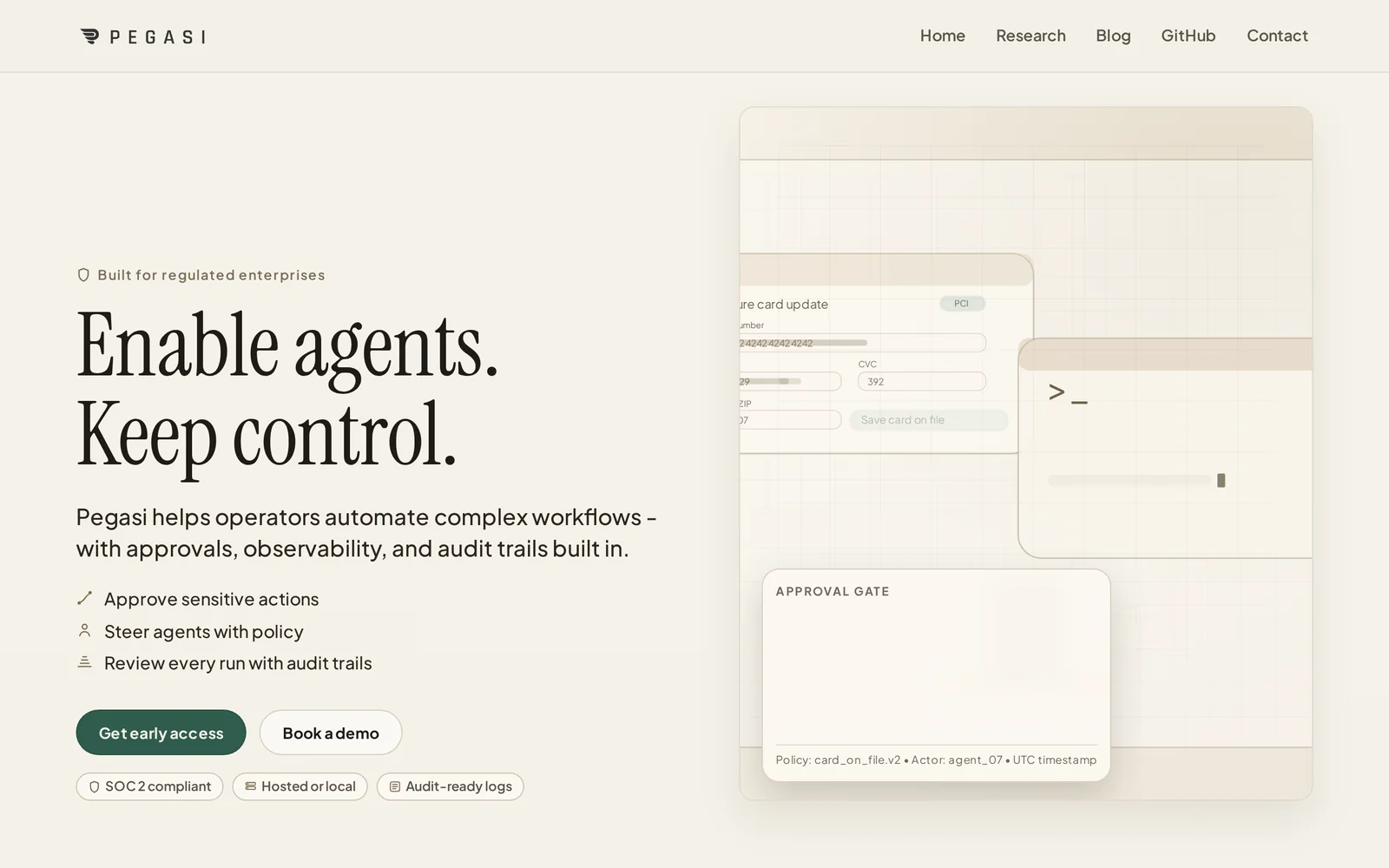
Pegasi provides a reliability layer for forward-deployed AI by monitoring model behavior in production, battle-testing LLMs, and automatically correcting risky or incorrect outputs before they impact users. The platform includes an SDK for integrating with deployed models, observability and monitoring to detect drift or hallucinations, and policy-based remediation to enforce business and compliance rules. Pegasi also offers telephony/Auto Attendant capabilities for customer contact flows and is positioned to serve regulated enterprise use cases such as financial services, where quality, safety, and compliance are critical.
Screenshots
Key Features
Use Cases



Frequently asked questions about Pegasi AI
What is Pegasi AI?
Pegasi AI is an advanced AI safety and compliance layer specifically designed for enterprise agent deployments. It ensures that AI systems operate within regulatory frameworks, manage risks, and maintain ethical standards, ultimately enhancing operational reliability and security for businesses utilizing AI technology.
Key Points
- AI Safety: Pegasi AI focuses on minimizing risks associated with AI applications.
- Regulatory Compliance: It helps enterprises comply with industry standards and regulations.
- Operational Reliability: Enhances the performance and trustworthiness of AI systems.
Detailed Explanation
Pegasi AI serves as a crucial component in the deployment of AI agents within enterprises, primarily focusing on safety and compliance. Its core functionalities include:
-
Risk Management: Pegasi AI identifies potential risks associated with AI operations, analyzing data and processes to mitigate issues before they escalate. This is particularly important in sectors like finance and healthcare, where compliance with strict regulatory standards is mandatory.
-
Regulatory Compliance: With increasing scrutiny on AI technologies, Pegasi AI ensures that enterprises adhere to various legal frameworks, such as GDPR, CCPA, and industry-specific regulations. This compliance is vital for avoiding hefty fines and maintaining customer trust.
-
Ethical AI Practices: Pegasi AI promotes ethical use of AI by implementing guidelines that prevent bias, discrimination, and unintended consequences in AI outputs. This aspect is crucial as businesses strive to align their AI strategies with corporate social responsibility goals.
-
Integration and Scalability: Designed to seamlessly integrate with existing AI frameworks, Pegasi AI supports scalability across various applications, making it suitable for businesses of all sizes.
Use Cases
- Healthcare: Enhancing patient data security while utilizing AI for predictive analytics.
- Finance: Ensuring that AI-driven trading systems comply with financial regulations.
- Retail: Personalizing customer experiences while maintaining data privacy and security.
Best Practices / Tips
- Regular Audits: Conduct periodic audits of AI systems to ensure compliance with safety standards and regulations.
- Training: Invest in training for staff on ethical AI practices to foster a culture of compliance and responsibility.
- Feedback Loops: Implement feedback loops to continuously improve AI systems based on real-world use and compliance challenges.
Additional Resources
How does Pegasi AI work?
Pegasi AI operates by integrating advanced artificial intelligence techniques to streamline everyday workflows for users. It combines machine learning, natural language processing, and automation tools, enabling users to enhance productivity, make informed decisions, and optimize their daily tasks efficiently.
Key Points
- AI Integration: Combines various AI technologies for enhanced functionality.
- User-Centric Workflows: Tailors solutions to meet specific user needs.
- Automation Features: Streamlines repetitive tasks efficiently.
Detailed Explanation
Pegasi AI leverages multiple core AI capabilities, including machine learning algorithms, natural language processing (NLP), and automation tools, to assist users in their daily tasks. For instance, through NLP, Pegasi AI can understand and respond to user queries in natural language, making interactions intuitive.
Use Cases
- Data Analysis: Users can upload datasets, and Pegasi AI will analyze trends, generate reports, and deliver insights quickly.
- Task Automation: Routine tasks such as scheduling meetings or sending reminders can be automated, saving users significant time and reducing errors.
- Content Generation: The platform can assist in creating content by suggesting topics, drafting articles, or even generating social media posts based on user input.
By implementing these features, Pegasi AI not only helps users save time but also enhances accuracy and productivity, making it an invaluable tool for professionals across various industries.
Best Practices / Tips
- Define Clear Objectives: Before using Pegasi AI, outline what you want to achieve to maximize its potential.
- Utilize Training Resources: Familiarize yourself with available tutorials and documentation to fully leverage Pegasi AI's capabilities.
- Monitor Performance: Regularly assess the outcomes of automated tasks to ensure they meet your expectations and adjust settings as necessary.
Additional Resources
By following these guidelines and understanding how Pegasi AI works, users can significantly enhance their productivity and streamline their workflows.
What are the main features of Pegasi AI?
Pegasi AI offers advanced features like natural language processing, machine learning integration, and real-time data analysis. These capabilities support businesses in automating tasks, enhancing decision-making, and improving customer engagement through personalized interactions.
Key Points
- Natural Language Processing (NLP): Understands and processes human language.
- Machine Learning Integration: Adapts and learns from data for improved outcomes.
- Real-Time Data Analysis: Provides insights instantly for timely decision-making.
Detailed Explanation
Pegasi AI is designed to empower businesses with cutting-edge artificial intelligence tools. Here’s a deeper look into its main features:
Natural Language Processing (NLP)
NLP allows Pegasi AI to interpret and generate human language in a way that is meaningful. This feature can be applied in various scenarios, such as:
- Customer Support: Automated chatbots that can understand and respond to customer queries.
- Content Creation: Generating reports or articles based on specific keywords or topics.
For instance, a retail company could use Pegasi AI's NLP capabilities to analyze customer feedback and identify common themes, leading to better product development.
Machine Learning Integration
Pegasi AI leverages machine learning to continuously improve its functionalities. By analyzing patterns in data over time, it can:
- Predict Trends: Help businesses forecast market trends and customer behavior.
- Optimize Processes: Automate repetitive tasks, allowing teams to focus on strategic initiatives.
A practical example includes a financial institution using machine learning algorithms to detect fraudulent transactions in real-time, significantly reducing losses.
Real-Time Data Analysis
Real-time data analysis is crucial for businesses operating in fast-paced environments. Pegasi AI enables users to:
- Make Informed Decisions: Access data insights instantly to pivot strategies as needed.
- Enhance Customer Engagement: Personalize marketing efforts based on up-to-the-minute analytics.
For instance, an e-commerce platform can adjust its promotional offers based on real-time sales data, maximizing revenue opportunities.
Best Practices / Tips
- Leverage NLP for Customer Interactions: Implement chatbots powered by Pegasi AI to enhance customer service and reduce response times.
- Utilize Machine Learning for Predictive Analytics: Regularly update your data sets to improve the accuracy of forecasts.
- Monitor Performance Metrics: Use Pegasi AI’s analytics capabilities to track the effectiveness of your strategies and make adjustments as necessary.
Additional Resources
By harnessing these features, organizations can unlock the potential of Pegasi AI to drive innovation and efficiency in their operations.
Who is Pegasi AI for?
Pegasi AI is designed for a diverse audience, including business professionals, marketers, educators, and developers who want to streamline their daily AI workflows. It's particularly beneficial for those seeking efficiency in tasks such as data analysis, content creation, and automation.
Key Points
- Target Audience: Business professionals, marketers, educators, developers.
- Main Use Cases: Data analysis, content generation, task automation.
- Accessibility: User-friendly interface suitable for varying skill levels.
Detailed Explanation
Pegasi AI caters to various users looking to enhance their productivity through artificial intelligence.
Business Professionals
For business professionals, Pegasi AI can automate mundane tasks like reporting and data entry, freeing up time for strategic decision-making. For instance, using Pegasi's automation features, a sales manager can generate insightful reports on customer interactions without spending hours on data compilation.
Marketers
Marketers benefit from Pegasi AI's ability to analyze consumer data and generate tailored content. By leveraging AI-generated insights, marketers can create targeted campaigns that yield higher engagement rates. For example, a marketer using Pegasi AI can quickly draft personalized email campaigns based on customer segmentation.
Educators
Educators find Pegasi AI useful for creating lesson plans and grading assignments. With AI's capabilities, teachers can provide personalized feedback on student submissions and streamline the evaluation process. An educator could use Pegasi AI to generate quizzes based on curriculum standards efficiently.
Developers
Developers can utilize Pegasi AI to enhance their workflows by integrating AI capabilities into their applications. By using the Pegasi API, developers can build smarter apps that provide users with real-time insights and recommendations, thus improving user experience.
Best Practices / Tips
- Start Small: Begin by automating one task at a time to understand Pegasi AI's capabilities fully.
- Leverage Templates: Use pre-built templates for common tasks to save time and ensure consistency.
- Continuously Optimize: Regularly review and refine your workflows to maximize efficiency and effectiveness.
Additional Resources
How much does Pegasi AI cost?
Pegasi AI's pricing varies based on the plan you choose, ranging from basic packages at approximately $19 per month to more advanced options that can exceed $99 monthly. For the most accurate and up-to-date pricing details, visit the official Pegasi AI website.
Key Points
- Pegasi AI offers multiple pricing tiers to accommodate different user needs.
- Basic plans start around $19 per month, while premium options may exceed $99.
- Pricing may change based on promotional offers or new features.
Detailed Explanation
Pegasi AI provides a tiered pricing structure designed to meet the diverse needs of its users. The basic plan, which starts at approximately $19 per month, is ideal for individuals or small businesses just beginning their journey with AI tools. This plan typically includes essential features such as basic data analysis and limited integration capabilities.
As you move up to the mid-tier plans, pricing can range from $39 to $69 per month. These plans often include additional features such as advanced analytics, enhanced customer support, and better integration with other platforms. They are suitable for growing businesses that require more robust functionality to support their operations.
The premium plan, which can exceed $99 per month, is tailored for larger organizations with extensive needs. This plan often includes comprehensive features such as custom AI model development, priority support, and unlimited data processing capabilities. It is designed for businesses that require advanced AI solutions tailored specifically to their operational needs.
Always check the Pegasi AI official website for current pricing, as they may offer seasonal discounts or promotional packages that provide significant savings.
Best Practices / Tips
- Evaluate Your Needs: Before selecting a plan, assess your specific requirements and how often you will use the tool. This helps in choosing a plan that offers value for money.
- Take Advantage of Trials: If available, utilize free trial periods to test the features of each plan before committing to a monthly subscription.
- Watch for Promotions: Keep an eye on the Pegasi AI website for special offers or discounts that may help you save on your subscription costs.
Additional Resources
How do I get started with Pegasi AI?
To get started with Pegasi AI, visit Pegasi AI's official website to sign up for an account. After signing up, you can explore its features, customize your settings, and integrate it into your existing workflows to enhance productivity.
Key Points
- Sign-Up Process: Easy registration on the website.
- Feature Exploration: Access various AI tools and functionalities.
- Integration: Seamless connections with other platforms.
Detailed Explanation
Starting with Pegasi AI is straightforward. First, navigate to the official website at Pegasi AI. The sign-up process involves entering your email and creating a password. Once registered, you will receive a confirmation email. Click the link in the email to verify your account.
After logging in, you can explore the dashboard, which offers a variety of AI tools tailored for different tasks. For instance, Pegasi AI provides features like automated content generation, data analysis, and project management assistance. Familiarize yourself with the user interface to maximize the benefits of these tools.
Use Cases
- Content Creation: Utilize Pegasi AI to generate blog posts, social media content, or marketing materials quickly.
- Data Analysis: Leverage AI capabilities to analyze large datasets and extract meaningful insights.
- Task Automation: Automate routine tasks to improve efficiency and save time.
Best Practices / Tips
- Explore Tutorials: Use available tutorials and guides on the website to understand how to use different features effectively.
- Community Engagement: Join Pegasi AI forums or communities to share experiences and learn from other users.
- Regular Updates: Keep an eye on feature updates and new integrations to maximize your usage of Pegasi AI.
Additional Resources
By following these steps and utilizing the resources provided, you can effectively harness the power of Pegasi AI to improve your workflow and productivity.
Explore more AI Ai Agents tools
Browse all Ai Agents tools →Compare Pegasi AI: vs ADE · vs Athena by Shoplazza · vs Openbase · vs jcode