

ADE
AIAn open-source agentic development environment that runs every major AI coding agent, synced across web, desktop, terminal, and mobile.
ADE
An open-source agentic development environment that runs every major AI coding agent, synced across web, desktop, terminal, and mobile.
About ADE
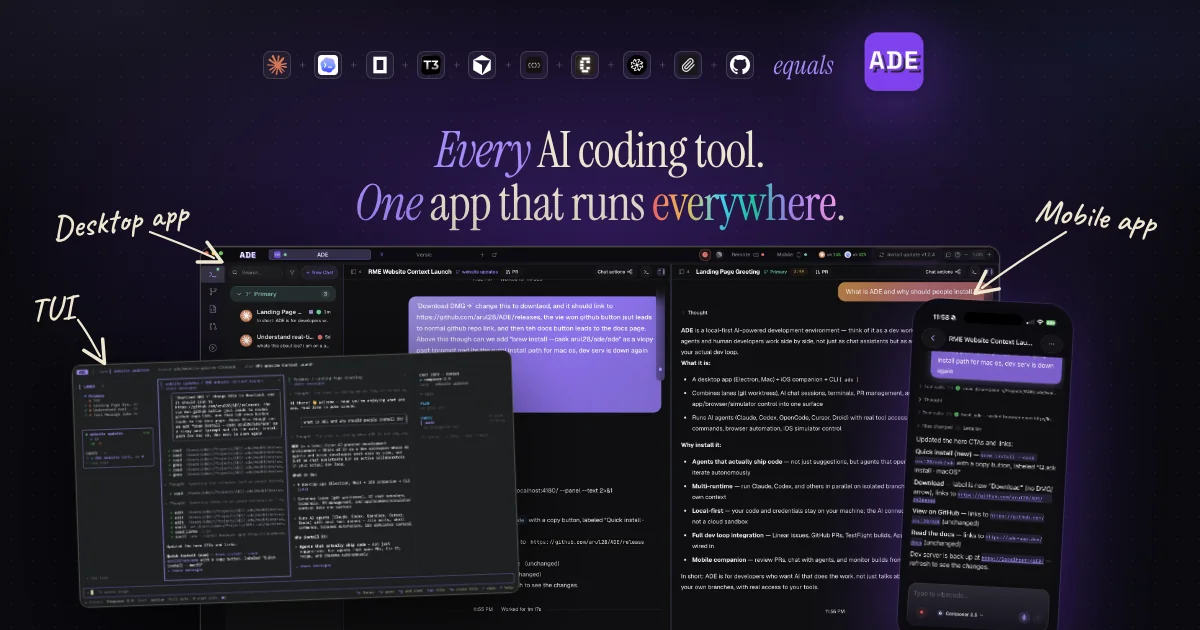
ADE (Agentic Development Environment) is a unified native workspace for running every major AI coding agent — Claude Code, Codex, Cursor, Factory Droid, and OpenCode — inside a single, real-time-synced surface. It runs on web, desktop, terminal, and mobile, so a developer can start a task from their laptop, review progress from their phone on the train, and finish it in the terminal, with chats and state kept in sync everywhere. Each task automatically gets its own git worktree, letting several agents ship features in parallel without stepping on each other's changes, and PRs can be reviewed and merged directly inside ADE. It is open source under the AGPL license and free to run yourself, and reuses any coding subscription the developer already pays for rather than adding another metered service.
Screenshots
Key Features
Use Cases



Frequently asked questions about ADE
What is ADE?
An Agentic Development Environment (ADE) is an open-source platform designed to facilitate the development and deployment of AI coding agents. It operates seamlessly across web, desktop, terminal, and mobile devices, enabling developers to create, test, and manage AI applications efficiently.
Key Points
- Open-Source Platform: ADE is freely available and customizable.
- Multi-Device Sync: It works across various platforms, including web, desktop, and mobile.
- Support for AI Coding Agents: ADE is compatible with all major AI coding agents, enhancing productivity.
Detailed Explanation
The Agentic Development Environment (ADE) serves as a versatile tool for developers looking to harness the power of artificial intelligence in their coding projects. By providing a unified platform, ADE allows users to develop AI applications without the constraints of traditional development environments.
Features of ADE
-
Cross-Platform Functionality: ADE can be accessed from any device—whether you’re using a web browser, desktop application, terminal, or mobile device. This flexibility is crucial for developers who need to work on-the-go or collaborate with teams across different locations.
-
Integration with AI Coding Agents: ADE supports a wide range of AI coding agents, such as OpenAI's Codex, Google's Bard, and other machine learning tools. This compatibility means developers can leverage the latest AI advancements to streamline their coding processes and improve efficiency.
-
User-Friendly Interface: The environment is designed with usability in mind, featuring an intuitive interface that simplifies complex tasks. This is particularly beneficial for those new to AI development.
Use Cases
- Collaborative Development: Teams can work together in real-time, making it easier to share code and ideas.
- Rapid Prototyping: Developers can quickly create and test AI applications, speeding up the development cycle.
- Learning and Experimentation: Beginners can use ADE to practice coding with AI without the need for extensive setup or resources.
Best Practices / Tips
- Stay Updated: Regularly check for updates to ensure you have the latest features and security patches.
- Utilize Community Resources: Engage with the ADE community for support, plugins, and shared experiences to enhance your projects.
- Optimize for Performance: Keep your code clean and modular to improve performance and maintainability within the ADE.
Additional Resources
By exploring these resources, you can further enhance your understanding of ADE and maximize its potential in your AI development endeavors.
How does ADE work?
ADE works by integrating various coding agents like Claude Code and Codex into a single workspace, enabling developers to manage tasks seamlessly across devices. Key features include real-time chat synchronization, isolated work environments for tasks, and in-app pull request (PR) handling to streamline the development workflow.
Key Points
- Multi-Agent Support: Operates various AI coding agents within one interface.
- Cross-Surface Sync: Maintains real-time state across devices.
- In-App PR Review: Allows reviewing and merging pull requests without leaving the platform.
Detailed Explanation
ADE (Agent Development Environment) revolutionizes the coding experience for developers by consolidating multiple coding tools into a unified interface. Here's how it works:
-
Multi-Agent Support: ADE enables developers to run AI agents like Claude Code, Codex, Cursor, Factory Droid, and OpenCode simultaneously. This eliminates the need to switch between different user interfaces, streamlining the coding process.
-
Cross-Surface Sync: Developers can access their work across various platforms—web, desktop, terminal, and mobile—while maintaining real-time synchronization of chat history and project states. This feature is particularly beneficial for developers who travel or work remotely.
-
Per-Task Git Worktrees: Each coding task in ADE generates its own Git worktree, allowing multiple agents to work on different features without the risk of merge conflicts. This is crucial for teams that handle large projects with many contributors.
-
In-App PR Review: ADE simplifies the pull request process. Developers can review, edit, and merge PRs generated by the agents directly within the environment, eliminating the need to switch to external platforms like GitHub.
-
Agent Fleet Coordination: With the ability to run several coding agents in parallel, ADE allows teams to tackle multiple features simultaneously, enhancing productivity.
-
Bring Your Own Subscription: ADE supports existing subscriptions to coding agents, making it cost-effective for developers who already invest in these tools.
-
Self-Hosted Development Environment: For teams requiring code isolation, ADE can be deployed on local hardware, ensuring security and compliance with organizational policies.
Best Practices / Tips
- Utilize Multi-Agent Support: Leverage the capabilities of different agents based on project requirements to maximize efficiency.
- Stay Synced: Regularly use cross-surface sync to ensure that all team members are on the same page, especially when working remotely.
- Review PRs in Context: Take advantage of the in-app PR review feature to maintain context and streamline feedback loops.
Additional Resources
What are the main features of ADE?
ADE offers key features such as Multi-Agent Support, Cross-Surface Sync, Per-Task Git Worktrees, In-App PR Review, and Bring Your Own Subscription, enabling developers to efficiently manage coding tasks and collaborate in real-time across different platforms without switching interfaces.
Key Points
- Multi-Agent Support: Integrates various coding agents in one workspace.
- Cross-Surface Sync: Ensures real-time chat history and state sharing across devices.
- Per-Task Git Worktrees: Facilitates parallel development with individual worktrees for tasks.
Detailed Explanation
ADE (Advanced Development Environment) is designed to streamline the developer workflow by integrating multiple coding agents within a single workspace. The Multi-Agent Support feature allows developers to run tools like Claude Code, Codex, Cursor, Factory Droid, and OpenCode together, eliminating the need to switch between different interfaces, thus enhancing productivity.
The Cross-Surface Sync feature is particularly beneficial for teams working on different devices, such as web, desktop, terminal, and mobile. This functionality ensures that all team members have access to the same chat history and project state in real-time, facilitating seamless collaboration.
Moreover, ADE’s Per-Task Git Worktrees allows each task to operate within its own isolated worktree. This means multiple agents can work on different features simultaneously without the risk of merge conflicts, making the development process more efficient.
Additionally, the In-App PR Review capability enables developers to review, edit, and merge pull requests generated by agents directly within the ADE interface. This keeps the workflow streamlined and minimizes context switching.
Lastly, the Bring Your Own Subscription feature allows developers to utilize existing subscriptions for coding agents they already pay for. This flexibility reduces costs and makes the transition to ADE smoother for teams.
Best Practices / Tips
- Utilize Multi-Agent Support: Leverage the ability to run multiple agents simultaneously to enhance your coding efficiency.
- Regular Syncing: Frequently check Cross-Surface Sync to ensure all team members are aligned and up-to-date with the latest changes.
- Isolate Tasks with Worktrees: Always create a new worktree for each task to avoid conflicts and maintain clean project management.
Additional Resources
Who is ADE for?
ADE is designed for developers and teams needing efficient agent coordination, seamless cross-device coding, streamlined PR management, consolidated AI tools, and self-hosted development environments. It caters to anyone looking to enhance productivity and collaboration in software development without the hassle of merge conflicts or context switching.
Key Points
- Agent Fleet Coordination: Run multiple coding agents simultaneously without merge conflicts.
- Cross-Device Development: Begin coding on one device and continue on another seamlessly.
- PR Triage Management: Review and manage agent-generated pull requests directly within the app.
Detailed Explanation
1. Agent Fleet Coordination
ADE excels in coordinating multiple coding agents, allowing developers to run various agents in parallel across different features. This eliminates merge conflicts by ensuring that each agent works independently without interfering with one another. For example, a team can assign different agents to work on UI, backend, and testing simultaneously, significantly speeding up development times.
2. Cross-Device Development
With ADE, developers can start coding on a laptop and seamlessly switch to a mobile device while traveling. This feature ensures that work is not interrupted, allowing for flexibility and convenience. Imagine starting a project on your laptop during a commute and finishing it on your tablet during a meeting.
3. PR Triage Management
ADE simplifies the management of pull requests (PRs) generated by AI agents. Users can review, comment on, and merge these PRs directly within the ADE interface, avoiding the need to switch between multiple platforms like GitHub. This streamlined process saves time and reduces the risk of errors during PR evaluations.
4. Consolidated Tooling
Instead of juggling several standalone coding tools, ADE provides a unified workspace that integrates various AI-coding UIs. This consolidation enhances productivity by reducing the need to switch contexts and minimizes the chances of losing focus or valuable work time.
5. Self-Hosted Development Environment
For teams that prioritize code isolation, ADE offers an open-source stack that can be run on local hardware. This setup ensures that sensitive code remains secure while providing the flexibility and control teams need over their development environment.
Best Practices / Tips
- Maximize Agent Efficiency: Regularly monitor and adjust agent assignments to ensure optimal task distribution.
- Stay Updated: Keep ADE updated to benefit from the latest features and security enhancements.
- Utilize Documentation: Familiarize yourself with the official documentation to utilize ADE's features fully and troubleshoot common issues effectively.
Additional Resources
How much does ADE cost?
ADE is entirely free to use, allowing users to access its features without any financial commitment. This makes it an attractive option for individuals and organizations looking to leverage advanced functionality without incurring costs.
Key Points
- Cost-Free Access: ADE is available at no charge.
- User-Friendly: The platform is designed for easy use, catering to various skill levels.
- No Hidden Fees: Users won't encounter unexpected costs or subscriptions.
Detailed Explanation
ADE, or Advanced Data Environment, provides a robust suite of tools for data analysis, visualization, and management. Being a free tool, it is particularly advantageous for startups, students, and educators who may have budget constraints.
Users can sign up for an account and gain immediate access to its extensive features without the need for credit card information. This accessibility encourages experimentation and learning, making it ideal for users who may be hesitant to invest in paid software before fully understanding its capabilities.
For example, educators can utilize ADE in classroom settings to teach data analytics principles without the worry of licensing fees. Similarly, small businesses can harness the power of ADE for their data-driven decisions without facing financial obstacles.
Best Practices / Tips
- Explore All Features: Take advantage of the free access to explore all functionalities extensively.
- Join the Community: Engage with other ADE users through forums or social media to share tips and best practices.
- Stay Updated: Follow ADE’s official announcements for any changes or new feature releases, even though the tool remains free.
Additional Resources
How do I get started with ADE?
To get started with ADE, visit https://ade-app.dev/ to sign up for an account. Once registered, you can explore its features, tools, and capabilities designed to enhance your development experience.
Key Points
- Sign Up: Create an account on the ADE website.
- Explore Features: Familiarize yourself with ADE's tools and functionalities.
- Utilize Resources: Access tutorials and documentation to maximize your usage.
Detailed Explanation
Getting started with ADE (App Development Environment) involves a few straightforward steps:
-
Visit the ADE Website: Navigate to https://ade-app.dev/ to access the platform. This site serves as your gateway to all ADE services and information.
-
Create an Account: Click on the “Sign Up” button. You will need to provide necessary details like your email address, a username, and a secure password. After submitting your information, you may receive a confirmation email to verify your account.
-
Explore the Dashboard: Once logged in, you will be taken to the ADE dashboard. Here, you can explore various features, such as project templates, collaboration tools, and deployment options tailored for different platforms.
-
Access Tutorials: ADE provides comprehensive tutorials and documentation. These resources guide you through the setup process, project creation, and using advanced features. Familiarizing yourself with these materials will greatly enhance your development skills.
-
Engage with the Community: Consider joining the ADE community forums or social media groups to connect with other users. This can provide additional insights, troubleshooting tips, and collaborative opportunities.
Best Practices / Tips
- Use Strong Passwords: Ensure your account is protected by using a complex password that includes letters, numbers, and symbols.
- Explore Templates: Take advantage of the pre-built templates available on ADE to expedite your project setup.
- Stay Updated: Regularly check for updates and new features on the ADE website to enhance your development process.
- Backup Your Projects: Always keep backups of your projects to prevent data loss during development.
Additional Resources
- ADE Documentation - In-depth guides on using various features.
- Community Forum - Join discussions and seek help from other ADE users.
- YouTube Tutorials - Video tutorials on using ADE effectively.
Explore more AI Ai Agents tools
Browse all Ai Agents tools →Compare ADE: vs TryCase · vs Aside · vs Wisry · vs Cline