

Vertext AI Agent Builder
AIA Google Cloud low-code platform to build, orchestrate, and deploy multi-agent experiences on Vertex AI infrastructure.
Vertext AI Agent Builder
A Google Cloud low-code platform to build, orchestrate, and deploy multi-agent experiences on Vertex AI infrastructure.
About Vertext AI Agent Builder
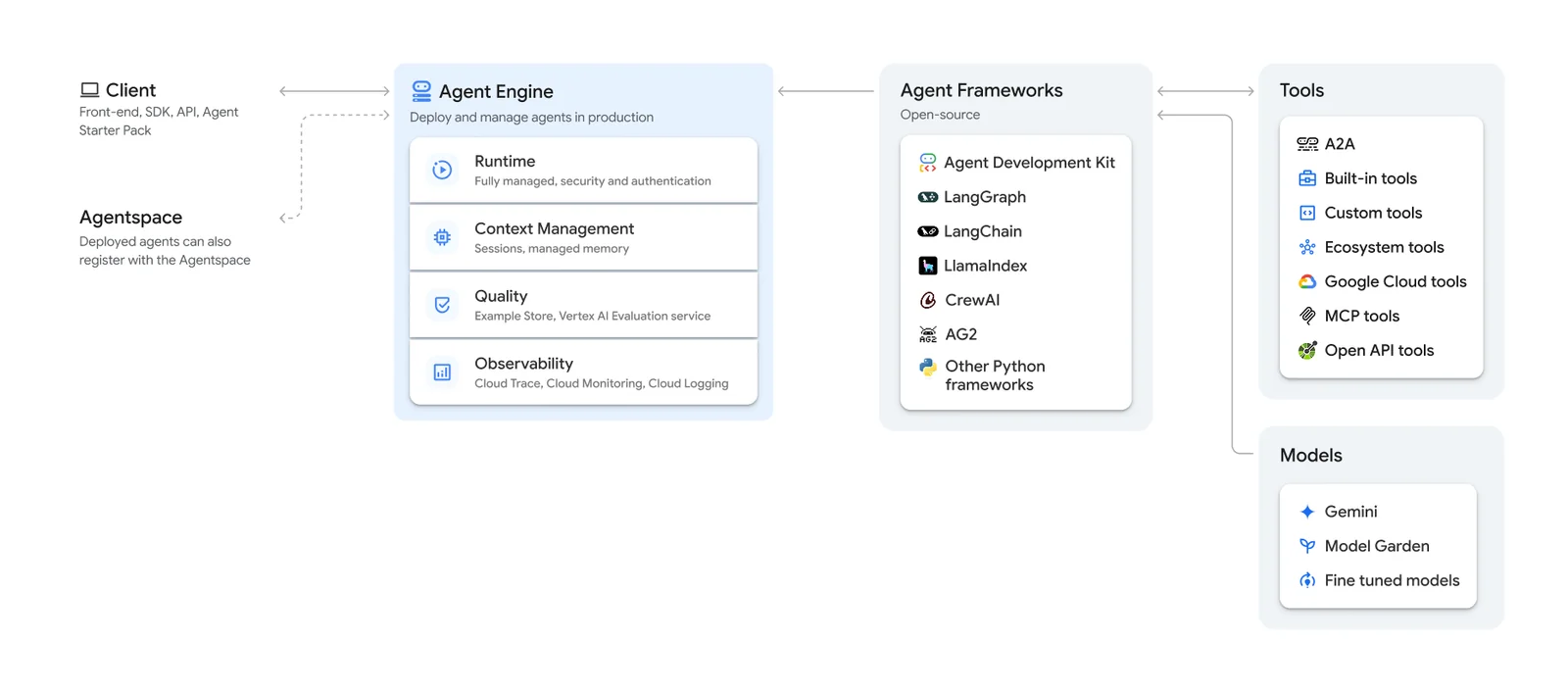
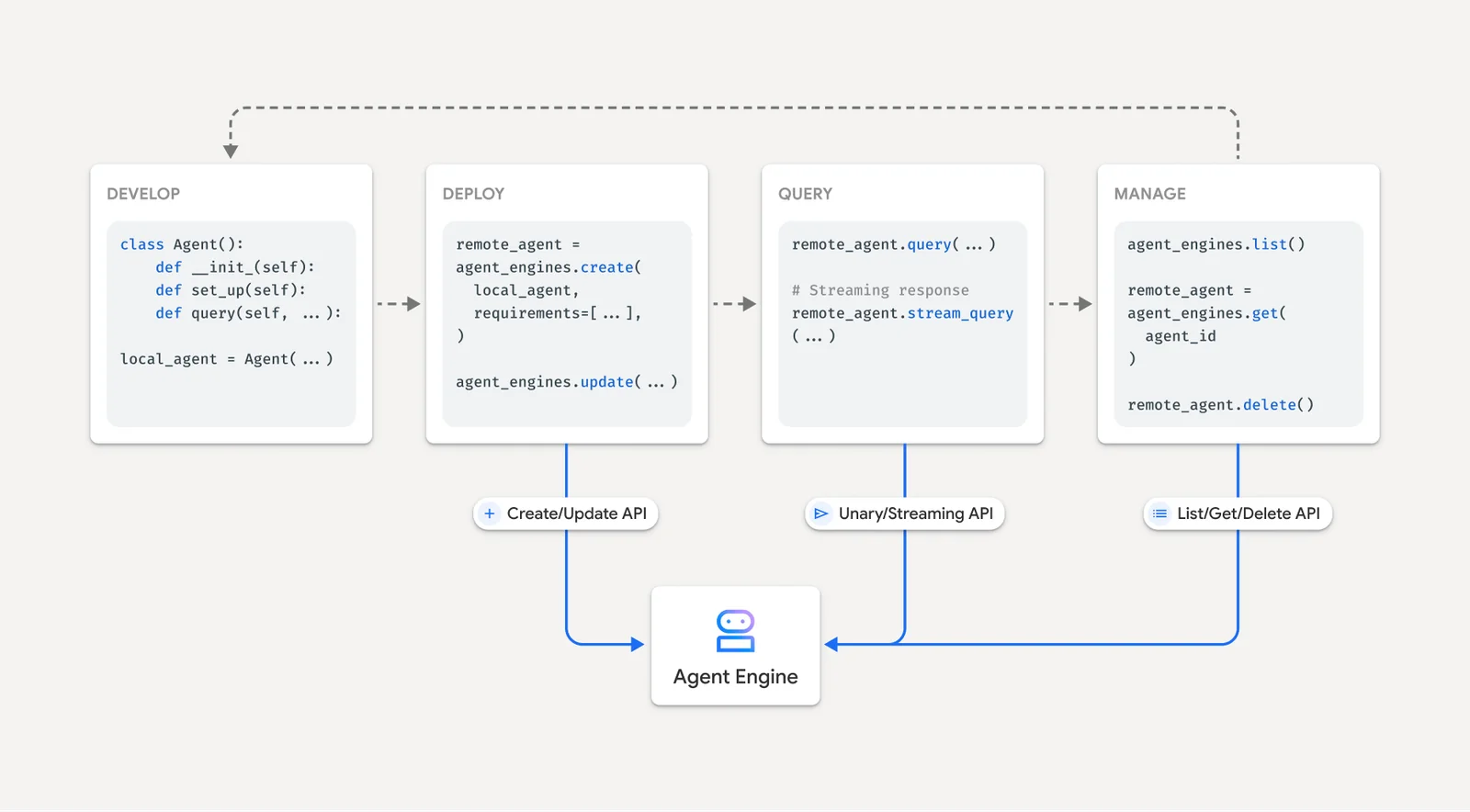
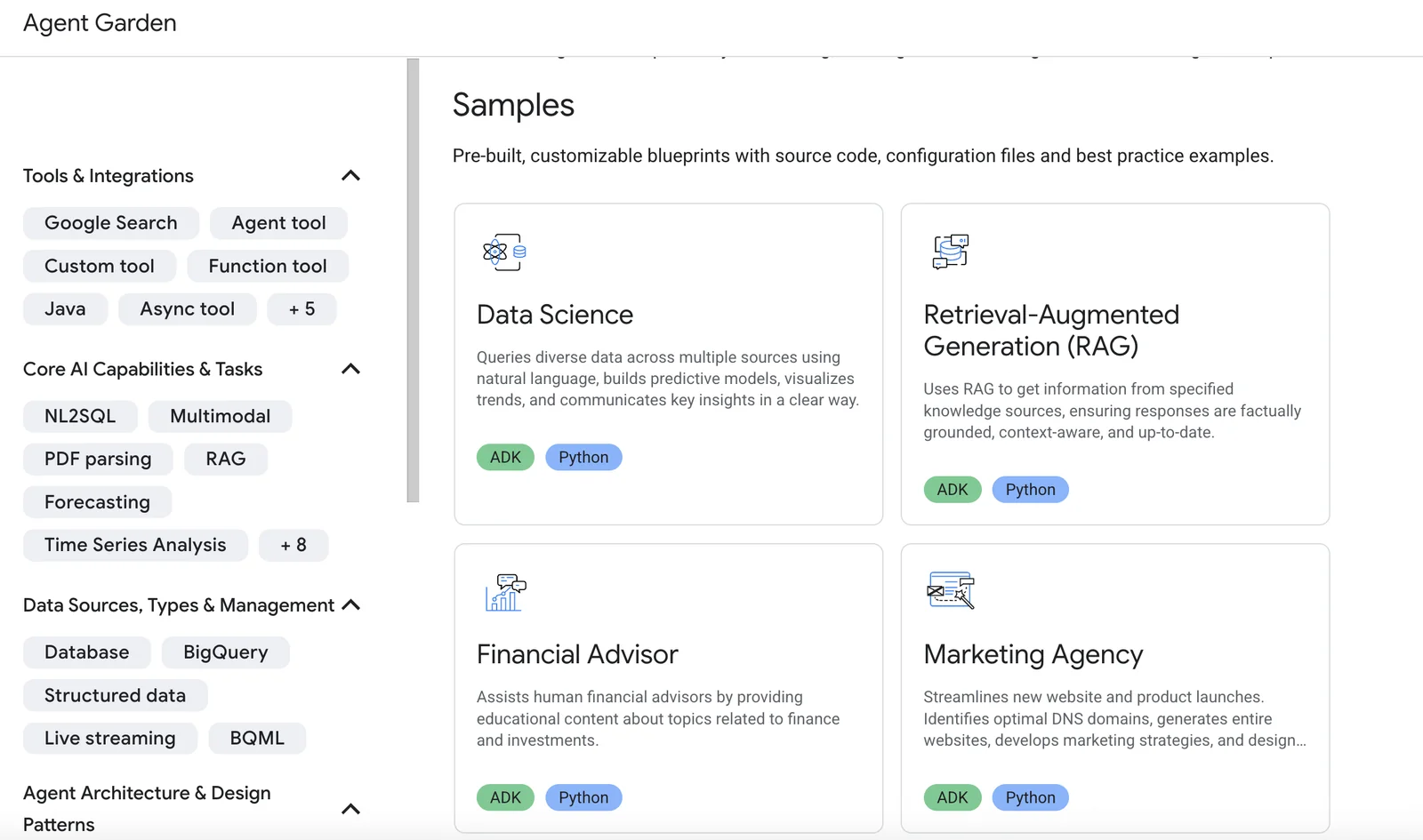
Vertex AI Agent Builder is a Google Cloud service that provides a low-code environment and templates to design, compose, and orchestrate networks of AI agents. It enables teams to connect existing frameworks (for example Agent Development Kit or LangGraph), use pre-built agent templates (ReAct, RAG, multi-agent, Live API), and integrate document search or vector search for retrieval-augmented generation. Agent Builder is purpose-built to deploy agents onto Google Cloud production infrastructure (Agent Engine, Cloud Run) while leveraging Vertex AI capabilities for scaling, monitoring, and security. Its value lies in accelerating agent development with production-ready templates, CI/CD automation, data pipelines for RAG, and seamless integration into enterprise workflows and foundation models.
Screenshots
Key Features
Use Cases



Frequently asked questions about Vertext AI Agent Builder
What is the pricing structure for Vertex AI Agent Builder?
Vertex AI Agent Builder employs a pay-as-you-go pricing model, charging $0.00994 per vCPU-hour, $0.0105 per GiB-hour for memory, and varying rates for model and search queries. For a detailed breakdown of costs, refer to the official Google Cloud pricing page.
Key Points
- Pay-as-you-go pricing structure
- Charges based on vCPU and memory usage
- Additional costs for model and search queries
Detailed Explanation
Vertex AI Agent Builder offers a flexible and scalable pricing model designed to cater to various business needs. The core components of the pricing structure include:
-
vCPU Costs: Users are charged $0.00994 per virtual CPU-hour. This allows you to only pay for the computational power you need, making it ideal for businesses with fluctuating workloads.
-
Memory Costs: The memory usage incurs a fee of $0.0105 per GiB-hour. This pricing enables you to scale your memory usage according to the demands of your applications, helping manage costs effectively.
-
Model and Search Query Charges: Additional costs apply for model training and search queries. These rates can vary based on the complexity and volume of requests. This component of the pricing is crucial for businesses that rely heavily on AI models for their operations.
For example, a small business using a single vCPU for 10 hours and 2 GiB of memory would incur approximately $0.0994 for vCPU usage and $0.021 for memory, totaling about $0.1204 for that period.
Best Practices / Tips
-
Monitor Usage: Regularly track your vCPU and memory usage through Google Cloud's dashboard. This helps in optimizing costs and avoiding unexpected charges.
-
Optimize Model Queries: If you're frequently using models or search queries, analyze usage patterns to identify peak times and possibly batch requests, thereby reducing costs.
-
Utilize Free Tier: If you’re new to Vertex AI, take advantage of any available free-tier offerings, which can help you understand the platform without incurring costs.
Additional Resources
How can I start using Vertex AI Agent Builder?
To start using Vertex AI Agent Builder, sign up for Google Cloud, explore its low-code environment, and leverage pre-built templates. Begin prototyping your agents by accessing the evaluation playground available on the official Google Cloud website for hands-on experience.
Key Points
- Sign up for Google Cloud
- Explore low-code environment
- Utilize pre-built templates
Detailed Explanation
Vertex AI Agent Builder is a powerful tool designed for developers and businesses looking to create intelligent agents without extensive coding knowledge. Here’s how to get started:
-
Sign Up for Google Cloud:
- Visit the Google Cloud website and sign up for an account. Google often offers credits for new users, allowing you to explore the platform at no initial cost.
-
Explore the Low-Code Environment:
- Familiarize yourself with the low-code interface that simplifies the process of building AI agents. This environment allows you to drag and drop components, making it accessible even for those without a technical background.
-
Utilize Pre-Built Templates:
- Google Cloud provides several pre-built templates tailored for various use cases, such as customer support, virtual assistants, or data analysis. These templates can significantly accelerate your development process.
-
Access the Evaluation Playground:
- The evaluation playground is a practical feature within Vertex AI that allows you to test and prototype your agents. You can experiment with different configurations and features to understand how they work before deploying them.
-
Follow Tutorials and Documentation:
- Google offers extensive documentation and tutorials that guide you through the process of creating and deploying your agents. Make sure to utilize these resources to enhance your learning experience.
Best Practices / Tips
- Start Small: Begin with simple projects before advancing to more complex agents. This approach helps you build confidence and understanding of the platform.
- Regularly Test Your Agents: Use the evaluation playground frequently to test how your agent responds in various scenarios. Continuous testing helps identify issues early.
- Stay Updated: Google Cloud updates its tools regularly. Subscribe to updates or check the blog for new features and best practices.
- Engage with Community: Join forums or Google Cloud community groups where you can ask questions, share insights, and learn from others’ experiences.
Additional Resources
What are the key features of Vertex AI Agent Builder?
Vertex AI Agent Builder provides a low-code development environment, pre-built templates for various applications, managed production deployment, and continuous integration/continuous deployment (CI/CD) automation. It seamlessly integrates with popular frameworks and offers industry-specific templates, enabling rapid development and deployment of AI agents.
Key Points
- Low-code development environment for quick AI solutions.
- Pre-built templates tailored for various industries.
- Managed production deployment with CI/CD automation.
Detailed Explanation
Vertex AI Agent Builder is designed to simplify the creation of AI agents, making it accessible for developers of all skill levels. Here’s a closer look at its key features:
-
Low-Code Environment: This feature allows users to build AI applications without extensive coding knowledge. Drag-and-drop tools and visual programming interfaces enable rapid development. For instance, users can create an AI chatbot using simple visual components rather than writing complex code.
-
Pre-Built Templates: Vertex AI offers a variety of pre-built templates tailored to specific industries, such as healthcare, finance, and retail. These templates include commonly requested functionalities, allowing users to jump-start their projects. For example, a customer service chatbot template can be customized to fit a retail business's needs in just a few clicks.
-
Managed Production Deployment: Vertex AI Agent Builder handles the deployment process, ensuring that AI agents are ready for production without the typical headaches associated with deployment. This includes automatic scaling and load balancing capabilities, which ensure that applications perform optimally under varying loads.
-
CI/CD Automation: Continuous integration and continuous deployment features streamline the update process, allowing developers to push changes quickly and efficiently. This is crucial for maintaining the relevance and functionality of AI agents as user needs evolve.
-
Integration with Popular Frameworks: Vertex AI Agent Builder supports integration with well-known frameworks like TensorFlow and PyTorch. This allows developers to leverage existing models and tools, making it easier to incorporate advanced machine learning capabilities into their applications.
Best Practices / Tips
- Utilize Templates: Start with industry-specific templates to save time and ensure best practices are followed.
- Test Regularly: Use the CI/CD features to implement regular testing cycles, ensuring that your AI agents are functioning as intended before deployment.
- Engage Users for Feedback: Incorporate user feedback to refine your AI agents continually. This can help in making necessary adjustments and updates to improve user experience.
Additional Resources
How does Vertex AI Agent Builder compare to other AI tools?
Vertex AI Agent Builder stands out among AI tools due to its user-friendly low-code interface, seamless integration with existing systems, and robust support for multi-agent orchestration. It simplifies deployment processes and offers comprehensive monitoring features that enhance performance tracking and optimization.
Key Points
- User-Friendly Low-Code Interface: Enables quick development without deep programming knowledge.
- Seamless Integration Capabilities: Easily connects with various data sources and APIs.
- Multi-Agent Orchestration Support: Manages multiple AI agents effectively for complex tasks.
Detailed Explanation
Vertex AI Agent Builder is designed for organizations seeking to implement AI quickly and efficiently. Its low-code interface is particularly beneficial for non-technical users, allowing teams to create, modify, and deploy AI agents without needing extensive coding skills. This accessibility accelerates the development cycle and reduces reliance on specialized IT resources.
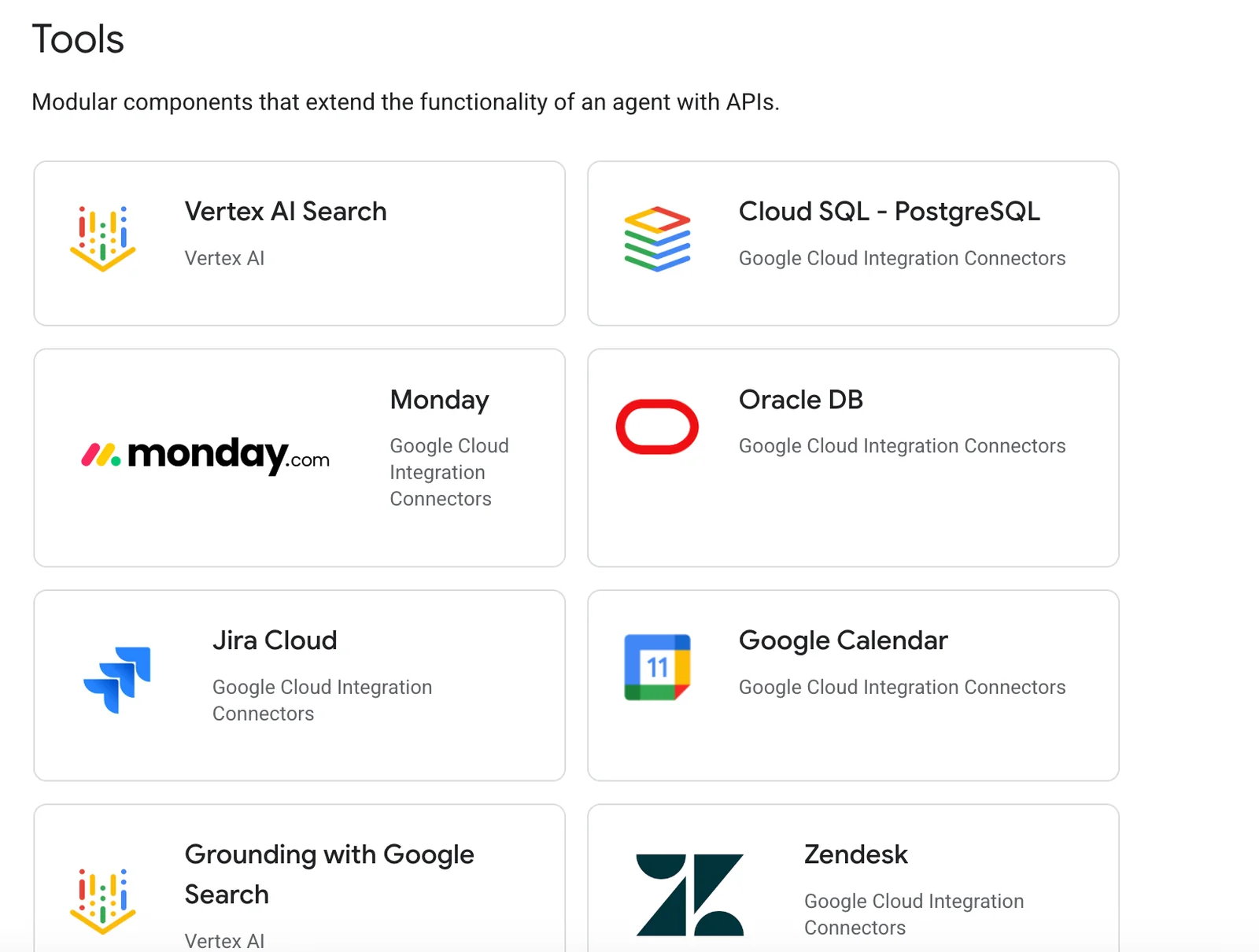
Integration capabilities are another significant advantage. Vertex AI Agent Builder can connect with Google Cloud services and third-party applications, facilitating data flow and automation. For instance, businesses can integrate customer relationship management (CRM) systems with AI agents to enhance customer support and engagement. This capability ensures that organizations can leverage their existing infrastructure while adopting AI solutions.
Furthermore, the support for multi-agent orchestration allows for complex tasks to be handled by several AI agents working collaboratively. This is particularly useful in environments where different agents must communicate and coordinate to provide comprehensive solutions, such as in customer service or logistics.
Best Practices / Tips
- Start Small: Begin with simple projects to familiarize your team with the platform before scaling up.
- Utilize Monitoring Features: Regularly track agent performance using the built-in monitoring tools to identify areas for improvement.
- Focus on Integration: Prioritize integrating Vertex AI with existing tools to maximize the value of your data.
- Train Your Team: Invest time in training your team on the platform to enhance productivity and innovation.
Additional Resources
Does Vertex AI Agent Builder support API integrations?
Yes, Vertex AI Agent Builder supports API integrations, enabling users to seamlessly connect with a variety of open-source frameworks such as LangGraph. This capability enhances the functionality, scalability, and interoperability of AI projects, making it easier to leverage existing tools and technologies.
Key Points
- Seamless API Integrations: Connect with various frameworks.
- Enhanced Functionality: Improve project capabilities.
- Interoperability: Work with diverse AI tools and services.
Detailed Explanation
Vertex AI Agent Builder's support for API integrations makes it a powerful tool for developers and data scientists. By integrating APIs, users can enhance their projects' capabilities and utilize existing technologies efficiently. For instance, connecting with LangGraph allows you to build sophisticated AI applications that can analyze and visualize language data.
Use Case Example
Imagine you are developing a customer support chatbot using Vertex AI. By integrating an API from a natural language processing framework like LangGraph, your chatbot can better understand user queries and provide more accurate responses. This integration not only boosts the chatbot's performance but also allows for easy updates as new features become available in the connected framework.
Step-by-Step Guidance
- Identify Your Needs: Determine which functionalities you need from external frameworks.
- Choose the Right API: Select an API that aligns with your project goals, such as LangGraph for language analysis.
- Integrate the API: Follow the documentation provided by Vertex AI to connect the chosen API within your Agent Builder environment.
- Test the Integration: After connecting, run tests to ensure that the integration works as expected and enhances your project.
Best Practices / Tips
- Thorough Documentation: Always refer to the official documentation for the APIs you are considering to ensure compatibility and understand the integration process fully.
- Incremental Testing: Test each new API integration in stages to identify any issues early.
- Monitor API Limitations: Be mindful of rate limits or usage quotas associated with your integrated APIs to avoid disruptions.
Additional Resources
Explore more AI Ai Agents tools
Browse all Ai Agents tools →Browse by use case: Automation & Productivity
Compare Vertext AI Agent Builder: vs Proto-Mind · vs Ami · vs Duvi · vs AskDeck