
Qwen 3
AIQwen 3 is the next-generation Qwen series LLM family offering multimodal, agentic, and high-reasoning capabilities across dense and MoE model variants.
Qwen 3
Qwen 3 is the next-generation Qwen series LLM family offering multimodal, agentic, and high-reasoning capabilities across dense and MoE model variants.
About Qwen 3
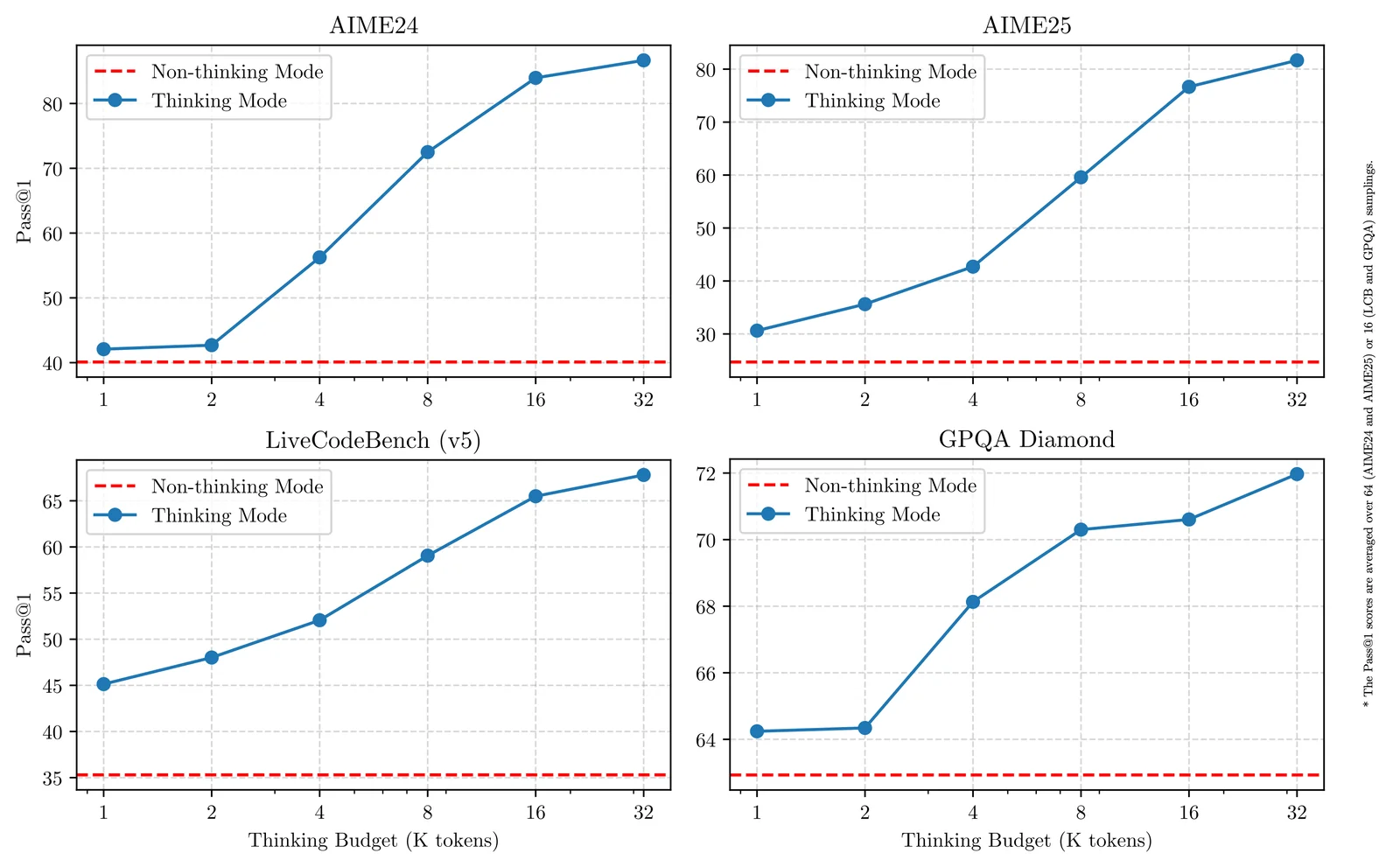
Qwen3 is the latest generation of the Qwen large-language-model family developed by the Qwen team at Alibaba Cloud. It includes dense and mixture-of-experts (MoE) variants and specialized branches (e.g., Qwen3-VL for vision-language and Qwen3-Coder for code/agentic coding). Qwen3 emphasizes advanced reasoning and instruction-following, a configurable "thinking" mode (enable_thinking) for chain-of-thought style reasoning, native long-context support (32,768 tokens, validated to 131,072 tokens with special techniques), multimodal inputs (image, text, bounding boxes), and first-class support for agentic tool-calls and integrations with tool-call parsers and runtime libraries. The series is published across GitHub and Hugging Face with tooling and CLI integrations (e.g., Qwen Code) to enable local inference, cloud API usage, and developer workflows.
Screenshots
Key Features
Use Cases



Frequently asked questions about Qwen 3
What are the pricing options for Qwen 3?
Qwen 3 provides a freemium model with three main pricing tiers: a free community tier, an OpenRouter free tier for limited API access, and various paid enterprise plans. Usage-based plans begin at approximately $0.0016 per 1,000 input tokens, catering to different user needs and budgets.
Key Points
- Freemium Model: Various tiers to suit different users.
- Usage-Based Pricing: Cost-effective options starting at $0.0016 per 1,000 input tokens.
- Enterprise Plans: Custom solutions for businesses with advanced requirements.
Detailed Explanation
Qwen 3’s pricing structure is designed to accommodate a wide range of users, from individual developers to large enterprises.
-
Free Community Tier: This option allows users to explore Qwen 3's capabilities without any initial investment. Ideal for hobbyists, students, and small projects, it provides access to basic functionalities.
-
OpenRouter Free Tier: This tier offers limited API access, allowing users to test Qwen 3’s features without cost. It is particularly useful for developers who want to experiment with integration before committing to a paid plan.
-
Paid Enterprise Plans: For businesses needing more robust features and higher usage limits, Qwen 3 offers customizable enterprise solutions. These plans are tailored to specific organizational needs, including priority support and advanced security features.
-
Usage-Based Pricing: Users can scale their usage according to their needs. Starting at approximately $0.0016 per 1,000 input tokens, this pricing model is ideal for those who prefer to pay only for what they use.
Example Use Cases
- Small Developers: A developer can start with the free community tier to build and test their application.
- Businesses: An organization looking to implement AI in their workflow may choose an enterprise plan for additional features and support.
- Researchers: Academics can utilize the OpenRouter free tier to conduct experiments without incurring costs.
Best Practices / Tips
- Evaluate Your Needs: Before selecting a tier, assess your project requirements to choose the most suitable option.
- Monitor Usage: Keep track of your token usage to avoid unexpected costs, especially with usage-based pricing.
- Leverage the Free Tiers: Utilize the free community and OpenRouter tiers for testing and development to minimize costs.
Additional Resources
By understanding the pricing options of Qwen 3, you can make informed decisions that align with your project goals and budget.
How do I get started with Qwen 3?
To get started with Qwen 3, simply sign up for a free account on their official website. You can then access model checkpoints on Hugging Face, explore community tools, or use the API via OpenRouter for free within its defined limits.
Key Points
- Sign up for a free account on the official website.
- Access model checkpoints on Hugging Face.
- Utilize the API through OpenRouter.
Detailed Explanation
Qwen 3 is an advanced AI model designed for various applications, such as natural language processing and machine learning tasks. To begin, follow these steps:
-
Create an Account: Visit the Qwen 3 official website and click on the "Sign Up" button. Fill in the required information—username, email, and password. Verify your email to activate your account.
-
Explore Model Checkpoints: Once logged in, navigate to the Hugging Face platform. Search for Qwen 3 model checkpoints, which are pre-trained models you can use for various AI tasks. Download the models that fit your project requirements.
-
Utilize Community Tools: Engage with a vibrant community of developers and AI enthusiasts. Community tools often include forums, tutorials, and shared projects. These resources can enhance your understanding and help troubleshoot common issues.
-
Access the API via OpenRouter: For developers looking to integrate Qwen 3 into applications, the OpenRouter API is an excellent option. You can make API calls to utilize Qwen 3's capabilities. Start with the free tier, which offers limited but valuable access to test your applications.
Best Practices / Tips
-
Familiarize Yourself with Documentation: Before diving into model implementation, read the official documentation. Understanding the architecture, functionalities, and limitations will save time and enhance your project outcomes.
-
Start Simple: If you’re new to AI or Qwen 3, begin with simple projects. Gradually increase complexity as you become more comfortable.
-
Join the Community: Engage with other users through forums and social media. Collaborating or seeking help can provide insights and accelerate your learning process.
-
Test Iteratively: Use feedback from your experiments to refine your model and approach. Iterative testing can lead to better performance and more robust applications.
Additional Resources
What are the key features of Qwen 3?
Qwen 3 showcases advanced features like multimodal capabilities for vision-language processing, long-context support of up to 32,768 tokens, agentic coding assistance for developers, and a configurable reasoning mode that enhances logical response accuracy.
Key Points
- Multimodal Capabilities: Integrates vision and language processing.
- Long-Context Support: Handles up to 32,768 tokens for extensive conversations.
- Agentic Coding Assistance: Provides developers with efficient coding support.
Detailed Explanation
Qwen 3 stands out with its multimodal capabilities, allowing it to interpret and generate content that combines both visual and textual data. This is particularly useful in applications like image captioning, visual content analysis, and interactive chatbots that require understanding of both text and images.
The model also supports long-context management, accommodating up to 32,768 tokens. This feature is essential for applications needing in-depth conversations or analysis of large documents, such as legal texts or research papers, where context retention over lengthy interactions is crucial. For instance, it can summarize entire chapters of a book or maintain coherence over long dialogues.
In addition, Qwen 3 offers agentic coding assistance aimed at software developers. This feature aids in generating code snippets, debugging existing code, and even suggesting best practices for various programming languages. By providing real-time coding suggestions, Qwen 3 enhances developer productivity and reduces errors.
Finally, the configurable reasoning mode allows users to adjust the model’s reasoning capabilities, improving the logical flow of responses based on the user's needs. This is advantageous in critical applications such as decision support systems or any scenario requiring logical consistency and clarity.
Best Practices / Tips
- Utilize Multimodal Features: When working with visual data, ensure you leverage the multimodal capabilities to enhance user engagement.
- Long Context Management: For applications needing extensive dialogue, structure your prompts to take advantage of the long-context support for better coherence.
- Code Assistance: Regularly explore the coding assistance feature to streamline your development process and reduce time spent on debugging.
Additional Resources
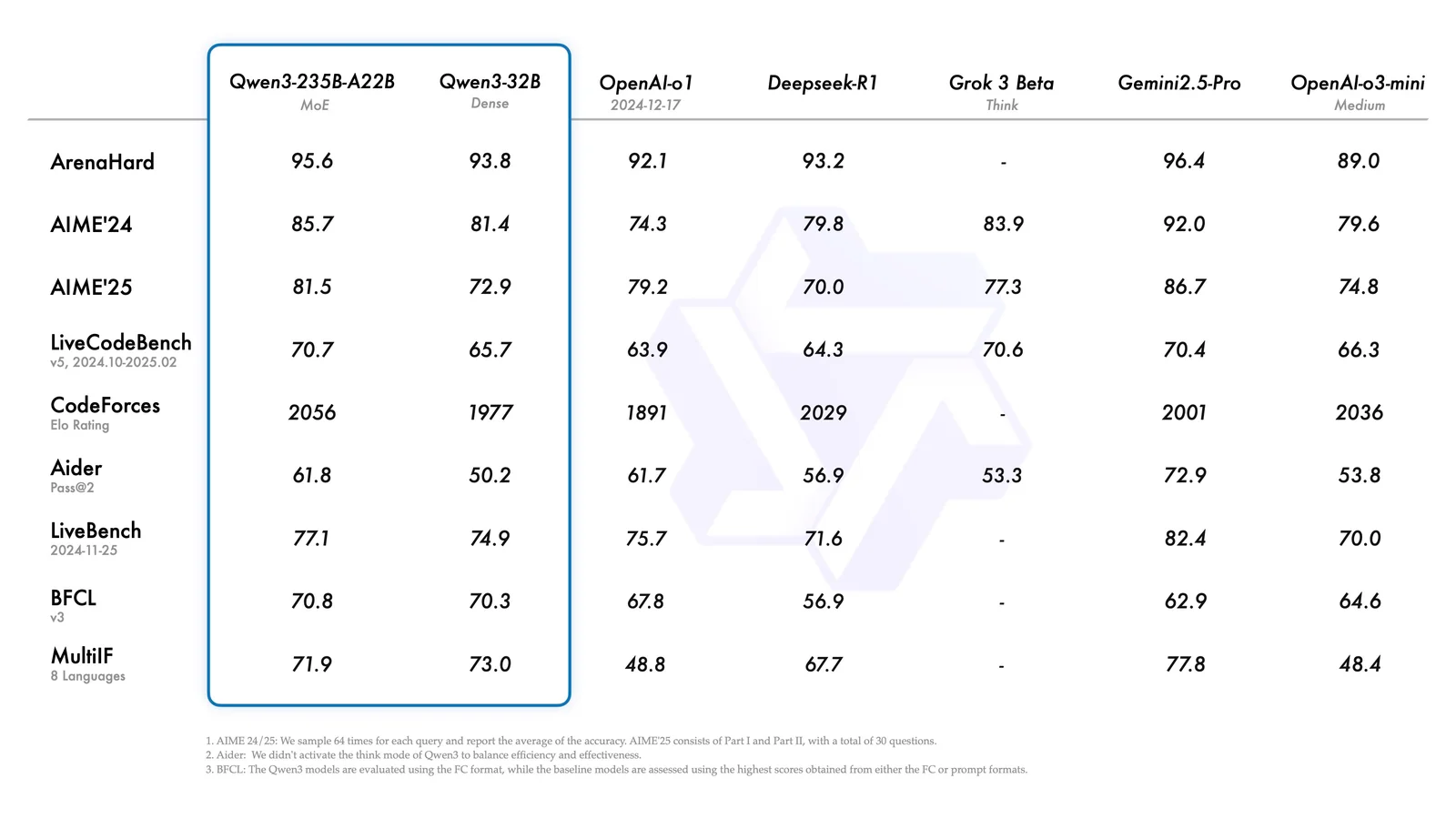
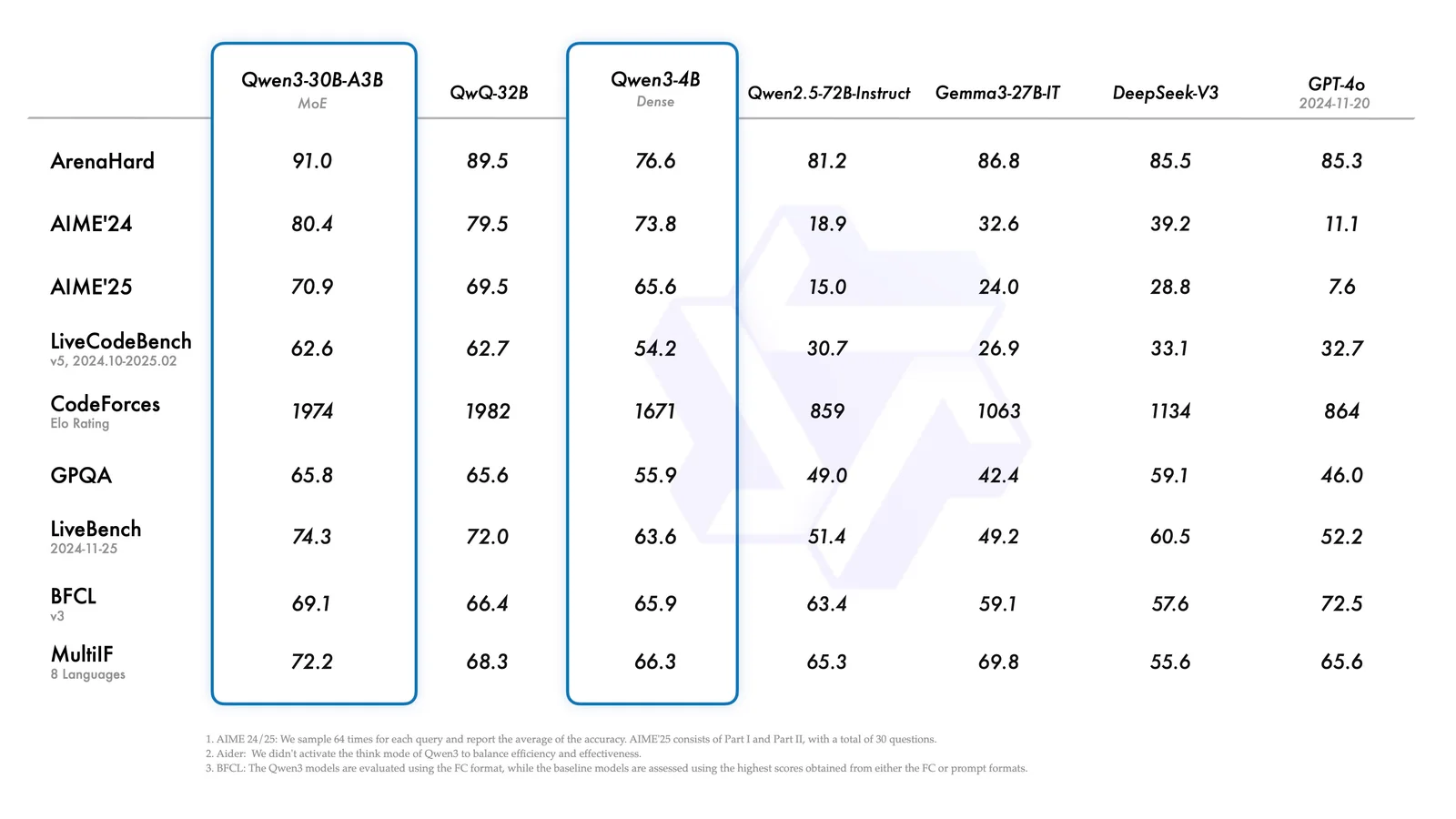
How does Qwen 3 compare to other AI models?
Qwen 3 excels among AI models with its advanced multimodal vision-language capabilities, extensive long-context processing, and robust support for coding tasks. This positions it competitively against models like ChatGPT and OpenAI Codex, especially in areas requiring complex reasoning and coding assistance.
Key Points
- Multimodal Capabilities: Integrates text and image processing efficiently.
- Long-Context Processing: Handles extensive text inputs, enhancing comprehension.
- Specialized Coding Support: Offers advanced assistance for programming tasks.
Detailed Explanation
Qwen 3 distinguishes itself through its ability to engage with both text and visual data, allowing users to input images alongside text prompts. This multimodal functionality is vital for applications in industries such as marketing, education, and creative arts, where visual context enhances communication.
Its long-context processing capability enables it to maintain coherence over longer conversations or documents, managing inputs of up to 32,000 tokens. This feature is particularly beneficial for users needing detailed analysis or storytelling, as it retains context better than many competing models.
Moreover, Qwen 3 provides specialized coding support that simplifies software development tasks. It can generate code snippets, debug existing code, and even explain complex programming concepts in a user-friendly manner. This makes it a valuable tool for developers, educators, and students alike, as it streamlines workflows and fosters learning.
Use Cases
- Marketing Campaigns: Create engaging content by combining text and images.
- Education: Develop educational materials that integrate visual aids for enhanced learning.
- Software Development: Utilize coding assistance for writing and debugging code efficiently.
Best Practices / Tips
- Experiment with Inputs: Leverage Qwen 3's multimodal capabilities by providing both text and images to see diverse outputs.
- Utilize Long-Context Features: Use extensive prompts to test its long-context capabilities, especially for complex projects.
- Iterate Prompting: Refine your prompts based on initial outputs for better results, especially in coding tasks.
Additional Resources
What are the technical requirements for integrating Qwen 3 API?
To integrate the Qwen 3 API, you need an API key from OpenRouter or Alibaba Cloud. Additionally, ensure your development environment supports recent transformer versions for compatibility with model checkpoints available on Hugging Face and GitHub.
Key Points
- Obtain an API key from OpenRouter or Alibaba Cloud.
- Ensure your environment supports recent transformer versions.
- Access model checkpoints on Hugging Face and GitHub.
Detailed Explanation
Integrating the Qwen 3 API allows developers to leverage advanced AI capabilities. To begin, you must acquire an API key, which is essential for authentication and accessing the API features. Both OpenRouter and Alibaba Cloud provide these keys, so choose the one that best fits your project needs.
Next, confirm that your development environment is equipped to handle recent transformer versions. This includes popular libraries such as TensorFlow and PyTorch. Compatibility with the latest versions ensures you can utilize the full potential of the Qwen 3 model efficiently.
You can find model checkpoints on platforms like Hugging Face and GitHub, which are crucial for initiating your integration. These checkpoints contain pre-trained models that can be fine-tuned according to your specific use cases, such as natural language processing, image recognition, or other AI tasks.
Best Practices / Tips
- Use Secure Key Management: When handling your API key, ensure it’s stored securely to prevent unauthorized access.
- Monitor API Usage: Keep track of your API calls to avoid exceeding usage limits and incurring additional costs.
- Test in a Sandbox Environment: Before deploying in production, test your integration in a safe environment to troubleshoot any potential issues.
Additional Resources
Explore more AI Ai Models tools
Browse all Ai Models tools →Browse by use case: Code Generation
Compare Qwen 3: vs Milliseconds.ai · vs SWE-2 · vs Desert Ant Labs · vs Hy4 preview