

Nudge Task
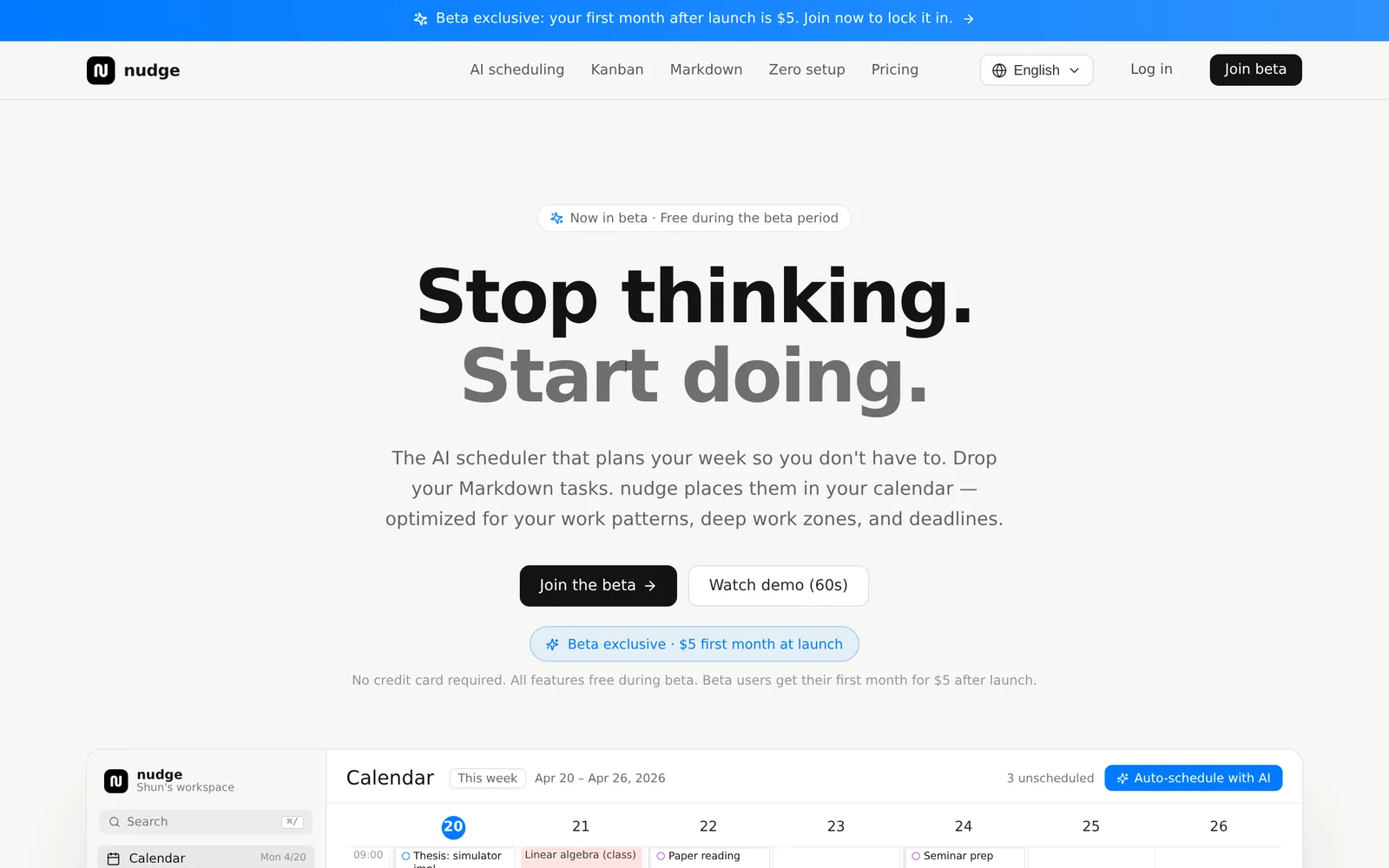
AIAI task scheduler that plans your week by converting Markdown tasks into calendar events around deep work zones and deadlines.
Nudge Task
AI task scheduler that plans your week by converting Markdown tasks into calendar events around deep work zones and deadlines.
About Nudge Task
Nudge Task is an AI-powered task scheduler that automatically organizes your to-dos into a weekly calendar. Users drop Markdown-formatted tasks and Nudge Task parses them, schedules work blocks around declared deep work zones and upcoming deadlines, and places tasks directly into the calendar. The tool prioritizes deadline-aware placement and minimizes planning friction so users can focus on execution rather than scheduling. Pricing starts from $5/month.
Screenshots
Key Features
Use Cases


Frequently asked questions about Nudge Task
What is Nudge Task?
Nudge Task is an AI-driven task scheduler that effortlessly organizes your weekly agenda by integrating Markdown tasks into your calendar. It optimally places these tasks around your deep work zones and deadlines, ensuring maximum productivity, starting at just $5 per month.
Key Points
- AI-Powered Scheduling: Automates task organization based on your preferences.
- Markdown Integration: Supports easy task entry through Markdown syntax.
- Affordability: Plans start at only $5 per month, making it accessible.
Detailed Explanation
Nudge Task revolutionizes how individuals manage their weekly schedules by leveraging artificial intelligence to optimize task placement. Users can simply input their tasks using Markdown, a lightweight markup language that allows for easy formatting. For instance, you might enter a task as - [ ] Write blog post, and Nudge Task will automatically recognize this input and schedule it accordingly.
The platform analyzes your available time slots, prioritizing deep work periods—times when you are least likely to be interrupted. By strategically placing tasks around these zones, Nudge Task helps you maintain focus and productivity throughout the week. Additionally, it considers deadlines to ensure timely completion of all tasks without overwhelming the user.
For example, if you have a deadline for a project on Friday, Nudge Task can allocate time earlier in the week to work on it, while still fitting in other tasks seamlessly. This ensures a balanced workload, reducing last-minute stress.
Best Practices / Tips
- Utilize Markdown Effectively: Familiarize yourself with Markdown syntax to maximize your task entries. This can include checkboxes, headings, and lists for better organization.
- Set Clear Deadlines: Clearly define deadlines when entering tasks to help Nudge Task prioritize effectively.
- Review Weekly: Take time to review your schedule at the beginning of each week. This allows you to adjust your deep work zones as needed based on upcoming commitments.
Common Pitfalls to Avoid:
- Overloading Tasks: Avoid entering too many tasks in a single day. This can lead to burnout and decreased productivity.
- Ignoring Breaks: Ensure to schedule breaks and downtime to maintain energy levels throughout the week.
Additional Resources
How does Nudge Task work?
Nudge Task leverages advanced AI capabilities to streamline daily workflows by automating tasks, enhancing productivity, and personalizing user experiences. It integrates seamlessly with existing tools, allowing users to efficiently manage their responsibilities with minimal manual intervention.
Key Points
- AI-Driven Automation: Automates repetitive tasks.
- Integration Capabilities: Works with various applications.
- User-Centric Features: Customizes workflows based on user preferences.
Detailed Explanation
Nudge Task functions by utilizing machine learning algorithms and natural language processing to understand user needs and preferences. Here’s how it works in detail:
-
Task Automation: Nudge Task can automate repetitive administrative duties such as scheduling meetings, sending reminders, and managing emails. For example, it can analyze your calendar and suggest optimal meeting times, reducing back-and-forth communication.
-
Integration with Tools: Nudge Task connects with popular applications like Google Workspace, Microsoft Office, and project management software. This integration allows users to manage tasks from one platform, enhancing workflow efficiency. For instance, you can create tasks directly from your email or calendar events without switching apps.
-
Personalization: The AI learns from user interactions to tailor its suggestions and actions. If you frequently prioritize certain types of tasks, Nudge Task adapts to highlight those, ensuring that users focus on what matters most.
Nudge Task also offers analytics to track productivity trends, helping users identify areas for improvement.
Best Practices / Tips
- Start Small: Begin by automating simple tasks to familiarize yourself with Nudge Task's capabilities.
- Customize Settings: Take advantage of personalization features to tailor the tool to your specific workflow preferences.
- Regularly Review Analytics: Use the insights provided to adjust your workflow and improve efficiency.
- Experiment: Try different integrations to see which combinations enhance your productivity the most.
- Stay Updated: Regularly check for new features and updates to maximize the tool's potential.
Additional Resources
What are the main features of Nudge Task?
Nudge Task offers a variety of key features, primarily centered around its core AI capabilities. These include task automation, real-time analytics, seamless team collaboration, and customizable workflows, all designed to enhance productivity and efficiency within organizations.
Key Points
- Task Automation: Streamlines repetitive tasks.
- Real-Time Analytics: Provides insights into team performance.
- Seamless Collaboration: Facilitates communication among team members.
Detailed Explanation
Nudge Task is designed to optimize workflow and increase productivity through innovative features that leverage artificial intelligence.
Task Automation
One of the standout features of Nudge Task is its robust task automation capabilities. Users can automate repetitive processes, such as sending reminders, updating project statuses, and generating reports. For instance, if a team member needs to follow up on a client interaction, Nudge Task can automatically set reminders without manual intervention.
Real-Time Analytics
Nudge Task provides real-time analytics that help teams track performance metrics and project progress. Users can access dashboards that display key performance indicators (KPIs) such as task completion rates and team workload distribution. This data-driven approach enables teams to make informed decisions quickly and adjust strategies as needed.
Seamless Collaboration
Collaboration is made easy with features like shared task boards and instant messaging. Team members can communicate within the platform, allowing for quicker feedback and problem-solving. For example, if a team member encounters an issue while working on a task, they can instantly reach out to others for assistance, ensuring that projects stay on track.
Customizable Workflows
Nudge Task allows users to create customizable workflows tailored to their specific needs. This flexibility means teams can design their processes to align with their unique operational requirements. By adjusting the workflows, teams can enhance efficiency and ensure that everyone is on the same page.
Best Practices / Tips
- Leverage Automation: Identify tasks that can be automated to save time and reduce errors.
- Utilize Analytics: Regularly review analytics dashboards to understand performance trends and adjust workflows accordingly.
- Encourage Collaboration: Foster a culture of communication by encouraging team members to use the collaboration tools provided by Nudge Task.
Additional Resources
Who is Nudge Task for?
Nudge Task is designed for professionals, small business owners, educators, and anyone interested in streamlining their day-to-day workflows with artificial intelligence. It simplifies task management and enhances productivity by integrating AI tools into everyday operations.
Key Points
- Target Audience: Professionals, small business owners, educators, and tech enthusiasts.
- Features: Automates daily tasks, improves efficiency, and integrates with various AI tools.
- Benefits: Saves time, reduces manual effort, and enhances decision-making.
Detailed Explanation
Nudge Task is particularly useful for individuals and organizations aiming to optimize their daily operations through AI integration. Professionals such as marketers can automate repetitive tasks like social media scheduling or email follow-ups. Small business owners may use Nudge Task to manage customer inquiries, track sales, and improve client interactions without the need for extensive technical knowledge.
For educators, Nudge Task can facilitate lesson planning and grading by automating administrative tasks. For example, teachers can set reminders for assignments and utilize AI-driven insights to personalize learning experiences. By incorporating Nudge Task into their workflow, users can free up valuable time to focus on higher-level strategic activities.
Use Cases:
- Marketing Teams: Automate content distribution and analyze customer engagement through AI insights.
- Small Business Owners: Streamline customer service tasks and manage inventory with automated notifications.
- Educators: Simplify grading processes and improve communication with students and parents through automated updates.
Best Practices / Tips
- Start Small: Begin with a few key tasks to automate before expanding your use of Nudge Task.
- Integrate Seamlessly: Make sure Nudge Task is compatible with existing tools like CRM software or project management apps.
- Regularly Evaluate: Assess the effectiveness of automated tasks periodically to ensure they meet your evolving needs.
Additional Resources
How much does Nudge Task cost?
Nudge Task's pricing varies based on the features and plan you select, with detailed costs available on their official website. Generally, they offer tiered pricing to accommodate different user needs, including basic and advanced functionalities.
Key Points
- Nudge Task offers tiered pricing plans.
- Costs depend on selected features and usage.
- Visit the official website for the latest updates.
Detailed Explanation
Nudge Task provides a variety of pricing plans tailored to different user requirements. Typically, their pricing structure includes:
-
Basic Plan: Ideal for individuals and small teams, this plan often includes essential features like task management and basic reporting. Pricing usually starts around $10 per user per month.
-
Pro Plan: Suitable for larger teams, this tier generally offers advanced functionalities such as integrations with other applications, enhanced reporting tools, and priority support. Pricing often ranges from $20 to $30 per user per month, depending on the features included.
-
Enterprise Plan: This custom-priced option is designed for organizations with extensive needs, offering full customization, dedicated account management, and premium features. Interested parties must contact Nudge Task for a personalized quote.
To ensure you are making the best decision, it’s advisable to compare the features offered in each plan. You can also look for any promotional discounts or free trial options that Nudge Task might provide to test the platform before committing.
Best Practices / Tips
- Evaluate Your Needs: Before choosing a plan, assess your team's size and specific needs to ensure you select the most cost-effective option.
- Consider Long-term Use: If you plan to use Nudge Task for an extended period, inquire about annual billing discounts, which can save you money in the long run.
- Utilize Free Trials: If available, take advantage of free trials to explore the platform’s features and determine if it fits your workflow before making a financial commitment.
Additional Resources
- Nudge Task Official Website - For the most current pricing and feature breakdowns.
- Comparison of Task Management Tools - To explore how Nudge Task stacks up against competitors.
- Customer Reviews and Case Studies - Gain insights from other users on the effectiveness of Nudge Task.
How do I get started with Nudge Task?
To get started with Nudge Task, visit Nudge Task AI's official website to sign up. Create an account, explore the platform's features, and begin utilizing AI-driven task management tools to enhance your productivity.
Key Points
- Sign up easily: Create an account in just a few minutes.
- Explore features: Familiarize yourself with the AI tools available.
- Boost productivity: Utilize task management capabilities effectively.
Detailed Explanation
Nudge Task is designed to streamline your workflow using AI technology for task management. To begin, follow these simple steps:
- Visit the Website: Go to Nudge Task AI and locate the sign-up button.
- Create an Account: Fill out the necessary fields, including your email address and password. Once registered, you may receive a confirmation email to verify your account.
- Onboard with Tutorials: After signing in, take advantage of the onboarding tutorials that guide you through the platform's features, such as setting up tasks, utilizing AI suggestions, and integrating with other tools you may already use, like Google Calendar or Trello.
- Start Managing Tasks: Begin creating tasks, setting deadlines, and using AI assistance to prioritize your to-dos, ensuring better time management and productivity.
For example, if you run a small team, you can assign tasks, monitor progress, and receive AI-generated insights on improving efficiency. This approach not only helps you stay organized but also encourages collaboration among team members.
Best Practices / Tips
- Utilize AI Features: Make the most of the AI-driven suggestions to prioritize tasks based on urgency and importance.
- Regularly Review Tasks: Check your task list daily to stay on top of deadlines and adjust priorities as needed.
- Integrate with Other Tools: Connect Nudge Task with other productivity tools you use to streamline your workflow further. This will help centralize your task management.
Common pitfalls to avoid include neglecting to update task statuses, which can lead to confusion, or underutilizing AI suggestions that can significantly enhance your productivity.
Additional Resources
- Nudge Task AI Official Documentation
- Productivity Tips with Nudge Task
- Integrations with Other Tools
By following these steps and tips, you can effectively leverage Nudge Task to optimize your task management and improve overall productivity.
Explore more AI Ai Tools tools
Browse all Ai Tools tools →Browse by use case: Automation & Productivity
Compare Nudge Task: vs Decode · vs LibreChat · vs AppGrowthKit · vs Humanizer