

Meetings Wrapped
AIWeb tool that analyzes your Google Calendar to show meeting stats, top collaborators, trends, and meetings that could've been emails.
Meetings Wrapped
Web tool that analyzes your Google Calendar to show meeting stats, top collaborators, trends, and meetings that could've been emails.
About Meetings Wrapped
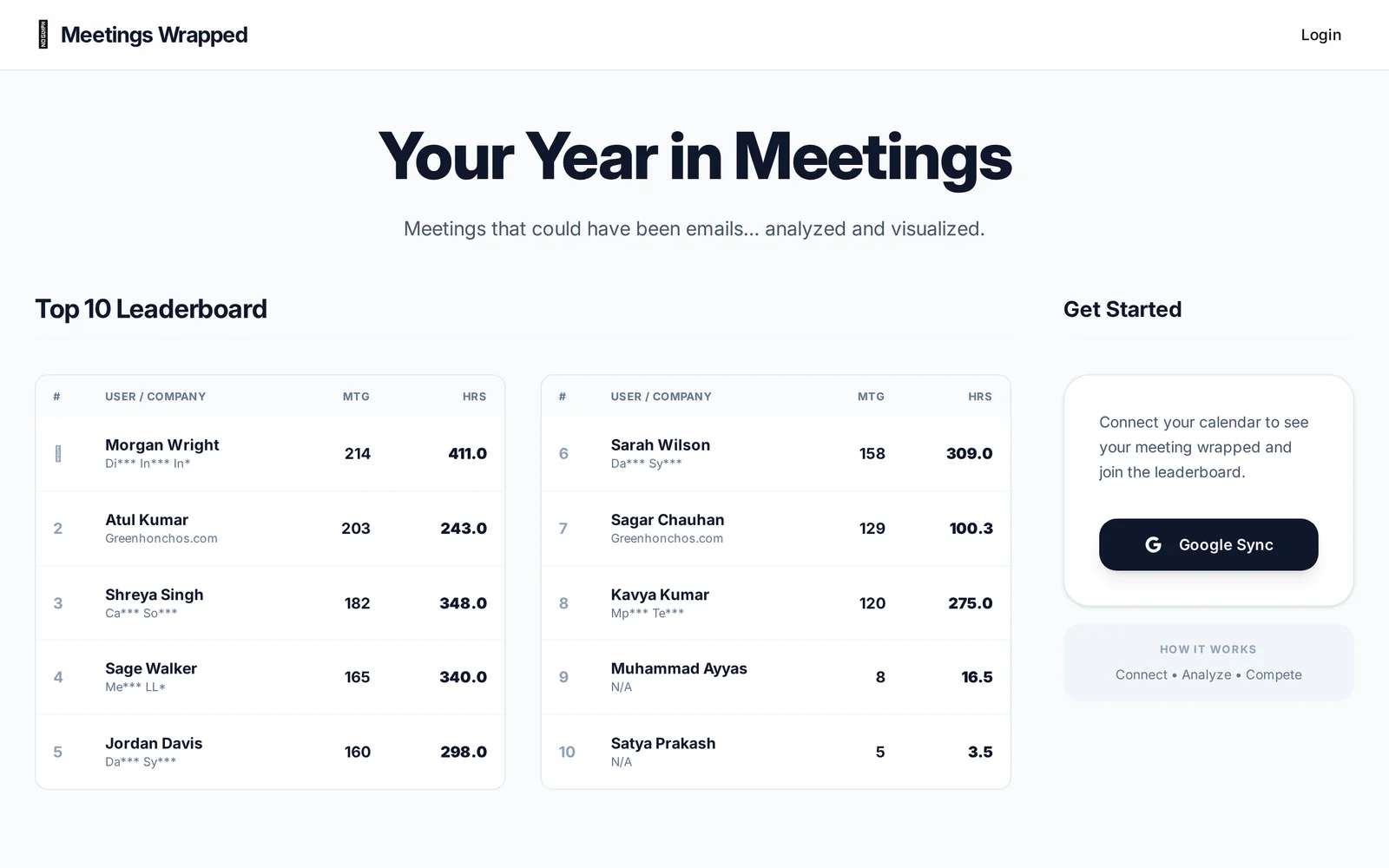
Meetings Wrapped is a lightweight web app that connects to your Google Calendar and analyzes your meeting history to produce a year-end "wrap" of meeting statistics and visualizations. It aggregates counts, weekly averages, trends over time, and highlights top collaborators and meetings that may have been replaceable by email. Launched as a side project by its creator, the tool emphasizes quick insights and visual summaries to help individuals and teams understand meeting habits and identify inefficiencies.
Screenshots
Key Features
Use Cases



Frequently asked questions about Meetings Wrapped
What is Meetings Wrapped?
Meetings Wrapped is a web tool that analyzes your Google Calendar to provide insights on meeting statistics, top collaborators, trends, and identifies meetings that could have been emails. This tool enhances productivity by streamlining calendar management and optimizing meeting effectiveness.
Key Points
- Meeting Statistics: Gain insights into the number and duration of meetings.
- Top Collaborators: Identify key team members you collaborate with most frequently.
- Email Opportunities: Discover meetings that could have been replaced with emails.
Detailed Explanation
Meetings Wrapped connects seamlessly to your Google Calendar, extracting data to provide a comprehensive overview of your meeting habits. Here are some of the key features:
-
Meeting Statistics: The tool summarizes your meeting frequency, average duration, and total time spent in meetings over a selected period (weekly, monthly, or annually). For instance, if you attend an average of 15 meetings a week totaling 10 hours, this data can help you adjust your schedule for better productivity.
-
Top Collaborators: Meetings Wrapped highlights your most frequent collaborators, helping you understand who you spend the most time with. This feature can be especially useful for networking and collaboration, giving insights into team dynamics and identifying potential areas for improvement.
-
Email Opportunities: One of the standout features is the identification of meetings that could have been conducted via email. By analyzing the content and goals of your meetings, the tool suggests whether a conversation could have been more efficiently handled through email, potentially saving you valuable time.
Best Practices / Tips
- Regularly Review Insights: Make it a habit to review your Meetings Wrapped insights weekly to identify trends and adjust your meeting schedule accordingly.
- Set Goals: Use the data to set measurable goals, such as reducing meeting time by 20% or increasing collaboration with underutilized team members.
- Communicate with Your Team: Share insights with your team to promote a culture of efficiency and open discussions about necessary versus unnecessary meetings.
Additional Resources
How does Meetings Wrapped work?
Meetings Wrapped leverages advanced AI capabilities to streamline and enhance daily workflows by automatically summarizing meetings, extracting key insights, and providing actionable recommendations. This tool helps users save time, improve productivity, and make informed decisions based on meeting outcomes.
Key Points
- AI-Powered Summarization: Automatically generates concise meeting summaries.
- Insight Extraction: Identifies key takeaways and action items from discussions.
- Workflow Integration: Seamlessly integrates with popular productivity tools.
Detailed Explanation
Meetings Wrapped operates as an advanced AI-driven tool designed to optimize the meeting experience. Here’s how it works:
-
Automatic Summarization: Using natural language processing (NLP), Meetings Wrapped captures the main points discussed during meetings. It processes audio or video recordings, creating a clear and concise summary that highlights critical information.
-
Insight Extraction: The AI identifies actionable items, decisions made, and important topics. This feature ensures that users can quickly refer to what needs to be addressed after meetings, reducing the time spent sifting through notes.
-
Integration with Productivity Tools: Meetings Wrapped is designed to work with various platforms such as Zoom, Microsoft Teams, and Slack. This integration allows users to access summaries and insights directly within their preferred tools, enhancing the workflow without needing to switch between applications.
-
User-Friendly Interface: The platform offers an intuitive dashboard where users can easily navigate through past meetings, search for specific topics, and review insights. This ease of use is crucial for maintaining productivity.
-
Customizable Features: Users can customize Meeting Wrapped to fit their specific needs, such as adjusting the level of detail in summaries or setting reminders for follow-up actions.
Best Practices / Tips
- Utilize Recording Features: Always record meetings to maximize the benefits of Meetings Wrapped. Clear audio leads to better summarization.
- Regularly Review Summaries: Make it a habit to review meeting summaries and action items at the start of each week to ensure nothing is overlooked.
- Integrate with Task Management Tools: Connect Meetings Wrapped with tools like Trello or Asana to transform action items into tasks automatically.
- Feedback Loop: Provide feedback on the summaries to help improve the AI's performance over time. This can enhance the accuracy of future summaries.
Additional Resources
What are the main features of Meetings Wrapped?
Meetings Wrapped offers key features such as AI-driven insights, personalized summaries, and action item tracking. These capabilities enhance productivity by streamlining meeting notes and ensuring follow-ups are clear, making it easier for teams to stay aligned and focused on their objectives.
Key Points
- AI-Driven Insights: Automatically generates insights from meeting discussions.
- Personalized Summaries: Tailors meeting recaps based on participants' roles.
- Action Item Tracking: Keeps tabs on tasks assigned during meetings.
Detailed Explanation
Meetings Wrapped utilizes advanced AI technology to transform how teams conduct and follow up on meetings.
-
AI-Driven Insights: This feature analyzes conversations in real-time, providing actionable insights derived from discussions. For instance, it can highlight key decisions made during meetings or identify recurrent topics that require further attention.
-
Personalized Summaries: After a meeting, the tool generates a tailored summary, focusing on what matters most to each participant. For example, a project manager might receive a different summary than a developer, emphasizing their respective action items and points of interest.
-
Action Item Tracking: Meetings Wrapped allows users to create and assign tasks directly during the meeting. This ensures everyone is clear on their responsibilities post-meeting. Users can easily track progress on these action items, making follow-ups straightforward and efficient.
Best Practices / Tips
- Integrate with Calendar: Link Meetings Wrapped with your calendar to automatically pull in meeting details and participants, ensuring seamless operation.
- Encourage Participation: Ask all team members to engage in discussions to enhance the quality of insights generated.
- Review Summaries Regularly: Regularly check the personalized summaries to stay updated and ensure nothing falls through the cracks.
Additional Resources
Who is Meetings Wrapped for?
Meetings Wrapped is designed for professionals, teams, and organizations seeking to enhance their day-to-day AI workflows, optimize meeting productivity, and streamline collaboration. It caters to anyone from executives to project managers who want to leverage AI to improve meeting efficiency and outcomes.
Key Points
- Target Audience: Professionals and teams across various industries.
- Use Cases: Enhancing productivity and collaboration during meetings.
- Benefits: Streamlined workflows and improved meeting outcomes with AI.
Detailed Explanation
Meetings Wrapped serves a diverse audience, including corporate executives, project managers, remote teams, and even freelancers. Its primary goal is to harness artificial intelligence to improve the efficiency of meetings, which are often time-consuming and unproductive.
For instance, executives can use Meetings Wrapped to analyze past meeting data, identify key insights, and prepare better agendas. Project managers might find value in tracking team performance and ensuring that follow-ups are executed. Remote teams benefit from AI-generated summaries that help align everyone, regardless of location.
The platform utilizes features like automated note-taking, action item tracking, and performance analytics to provide comprehensive insights into meetings. These features cater to the needs of various roles within an organization, making it a versatile tool for enhancing collaboration and communication.
Best Practices / Tips
- Set Clear Objectives: Before a meeting, outline specific goals to ensure that Meetings Wrapped can effectively analyze the discussion and outcomes.
- Integrate with Existing Tools: Use Meetings Wrapped alongside other project management and communication tools for comprehensive workflow optimization.
- Regularly Review Analytics: Make it a habit to review the data and insights provided by Meetings Wrapped to continuously improve meeting strategies.
- Encourage Team Participation: Foster an environment where all team members can contribute to discussions and share insights, maximizing the value derived from meetings.
Additional Resources
How much does Meetings Wrapped cost?
Meetings Wrapped is completely free to use, providing users with a variety of features to enhance their meeting experiences without any financial commitment. This makes it accessible for individuals and organizations looking to optimize their meeting productivity without incurring additional costs.
Key Points
- Meetings Wrapped is a free tool.
- It offers features for meeting optimization.
- Accessible for both individuals and organizations.
Detailed Explanation
Meetings Wrapped is designed to streamline and enhance your meeting experiences. As a free tool, it provides functionalities that cater to various user needs, from scheduling to analyzing past meetings. Users can track meeting duration, participant engagement, and follow-up tasks, all without any subscription fees.
Features of Meetings Wrapped:
- Meeting Summaries: Automatically generate summaries of your meetings, allowing for easy reference and follow-up.
- Participant Analytics: Gain insights into participant engagement levels, helping to identify areas for improvement.
- Task Management: Create and assign tasks directly from your meeting notes, ensuring accountability.
This tool is particularly beneficial for remote teams looking to stay organized and maintain effective communication. By utilizing Meetings Wrapped, organizations can foster a culture of productivity without the burden of additional costs.
Best Practices / Tips
- Regular Usage: To maximize benefits, incorporate Meetings Wrapped into your weekly routine. Regularly review past meetings to identify trends in engagement and productivity.
- Customize Settings: Explore customization options to tailor notifications and summaries to your specific needs, ensuring you get the most relevant information.
- Share Insights: Encourage team members to utilize the tool and share insights from their meetings to foster a collaborative environment.
Avoid common pitfalls such as neglecting to follow up on the tasks generated by the tool. Consistent engagement with the features offered by Meetings Wrapped can significantly improve meeting outcomes.
Additional Resources
Using Meetings Wrapped can transform your meeting culture, making it both efficient and enjoyable—all for free!
How do I get started with Meetings Wrapped?
To get started with Meetings Wrapped, visit wrap.sagarchauhan.in to sign up and create an account. After signing up, you can explore the features, customize your settings, and begin using the tool for your meeting analytics.
Key Points
- Easy Sign-Up: Register quickly with your email.
- User-Friendly Interface: Navigate through intuitive features and settings.
- Comprehensive Analytics: Gain insights into your meetings' productivity.
Detailed Explanation
Meetings Wrapped is a powerful tool designed to enhance your meeting experiences by providing analytics and insights. To begin, follow these steps:
- Visit the Website: Go to wrap.sagarchauhan.in.
- Create an Account: Click on the "Sign Up" button. You can register using your email address or social media accounts for quick access.
- Explore Features: Once logged in, navigate through the dashboard, which provides an overview of your meeting stats, including duration, frequency, and participant engagement.
- Customize Settings: Adjust your preferences for notifications and data collection. You can set parameters based on your meeting goals.
- Start Analyzing: After your meetings, review the analytics generated by Meetings Wrapped. Use the insights to improve future meetings.
For example, if you notice a pattern of low engagement in certain meetings, you can adjust your agenda or format to enhance participation.
Best Practices / Tips
- Regularly Review Analytics: Make it a habit to check your meeting data weekly to identify trends.
- Set Clear Goals: Define what success looks like for your meetings to better leverage the insights provided by Meetings Wrapped.
- Engage Participants: Use the analytics to create more engaging agendas based on participant feedback and interaction levels.
- Avoid Information Overload: Focus on key metrics that matter most to your team’s success rather than getting bogged down by excessive data.
Additional Resources
Explore more AI Ai Tools tools
Browse all Ai Tools tools →Compare Meetings Wrapped: vs Mise · vs BiBimba · vs VoiceCap · vs NM Signals