

Lumi
AIA Google PAIR prototype that adds AI-powered annotations, granular summaries, and custom Q&A to arXiv research papers.
Lumi
A Google PAIR prototype that adds AI-powered annotations, granular summaries, and custom Q&A to arXiv research papers.
About Lumi
Lumi is a reading prototype from People & AI Research (PAIR) at Google that overlays a lightweight AI layer on top of arXiv research papers. It provides inline, context-aware features — including granular summaries, sentence- and paragraph-level annotations, and custom question-and-answer interactions — to help readers understand and navigate complex scientific texts. Lumi is offered as an open-source project (Apache-2.0) to enable transparency and community contributions and is designed to accelerate literature review, comprehension, and discovery for researchers, students, and practitioners.
Screenshots
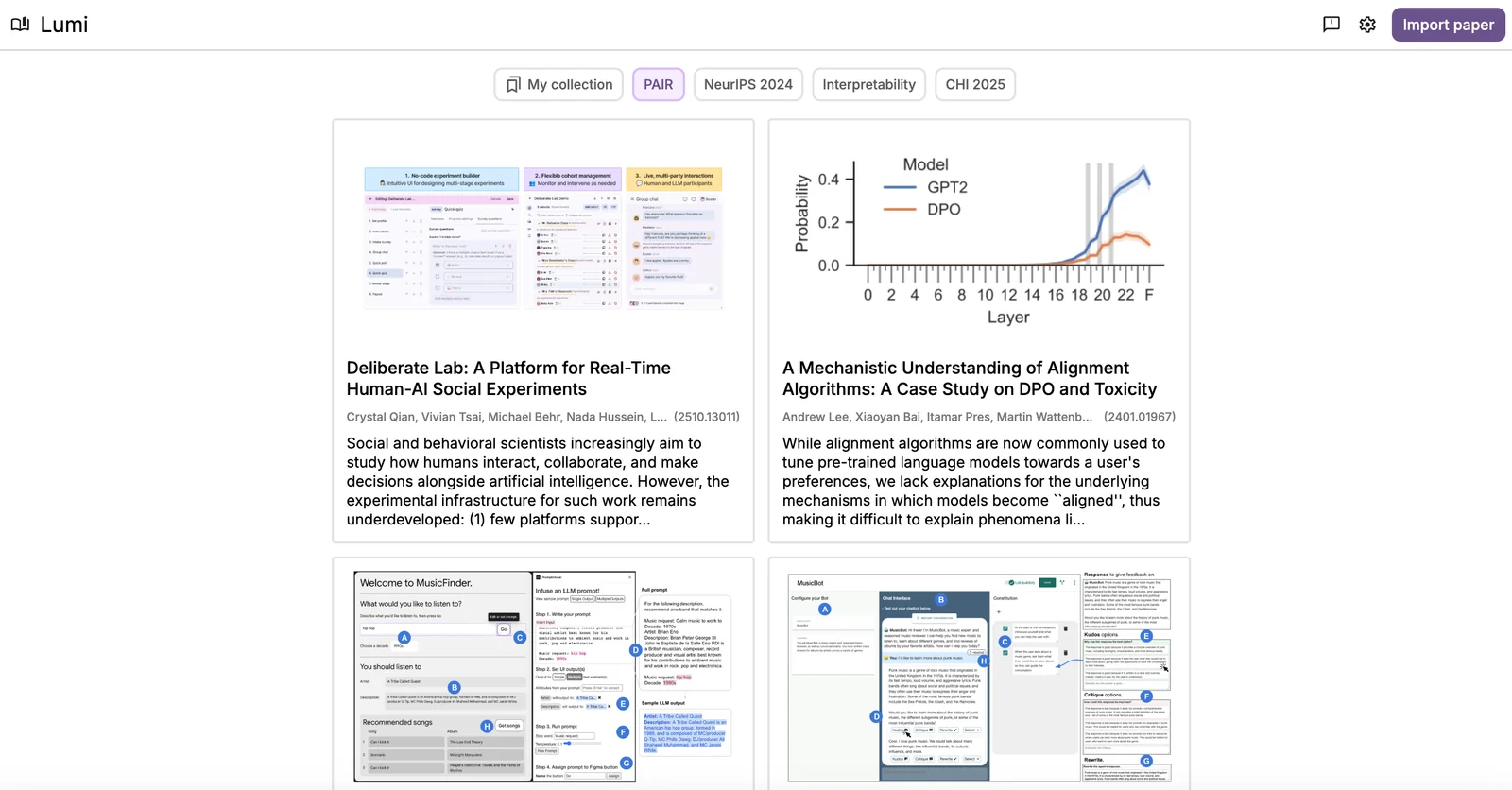
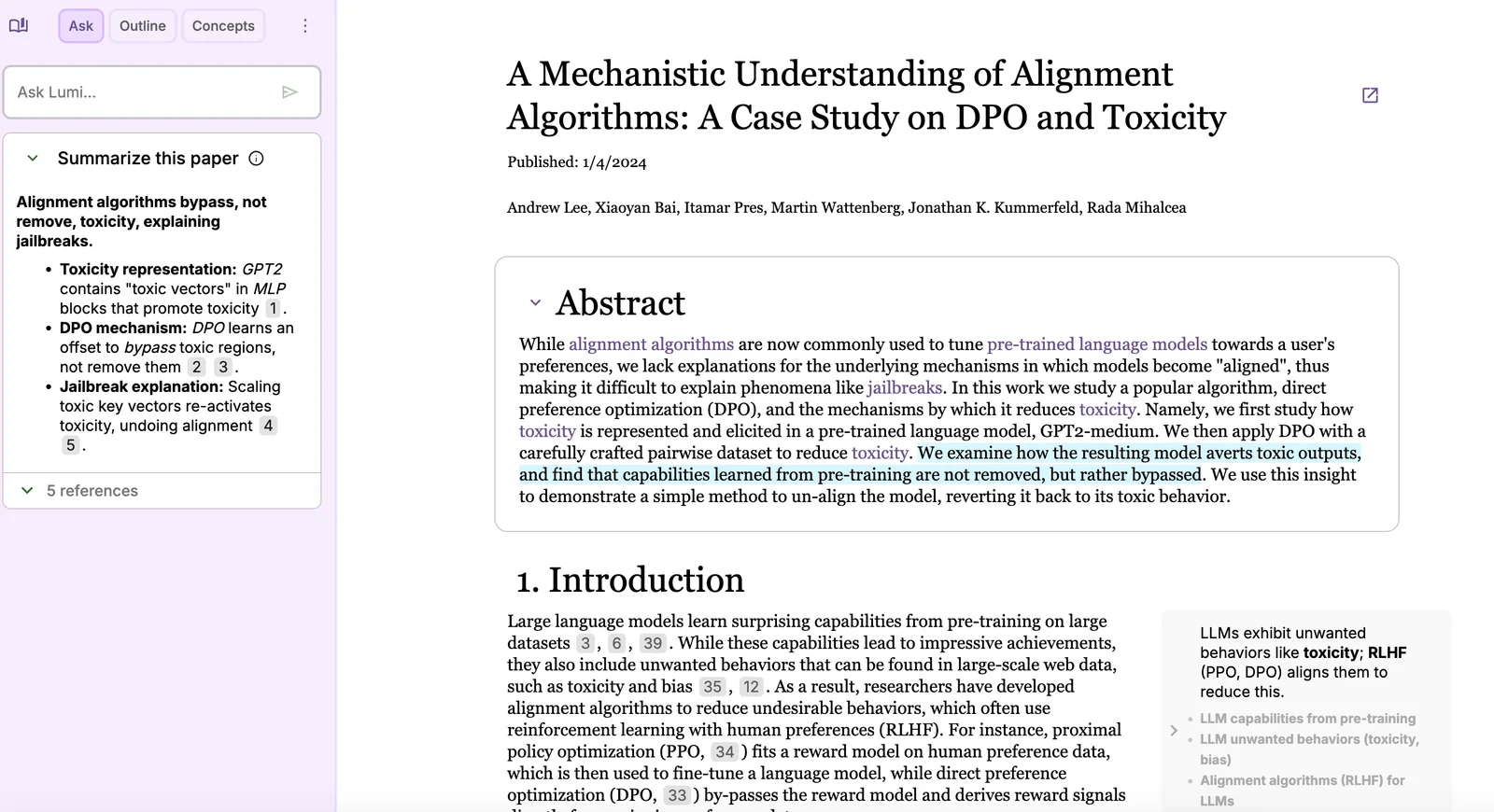
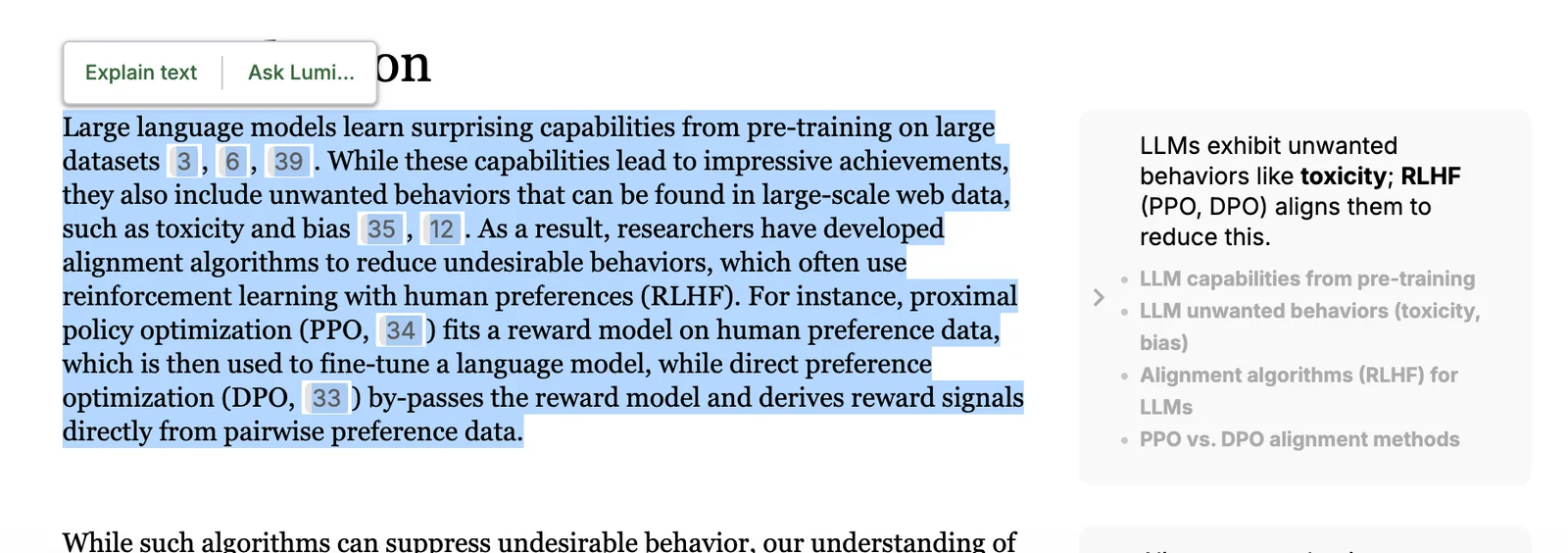
Key Features
Use Cases



Frequently asked questions about Lumi
What pricing options are available for Lumi?
Lumi is currently available as a free research prototype, allowing users to access features like annotations, summaries, and Q&A without any charges. However, third-party services may incur additional costs depending on their individual pricing structures.
Key Points
- Lumi is free to use as a research prototype.
- Key features include annotations, summaries, and Q&A.
- Third-party services may have separate pricing.
Detailed Explanation
Lumi stands out as an innovative AI tool designed for research purposes, offering a suite of features that enhance the user experience without any cost. As a free research prototype, Lumi provides users with the ability to annotate texts, generate summaries, and engage in Q&A sessions, making it an invaluable resource for students, researchers, and professionals alike.
Features of Lumi:
- Annotations: Users can highlight and comment on texts, facilitating collaboration and deeper understanding.
- Summaries: Lumi can condense lengthy documents into concise summaries, saving time and improving efficiency.
- Q&A Functionality: Users can interact with the tool to get instant answers to specific questions, optimizing research processes.
While Lumi itself does not charge users, it’s essential to note that integration with third-party services may lead to additional costs. For instance, if you choose to use Lumi alongside other platforms or tools that require subscriptions or fees, those charges would apply separately. Researching these third-party services beforehand can help users budget effectively.
Best Practices / Tips
- Explore Lumi's Features: Take full advantage of the free features offered by Lumi to enhance your research capabilities.
- Keep an Eye on Third-Party Services: If you plan to integrate Lumi with other tools, research their pricing structures to avoid unexpected expenses.
- Stay Updated: As Lumi evolves, keep an eye on updates regarding new features or changes in pricing for any third-party integrations.
Additional Resources
- Lumi Official Website - Explore the latest updates and features.
- Lumi Documentation - Find comprehensive guides and support for using Lumi effectively.
- Related AI Tools Comparison - Evaluate other AI tools and their pricing models.
What are the key features of Lumi?
Lumi offers advanced AI-powered annotations, customizable granular summaries at various levels, and a tailored Q&A functionality for arXiv research papers. These features enhance the research experience by making complex information easily digestible and accessible for researchers and academics.
Key Points
- AI-Powered Annotations: Automatically generated insights and highlights.
- Granular Summaries: Summaries available at multiple detail levels.
- Custom Q&A Functionality: Interactive question-and-answer feature designed for specific research queries.
Detailed Explanation
Lumi leverages cutting-edge artificial intelligence to transform how researchers interact with arXiv papers.
AI-Powered Annotations
Lumi’s AI analyzes research papers and generates contextually relevant annotations, highlighting key concepts and important findings. These annotations help users quickly identify critical information without reading the entire document. For example, if a paper discusses complex algorithms, Lumi will highlight definitions and key results, allowing readers to grasp the essential points swiftly.
Granular Summaries
The tool provides summaries that can be customized according to the reader's needs. Users can choose from various levels of detail—ranging from brief overviews to in-depth analyses. This feature is particularly useful for those who need different depths of understanding, whether for a quick review or a comprehensive study session.
Custom Q&A Functionality
Lumi’s unique Q&A functionality allows users to ask specific questions about the content of research papers and receive precise, context-aware answers. This interactive approach not only saves time but also enhances comprehension, as users can clarify doubts instantly. For example, asking, "What are the main findings of this paper?" yields a succinct response based on the text.
Best Practices / Tips
- Utilize Annotations: Regularly engage with the AI-powered annotations for a deeper understanding of the content.
- Customize Summaries: Tailor the summaries to match your research needs—use brief summaries for quick reviews and detailed summaries for thorough analyses.
- Engage with Q&A: Take advantage of the custom Q&A feature to clarify concepts or delve deeper into specific sections of the paper, ensuring a comprehensive grasp of the material.
Additional Resources
How can I start using Lumi for my research?
To start using Lumi for your research, visit the official website at lumi.withgoogle.com. There, you can access the prototype for free and seamlessly integrate it with arXiv papers, enhancing your research capabilities through advanced AI tools and features.
Key Points
- Free Access: Lumi is available for free on its official website.
- Integration with arXiv: Effortlessly connect Lumi with arXiv papers.
- User-Friendly Interface: Designed for researchers to easily navigate and utilize AI-driven insights.
Detailed Explanation
Lumi is a prototype tool developed by Google that leverages artificial intelligence to enhance research workflows. Here’s how to get started:
-
Visit the Website: Go to lumi.withgoogle.com. This is where you'll find the latest version of the prototype.
-
Create an Account: Depending on the latest updates, you might need to create a Google account to access all features. Follow the prompts to sign up or log in.
-
Explore the Interface: Once logged in, familiarize yourself with the user-friendly dashboard. The design is intuitive, allowing you to easily navigate through various functions.
-
Integrate arXiv Papers: To enhance your research, integrate papers from arXiv. Use the search function to find relevant papers, and import them into Lumi for analysis. This integration helps in summarizing findings and comparing research outcomes.
-
Utilize AI Features: Take advantage of Lumi’s AI-driven capabilities. For instance, you can generate summaries, extract key insights, and visualize data trends relevant to your research topic.
Best Practices / Tips
- Stay Updated: Regularly check for updates on Lumi’s features as they can enhance your research experience.
- Utilize Filters: When searching for papers, use advanced filtering options to narrow down results relevant to your specific field of study.
- Engage with the Community: Join forums or groups of researchers using Lumi to share experiences and tips on optimizing your research process.
Additional Resources
- Lumi Official Website
- Google AI Research Blog
- arXiv.org for accessing a plethora of research papers across disciplines.
Does Lumi support API integrations for custom workflows?
Yes, Lumi supports API integrations for custom workflows. Its open-source code is available on GitHub, enabling developers to tailor and seamlessly integrate its features into their projects, enhancing functionality and user experience according to specific business needs.
Key Points
- Lumi's open-source code is accessible on GitHub.
- API integrations allow for customized workflows.
- Developers can enhance Lumi's features based on project requirements.
Detailed Explanation
Lumi offers a robust API that facilitates integration with various applications, allowing developers to create customized workflows tailored to their specific needs. By leveraging its open-source nature, businesses can modify the code hosted on GitHub to fit their operational requirements.
Use Cases
- E-commerce Platforms: Companies can integrate Lumi’s API to automate order processing, inventory management, and customer notifications, streamlining their operations.
- Data Analytics: Businesses can pull data from Lumi into their analytics tools for real-time insights, enabling informed decision-making.
- Custom Applications: Developers can use Lumi's API to build unique applications that interact with other tools, enhancing workflow efficiency.
Example Steps for Integration
- Clone the Repository: Start by cloning Lumi’s GitHub repository to your local machine.
- Set Up Your Environment: Configure your development environment by installing necessary dependencies.
- Modify the Code: Customize the API endpoints as needed for your specific workflows.
- Test Your Integration: Run tests to ensure that the API integration works as intended.
- Deploy: Once testing is complete, deploy your customized integration to your production environment.
Best Practices / Tips
- Documentation: Always refer to Lumi's official API documentation for detailed instructions and best practices.
- Version Control: Use version control systems like Git to manage changes effectively.
- Community Support: Engage with the Lumi developer community on forums or GitHub to seek advice or share your experiences.
- Security: Implement security best practices, such as using secure tokens and validating inputs to prevent vulnerabilities.
Additional Resources
These resources will provide further insights and assistance in optimizing your Lumi API integrations.
How does Lumi compare to other AI annotation tools?
Lumi stands out among AI annotation tools by offering specialized features for arXiv papers, such as inline annotations and granular summaries. Unlike many other tools, which may lack academic integration, Lumi enhances the research experience by simplifying the annotation process for scholarly articles.
Key Points
- Specialization in Academic Content: Lumi is tailored for arXiv papers, making it ideal for researchers.
- Unique Annotation Features: Inline annotations and granular summaries provide detailed insights.
- Enhanced Collaboration: Facilitates sharing and collaboration among research teams.
Detailed Explanation
Lumi's focus on arXiv papers allows researchers to annotate, summarize, and share academic content efficiently. The inline annotation feature lets users highlight text directly within the paper and add comments, which is particularly beneficial for collaborative projects. Granular summaries enable users to distill complex papers into digestible insights, aiding comprehension and retention.
For example, if a researcher is working on a project involving machine learning, they can use Lumi to annotate relevant sections of arXiv papers, making it easier to reference critical points during discussions or presentations. This targeted approach not only saves time but also enhances the accuracy of research findings.
In comparison, other AI annotation tools may offer general features applicable to various document types, but they often lack the specialized functionalities that cater specifically to academic research. This distinction makes Lumi a preferred choice for scholars and students in the field.
Best Practices / Tips
- Utilize Inline Annotations: Take full advantage of inline annotations for active collaboration with team members.
- Leverage Granular Summaries: Use the granular summaries to create quick reference guides for complex papers.
- Stay Updated: Regularly check for updates or new features within Lumi to maximize its capabilities.
Additional Resources
Explore more AI Ai Agents tools
Browse all Ai Agents tools →Compare Lumi: vs Apache Maka · vs Construct Computer · vs ShogunAI · vs fx