

InsightTube
AIGenerate summaries, chapters, subtitles, translations, and chat-based insights from any YouTube video by pasting a link.
InsightTube
Generate summaries, chapters, subtitles, translations, and chat-based insights from any YouTube video by pasting a link.
About InsightTube
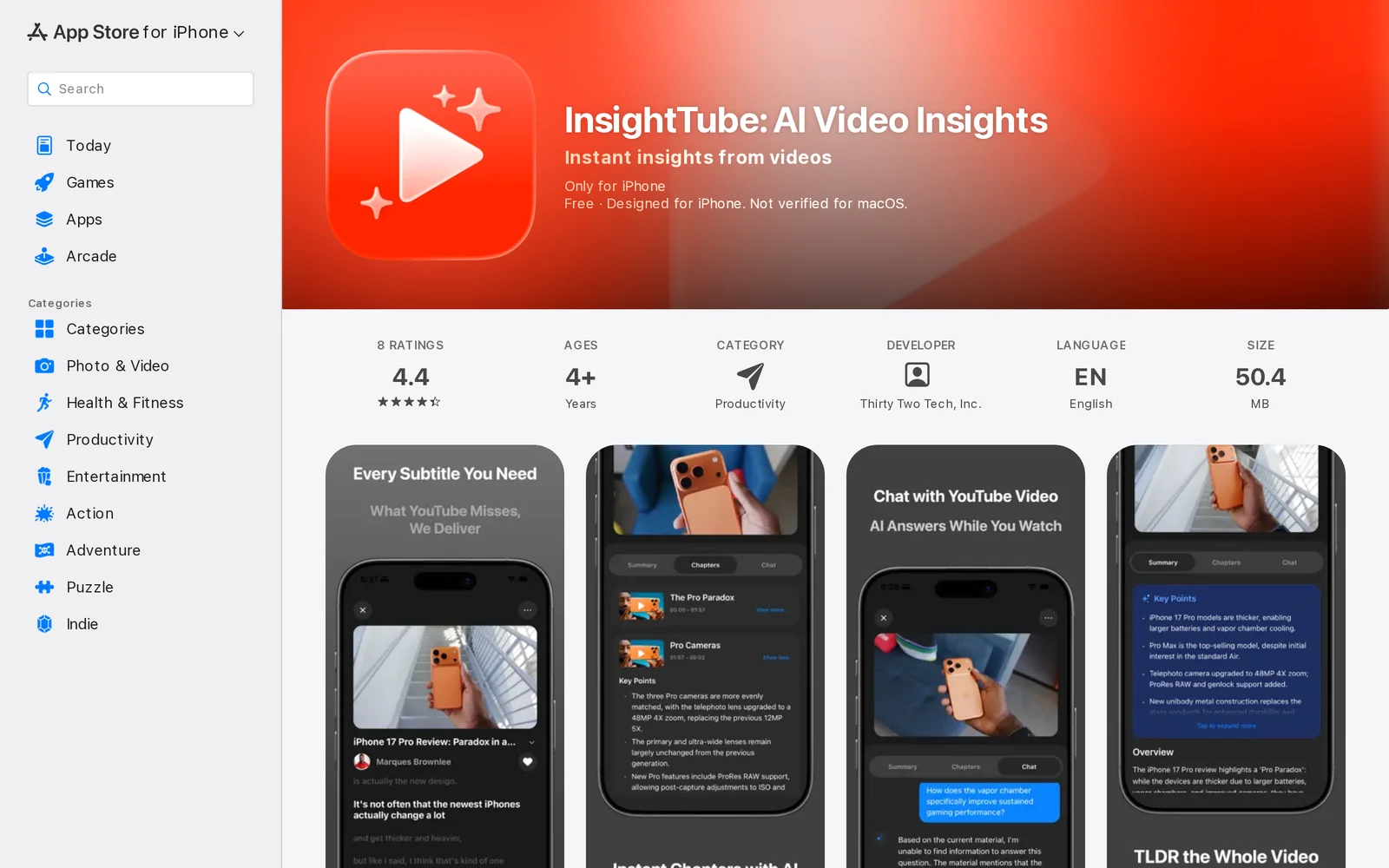
InsightTube is a mobile app that processes YouTube videos to produce concise summaries, chapter markers, multilingual subtitles, and searchable insights. Users paste a video link and the app's AI extracts main ideas, creates navigable chapters, generates captions/translations for videos without built-in captions, and enables a chat interface to ask questions about the video's content. It also stores and organizes processed videos in a personal library for later reference, aiming to save time for students, researchers, creators, and professionals. The app emphasizes privacy by linking data to the user account and stating it does not store raw video content, AI chat history, or search history.
Screenshots
Key Features
Use Cases



Frequently asked questions about InsightTube
What is InsightTube?
InsightTube is an innovative tool that allows users to generate summaries, chapters, subtitles, translations, and chat-based insights from any YouTube video by simply pasting the video link. This tool enhances video comprehension, making content more accessible and easier to digest.
Key Points
- Comprehensive Summaries: Automatically distill video content into key points.
- Multilingual Support: Generate translations to cater to global audiences.
- Interactive Insights: Engage with videos through chat-based discussions.
Detailed Explanation
InsightTube leverages advanced AI algorithms to analyze YouTube videos, providing users with a range of functionalities. For instance, when you paste a YouTube link into InsightTube, it processes the video and generates a concise summary that highlights the main ideas. This feature is especially beneficial for students, researchers, or busy professionals who need to grasp video content quickly without watching the entire video.
Moreover, InsightTube offers chapter generation, which breaks down videos into easily navigable sections. This allows users to jump directly to the topics of interest, saving time and improving the viewing experience.
Multilingual Features
With the ability to create subtitles and translations, InsightTube caters to a diverse audience. Users can access content in their preferred language, making it a valuable resource for educators and learners worldwide. For example, a video in English can be translated to Spanish, enabling Spanish-speaking audiences to benefit from the original content.
Chat-Based Insights
InsightTube also provides chat-based insights, allowing users to engage in discussions about the video content. This feature fosters a collaborative learning environment and enhances comprehension through dialogue.
Best Practices / Tips
- Use Specific Links: When pasting links, ensure they lead directly to the desired YouTube video for optimal results.
- Explore Features: Take advantage of all features, including chapter navigation and multilingual subtitles, to enhance your learning experience.
- Stay Updated: Regularly check for updates or new features that InsightTube may offer to maximize your usage.
Additional Resources
How does InsightTube work?
InsightTube is an AI-powered platform designed to streamline daily workflows by integrating various artificial intelligence capabilities. It assists users in automating tasks, analyzing data, and generating insights, making it easier to manage projects and improve productivity.
Key Points
- AI Integration: Combines multiple AI tools for seamless workflow management.
- User-Friendly Interface: Designed for ease of use, catering to both beginners and advanced users.
- Versatile Applications: Suitable for various industries, enhancing productivity and decision-making.
Detailed Explanation
InsightTube operates by harnessing the power of artificial intelligence to simplify complex tasks. Here’s how it works:
-
AI Capabilities: InsightTube integrates various AI functionalities, such as natural language processing (NLP) and machine learning. These capabilities enable users to analyze large datasets, extract meaningful insights, and automate repetitive tasks, reducing manual effort.
-
Workflow Automation: Users can set up automated workflows tailored to their specific needs. For example, if you're managing a marketing campaign, InsightTube can automate social media posts, collect engagement metrics, and provide real-time analytics, allowing you to focus on strategy rather than execution.
-
Data Analysis: The platform offers advanced analytics tools that help users visualize data trends and generate reports. With customizable dashboards, users can track performance metrics relevant to their projects, making informed decisions quickly.
-
Collaboration Features: InsightTube fosters collaboration through shared workspaces, enabling teams to collaborate efficiently on projects. Users can assign tasks, share insights, and communicate within the platform, ensuring everyone is aligned.
-
Scalability: Whether you’re a small business or a large enterprise, InsightTube scales with your needs. Its modular design allows users to add or remove features as required, making it a flexible solution for growing organizations.
Best Practices / Tips
- Maximize Automation: Identify repetitive tasks that can be automated to save time and effort. Regularly review and update your workflows for optimal efficiency.
- Leverage Analytics: Use the analytics tools to track performance and adjust strategies based on data-driven insights.
- Engage with Support: Take advantage of InsightTube’s customer support and community forums to learn best practices and troubleshoot any issues.
Additional Resources
What are the main features of InsightTube?
InsightTube offers a range of advanced features, including powerful AI capabilities for video analysis, personalized content recommendations, and user-friendly analytics dashboards. These features enhance the way users interact with video content, making it easier to discover, analyze, and engage with media.
Key Points
- AI-Powered Video Analysis: InsightTube employs cutting-edge AI to analyze video content.
- Personalized Recommendations: Tailors content suggestions based on user preferences.
- User-Friendly Analytics: Provides intuitive dashboards for tracking performance metrics.
Detailed Explanation
InsightTube stands out with its robust features designed to optimize video content engagement.
AI-Powered Video Analysis
This feature utilizes advanced algorithms to dissect video data, providing insights on viewer behavior, engagement rates, and content performance. For instance, it can analyze viewer drop-off points, helping content creators understand where engagement wanes. This analysis aids in refining future video strategies.
Personalized Recommendations
InsightTube's AI algorithms assess individual user preferences and viewing habits to deliver tailored content suggestions. This not only enhances user experience but also increases the likelihood of video engagement. For example, if a user frequently watches cooking videos, InsightTube will prioritize similar content, promoting higher viewer retention.
User-Friendly Analytics
The platform features intuitive dashboards that present critical performance metrics in an easily digestible format. Users can track views, engagement rates, and audience demographics at a glance. This data is crucial for creators and marketers aiming to adjust their strategies effectively.
Best Practices / Tips
- Leverage AI Insights: Regularly review the video analysis to identify trends and optimize content.
- Test Recommendations: Use A/B testing on different video types to see what resonates best with your audience.
- Monitor Analytics: Frequently check the analytics dashboard to adjust your content strategy based on real-time data.
Additional Resources
Who is InsightTube for?
InsightTube is designed for a diverse audience, including professionals, educators, and businesses looking to enhance their daily AI workflows. It caters to anyone interested in leveraging AI tools for productivity, creativity, and data analysis, making it ideal for both beginners and advanced users.
Key Points
- Target Audience: Professionals, educators, and businesses.
- Use Cases: Enhancing productivity, creativity, and data analysis.
- Accessibility: Suitable for both beginners and advanced users.
Detailed Explanation
InsightTube serves a broad spectrum of users who seek to integrate AI into their daily tasks. Whether you're a marketing professional aiming to streamline content creation or an educator looking to enhance lesson plans with AI-assisted tools, InsightTube provides the necessary resources and workflows.
For instance, a content marketer can use InsightTube to generate high-quality blog topics and social media posts, significantly reducing time and effort. Educators can create interactive learning experiences by leveraging AI to personalize content for different learning styles. The platform's ease of use ensures that even those new to AI can quickly adapt and benefit.
Moreover, businesses can analyze customer data more effectively, using InsightTube to automate reporting and gain insights through AI-driven analytics. This versatility makes InsightTube indispensable for anyone wanting to harness the power of AI in their day-to-day operations.
Best Practices / Tips
- Start Small: For beginners, start with basic features and gradually explore advanced functionalities.
- Leverage Tutorials: Utilize InsightTube’s tutorials and community forums to enhance your understanding of AI tools.
- Stay Updated: Follow the latest trends in AI technology to maximize the potential of InsightTube in your workflows.
- Experiment: Don’t hesitate to experiment with different tools within InsightTube to find what best suits your needs.
Additional Resources
By utilizing InsightTube, users can effectively incorporate AI into their daily routines, fostering innovation and efficiency in various fields.
How much does InsightTube cost?
InsightTube offers a free tier that allows users to access basic features, while its paid plans start at $15 per month for advanced functionalities. These plans provide additional tools and capabilities ideal for content creators looking to enhance their video experience.
Key Points
- Free Tier: Basic features available at no cost.
- Paid Plans: Start at $15/month for advanced features.
- User Benefits: Enhanced tools for content creators and marketers.
Detailed Explanation
InsightTube is designed to assist content creators in analyzing and optimizing their video performance on platforms like YouTube. The free tier grants users access to fundamental features, such as basic analytics and tools for video management. This is particularly beneficial for beginners who want to familiarize themselves with video optimization without any financial commitment.
Paid Plans
For users seeking more robust functionality, InsightTube offers paid plans that start at $15 per month. These plans include advanced features such as:
- In-depth analytics for video performance tracking.
- Customized recommendations based on viewer behavior.
- Enhanced SEO tools to improve video discoverability.
These features are crucial for marketers and established creators looking to maximize their reach and engagement.
Use Cases
For instance, a small business owner using the free tier can track basic viewer metrics, while a professional content creator can leverage the paid plan to analyze viewer retention rates and optimize future video content accordingly. This tiered approach ensures that users of all levels find value in the platform.
Best Practices / Tips
- Start with the Free Tier: Familiarize yourself with InsightTube's interface and capabilities before opting for a paid plan.
- Evaluate Your Needs: If you’re a professional or serious content creator, consider the paid plan to access advanced analytics that can significantly impact your content strategy.
- Monitor Trends: Use the insights gained from both tiers to stay updated on viewer preferences and adjust your content accordingly.
Additional Resources
By understanding the pricing structure and features of InsightTube, users can make informed decisions that align with their creative goals and business needs.
How do I get started with InsightTube?
To get started with InsightTube, visit InsightTube on the App Store to sign up. Once you download the app, you can explore its features designed to enhance your YouTube experience through AI-driven insights and analytics.
Key Points
- Download the app from the App Store.
- Create an account to access features.
- Explore AI-driven analytics and insights.
Detailed Explanation
Getting started with InsightTube is straightforward. First, visit the App Store link to download the application. The app is available for iOS devices, making it easy to install on your iPhone or iPad.
Step-by-Step Guide:
- Download the App: Click on the link above or search for InsightTube in the App Store.
- Create an Account: After installation, open the app and sign up with your email or social media account. This allows you to save your preferences and track your insights.
- Explore Features: Once logged in, you can start exploring InsightTube's features. This includes personalized video recommendations, analytics on your viewing habits, and insights on trending content.
InsightTube leverages artificial intelligence to analyze your YouTube activity and provide tailored suggestions that enhance your viewing experience. By utilizing these insights, you can discover new channels and videos aligned with your interests.
Best Practices / Tips
- Regularly Update the App: Ensure that you keep InsightTube updated to access the latest features and improvements.
- Engage with Recommendations: Actively engage with the AI-generated recommendations to refine and improve the accuracy of future suggestions.
- Utilize Analytics: Take advantage of the analytics provided by InsightTube to understand your viewing habits and optimize your content consumption.
Additional Resources
- Official InsightTube Website
- InsightTube User Guide
- YouTube Creator Academy for tips on maximizing your YouTube experience.
Explore more AI Ai Tools tools
Browse all Ai Tools tools →Compare InsightTube: vs Mise · vs BiBimba · vs VoiceCap · vs NM Signals