

Folio AI
AIAI agent that builds and edits PowerPoint and Google Slides decks directly inside the app, built for consulting and finance teams.
Folio AI
AI agent that builds and edits PowerPoint and Google Slides decks directly inside the app, built for consulting and finance teams.
About Folio AI
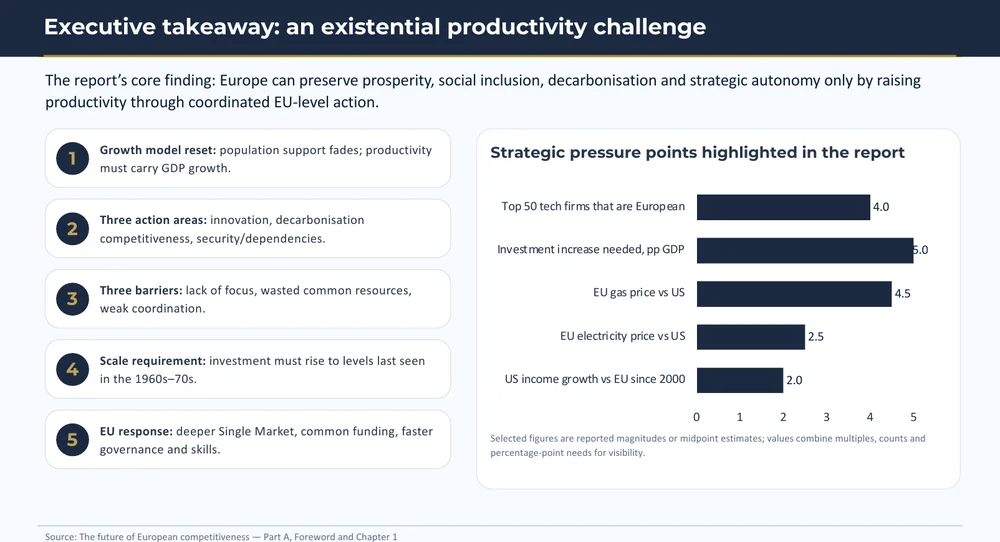
Folio AI is an AI presentation agent purpose-built for consulting and strategy teams that need polished, on-brand decks. It works directly inside PowerPoint and Google Slides with no separate app to install, generating full presentations from a prompt or editing existing decks on request. Folio operates on real PowerPoint shapes and objects rather than flat images, so every element stays fully editable, and it automatically applies your existing template fonts, colors, and layouts. Users can upload logos, images, and reference files to ground each prompt, and enterprise plans add bring-your-own API keys, SSO, MFA, and GDPR-compliant data handling.
Screenshots
Key Features
Use Cases



Frequently asked questions about Folio AI
What is Folio AI?
Folio AI is an advanced AI-powered tool designed to create and edit PowerPoint and Google Slides presentations directly within the application. Tailored specifically for consulting and finance teams, it streamlines the presentation-making process, enhancing productivity and collaboration.
Key Points
- AI-Powered Automation: Folio AI automates design and content generation.
- Seamless Integration: Works directly with PowerPoint and Google Slides.
- Targeted for Professionals: Ideal for consulting and finance sectors.
Detailed Explanation
Folio AI leverages artificial intelligence to simplify the creation of professional presentations. It allows users to input data and generate slides that are visually appealing and informative. For example, a finance team can upload a dataset, and Folio AI will generate charts and graphs in seconds, automatically formatting them for clarity and impact.
Use Cases
- Consulting Projects: Consultants can quickly prepare presentations for client meetings, using Folio AI to analyze data, generate insights, and create compelling visuals.
- Financial Reports: Finance teams can use Folio AI to convert complex financial data into understandable slides, ensuring stakeholders grasp key metrics effortlessly.
Step-by-Step Guidance
- Sign Up: Create an account on the Folio AI platform.
- Upload Data: Input spreadsheets or datasets that you want to visualize.
- Select Templates: Choose from various professional templates that suit your industry's needs.
- Generate Slides: Click on the AI tool to automatically create slides, which you can then edit further as needed.
- Collaborate and Share: Work with team members in real-time, making adjustments and finalizing the presentation seamlessly.
Best Practices / Tips
- Use Clear Data: Ensure your data is well-structured to get the best results from Folio AI.
- Leverage Templates: Don’t hesitate to use the available templates to save time and maintain consistency.
- Regular Updates: Keep your Folio AI software updated to access the latest features and improvements.
Additional Resources
How does Folio AI work?
Folio AI functions by utilizing advanced artificial intelligence to create and refine slide presentations directly within PowerPoint and Google Slides. It generates customized slide decks based on user prompts, integrates brand elements, and provides a fully editable output, making it ideal for quick and professional presentations.
Key Points
- Prompt to Deck Generation: Create complete slide decks from user descriptions.
- In-App Editing: Edit presentations directly within PowerPoint and Google Slides.
- Template Awareness: Automatically incorporates brand fonts, colors, and layouts.
Detailed Explanation
Folio AI streamlines the presentation creation process through several innovative features:
1. Prompt to Deck Generation
Users can simply describe their needs, and Folio AI will generate a comprehensive slide deck. For example, if a user specifies a “marketing strategy presentation for Q1,” Folio AI will use this input to create a tailored deck.
2. In-App Editing
Once the slide deck is generated, users can edit it directly in PowerPoint or Google Slides. This seamless integration eliminates the need for software installations, allowing for quick adjustments and enhancements.
3. Template Awareness
Folio AI recognizes and applies existing brand templates automatically. This ensures that every slide adheres to a company’s branding guidelines, maintaining consistency in fonts, colors, and layouts across all presentations.
4. Fully Editable Output
Unlike many AI tools that create image-based slides, Folio AI produces real PowerPoint shapes and objects. This means users can modify every component—text, graphics, and layouts—without sacrificing quality.
5. File Upload Grounding
Users can upload logos, images, or inspiration files, grounding their prompts in visual assets. This feature is particularly useful for branding presentations or consulting decks, where maintaining a professional appearance is crucial.
6. Use Cases
- Consulting Decks: Quickly produce client-ready strategy presentations while ensuring brand consistency.
- Financial Reporting: Transform raw data into polished investor or board slides.
- Deck Refinement: Open an existing presentation and instruct Folio to restructure or restyle it for improved clarity and impact.
- Template Standardization: Apply a firm's master template automatically across new decks to ensure uniformity.
- Rapid Drafting: Generate a first-draft deck from a brief and iterate manually, saving time and effort.
Best Practices / Tips
- Be Specific: When generating slides, provide detailed prompts for the best outcomes.
- Use Existing Templates: Upload and set your company’s master slides to optimize brand consistency.
- Iterate and Refine: Always review and manually refine AI-generated slides to add a personal touch and ensure accuracy.
Additional Resources
- Folio AI Official Website for product details and tutorials.
- User Guide and Documentation for in-depth functional insights and tips.
- Blog on AI in Presentations for trends and best practices in utilizing AI tools for presentations.
What are the main features of Folio AI?
Folio AI offers several key features, including the ability to generate complete slide decks from prompts, in-app editing within PowerPoint and Google Slides, automatic application of brand templates, fully editable outputs, and file upload grounding for personalized presentations. These features streamline the presentation creation process significantly.
Key Points
- Prompt to Deck: Instantly create slide decks from simple descriptions.
- In-App Editing: Edit directly within PowerPoint and Google Slides.
- Template Awareness: Automatically integrates your branding elements.
Detailed Explanation
Folio AI revolutionizes presentation creation by allowing users to generate entire slide decks merely by describing their requirements. For instance, if you need a marketing proposal, you can input key points, and the AI generates a structured slide deck tailored to your needs.
In-App Editing
Folio AI integrates seamlessly with popular tools like PowerPoint and Google Slides. This means users can make edits directly in these applications without any additional installations. The AI-generated content can be further customized, combining AI efficiency with manual adjustments for a personalized touch.
Template Awareness
One of Folio AI's standout features is its template awareness. When generating slides, the AI automatically applies your existing brand fonts, colors, and layouts. This ensures that every presentation maintains brand consistency, saving time while enhancing professional appearance.
Fully Editable Output
Unlike many AI tools that produce static images, Folio AI generates real PowerPoint shapes and objects. Consequently, every element in the slides remains fully editable, allowing users to modify text, graphics, and layouts as needed.
File Upload Grounding
Another innovative feature is the ability to upload logos, images, or inspiration files. Folio AI uses these uploads to ground the generated presentations, providing context and enhancing creativity. For example, if you upload your logo, the AI can incorporate it into the slides, ensuring your branding is front and center.
Best Practices / Tips
- Clear Prompts: When using the Prompt to Deck feature, be as specific as possible to get better results.
- Regular Updates: Keep your branding elements updated in Folio AI to ensure consistency across all presentations.
- Experiment with Edits: Use the in-app editing feature to fine-tune AI-generated slides, blending AI efficiency with your creative touch.
- Utilize File Uploads: Take advantage of the file upload grounding feature to personalize your slides further and enhance relevance.
Additional Resources
Who is Folio AI for?
Folio AI is designed for professionals across various sectors, including consultants, financial analysts, and corporate teams. It streamlines the creation of presentations, reports, and templates, enabling users to produce high-quality, on-brand materials quickly and efficiently.
Key Points
- Consultants: Quickly create client-ready strategy presentations.
- Financial Analysts: Generate polished financial reports and investor slides.
- Corporate Teams: Standardize templates and refine existing presentations.
Detailed Explanation
Folio AI caters to a diverse audience, including:
-
Consultants: Professionals in consulting can leverage Folio AI to produce engaging and visually appealing client presentations in record time. By utilizing built-in templates and design features, consultants can ensure their presentations align with client branding while focusing on strategic content.
-
Financial Reporting Specialists: Financial analysts benefit from Folio AI's ability to transform raw data into polished boardroom slides. The tool allows users to input complex financial metrics easily, which are then converted into clear, informative visuals that enhance understanding and decision-making.
-
Corporate Teams: For teams needing to ensure consistency across multiple presentations, Folio AI offers template standardization. Users can apply a firm's master template automatically, maintaining brand identity across all decks. Additionally, the deck refinement feature allows users to upload existing presentations and prompt Folio AI to restructure or restyle them for improved clarity and impact.
-
Rapid Drafting: Folio AI accelerates the initial drafting process by generating first-draft decks from brief inputs. This feature is particularly useful for teams facing tight deadlines, allowing for quick iterations and manual adjustments to hone the final presentation.
Best Practices / Tips
- Utilize Templates: Always start with a template that suits your audience. Folio AI offers a variety of customizable templates that can save time and maintain brand consistency.
- Iterate and Refine: After generating a draft, take the time to manually refine the presentation. Check for clarity, flow, and alignment with your messaging.
- Engage with Visuals: Incorporate visuals such as charts and graphs to enhance your presentations. Folio AI simplifies this process, making data visually appealing and easier to digest.
Additional Resources
How much does Folio AI cost?
Folio AI offers a free tier, allowing users to explore basic features at no cost. For advanced functionalities, Folio AI provides several paid plans that typically start at around $15 per month, with pricing varying based on selected features and user needs.
Key Points
- Free tier available for basic usage.
- Paid plans start around $15 per month.
- Pricing varies based on features and user needs.
Detailed Explanation
Folio AI is designed to cater to both casual users and professionals seeking advanced AI tools. The free tier allows users to access fundamental features, making it ideal for individuals wanting to evaluate the platform without financial commitment. This tier is particularly beneficial for small businesses or freelancers who need basic AI capabilities for tasks like content creation or data analysis.
For users requiring more robust functionalities, paid plans are available. These plans typically start at approximately $15 per month and can go up depending on the user’s specific needs, such as enhanced analytics, priority support, or advanced automation features. Each plan is structured to offer scalability; therefore, businesses can choose a plan that aligns with their growth trajectory.
Folio AI regularly updates its offerings, which means pricing and features may change. Users are encouraged to check the official website for the most current information and plan comparisons.
Use Cases
- Small Businesses: Leverage the free tier to streamline operations and assess the platform's value before investing in a paid plan.
- Content Creators: Utilize advanced features in a paid plan for content optimization tools that enhance SEO performance.
- Data Analysts: Use Folio AI's analytics features to derive insights from large datasets, available in premium plans.
Best Practices / Tips
- Start with Free Tier: Begin by utilizing the free tier to understand your needs, ensuring you make an informed decision about upgrading.
- Compare Plans: Before committing to a paid plan, carefully compare the features of each option to ensure you select a plan that offers the best value for your specific requirements.
- Monitor Usage: Regularly assess your usage of Folio AI’s features to determine if an upgrade or downgrade might be more cost-effective as your needs evolve.
Additional Resources
How do I get started with Folio AI?
To get started with Folio AI, simply visit https://get-folio.ai/ to sign up for an account. After signing up, you can explore various features, tools, and integrations that Folio AI offers to enhance your productivity and streamline your workflows.
Key Points
- Easy signup process through the official website.
- Access to a variety of AI-driven tools and features.
- User-friendly interface designed for all skill levels.
Detailed Explanation
Folio AI is a powerful platform designed to harness the capabilities of artificial intelligence for improved workflow management and productivity. To begin using Folio AI, follow these steps:
-
Visit the Website: Go to get-folio.ai and click on the "Sign Up" button prominently displayed on the homepage.
-
Create an Account: You will be prompted to provide basic information such as your name, email address, and password. Be sure to use a valid email, as you will need it for account verification.
-
Explore Features: After verifying your email, log into your Folio AI account. Familiarize yourself with the dashboard, which showcases various tools such as project management, automation, and data analysis features.
-
Integrate with Other Tools: Folio AI allows integrations with popular apps like Google Workspace, Slack, and Trello. This enables a seamless workflow and enhances your productivity.
-
Utilize Tutorials and Support: Folio AI provides tutorials and a help center to guide you through the features and functionalities. Make use of these resources to maximize your experience.
Best Practices / Tips
-
Start with Tutorials: Utilize the tutorial resources available on the platform to understand the full range of capabilities.
-
Test Integrations: Experiment with different integrations to find the best combination for your needs. This can significantly enhance your productivity.
-
Regularly Update Your Skills: As Folio AI evolves, keep an eye on new features. Regularly updating your knowledge will ensure you’re using the platform to its fullest potential.
-
Engage with the Community: Join forums or community groups related to Folio AI to share experiences and learn best practices from other users.
Additional Resources
- Folio AI Official Documentation
- Folio AI Blog for updates and tips.
- YouTube Tutorials for visual guides on using Folio AI effectively.
Explore more AI Ai Tools tools
Browse all Ai Tools tools →Browse by use case: Automation & Productivity
Compare Folio AI: vs nodeterm · vs A.I.G (AI Infra Guard) · vs Trama · vs Agents Never Sleep