

FluentDB
AINative macOS database client with an AI co-pilot for PostgreSQL, MySQL, SQLite, and SQL Server — bring your own model.
FluentDB
Native macOS database client with an AI co-pilot for PostgreSQL, MySQL, SQLite, and SQL Server — bring your own model.
About FluentDB
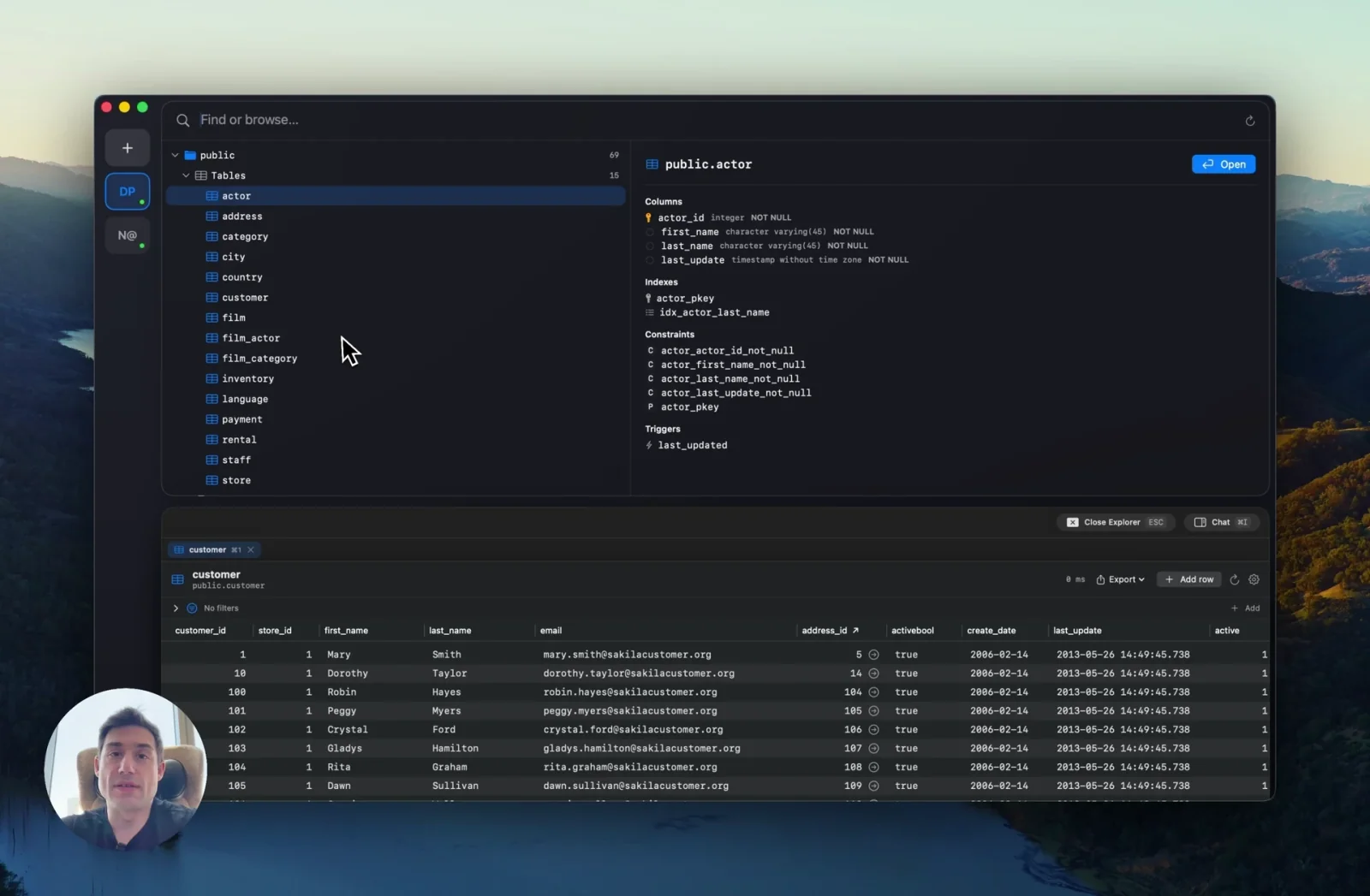
FluentDB is a Mac-native, Apple Silicon database client that puts an AI co-pilot next to a full SQL editor so developers and analysts can query PostgreSQL, MySQL, SQLite, and SQL Server in plain English or hand-written SQL. It is AI-first with strong guardrails — the co-pilot is wrapped in safety checks that block destructive operations and keep sensitive data from leaking. FluentDB does not ship its own model: you connect an Anthropic (Claude Code) or OpenAI (Codex) subscription/API key, or run a fully local model through Ollama, and prompts go straight to the provider you already trust. The app pairs the co-pilot with a fluid data grid that scrolls 100K+ rows without stutter, a schema-aware SQL editor, chartable query results, and MCP support so external agents can drive connections. Licensing is one-time (no subscription), with per-seat team pools.
Screenshots
Key Features
Use Cases


Frequently asked questions about FluentDB
What is FluentDB?
FluentDB is a native macOS database client that integrates an AI co-pilot for managing PostgreSQL, MySQL, SQLite, and SQL Server databases. Users can leverage their own AI models to enhance database interactions, making it an innovative tool for developers and data analysts.
Key Points
- AI Integration: FluentDB features an AI co-pilot that assists users in managing databases efficiently.
- Database Compatibility: It supports multiple database systems, including PostgreSQL, MySQL, SQLite, and SQL Server.
- User-Centric Design: The application is designed specifically for macOS, providing a seamless user experience.
Detailed Explanation
FluentDB stands out as a robust database management tool specifically tailored for macOS users. By integrating an AI co-pilot, FluentDB allows users to enhance their database operations significantly. The AI can assist with query suggestions, performance optimizations, and error handling, which streamlines the workflow for developers and data analysts alike.
Database Compatibility
FluentDB supports a variety of database systems:
- PostgreSQL: Known for its advanced features and reliability.
- MySQL: A popular choice for web applications due to its speed and simplicity.
- SQLite: Ideal for smaller applications, providing a lightweight solution.
- SQL Server: A powerful option for enterprise-level solutions with extensive functionalities.
Use Cases
- Query Optimization: Users can leverage the AI co-pilot to suggest optimized queries based on historical data.
- Data Visualization: FluentDB allows users to visualize data directly within the interface, enhancing data comprehension.
- Automation: Routine tasks can be automated, saving time and reducing errors.
Best Practices / Tips
- Experiment with AI Models: Since users can bring their own AI models, test various models to find the best fit for your specific database needs.
- Stay Updated: Regularly check for updates to ensure you have the latest features and security enhancements.
- Utilize Documentation: Make use of FluentDB’s official documentation for troubleshooting and advanced features.
Additional Resources
How does FluentDB work?
FluentDB operates by integrating AI Co-pilot functionalities with robust safety measures, allowing users to query databases in plain English while ensuring data security. It supports various AI models, offers a schema-aware SQL editor, and features advanced visualization tools for efficient data exploration and analytics.
Key Points
- AI Co-pilot with Guardrails: Enables safe SQL querying in natural language.
- Supports Multiple AI Models: Compatible with providers like OpenAI and Anthropic.
- Advanced Data Visualization: Instant chart generation from query results.
Detailed Explanation
FluentDB simplifies database interactions by utilizing an AI Co-pilot that translates plain English questions into SQL commands. The built-in guardrails ensure that users, especially junior engineers, can explore live databases without risking destructive operations or data leaks. This is particularly beneficial in production environments where data integrity is crucial.
Key Features
-
Bring Your Own Model: FluentDB allows users to connect to AI models from Anthropic (Claude Code), OpenAI (Codex), or any local Ollama model. This flexibility ensures that queries are processed directly by the chosen provider without passing through FluentDB, enhancing security and performance.
-
Schema-Aware SQL Editor: The SQL editor is designed for modern usage with features like autocomplete, SQL formatting, and instant results. Users can switch to AI mode with a single click, making it intuitive to generate complex queries.
-
Fluid 100K+ Row Grid: The application supports large datasets, allowing users to scroll through thousands of rows smoothly. This capability is vital for analysts working with extensive databases, ensuring that performance is never compromised.
-
Instant Chart Visualization: Users can seamlessly convert any query result into a visual chart without leaving the application, facilitating quick insights and reporting.
-
Safe Data Exploration: With AI guardrails in place, junior engineers can safely explore live databases, as the system blocks any potentially harmful SQL statements.
-
Local-Only Querying: For teams dealing with sensitive information, FluentDB supports local querying against SQLite and SQL Server using a local Ollama model, ensuring that no data leaves the machine.
-
Team License Management: The platform offers a flexible licensing model, allowing teams to purchase reassignable seats and share an activation pool across multiple users.
-
Agent-Driven Database Operations: Users can route a coding agent through FluentDB for autonomous database connections and query execution, streamlining database operations.
Best Practices / Tips
- Utilize AI Co-pilot Effectively: Always phrase your questions clearly to maximize the accuracy of the SQL generated by the AI Co-pilot.
- Leverage Visualization Tools: Make use of the instant charting feature to quickly interpret and present data findings.
- Test Queries: Before running SQL commands on production databases, use a staging environment to ensure safety and accuracy.
- Stay Updated: Regularly check for updates on supported AI models and features to enhance your experience with FluentDB.
Additional Resources
What are the main features of FluentDB?
FluentDB offers several key features, including an AI Co-pilot with safety checks, a Schema-Aware SQL Editor, support for custom AI models, a Fluid grid for large datasets, and instant chart visualization. These tools empower users to interact with data efficiently and securely.
Key Points
- AI Co-pilot with Guardrails: Interact in plain English for trusted SQL queries.
- Bring Your Own Model: Seamlessly integrate with external AI models like OpenAI and Anthropic.
- Fluid 100K+ Row Grid: Effortlessly handle large datasets with smooth performance.
Detailed Explanation
FluentDB is designed to enhance data management and analysis for users at all levels.
-
AI Co-pilot with Guardrails: This feature allows users to ask questions naturally in English, facilitating a deeper engagement with data. The AI Co-pilot generates trusted SQL queries while incorporating safety checks to prevent harmful operations and data leaks, ensuring data integrity.
-
Bring Your Own Model: Users can connect FluentDB to their preferred AI models, such as Anthropic's Claude Code or OpenAI's Codex. This flexibility means that prompts go directly to these providers, maintaining data security and efficiency, as no information is processed through FluentDB itself.
-
Schema-Aware SQL Editor: The advanced SQL editor mimics features expected in 2026, including autocomplete, formatting, and instant results. This editor simplifies the SQL writing process, allowing users to toggle effortlessly into AI mode for enhanced data interactions.
-
Fluid 100K+ Row Grid: Perfect for organizations handling large datasets, this grid allows users to scroll through thousands of rows without lag, enhancing the overall user experience.
-
Instant Chart Visualization: Users can transform any query result into a visual chart seamlessly within the app. This feature aids in data interpretation and presentation, making insights more accessible.
Best Practices / Tips
- Utilize AI Co-pilot Effectively: Always frame your questions clearly to get the most accurate SQL responses. Experiment with different queries to see how the AI adapts.
- Integrate External Models Wisely: Before connecting AI models, evaluate their capabilities and ensure they align with your data requirements.
- Optimize Grid Performance: For optimal performance, limit the number of rows displayed in the grid when possible. This will enhance speed and responsiveness.
Additional Resources
Who is FluentDB for?
FluentDB is designed for data professionals including data analysts, junior engineers, and teams needing efficient database querying and management. It supports ad-hoc analytics, safe data exploration, local-only querying for sensitive data, and seamless team collaboration through reassignable licenses.
Key Points
- Ad-hoc Analytics: Simplify SQL queries with natural language.
- Safe Data Exploration: Protect against destructive commands for junior engineers.
- Local-Only Querying: Securely analyze sensitive data without leaving your machine.
Detailed Explanation
FluentDB empowers users to perform analytics on production databases using plain English, transforming queries into SQL for PostgreSQL or MySQL. For example, a user can type “Summarize sales data by region,” and FluentDB will generate the appropriate SQL query.
Safe Data Exploration
Junior engineers can explore live databases safely, thanks to AI guardrails that prevent harmful commands. This feature allows less experienced users to learn and experiment without risking data integrity.
Local-Only Querying
For teams handling sensitive information, FluentDB enables local querying using SQLite or SQL Server. With an integrated Ollama model, all queries remain on the user's machine, ensuring privacy and compliance with data protection regulations.
Team License Management
FluentDB offers flexible licensing for small teams. Teams can purchase reassignable seats, sharing a single activation pool across multiple Macs. This feature streamlines access management and fosters collaboration among team members.
Agent-Driven Database Operations
Another innovative feature is the ability to route an MCP-compatible coding agent through FluentDB. This allows for autonomous opening of connections and execution of queries, significantly enhancing operational efficiency.
Best Practices / Tips
- Utilize Natural Language Queries: Encourage team members to leverage the natural language processing feature for quicker insights.
- Regular Training: Provide training sessions for junior engineers to familiarize them with the safe exploration features.
- Monitor License Usage: Keep track of seat assignments and usage to optimize team resources.
Additional Resources
How much does FluentDB cost?
FluentDB offers a free tier allowing users to explore basic features, while its paid plans start from $29 per month for advanced functionalities. Pricing can vary based on user needs, including additional features and usage levels.
Key Points
- Free tier available for basic usage.
- Paid plans start at $29 per month.
- Pricing varies by features and usage levels.
Detailed Explanation
FluentDB is designed to cater to different user needs, making it accessible for both individuals and businesses. The free tier allows users to familiarize themselves with essential features, making it ideal for small projects or testing purposes. This tier includes basic functionalities, but users may find limitations in data storage, analytics capabilities, and customer support.
For those seeking advanced features, FluentDB offers several paid plans:
-
Basic Plan: Starting at $29 per month, this plan includes increased data storage, enhanced analytics, and priority customer support. It’s suitable for small to medium-sized businesses.
-
Professional Plan: Priced at approximately $99 per month, this plan includes additional integrations, advanced reporting tools, and custom API access. It’s perfect for teams requiring deeper insights and more robust data management.
-
Enterprise Solutions: For larger organizations, FluentDB provides custom pricing based on specific needs, including tailored features, dedicated support, and scalable solutions.
Users can choose their plan based on the volume of data processed, necessary integrations, and the scale of their operations.
Best Practices / Tips
- Evaluate Your Needs: Before opting for a paid plan, assess your project requirements to determine the necessary features and storage options.
- Utilize the Free Tier: Take full advantage of the free tier to understand FluentDB's capabilities before committing to a paid plan.
- Monitor Usage: Regularly check your data usage and feature needs to ensure you're on the most cost-effective plan.
- Keep an Eye on Promotions: FluentDB occasionally offers discounts or promotions, especially for annual subscriptions, which can lead to significant savings.
Additional Resources
These resources can provide further insights and updates on pricing and features.
How do I get started with FluentDB?
To get started with FluentDB, visit FluentDB's official website to create an account. After signing up, explore the user-friendly interface and various features available to help manage your data efficiently.
Key Points
- Sign Up: Create an account on the FluentDB website.
- User-Friendly Interface: Navigate through the dashboard easily.
- Explore Features: Utilize various tools for data management.
Detailed Explanation
Getting started with FluentDB is simple and straightforward. Follow these steps:
- Visit the Website: Go to FluentDB.ai in your web browser.
- Create an Account: Click on the “Sign Up” button. You’ll need to provide your email address and create a password. Make sure to choose a strong password to secure your account.
- Verify Your Email: After signing up, check your email for a verification link from FluentDB. Click the link to activate your account.
- Log In and Explore: Once your account is verified, log in to the FluentDB dashboard. Familiarize yourself with the layout and various features available, such as data import/export options, analytics tools, and user management settings.
Use Cases
- Data Management: Use FluentDB to aggregate and analyze datasets from various sources.
- Collaboration: Share access with team members to improve project workflows.
- Insight Generation: Utilize built-in analytics tools to derive actionable insights from your data.
Best Practices / Tips
- Choose the Right Plan: FluentDB offers different pricing tiers; choose one that suits your needs and budget. Evaluate your data size and expected usage to select the appropriate plan.
- Regularly Backup Data: Make use of FluentDB’s backup features to ensure data safety.
- Explore Tutorials: Familiarize yourself with the platform by accessing tutorials and FAQs available on the website.
Additional Resources
- FluentDB Documentation - Comprehensive guides on features and functionalities.
- FluentDB Blog - Stay updated on the latest news and best practices.
- Community Forum - Engage with other users to share tips and ask questions.
By following these steps and utilizing the resources provided, you'll be well on your way to effectively using FluentDB for your data needs.
Explore more AI Ai Tools tools
Browse all Ai Tools tools →Compare FluentDB: vs Decode · vs LibreChat · vs AppGrowthKit · vs Humanizer