

echo
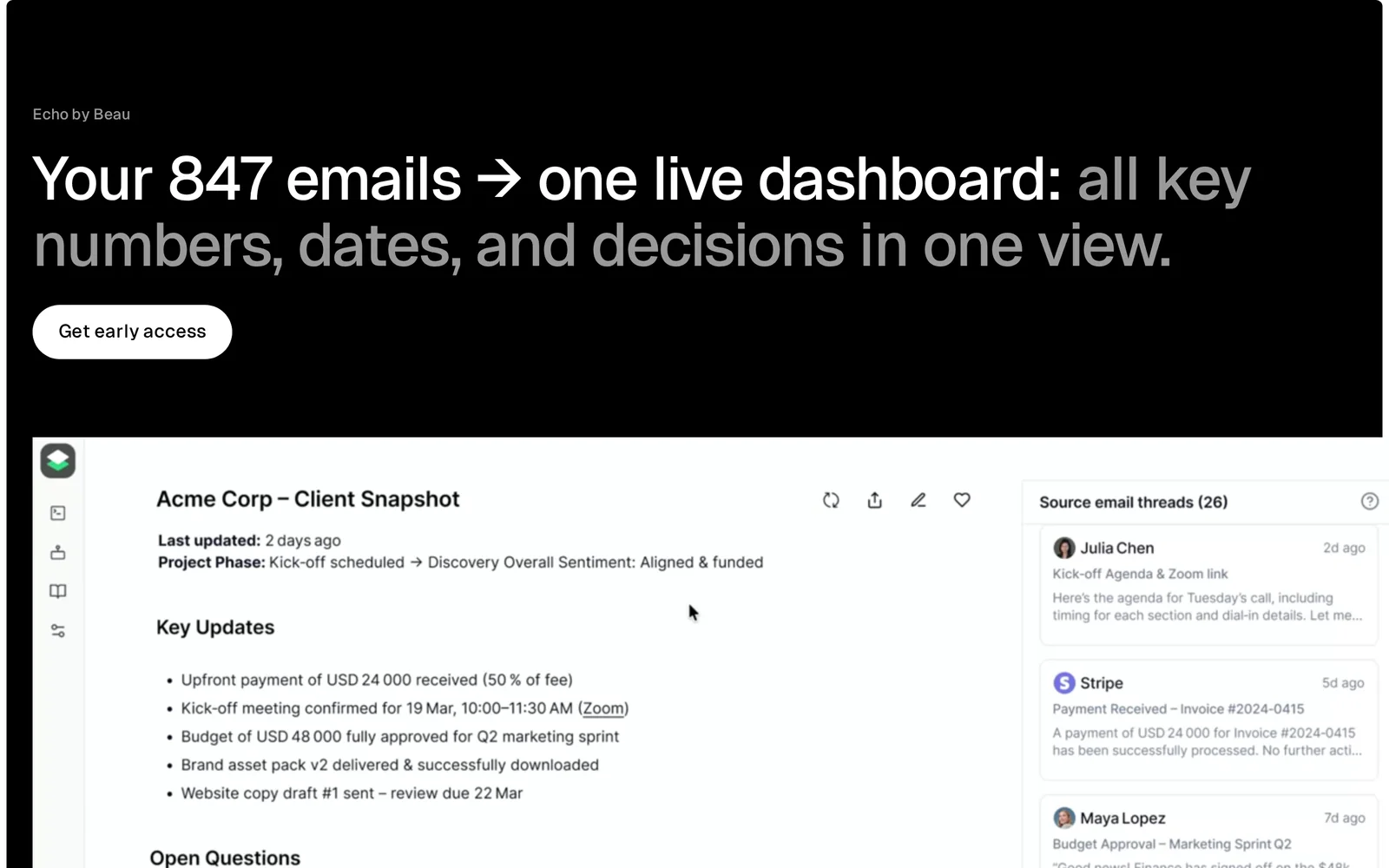
AITurn every email into a data asset — build dashboards from Gmail traffic to monitor activity without micromanaging.
echo
Turn every email into a data asset — build dashboards from Gmail traffic to monitor activity without micromanaging.
About echo
echo converts email traffic into structured data and visual dashboards directly from Gmail. It ingests email metadata and content to surface trends, volume, and key signals so teams can monitor workflows and outcomes without digging through inboxes. By providing dashboarding, filtering, and automated metrics based on email traffic, echo helps users turn routine messages (leads, receipts, support requests, notifications) into actionable operational insights.
Screenshots
Key Features
Use Cases



Frequently asked questions about echo
What is echo?
Echo is an AI tool that transforms every email into a data asset, enabling users to build interactive dashboards from Gmail traffic. This helps monitor email activity efficiently without the need for constant micromanagement, making it ideal for teams looking to enhance productivity and insights.
Key Points
- Data Asset Creation: Turn emails into actionable data.
- Dashboard Functionality: Build visual representations of email traffic.
- Activity Monitoring: Track email engagement without micromanaging.
Detailed Explanation
Echo leverages artificial intelligence to analyze email communication patterns within Gmail. By converting each email into structured data, users can create comprehensive dashboards that visualize key metrics such as open rates, response times, and overall engagement. This functionality is beneficial for businesses aiming to improve communication efficiency and decision-making processes.
For example, a sales team can utilize Echo to monitor email interactions with potential clients. By viewing responses and tracking follow-up times, they can identify which strategies yield the best results. This data-driven approach allows teams to focus on high-impact activities, ultimately enhancing productivity.
Use Cases:
- Marketing Teams: Assess the effectiveness of email campaigns by tracking engagement metrics.
- Customer Support: Monitor response times and customer interactions to improve service quality.
- Project Management: Keep tabs on communication related to project milestones, ensuring nothing slips through the cracks.
Best Practices / Tips
- Integrate with Existing Tools: Ensure Echo is integrated with your CRM or project management software to maximize data utility.
- Customize Dashboards: Tailor your dashboards to display the most relevant metrics for your team’s goals.
- Regularly Review Data: Schedule weekly or monthly reviews of your email metrics to adapt strategies as needed.
Common Pitfalls to Avoid:
- Neglecting Data Privacy: Always ensure compliance with data protection regulations when handling email data.
- Overcomplicating Dashboards: Keep your dashboards simple and focused; too many metrics can lead to confusion.
Additional Resources
- Echo Official Documentation - Explore detailed guides and tutorials.
- Gmail API Documentation - Learn how to integrate Echo with Gmail.
- Email Marketing Best Practices - Enhance your email strategy with expert tips.
How does echo work?
Echo operates by leveraging advanced AI technologies to assist users in streamlining their daily tasks, enhancing productivity, and automating workflows. Its ability to understand natural language and respond contextually makes it a powerful tool for both personal and professional use.
Key Points
- AI-Powered Assistance: Echo utilizes advanced algorithms to process user queries and provide relevant responses.
- Natural Language Processing: It understands and interprets human language, enabling seamless interaction.
- Workflow Automation: Echo integrates with various applications to automate repetitive tasks, saving time and effort.
Detailed Explanation
Echo's functionality is rooted in its core AI capabilities, which include Natural Language Processing (NLP) and machine learning.
-
AI-Powered Assistance: Echo is designed to assist users by understanding their needs and providing instant solutions. For example, if a user asks, "What’s on my calendar today?" Echo can pull data from your calendar application, offering a quick overview of scheduled events.
-
Natural Language Processing: This technology enables Echo to interpret spoken commands and respond appropriately. It can handle complex requests such as "Find a good Italian restaurant nearby" by analyzing location data and user preferences. This makes Echo not just a voice assistant but an intelligent companion that can engage in meaningful interactions.
-
Workflow Automation: Echo connects with various productivity tools like Google Workspace, Microsoft Office, and more. For instance, you can use voice commands to set reminders, send emails, or manage to-do lists, allowing for a hands-free experience that boosts efficiency.
Best Practices / Tips
- Voice Commands: Use clear and concise language when interacting with Echo to enhance understanding. For example, instead of saying "Can you remind me about the meeting?" simply say "Remind me about the meeting at 3 PM."
- Integration: Take advantage of Echo's ability to integrate with third-party applications. This can help automate tasks across platforms, like linking your calendar to your email.
- Regular Updates: Keep the Echo app and connected devices updated to ensure the best performance and access to new features.
Additional Resources
What are the main features of echo?
Echo's main features include advanced voice recognition, smart home integration, music streaming, and personalized assistance via Alexa. These capabilities allow users to control devices, access information, and enjoy entertainment seamlessly, making Echo a versatile tool for everyday tasks and home automation.
Key Points
- Voice Recognition: Utilizes advanced AI to understand and process natural language.
- Smart Home Integration: Connects with various smart devices for home automation.
- Music Streaming: Provides access to multiple streaming services for music playback.
Detailed Explanation
Echo devices are powered by Alexa, Amazon's virtual assistant, which enhances user experience through its core AI capabilities.
Voice Recognition
Echo's voice recognition capabilities allow users to engage in natural conversations with the device. The technology employs machine learning algorithms to improve its understanding of different accents, dialects, and commands. For example, you can ask, "Alexa, what's the weather today?" and receive real-time updates.
Smart Home Integration
One of Echo's standout features is its ability to integrate with various smart home devices, including lights, thermostats, and security systems. This feature enables users to control their home environment through simple voice commands. For instance, saying "Alexa, turn on the living room lights" will activate the connected lights without needing a smartphone app.
Music Streaming
Echo supports numerous music streaming platforms, such as Amazon Music, Spotify, and Apple Music. Users can easily request songs, albums, or playlists using voice commands. You can say, "Alexa, play my favorite playlist," and the device will begin streaming instantly.
Best Practices / Tips
- Voice Commands: Familiarize yourself with effective voice commands to get the most out of your Echo. Use specific phrases for better recognition.
- Smart Home Setup: Invest in compatible smart devices to enhance home automation capabilities. Ensure they are all linked to the same Wi-Fi network for seamless control.
- Regular Updates: Keep your Echo device updated to benefit from the latest features and security enhancements. Check the Alexa app regularly for updates.
Additional Resources
Who is echo for?
Echo is designed for individuals and businesses looking to enhance their daily workflows with artificial intelligence. It benefits anyone from content creators and marketers to developers and project managers, streamlining tasks, improving productivity, and fostering creativity.
Key Points
- Target Audience: Content creators, marketers, developers, and project managers.
- Workflow Integration: Seamlessly integrates into various daily tasks.
- Productivity Enhancement: Automates repetitive tasks, boosting efficiency.
Detailed Explanation
Echo is an AI tool tailored for a diverse audience, including freelancers, small business owners, and corporate teams. Whether you're a content creator needing assistance in generating ideas or a project manager looking for better task organization, Echo is versatile enough to meet various needs.
For content creators, Echo can assist in brainstorming blog topics, drafting articles, or even optimizing existing content for SEO. This feature is particularly useful in today’s fast-paced digital landscape where timely, relevant content is crucial for engagement and visibility.
Marketers can leverage Echo to analyze consumer data, craft targeted advertising campaigns, and personalize customer experiences. By automating these processes, marketers can focus on strategic planning instead of repetitive tasks, ultimately increasing return on investment.
Developers benefit from Echo by utilizing its capabilities to streamline coding processes. It can assist in debugging, code generation, and even documentation, which can save hours of manual work.
For project managers, Echo helps in organizing tasks, setting deadlines, and tracking project progress. By providing a centralized platform for team collaboration, Echo enhances transparency and accountability.
Best Practices / Tips
- Identify Your Needs: Determine what specific tasks you want to automate before using Echo to maximize its potential.
- Integrate with Existing Tools: Use Echo alongside tools you already employ for seamless workflow integration.
- Regularly Update Your Inputs: Keep your prompts and commands updated for the most relevant and accurate outputs from Echo.
- Explore Advanced Features: Don't hesitate to delve into advanced functionalities that may offer additional benefits.
Additional Resources
How much does echo cost?
Echo offers a free tier that allows users to access basic features at no cost. For advanced functionalities, paid plans start at approximately $5 per month, providing enhanced capabilities tailored for businesses and power users.
Key Points
- Echo provides a free tier for basic access.
- Paid plans begin around $5 per month for advanced features.
- Pricing may vary based on specific feature sets and user requirements.
Detailed Explanation
Echo is a versatile tool that caters to varying user needs, whether you are an individual seeking basic functionalities or a business requiring advanced capabilities. The free tier is a great starting point, allowing users to explore Echo's core features without any financial commitment. This tier typically includes essential functions like basic analytics, limited integrations, and standard support.
For those looking to leverage more advanced features, Echo's paid plans are designed to scale with your needs. Starting at about $5 per month, these plans offer enhanced functionalities such as:
- Advanced Analytics: Gain deeper insights into your usage patterns and performance metrics.
- Increased Integrations: Connect Echo with more third-party applications, enhancing your workflow.
- Priority Support: Access dedicated customer service for faster issue resolution.
Pricing can vary based on the specific features you choose. Businesses often benefit from customized plans that align with their operational needs, which may include bulk discounts or enterprise-level features.
Best Practices / Tips
- Start with the Free Tier: Before committing to a paid plan, explore the free tier to understand your needs.
- Compare Features: Review what each paid plan offers to ensure you select the one that best fits your requirements.
- Monitor Usage: Regularly check your usage statistics to determine if you need to upgrade or if a different plan would be more cost-effective.
Additional Resources
How do I get started with echo?
To get started with Echo, visit beau.to/echo to sign up for an account. Once registered, you can explore its features, tools, and resources designed to enhance your experience and productivity with Echo.
Key Points
- Easy Sign-Up: Registration is quick and straightforward.
- User-Friendly Interface: Navigate through the platform with ease.
- Rich Features: Access a variety of tools for improved functionality.
Detailed Explanation
To begin using Echo, follow these steps:
- Sign Up: Go to beau.to/echo and fill out the registration form with your details. This typically includes your name, email address, and a password.
- Confirmation: After signing up, check your email for a confirmation link. Click on it to activate your account.
- Explore Features: Once your account is active, log in to the Echo platform. Take some time to familiarize yourself with the user interface and explore the various tools available, such as task management, collaboration features, and integration options.
- Utilize Resources: Echo often provides tutorials and documentation to help new users. Check the help section or resources page for guides on maximizing your use of the platform.
Echo is designed for both individuals and teams, making it a versatile tool for project management, communication, and productivity enhancement.
Best Practices / Tips
- Start with Tutorials: Take advantage of any onboarding tutorials or webinars offered by Echo to get up to speed quickly.
- Utilize Integrations: If you use other tools (like Google Drive or Slack), explore integration options within Echo to streamline your workflow.
- Regular Updates: Keep an eye on updates and new features released by Echo to continuously improve your usage and adapt to new functionalities.
Additional Resources
For further details and support, you can always refer to the official Echo documentation available on their website.
Explore more AI Ai Tools tools
Browse all Ai Tools tools →Compare echo: vs Mise · vs BiBimba · vs VoiceCap · vs NM Signals