

Draft
AILocal-first, block-based text editor for capturing, editing, searching, and sharing notes with privacy-focused hybrid storage.
Draft
Local-first, block-based text editor for capturing, editing, searching, and sharing notes with privacy-focused hybrid storage.
About Draft
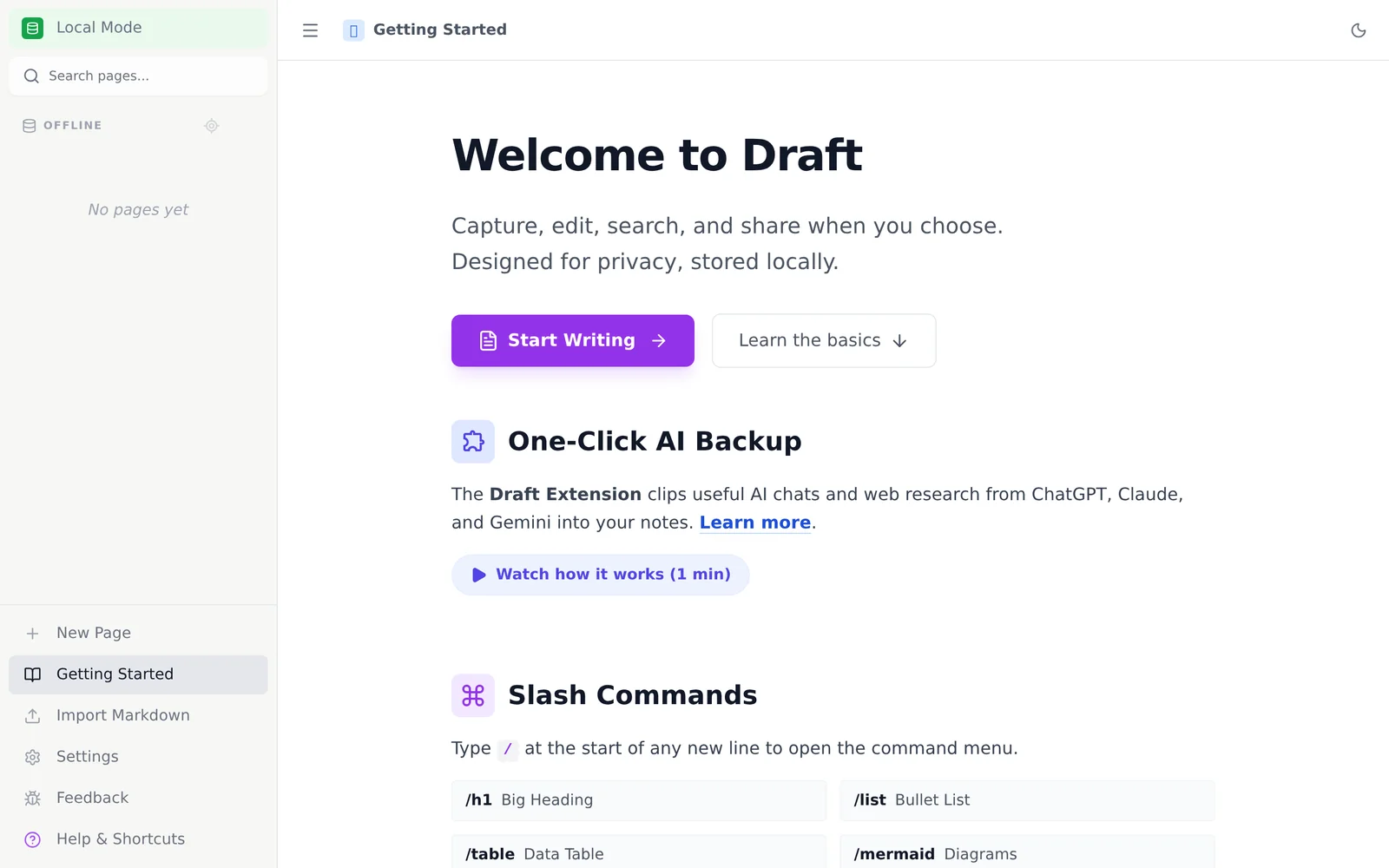
Draft is a local-first, block-based text editor that lets users capture, edit, search, and share written content with a strong emphasis on privacy. It uses a "Hybrid Storage" architecture that stores content in the browser or local workspace by default, while providing mechanisms for managed remote storage per the service terms. A companion browser extension captures web and AI-chat content directly into the Draft workspace, enabling quick clipping and consolidation of research or conversation snippets. The product is positioned for private, offline-capable writing workflows with searchable organization and user-controlled sharing.
Screenshots
Key Features
Use Cases


Frequently asked questions about Draft
What is Draft?
Draft is an AI-powered tool designed to capture and organize chat interactions into your knowledge base, enhancing information retrieval and collaboration. By streamlining data collection from conversations, Draft helps teams maintain an up-to-date repository of insights and knowledge for efficient decision-making.
Key Points
- AI-Powered: Draft utilizes artificial intelligence to streamline chat data capture.
- Knowledge Management: It enhances the organization of information into a structured knowledge base.
- Collaboration Tool: Facilitates team collaboration by maintaining a centralized repository of insights.
Detailed Explanation
Draft revolutionizes how teams manage and utilize chat interactions. Traditionally, valuable insights from conversations can get lost in the chat streams. Draft addresses this by capturing chat data and automatically organizing it into a structured format within your knowledge base.
Use Cases
- Customer Support: Support teams can use Draft to log customer interactions, enabling quick access to frequently asked questions and solutions.
- Project Collaboration: Teams can document discussions on project updates, ensuring all members have access to the same information without sifting through chat history.
- Training Resources: New employees can benefit from a well-maintained knowledge base filled with prior chat interactions, providing insights into common challenges and solutions.
Step-by-Step Guidance
- Integration: Connect Draft with your chat platform (e.g., Slack, Microsoft Teams) to enable seamless data capture.
- Configuration: Customize your knowledge base categories to reflect your team's needs, like product information or troubleshooting tips.
- Active Usage: Encourage team members to utilize the knowledge base during their workflows, ensuring it remains a relevant and valuable resource.
Best Practices / Tips
- Regular Updates: Ensure that the knowledge base is updated frequently to reflect the latest interactions and insights.
- Encourage Contributions: Motivate team members to add valuable insights to the knowledge base, fostering a culture of shared knowledge.
- Search Optimization: Use clear, descriptive titles and tags for captured information to enhance searchability and retrieval.
Additional Resources
How does Draft work?
Draft works by leveraging advanced AI technologies to streamline daily workflows. It assists users in generating content, managing projects, and automating repetitive tasks, enhancing productivity and creativity in various applications, from writing to data analysis.
Key Points
- AI-Powered Content Generation: Draft uses natural language processing to create high-quality text.
- Workflow Automation: It automates repetitive tasks, saving time and effort.
- User-Friendly Interface: Designed for seamless integration into existing workflows.
Detailed Explanation
Draft employs cutting-edge AI capabilities to enhance productivity in numerous ways. Here’s how it works:
-
AI-Powered Content Generation:
- Draft utilizes natural language processing (NLP) to help users generate written content quickly. For example, bloggers can use Draft to create articles, while marketers can generate ad copy, reducing the time spent on writing tasks.
-
Workflow Automation:
- Draft automates routine tasks such as scheduling, reminders, and follow-ups. Users can set up workflows that automatically handle these tasks, like sending out emails or updating project statuses, ensuring that they can focus on more strategic activities.
-
User-Friendly Interface:
- The platform is designed to be intuitive, allowing users to easily navigate through its features. Whether you are a novice or an experienced user, Draft provides tools that are accessible and straightforward, making it easier to implement AI into daily operations.
Use Cases
- Content Creators: Writers can generate drafts and outlines, improving their writing efficiency.
- Project Managers: They can automate task assignments and status updates, keeping team members informed without manual check-ins.
- Marketers: Draft can assist in content marketing strategies by suggesting topics based on trending keywords.
Best Practices / Tips
- Start Small: Begin by using Draft for minor tasks to familiarize yourself with its features.
- Leverage Templates: Use pre-built templates for common tasks to save time and maintain consistency.
- Regular Updates: Keep your Draft application updated to access the latest features and improvements.
Additional Resources
- Draft Official Documentation - Comprehensive guides and tutorials.
- AI Workflow Automation - Explore how Draft can automate your daily tasks.
- User Community - Connect with other users for tips and best practices.
What are the main features of Draft?
Draft is an advanced AI writing tool that offers features like content generation, collaboration tools, and seamless integration with various platforms. Its core capabilities enhance productivity for writers, marketers, and businesses by streamlining the content creation process and improving overall quality.
Key Points
- Content Generation: Draft uses AI to produce high-quality text based on user input.
- Collaboration Tools: Real-time editing and feedback features for team projects.
- Integration: Connects with other tools for a smooth workflow.
Detailed Explanation
Draft stands out due to its content generation capabilities, which leverage machine learning algorithms to create text tailored to user specifications. For example, users can input keywords or phrases, and Draft will generate relevant articles, blog posts, or marketing copy, saving time and enhancing creativity.
The collaboration tools within Draft allow multiple users to work on a single document simultaneously. This feature is particularly useful for marketing teams and content creators who need to provide feedback or make edits in real time. With commenting and version history, teams can track changes and maintain a clear communication channel throughout the writing process.
Draft’s integration capabilities are another significant advantage. It can seamlessly connect with various platforms like Google Docs, WordPress, and social media channels. This ensures that users can easily share their content and publish directly without switching between applications, thereby improving workflow efficiency.
Best Practices / Tips
- Maximize AI Potential: Provide clear and specific input to the AI for better results.
- Utilize Collaboration Features: Engage team members for diverse input and faster revisions.
- Explore Integrations: Take advantage of Draft’s integrations to streamline your workflow.
Additional Resources
Who is Draft for?
Draft is designed for professionals, businesses, and individuals seeking to enhance their daily AI workflows. Whether you're a marketer, content creator, or data analyst, Draft streamlines tasks like writing, brainstorming, and automating repetitive processes, making it an invaluable tool across various industries.
Key Points
- Target Audience: Professionals, businesses, and individuals.
- Primary Functions: Enhances writing, brainstorming, and automation.
- Versatile Use Cases: Applicable in marketing, content creation, and data analysis.
Detailed Explanation
Draft is a powerful AI tool tailored for a diverse audience, including:
-
Marketing Professionals: Marketers can leverage Draft to generate engaging content, optimize ad copy, and analyze consumer behavior. For instance, using AI to create tailored email campaigns can save time and boost conversion rates.
-
Content Creators: Writers, bloggers, and social media managers benefit from Draft's capabilities in brainstorming topics, creating outlines, and refining their writing. The tool can suggest improvements or generate alternative phrases, helping to enhance the quality of content quickly.
-
Data Analysts: Analysts can utilize Draft to automate data-related tasks, such as generating reports or summarizing findings. This streamlining allows them to focus on high-level analysis rather than repetitive data entry or formatting.
By integrating Draft into your daily workflow, you can reduce the time spent on mundane tasks and increase productivity, leading to better outcomes and more creative solutions.
Best Practices / Tips
- Define Your Goals: Before using Draft, outline specific objectives you want to achieve with AI assistance, such as improving writing speed or generating creative ideas.
- Experiment with Features: Explore various features of Draft, such as content generation, editing suggestions, and workflow automation, to maximize its utility.
- Stay Updated: Regularly check for updates or new features in Draft to leverage the latest advancements in AI technology.
- Avoid Over-Reliance: While Draft is a powerful tool, it's essential to maintain your unique voice and style in writing. Use AI as a supplement, not a replacement.
Additional Resources
How much does Draft cost?
Draft offers various pricing plans, including a free tier and paid options starting at $10 per month. For the most accurate and updated pricing details, it's best to visit the official Draft website directly.
Key Points
- Free Tier Available: Users can start with no cost.
- Paid Plans: Starting at $10 per month.
- Subscription Flexibility: Options for monthly or annual payments.
Detailed Explanation
Draft provides a flexible pricing structure to cater to different user needs. The free tier allows individuals to utilize basic features, making it an excellent option for casual users or those new to drafting tools.
The paid plans, which begin at $10 per month, unlock advanced features such as collaboration tools, enhanced storage, and priority customer support. Users can choose between monthly and annual subscriptions, with the annual plan often offering a discount, making it a cost-effective solution for frequent users.
For example, a team of writers collaborating on a project can benefit significantly from the paid subscription, as it allows real-time editing and commenting features. This enhances productivity and ensures that all team members are on the same page.
Best Practices / Tips
- Start with the Free Tier: If you’re unsure about committing financially, use the free tier to explore the platform.
- Evaluate Needs: Assess your drafting needs to choose the right plan; if you collaborate often, a paid plan may be more beneficial.
- Check for Promotions: Sometimes, Draft offers promotions or discounts for new users—keeping an eye out for these can save you money.
Additional Resources
How do I get started with Draft?
To get started with Draft, visit Draft's official site and sign up for an account. Once registered, you can explore its features, including document drafting, collaboration tools, and customizable templates tailored for various projects.
Key Points
- Easy sign-up process
- User-friendly interface
- Collaborative features for teams
Detailed Explanation
Draft is a versatile tool designed for creating, editing, and collaborating on documents seamlessly. Here’s how to get started:
- Visit the Official Site: Go to Draft's signup page.
- Create Your Account: Click on the “Sign Up” button and fill in the required details, including your email and password. You may also have the option to sign up using social media accounts for faster access.
- Explore the Dashboard: After signing up, you’ll be directed to your dashboard. Familiarize yourself with the layout, which includes sections for recent documents, templates, and collaboration features.
- Create a New Document: Click on “New Document” to start drafting. You can choose from a variety of templates tailored for specific needs, whether you’re writing a blog post, report, or proposal.
- Collaboration Tools: Invite team members to collaborate by sharing links or granting access directly through the platform. You can comment in real-time, making it easy to provide feedback.
By following these steps, you’ll be well-equipped to utilize Draft effectively for your writing and collaborative needs.
Best Practices / Tips
- Utilize Templates: Take advantage of Draft’s templates to save time and ensure consistency in your documents.
- Regularly Save Your Work: Although Draft autosaves, it's a good habit to manually save your progress frequently to avoid any potential data loss.
- Explore Integrations: Check for integrations with other tools you use, such as Google Drive or Dropbox, to streamline your workflow.
Additional Resources
- Draft Documentation for detailed guides and FAQs.
- User Community Forum for tips and shared experiences from other users.
- Explore tutorials on platforms like YouTube for visual guidance on maximizing Draft’s features.
Explore more AI Ai Tools tools
Browse all Ai Tools tools →Compare Draft: vs Decode · vs LibreChat · vs AppGrowthKit · vs Humanizer