

Build With Claude
AIA plugin marketplace and discovery hub for Claude Code to browse, install, and contribute agents, commands, hooks, skills, and plugin collections.
Build With Claude
A plugin marketplace and discovery hub for Claude Code to browse, install, and contribute agents, commands, hooks, skills, and plugin collections.
About Build With Claude
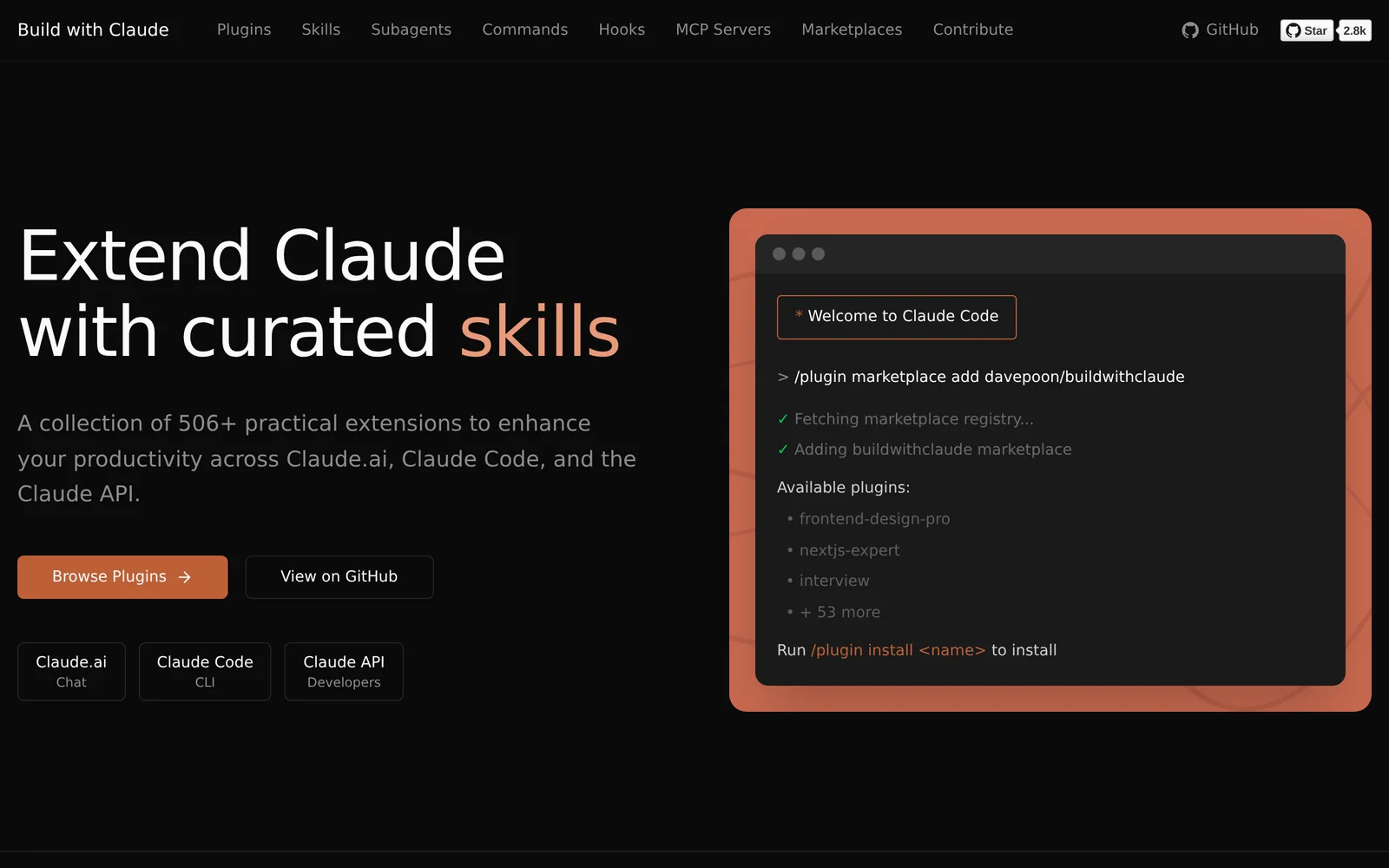
Build With Claude is an open-source plugin marketplace and discovery platform for Claude Code and related Claude developer surfaces. It indexes and curates plugins, agent skills, commands, hooks, and bundled plugin collections so developers can extend Claude Code, Claude Desktop, Agent SDK, and OpenClaw. The project provides a searchable web UI, contribution guidelines, and a standardized plugin format (agents, commands, hooks) with validation tooling to help developers publish and consume extensions. Its value is in consolidating community-contributed capabilities, offering curated collections, and enabling event-driven automation and integrations that enhance Claude-driven development workflows.
Screenshots
Key Features
Use Cases



Frequently asked questions about Build With Claude
What is Build With Claude?
Build With Claude is a comprehensive plugin marketplace and discovery hub designed specifically for Claude Code. It allows users to browse, install, and contribute various components such as agents, commands, hooks, skills, and plugin collections, facilitating enhanced customization and functionality for AI applications.
Key Points
- User-Friendly Marketplace: Easily search and discover plugins tailored for Claude Code.
- Community Contributions: Users can contribute their own plugins, fostering collaboration and innovation.
- Enhanced Customization: Access a variety of tools to optimize AI applications according to specific needs.
Detailed Explanation
Build With Claude serves as a pivotal resource for developers and users looking to enhance their Claude Code experience. By providing a centralized platform for plugins, it simplifies the process of finding and utilizing various tools.
What You Can Find:
- Agents: These are intelligent entities that can perform specific tasks or functions within Claude applications. For example, a user might install a data processing agent that automates data cleaning.
- Commands: These are predefined instructions that help streamline workflows. Users can find commands that facilitate repetitive tasks like data entry or report generation.
- Hooks: These are functions that allow developers to integrate their code with existing plugins seamlessly. Hooks can trigger specific actions based on user interactions or system events.
- Skills: Skills are specialized capabilities that can be added to agents, enhancing their functionalities. For instance, a language processing skill can be integrated into an agent to improve its natural language understanding.
- Plugin Collections: These curated sets of plugins provide comprehensive solutions for common use cases, making it easier for users to implement complex functionalities.
Use Cases:
- Business Automation: Companies can leverage Build With Claude to find plugins that automate tasks, such as customer support or inventory management.
- Educational Tools: Educators can discover plugins that help create interactive learning experiences, like virtual tutors or assessment tools.
Best Practices / Tips
- Explore Community Contributions: Regularly check for new plugins contributed by other users to stay updated on the latest innovations.
- Read Reviews: Before installing any plugin, read user reviews to gauge its effectiveness and compatibility with your specific needs.
- Test in a Safe Environment: If possible, test new plugins in a controlled environment to ensure they work as expected without affecting your main application.
Additional Resources
How does Build With Claude work?
Build With Claude operates by integrating advanced AI capabilities to streamline and enhance everyday workflows for users. It provides tools for task automation, content generation, and data analysis, making it easier for individuals and businesses to leverage AI effectively in their daily operations.
Key Points
- Task Automation: Automates repetitive tasks to increase productivity.
- Content Generation: Assists in creating high-quality written content quickly.
- Data Analysis: Analyzes large datasets to extract insights and trends.
Detailed Explanation
Build With Claude harnesses the power of artificial intelligence to transform mundane tasks into efficient workflows. Here’s how it works:
-
Task Automation: Users can set up workflows that automate repetitive tasks such as email responses, scheduling, or data entry. For instance, businesses can use Build With Claude to automate their customer follow-ups, saving time and reducing human error.
-
Content Generation: The platform excels in generating various forms of content, from blog posts to marketing copy. For example, a user can input a topic, and Claude will produce a well-structured article in minutes, which can be particularly beneficial for marketers needing fresh content regularly.
-
Data Analysis: Build With Claude can process and analyze vast amounts of data, helping users make informed decisions. It can identify trends, create visual reports, and summarize findings. For instance, businesses can use it to evaluate customer feedback or sales data quickly.
These features collectively empower users to maximize efficiency, creativity, and insights in their operations.
Best Practices / Tips
- Define Clear Objectives: Before using Build With Claude, outline what you want to achieve, whether it’s increasing productivity or generating content.
- Leverage Templates: Use pre-built templates for common tasks to save time and ensure consistency in outputs.
- Regularly Update Workflows: As your needs evolve, revisit and adjust your automated workflows to maintain effectiveness and relevance.
Additional Resources
What are the main features of Build With Claude?
Build With Claude offers a range of advanced AI capabilities including natural language processing, automated content generation, and machine learning integration. These features empower businesses to enhance their operations, create engaging content, and leverage data-driven insights effectively.
Key Points
- Natural Language Processing (NLP): Understands and generates human-like text.
- Automated Content Generation: Creates articles, blog posts, and marketing materials quickly.
- Machine Learning Integration: Adapts and improves based on user interactions.
Detailed Explanation
Build With Claude is designed to streamline various business processes through its powerful AI features.
Natural Language Processing (NLP)
NLP allows users to interact with the AI in a conversational manner. This feature can be used for customer support chatbots that provide real-time assistance, improving customer satisfaction and reducing response times. For instance, businesses can deploy Claude to handle FAQs or troubleshoot common issues, freeing up human agents for more complex inquiries.
Automated Content Generation
This feature enables users to generate high-quality written content efficiently. Whether it's drafting blog posts, creating social media updates, or writing email newsletters, Build With Claude can produce engaging content tailored to specific audiences. For example, a marketing team might use Claude to generate multiple variations of an ad copy, optimizing for different demographics and platforms.
Machine Learning Integration
Build With Claude leverages machine learning to continuously improve its performance based on user feedback and interactions. This adaptability means that the more you use the tool, the better it becomes at understanding your specific needs. For instance, if a user frequently requests reports on specific data trends, Claude will learn to prioritize this information in future outputs.
Best Practices / Tips
- Utilize NLP for Customer Engagement: Implement chatbots powered by Claude to enhance customer interactions on your website.
- Experiment with Content Generation: Use the automated content generation feature to test various formats and styles, then refine based on engagement metrics.
- Monitor Machine Learning Outputs: Regularly assess the improvements and adjustments made by Claude to ensure alignment with your business goals.
Additional Resources
Who is Build With Claude for?
Build With Claude is designed for individuals and teams looking to enhance their daily AI workflows, including entrepreneurs, content creators, marketers, and developers. It offers tools that streamline tasks, automate processes, and improve productivity in various sectors.
Key Points
- Target Audience: Entrepreneurs, marketers, content creators, developers, and teams.
- Versatile Use: Applicable in diverse fields such as marketing, customer service, and content generation.
- Productivity Enhancement: Automates repetitive tasks to save time and increase efficiency.
Detailed Explanation
Build With Claude caters to a wide range of users who want to integrate AI into their daily operations. For instance, entrepreneurs can utilize the platform to automate customer interactions, while marketers can leverage it for content creation and data analysis. Here are some specific use cases:
-
Entrepreneurs: Automate lead generation and customer follow-up emails. This saves time and ensures consistent communication with potential clients.
-
Content Creators: Generate creative content ideas, draft articles, or even manage social media posts. AI can help brainstorm and refine concepts, making the content creation process more efficient.
-
Developers: Integrate AI into apps and software solutions. Build With Claude provides APIs and tools to enhance user experiences through intelligent automation.
By using these features, users can streamline their workflows, allowing them to focus on strategic tasks rather than mundane operations.
Best Practices / Tips
- Define Your Goals: Before using Build With Claude, outline what you want to achieve, such as reducing manual tasks or enhancing content quality. This will help you utilize the tool effectively.
- Leverage Automation: Explore automation capabilities to handle repetitive tasks. Set up triggers for emails, social media posts, or data reports to maintain consistency.
- Experiment with Features: Take time to explore different functionalities. Utilize A/B testing for content generated by Build With Claude to identify what resonates best with your audience.
- Stay Updated: Regularly check for updates or new features that Build With Claude may release. Keeping abreast of changes can help you take full advantage of the tool’s capabilities.
Additional Resources
How much does Build With Claude cost?
Build With Claude is completely free to use, making it an accessible tool for developers and businesses looking to leverage AI capabilities without incurring costs. There are no subscription fees or hidden charges associated with its usage, allowing users to explore its features without financial barriers.
Key Points
- Build With Claude is free for all users.
- No hidden fees or subscription costs.
- Designed for ease of access and usability.
Detailed Explanation
Build With Claude is an AI tool that allows users to build applications or integrate AI functionalities into their existing systems without any financial investment. This makes it particularly attractive to startups, small businesses, and developers who want to experiment with AI technologies without budget constraints.
The platform is user-friendly, providing a straightforward interface that helps users navigate its features efficiently. Users can engage with a variety of tools and functionalities, such as natural language processing and machine learning capabilities, to create innovative solutions tailored to their needs.
While the tool is free, it's essential to consider any associated costs that may arise from using additional services or APIs that integrate with Build With Claude. For instance, if users plan to access premium data or cloud services, those may incur fees.
Best Practices / Tips
- Explore Regularly: Take advantage of the free access to explore all features and updates frequently.
- Utilize Community Support: Engage with online communities or forums related to Build With Claude for tips and troubleshooting.
- Monitor Integration Costs: If using third-party services, stay informed about any potential costs that may arise from those integrations.
- Feedback Loop: Provide feedback on your experience to help improve the tool and potentially influence future updates.
Additional Resources
How do I get started with Build With Claude?
To get started with Build With Claude, visit https://buildwithclaude.com/ to sign up for an account. Once registered, you can explore the platform's features, including tutorials and tools designed to enhance your AI development experience.
Key Points
- User Registration: Create an account to access Build With Claude.
- Platform Features: Explore various AI tools and resources available.
- Learning Resources: Utilize tutorials and guides to enhance your skills.
Detailed Explanation
Build With Claude is an innovative platform that facilitates AI development and project management. To begin:
-
Visit the Website: Navigate to Build With Claude and click on the "Sign Up" button. The registration process is straightforward, requiring basic information such as your name, email address, and password.
-
Account Verification: After signing up, you will receive a verification email. Follow the link in the email to activate your account. This step is crucial to ensure security and access to all features.
-
Explore the Dashboard: Once logged in, you will be directed to the user dashboard. Here, you can access various tools for AI development, including coding environments, project templates, and community forums.
-
Utilize Learning Materials: Take advantage of the tutorials and documentation available on the platform. These resources cover essential topics like natural language processing, machine learning models, and application deployment.
-
Join the Community: Engage with other users through forums and discussion boards. Sharing experiences and troubleshooting together can greatly enhance your learning process.
Best Practices / Tips
- Complete Your Profile: Fill out your user profile to connect with others and receive personalized recommendations.
- Start Small: Begin with simple projects to familiarize yourself with the tools and interface. Gradually progress to more complex tasks as your confidence grows.
- Stay Updated: Follow Build With Claude on social media or subscribe to their newsletter to receive updates on new features, webinars, and best practices.
Additional Resources
- Build With Claude Official Documentation
- Community Forum for User Discussions
- YouTube Channel for Tutorials
By following these steps and utilizing available resources, you can effectively start your journey with Build With Claude and maximize your AI development potential.
Explore more AI Ai Agents tools
Browse all Ai Agents tools →Browse by use case: Automation & Productivity
Compare Build With Claude: vs Proto-Mind · vs Ami · vs Duvi · vs AskDeck