

Whistle - AI Workout Planner
AIAI-powered workout planner and coach that builds, adapts and explains multi-sport training plans using health, recovery and weather data.
Whistle - AI Workout Planner
AI-powered workout planner and coach that builds, adapts and explains multi-sport training plans using health, recovery and weather data.
About Whistle - AI Workout Planner
Whistle is an AI-driven training planner for running, cycling, swimming, strength and mixed training that generates structured programs, flexible weekly plans and individual workouts. It uses goals, schedule, recent workouts, recovery, sleep, vitals and local weather to create context-aware plans, project training load, predict workout outcomes and surface training insights. Users can build multi-week programs, adjust sessions on the fly, save templates, and sync planned workouts to Apple Watch; HealthKit integration and privacy-first local storage/iCloud use make personalization possible without mandatory accounts. Certain advanced features are gated behind Pro/Ultra in-app tiers.
Screenshots
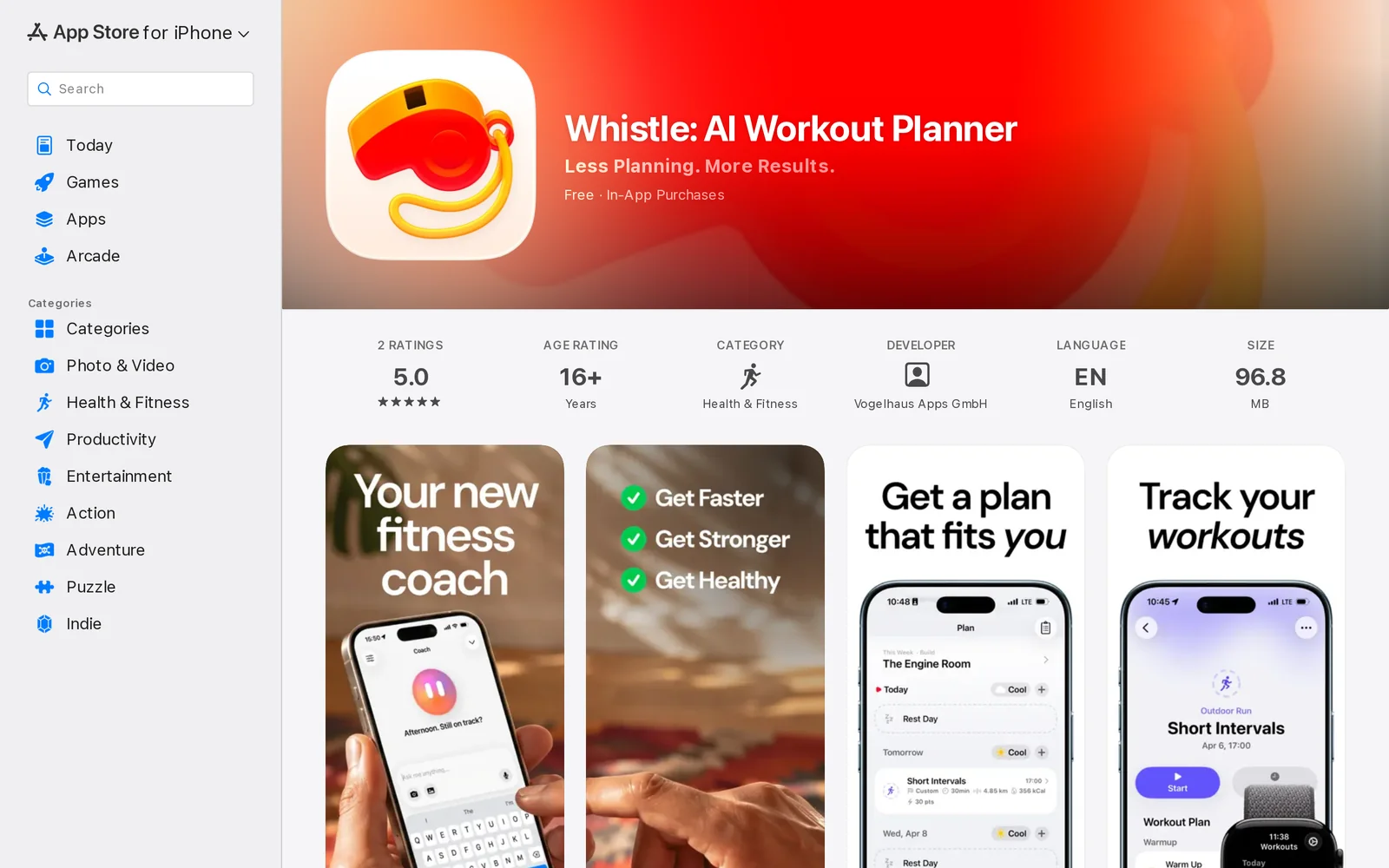
Key Features
Use Cases


Frequently asked questions about Whistle - AI Workout Planner
What is App Store?
The App Store is a digital distribution platform created by Apple for iOS and macOS applications. Users can download, purchase, and update apps, games, and other digital content. It features user reviews, ratings, screenshots, and personalized recommendations based on user preferences.
Key Points
- Platform Overview: The App Store is exclusive to Apple devices.
- Content Variety: Offers apps across multiple categories including games, productivity, and health.
- User Interaction: Users can leave ratings, reviews, and share tips about apps.
Detailed Explanation
The App Store serves as a central hub for Apple users to access a vast array of applications designed for iPhone, iPad, and Mac. Launched in 2008, it has transformed how users discover and interact with software.
Features of the App Store:
- User-Friendly Interface: The App Store has a clean, navigable interface that allows users to easily search for apps by categories, popularity, or personal recommendations.
- Screenshots and Previews: Before downloading an app, users can view screenshots, videos, and detailed descriptions to help make informed decisions.
- User Reviews and Ratings: Genuine feedback from users provides insight into app performance, usability, and overall satisfaction. This community-driven aspect helps in selecting the best apps.
Purchasing and Downloading:
To download apps, users must have an Apple ID. The App Store offers both free and paid apps, with prices ranging from a few dollars to subscription services. Payment options include credit cards and Apple ID balance. Users can also manage subscriptions directly through the App Store, ensuring they stay updated with recurring charges.
Best Practices / Tips
- Check Compatibility: Always ensure that the app is compatible with your device model and operating system version.
- Read Reviews: Before downloading, read through user reviews to gauge the app’s reliability and functionality.
- Manage Storage: Regularly check your device’s storage space, as apps can take up significant memory, especially games or multimedia applications.
- Update Regularly: Keep apps updated for optimal performance and security features. The App Store notifies users of available updates.
Additional Resources
How does App Store work?
The App Store operates as a digital marketplace where users can discover, purchase, and download applications for their devices. It employs advanced AI technologies to recommend apps based on user preferences, enhancing daily workflows and productivity for individuals and businesses alike.
Key Points
- Marketplace Functionality: The App Store serves as a hub for app distribution.
- AI Integration: AI algorithms personalize app recommendations.
- User Engagement: Ratings and reviews influence app visibility and user choices.
Detailed Explanation
The App Store, available on platforms like iOS and macOS, allows users to browse and install applications that cater to various needs, from productivity tools to games.
-
Marketplace Functionality:
- The App Store acts as a centralized platform where developers submit their apps. The submission process includes app review to ensure quality and compliance with guidelines.
- Users can search for apps using keywords, categories, or by browsing featured sections.
-
AI Integration:
- The App Store utilizes AI to analyze user behavior and preferences. For example, if a user frequently downloads productivity apps, the algorithm will suggest similar applications.
- This intelligent recommendation system not only enhances user experience but also helps developers reach their target audience effectively.
-
User Engagement:
- Ratings and reviews play a significant role in app visibility. Higher-rated apps are often featured prominently, driving more downloads.
- User feedback helps improve app quality and informs potential users about the app's functionality.
Best Practices / Tips
-
For Users:
- Always read reviews and check ratings before downloading an app to ensure its quality.
- Utilize the search filters to find apps that meet specific needs or preferences.
-
For Developers:
- Focus on obtaining positive reviews and ratings to boost your app's visibility.
- Regularly update your app to fix bugs and introduce new features, which can lead to better user satisfaction and retention.
-
For Marketers:
- Optimize app descriptions with relevant keywords to improve discoverability.
- Use eye-catching visuals and engaging content in app previews to attract potential users.
Additional Resources
What are the main features of App Store?
The App Store offers a variety of features, including a vast selection of applications, seamless integration with Apple devices, personalized recommendations, and robust security measures. Core AI capabilities enhance user experience by providing tailored app suggestions based on individual preferences and usage patterns.
Key Points
- Vast Application Library: Access to millions of apps across various categories.
- Personalized Recommendations: AI-driven suggestions to enhance user experience.
- Security and Privacy: Robust measures to protect user data and ensure safe downloads.
Detailed Explanation
The App Store is a digital distribution platform for Apple devices, including iPhone, iPad, and Mac. One of its standout features is the vast application library, which hosts millions of apps across diverse categories such as games, productivity, health, and education. Users can easily browse and download apps, ensuring they find what suits their needs.
Another critical feature is the personalized recommendations powered by core AI capabilities. The App Store analyzes user behavior, preferences, and previous downloads to suggest relevant apps, enhancing the overall user experience. For instance, if a user frequently downloads fitness apps, they may be presented with new workout programs or health tracking tools tailored to their interests.
Security is a top priority in the App Store, which incorporates robust security and privacy measures. Each app undergoes a thorough review process to ensure it meets Apple's stringent guidelines, minimizing the risk of malware or data breaches. Additionally, users can easily manage their app permissions and settings, putting them in control of their privacy.
Best Practices / Tips
- Explore Categories: Regularly check different app categories to discover new and trending applications.
- Read Reviews: Before downloading, read user reviews and ratings to gauge app quality and performance.
- Enable Automatic Updates: This ensures you have the latest features and security improvements without manual intervention.
Additional Resources
By leveraging these features and following best practices, users can maximize their experience with the App Store while enjoying a secure and personalized app ecosystem.
Who is App Store for?
The App Store is designed for anyone looking to enhance their daily tasks through AI-powered applications. This includes professionals, businesses, and individuals who seek to streamline workflows, improve productivity, and access innovative tools tailored to various needs in everyday life.
Key Points
- Target Audience: Professionals, businesses, and casual users.
- Purpose: Streamlining daily tasks and enhancing productivity.
- Applications: A wide range of AI tools for different sectors.
Detailed Explanation
The App Store serves a diverse audience, including tech-savvy professionals, small business owners, and everyday users. Each group can benefit from various AI applications available in the App Store, which are designed to automate tasks, enhance creativity, and improve decision-making processes.
Professionals
For professionals in fields such as marketing, finance, and healthcare, the App Store offers specialized AI tools. For example, marketing professionals can use AI-driven analytics apps to optimize campaigns, while healthcare workers may find applications that assist in patient management and diagnostics.
Businesses
Small and medium enterprises (SMEs) can leverage the App Store for tools that automate workflows and cut costs. For instance, AI project management apps help teams collaborate more efficiently, while customer service chatbots improve response times and customer satisfaction.
Everyday Users
Casual users can explore AI applications that simplify daily life. This includes personal finance managers that track expenses or fitness apps that provide personalized training plans. The versatility of these applications means there is something for everyone, regardless of technical expertise.
Best Practices / Tips
- Research Apps: Before downloading, read reviews and check ratings to ensure the app meets your needs.
- Free Trials: Take advantage of free trials to test apps before making a purchase decision.
- Regular Updates: Keep your apps updated to benefit from the latest features and security enhancements.
Additional Resources
How much does App Store cost?
The cost of the App Store for developers is $99 per year for an individual Apple Developer account, while organizations need to pay $299 annually for an Enterprise Developer account. Pricing for apps varies significantly, depending on features and market strategy, with some apps available for free and others priced up to several hundred dollars.
Key Points
- Individual Apple Developer account costs $99 annually.
- Organization or Enterprise Developer account costs $299 annually.
- App pricing varies widely, from free to premium options.
Detailed Explanation
When considering costs associated with the App Store, it's essential to understand the different types of developer accounts. An individual Apple Developer account is suitable for solo developers or small teams and costs $99 per year. This account allows you to publish apps on the App Store, access beta software, and utilize app analytics.
For larger organizations, the Enterprise Developer account is available for $299 annually. This account is designed for companies looking to distribute proprietary apps internally, without going through the App Store.
In addition to the developer account fees, app pricing can fluctuate based on various factors, including app complexity, target audience, and monetization strategy. Some apps are offered for free, enticing users to download and engage, while others may be priced anywhere from $0.99 to $999 or more for specialized software.
Example Pricing Models:
- Freemium Model: Offers a free version with paid upgrades.
- Subscription Model: Charges users on a recurring basis (monthly or annually).
- One-time Purchase: Users pay once to download the app.
Best Practices / Tips
- Research Competitor Pricing: Analyze similar apps in your category to set competitive prices.
- Utilize App Store Optimization (ASO): Optimize app titles, descriptions, and keywords to improve visibility.
- Monitor User Feedback: Regularly review user reviews and ratings to adjust pricing strategies or app features accordingly.
- Test Different Pricing Models: Use A/B testing for various pricing strategies to see what resonates best with your audience.
Additional Resources
How do I get started with App Store?
To get started with the App Store, visit this link to sign up for an Apple ID. Once you have an account, you can explore, download, and purchase apps easily through the App Store interface.
Key Points
- Create an Apple ID to access the App Store.
- Explore various app categories and top charts.
- Download and purchase apps directly through the App Store.
Detailed Explanation
To begin your journey with the App Store, the first step is to create an Apple ID, which serves as your account for accessing all Apple services, including the App Store. Follow these steps:
- Visit the App Store: On your iPhone, iPad, or Mac, locate the App Store app.
- Sign Up: If you don't have an Apple ID, select "Create New Apple ID." You will need to provide your email address, create a password, and fill out personal information, including your name and date of birth.
- Verification: You might need to verify your email address or phone number.
- Explore the App Store: After signing in, you can browse through different categories like Games, Productivity, Health, and more. Check out the "Top Charts" to see popular and trending apps.
- Download Apps: Simply tap the "Get" button next to any free app, or the price button for paid apps, to download and install them on your device.
Best Practices / Tips
- Security: Always use a strong password for your Apple ID and enable two-factor authentication for added security.
- Check App Reviews: Before downloading an app, read user reviews and ratings to ensure the app meets your needs.
- Stay Updated: Regularly update your apps to benefit from the latest features and security patches.
Additional Resources
Explore more AI Ai Tools tools
Browse all Ai Tools tools →Compare Whistle - AI Workout Planner: vs Rivault · vs Pi Web · vs Aymo AI · vs Speech To Markdown