
Aymo AI
AIAll-in-one AI workspace giving teams unified access to 51+ frontier models like GPT-5, Claude, and Gemini with shared credits and collaboration.
Aymo AI
All-in-one AI workspace giving teams unified access to 51+ frontier models like GPT-5, Claude, and Gemini with shared credits and collaboration.
About Aymo AI
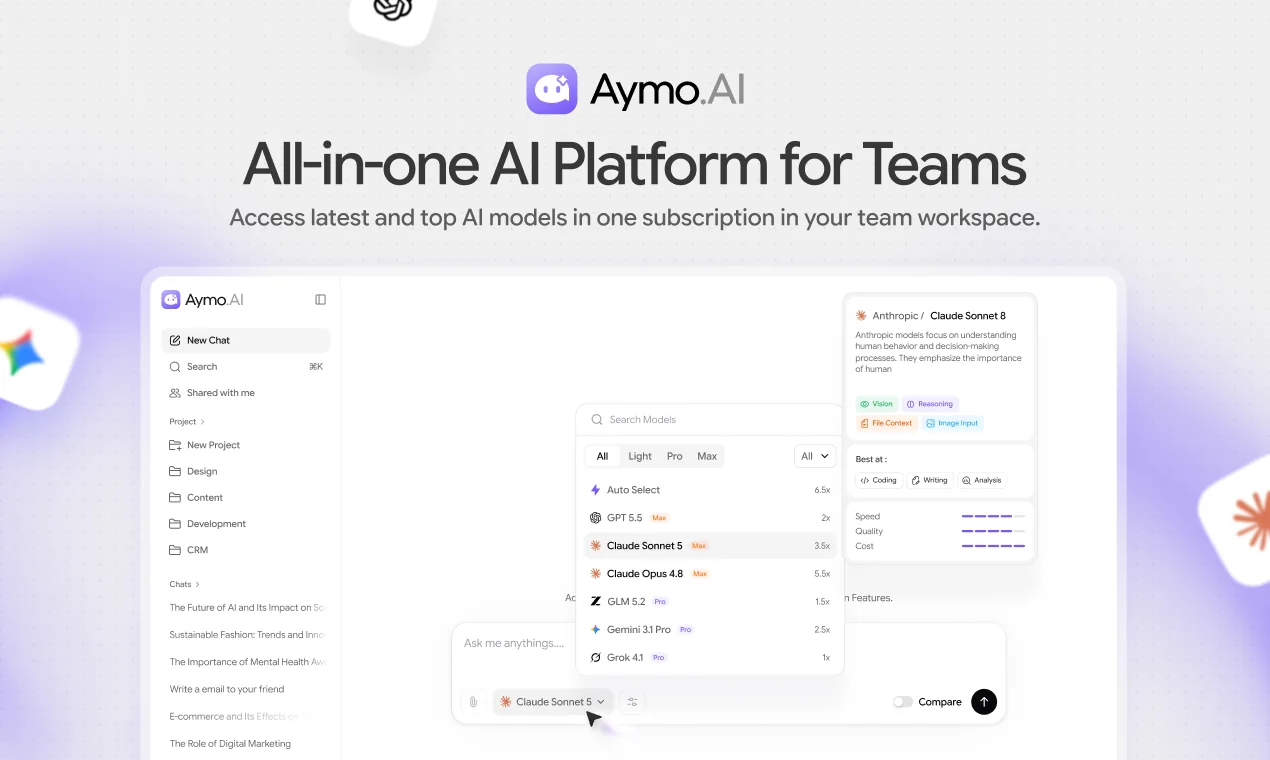
Aymo AI is a unified AI workspace that lets teams access more than 51 leading LLMs — including GPT, Claude, Gemini, DeepSeek, Grok, Mistral, LLaMA, Qwen, Kimi, and Sonar — from a single account and interface. Instead of juggling separate subscriptions, users switch models on the fly, run the same prompt across multiple models in Compare Mode, and pick the best answer for the task. Uploaded PDFs, docs, sheets, and code are ingested for context-aware answers with no manual copy-paste. Team features are built in on every plan, so members share chats, project context, and reusable workflows while running on a shared credit pool rather than per-seat fees. A Chrome extension and free utility tools (PDF summarizer, email writer, marketing helpers) round out the platform.
Screenshots
Key Features
Use Cases



Frequently asked questions about Aymo AI
What is Aymo AI?
Aymo AI is a comprehensive all-in-one AI workspace that provides teams with unified access to over 51 advanced models, including GPT-5, Claude, and Gemini. It facilitates collaboration with shared credits, enabling seamless integration of cutting-edge AI technologies into various business workflows.
Key Points
- Unified Access: Aymo AI offers over 51 frontier AI models.
- Collaboration Features: Teams can work together efficiently using shared credits.
- Versatile Applications: Supports diverse use cases across industries.
Detailed Explanation
Aymo AI stands out in the AI landscape by offering a centralized platform where teams can access a multitude of advanced AI models. These include leading technologies like GPT-5, which excels in natural language processing, Claude, known for its interactive capabilities, and Gemini, which focuses on generative tasks.
Use Cases
- Content Creation: Teams can leverage Aymo AI to produce high-quality articles, marketing copy, and social media posts quickly.
- Data Analysis: The platform allows users to analyze large datasets using AI-driven insights, enhancing decision-making processes.
- Customer Support: Integrating AI models into customer service workflows can automate responses and improve user experience.
By providing shared credits, Aymo AI promotes collaboration among team members, allowing them to experiment with different models without incurring excessive costs. This feature is particularly beneficial for startups and small businesses looking to integrate AI capabilities without significant upfront investments.
Best Practices / Tips
- Explore Different Models: Take advantage of the variety of models available. Each model has unique strengths, so experiment to find the best fit for your specific needs.
- Utilize Collaboration Tools: Use the platform’s collaboration features to ensure that all team members can contribute effectively, share insights, and optimize workflows.
- Monitor Usage: Keep an eye on credit usage to avoid unexpected costs. Aymo AI provides analytics to help you track how resources are being utilized.
Additional Resources
How does Aymo AI work?
Aymo AI operates by integrating over 51 cutting-edge language models, enabling users to easily compare outputs, collaborate in real-time, and query documents directly. It streamlines AI usage with a shared credit pool, making it cost-effective for teams while enhancing productivity through features like document-aware chat and rapid prototyping.
Key Points
- Multi-Model Access: Instant access to 51+ language models.
- Real-Time Collaboration: Shared workspaces for teams.
- Cost Efficiency: Shared credit pool for budget-friendly AI usage.
Detailed Explanation
Aymo AI revolutionizes how users interact with AI by providing a comprehensive platform that aggregates multiple advanced language models such as GPT-5, Claude, and Gemini. This multi-model access allows users to experiment with different AI outputs for various tasks without the hassle of managing multiple accounts.
Key Features:
- Multi-Model Access: Users have access to over 51 language models with a single account, enhancing flexibility in choosing the right model for their needs.
- Compare Mode: This feature allows side-by-side comparisons of outputs from different models using the same prompt. For instance, marketers can A/B-test content variations across models to identify the most effective messaging before launching campaigns.
- Document-Aware Chat: Users can upload PDFs, spreadsheets, and code files directly into the platform. This means you can ask questions related to complex documents without copying and pasting content, making it ideal for data analysts and researchers.
- Team Workspaces: Collaborative features include shared chats and project contexts, allowing teams to maintain a unified tone and approach. This is especially beneficial for distributed teams working on marketing or product development.
- Shared Credit Pool: Instead of incurring costs per user, teams pay for a collective pool of credits. This model is advantageous for organizations with varying AI usage levels, ensuring that light users don’t inflate costs.
Use Cases:
- Marketing Teams: Quickly generate and test multiple ad copies or social media posts.
- Engineers: Iterate on code snippets and receive feedback in real-time from various AI models.
- Analysts: Query large datasets or documents conversationally, making data extraction more intuitive.
Best Practices / Tips
- Maximize Multi-Model Access: Regularly experiment with different models to leverage unique strengths.
- Utilize Compare Mode: Always run critical prompts in Compare Mode to ensure you select the best-performing model.
- Foster Collaboration: Encourage your team to use shared workspaces to keep everyone aligned and informed.
- Monitor Credit Usage: Keep an eye on your shared credit pool to optimize costs and ensure efficient use of resources.
Additional Resources
What are the main features of Aymo AI?
Aymo AI offers several advanced features, including access to over 51 frontier LLMs like GPT-5 and Claude, a Compare Mode for evaluating outputs from different models, document-aware chat capabilities for seamless data integration, collaborative Team Workspaces, and a shared credit pool for cost-effective team usage.
Key Points
- Multi-Model Access: Instantly access 51+ advanced language models.
- Compare Mode: Evaluate outputs side by side to determine the best fit.
- Document-Aware Chat: Upload files for contextual responses without manual input.
Detailed Explanation
Aymo AI stands out in the AI landscape with its robust feature set designed for efficiency and collaboration.
-
Multi-Model Access: Users can leverage over 51 advanced language models, including industry leaders like GPT-5, Claude, and Gemini, all through a single account. This feature allows users to choose the best model for specific tasks, enhancing flexibility and performance.
-
Compare Mode: This function enables users to run identical prompts across various models simultaneously. By comparing outputs side by side, users can select the most suitable response for their needs. For instance, if drafting a marketing email, users can quickly assess which model generates the most compelling copy.
-
Document-Aware Chat: Aymo AI allows users to upload PDFs, spreadsheets, and documents directly into the chat interface. This feature ensures that the AI provides grounded answers based on the uploaded content, eliminating the need for tedious copy-pasting and improving the accuracy of the responses.
-
Team Workspaces: Teams can collaborate effectively with shared chat functionalities, project context, and reusable prompts. This feature is perfect for organizations working on joint projects, as it fosters real-time collaboration and knowledge sharing.
-
Shared Credit Pool: Instead of incurring costs per user, Aymo AI's shared credit pool allows teams to pool their usage credits. This model is particularly beneficial for organizations with varying usage levels, ensuring that light users do not inflate costs unnecessarily.
Best Practices / Tips
- Maximize Multi-Model Access: Experiment with different models for various tasks to find the best fit for your workflow.
- Utilize Compare Mode: Always leverage the Compare Mode feature when dealing with important outputs to ensure quality and relevance.
- Streamline Document Uploads: Regularly upload frequently used documents to enhance the efficiency of responses during chat sessions.
- Encourage Team Collaboration: Use Team Workspaces to foster a collaborative environment, ensuring all team members can contribute effectively.
Additional Resources
Who is Aymo AI for?
Aymo AI is designed for marketers, engineers, analysts, and product teams who need to compare AI models, maintain team knowledge, conduct document Q&A, consolidate AI costs, and prototype rapidly. It enhances collaboration, streamlines workflows, and optimizes AI usage across projects.
Key Points
- Model Comparison: Facilitate A/B testing between different AI models.
- Team Knowledge Base: Centralize project prompts and maintain consistency across teams.
- Document Q&A: Enable conversational querying of lengthy documents.
Detailed Explanation
Aymo AI serves a diverse audience by addressing specific needs across various sectors:
-
Model Comparison: Marketers and engineers can leverage Aymo AI to A/B test prompts against multiple AI models like GPT, Claude, and Gemini. This functionality allows users to identify which model generates the best results for their specific requirements, ensuring data-driven decisions before finalizing any campaign or project.
-
Team Knowledge Base: For organizations with distributed teams, Aymo AI functions as a centralized hub for shared project prompts and discussions. This feature helps maintain a consistent tone and context in communications and ensures that team members adhere to established templates, enhancing overall productivity and alignment.
-
Document Q&A: Analysts can upload extensive PDFs or spreadsheets into Aymo AI, enabling them to query these documents conversationally within a single workspace. This eliminates the need to sift through pages of information manually, making it easier to extract insights quickly.
-
AI Cost Consolidation: Aymo AI allows small companies to replace multiple per-seat AI subscriptions with a single shared credit pool. This not only reduces costs but also simplifies budgeting and resource allocation for AI tools.
-
Rapid Prototyping: Product teams can use Aymo AI to iterate on marketing copy, code snippets, or design briefs across various AI models in one thread. This capability accelerates the prototyping process, allowing for faster iterations and improved outcomes.
Best Practices / Tips
- Choose the Right Model: Experiment with different models for various tasks to find the best fit for your specific use case.
- Maintain Documentation: Regularly update the team knowledge base to reflect changes in project templates or tone.
- Leverage Queries: Use natural language when querying documents to improve the relevance of the responses received.
- Monitor Usage: Keep track of AI credit consumption to avoid unexpected costs, especially when consolidating subscriptions.
Additional Resources
How much does Aymo AI cost?
Aymo AI provides a free tier for users, allowing access to basic features, while its paid plans start at $19 per month for advanced functionalities. These plans cater to various needs, making it suitable for both individual users and organizations seeking enhanced capabilities.
Key Points
- Aymo AI offers a free tier with limited features.
- Paid plans start at $19 per month.
- Advanced features include customization and analytics tools.
Detailed Explanation
Aymo AI is designed to cater to a broad audience, from casual users to businesses requiring more robust solutions. The free tier allows users to explore basic functionalities, which can be beneficial for those just starting with AI tools or those who need minimal features.
For users looking for more advanced capabilities, Aymo AI offers several paid plans. The most basic paid plan starts at $19 per month, which unlocks additional features such as enhanced customization options, improved analytics, and priority customer support. As users' needs grow, Aymo AI provides higher-tier plans that offer even more comprehensive features, such as team collaboration tools and integration with other software.
Use Cases
- Individuals and Freelancers: The free tier is perfect for solo projects or basic automations.
- Small to Medium Businesses (SMBs): The $19 plan is suitable for teams needing collaborative features and analytics.
- Large Enterprises: Higher-tier plans can support extensive customization and integration capabilities, making them suitable for large-scale operations.
Best Practices / Tips
- Start with the Free Tier: If you're new to Aymo AI, begin with the free version to assess its capabilities.
- Evaluate Your Needs: Determine which features are essential for your work before choosing a paid plan.
- Watch for Promotions: Aymo AI occasionally offers discounts on their subscriptions, so keep an eye out for savings.
- Utilize Customer Support: Take advantage of customer support for assistance, especially if you're on a paid plan.
Additional Resources
These resources provide further insights into Aymo AI's features, pricing plans, and user experiences, helping you maximize the tool's potential for your needs.
How do I get started with Aymo AI?
To get started with Aymo AI, simply visit Aymo.ai to sign up for an account. Once registered, you can explore its features, access tutorials, and utilize various tools tailored for your needs in artificial intelligence and machine learning.
Key Points
- Easy Registration: Sign up quickly on the Aymo AI website.
- Feature Exploration: Access a variety of AI tools and resources.
- Support and Tutorials: Learn through guides and community resources.
Detailed Explanation
Aymo AI offers a user-friendly platform designed for both beginners and advanced users in AI. To begin your journey:
- Visit the Website: Go to Aymo.ai.
- Create an Account: Click on the "Sign Up" button. Fill in the required information, such as your email address and a secure password. You may also have the option to sign up using social media accounts.
- Explore the Dashboard: Once you log in, familiarize yourself with the dashboard. Here you’ll find various tools, including machine learning models, data analytics options, and AI project templates.
- Access Tutorials: Aymo AI provides a range of tutorials and documentation. These resources can help you understand how to use the platform effectively, from beginner concepts to advanced techniques.
- Join the Community: Engage with other users through forums or community groups. This can provide valuable insights and support as you learn how to maximize the capabilities of Aymo AI.
Best Practices / Tips
- Start Small: If you’re new to AI, begin with simpler projects to build your confidence.
- Utilize Tutorials: Take advantage of the available tutorials and documentation—they can save you time and help overcome common challenges.
- Stay Updated: Follow Aymo AI’s blog or updates to learn about new features and enhancements.
- Experiment: Don’t hesitate to test different tools and features to see what works best for your specific needs.
- Network: Connect with other Aymo AI users to exchange ideas and tips.
Additional Resources
- Aymo AI Documentation: Comprehensive guides and tutorials.
- Aymo AI Blog: Stay updated with the latest news, tips, and AI trends.
- Community Forum: Join discussions with fellow users and experts.
Explore more AI Ai Tools tools
Browse all Ai Tools tools →Compare Aymo AI: vs Humanizer · vs Worktrunk · vs Mise · vs BiBimba