

Uiverse | The Largest Library of Open-Source UI elements
AIA community-curated, open-source library of 3,000+ UI elements available in CSS and Tailwind for easy reuse and prototyping.
Uiverse | The Largest Library of Open-Source UI elements
A community-curated, open-source library of 3,000+ UI elements available in CSS and Tailwind for easy reuse and prototyping.
About Uiverse | The Largest Library of Open-Source UI elements
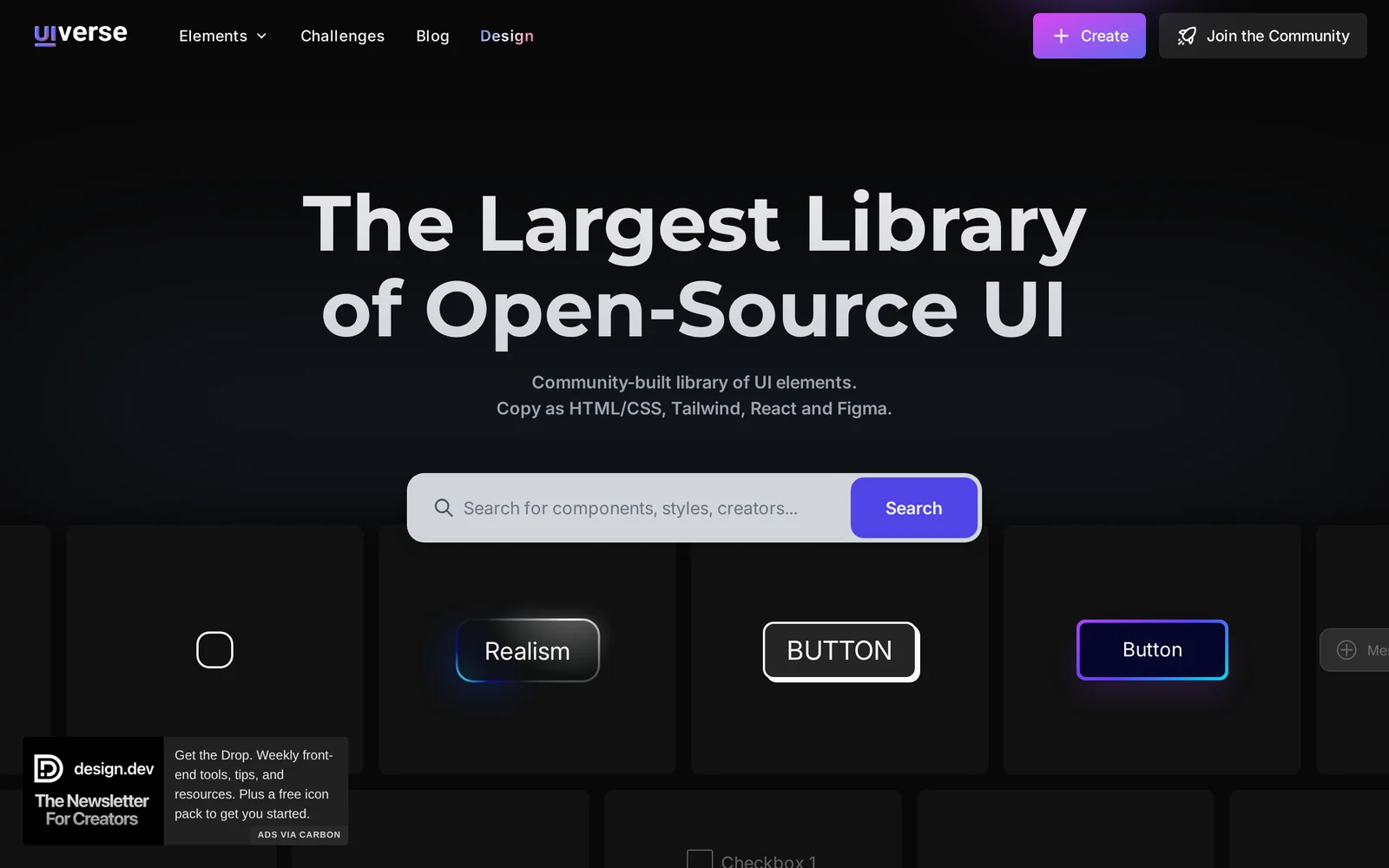
Uiverse (Galaxy) is a community-driven library of UI components and patterns sourced from the Uiverse.io platform and mirrored in the 'galaxy' GitHub repository. It provides hundreds to thousands of ready-made UI elements — buttons, cards, forms, loaders, tooltips, toggles and more — implemented in plain CSS and Tailwind so developers can copy, paste and integrate components directly into projects. Components are curated and managed via the Uiverse.io platform to maintain consistency and quality, and the repository distributes the code under the permissive MIT license to allow free use, modification and redistribution. The project emphasizes discoverability, practical examples, and community attribution while keeping contribution workflows centralized through the Uiverse.io site.
Screenshots
Key Features
Use Cases


Frequently asked questions about Uiverse | The Largest Library of Open-Source UI elements
What is Uiverse | The Largest Library of Open-Source UI elements?
Uiverse is the largest community-driven library of free and customizable open-source UI elements created with CSS or Tailwind. It allows developers to easily integrate high-quality components into their projects, saving valuable time spent on design and development.
Key Points
- Extensive library of free UI components
- Built with CSS and Tailwind for flexibility
- Community-driven contributions and updates
Detailed Explanation
Uiverse serves as a comprehensive resource for developers seeking to enhance their web applications with visually appealing user interfaces. The library features a wide array of UI elements, including buttons, forms, cards, and navigation bars, all designed to be easily customizable.
For instance, if you're designing a dashboard, you can quickly access pre-made components that fit your aesthetic requirements and functionality. This library not only accelerates the design process but also fosters creativity by allowing developers to tweak the CSS or integrate Tailwind classes to match their project's branding.
Use Cases
- Web Applications: Quickly prototype and build applications using Uiverse components, saving time on design iterations.
- Landing Pages: Enhance marketing efforts by utilizing eye-catching UI elements to draw visitors' attention.
- Personal Projects: Ideal for hobbyists looking to create visually appealing websites without extensive design knowledge.
Best Practices / Tips
- Explore the Library: Take time to navigate through the various UI elements available on Uiverse to find what best suits your project needs.
- Customization: Don’t hesitate to modify the CSS to better align with your brand identity; this is one of Uiverse's key strengths.
- Stay Updated: Since Uiverse is community-driven, regularly check for new components and updates to keep your project fresh and modern.
Additional Resources
How does Uiverse | The Largest Library of Open-Source UI elements work?
Uiverse, the largest library of open-source UI elements, operates by leveraging advanced AI technologies to streamline the design process. Users can access a vast collection of customizable UI components, enabling efficient integration into their projects, thus enhancing productivity in daily workflows.
Key Points
- Extensive Library: Uiverse offers thousands of open-source UI elements.
- AI Integration: Utilizes AI to recommend and optimize UI components.
- User-Friendly Interface: Simplifies the design process for developers and designers alike.
Detailed Explanation
Uiverse is designed to simplify and accelerate the development of user interfaces. It features an extensive library that includes buttons, forms, icons, and entire templates created by a community of designers and developers. This library allows users to quickly find and implement UI components that fit their project's aesthetic and functional requirements.
How It Works
- Search Functionality: Users can search for specific UI elements using keywords. For instance, if you need a "responsive navigation bar," simply type that in the search bar to find relevant results.
- AI Recommendations: Uiverse employs AI algorithms to analyze your past selections and suggest UI elements that align with your preferences. This makes it easier to maintain a cohesive design throughout your project.
- Customization: Each element can be customized to fit your specific needs. Users can modify styles, colors, and sizes directly within the platform to ensure each component matches their overall design vision.
Use Cases
- Web Development: Quickly assemble components for websites without starting from scratch.
- Prototyping: Designers can create interactive prototypes using pre-built elements, saving time and resources.
- Collaboration: Team members can share and recommend UI elements, fostering collaboration and ensuring consistency across projects.
Best Practices / Tips
- Utilize Filters: Make use of filtering options to narrow down your search by categories such as color, style, or component type.
- Stay Updated: Regularly check for new elements added to the library to keep your designs fresh and modern.
- Leverage Community Feedback: Engage with the Uiverse community for insights and recommendations on the best-performing UI components.
Additional Resources
By integrating Uiverse into your design workflow, you can significantly enhance your efficiency and creativity while ensuring access to high-quality open-source UI elements.
What are the main features of Uiverse | The Largest Library of Open-Source UI elements?
Uiverse is the largest library of open-source UI elements, featuring core AI capabilities, extensive customization options, and a user-friendly interface. Key features include a vast collection of components, seamless integration with various frameworks, and collaborative tools for designers and developers.
Key Points
- Vast Library of Components: Access thousands of customizable UI elements.
- AI-Powered Features: Utilize artificial intelligence for design suggestions and enhancements.
- Seamless Integration: Easily integrate with popular frameworks like React, Vue, and Angular.
Detailed Explanation
Uiverse offers an extensive library of open-source UI elements that cater to a wide array of design needs. With thousands of components at your fingertips, developers can quickly find the perfect button, card, or input field to elevate their projects. The platform also harnesses AI capabilities, allowing users to receive design suggestions tailored to their specific requirements. For instance, when you input a particular design style, Uiverse can recommend elements that align with that aesthetic.
Moreover, Uiverse's seamless integration with frameworks such as React, Vue, and Angular means that developers can implement UI elements directly into their projects without hassle. This feature saves time and reduces the complexity of incorporating UI components, promoting efficient workflows.
Collaboration tools within Uiverse enhance teamwork, allowing designers and developers to work together in real time. This capability ensures that feedback is immediate and changes can be implemented on-the-fly, improving overall productivity.
Best Practices / Tips
- Utilize AI Features: Leverage Uiverse's AI capabilities to generate design ideas and enhance your projects effectively.
- Explore the Library Regularly: Keep an eye on new components and updates in the library to stay ahead of design trends.
- Integrate Smoothly: Follow the provided documentation for integrating UI elements into your chosen framework to avoid common integration issues.
Additional Resources
- Uiverse Official Website - Explore the full library and features.
- Documentation for Integration - Find step-by-step guides for integrating UI elements into various frameworks.
- Community Forum - Engage with other users, share tips, and seek advice on design queries.
Who is Uiverse | The Largest Library of Open-Source UI elements for?
Uiverse is the largest library of open-source UI elements, catering to developers, designers, and anyone involved in UI/UX projects. This platform streamlines the design process by offering a wide range of customizable components that enhance day-to-day AI workflows and improve productivity in web and app development.
Key Points
- Target Audience: Uiverse serves developers, designers, and product managers.
- Resource Rich: It provides thousands of customizable UI elements.
- AI Integration: Uiverse enhances AI workflows by offering rapid prototyping tools.
Detailed Explanation
Uiverse is designed for individuals and teams working on user interface and user experience projects. Developers and designers can find a comprehensive selection of UI components, including buttons, forms, icons, and layouts, all of which are open-source and easily customizable. This library saves time during the design phase, allowing users to focus on creativity rather than coding repetitive elements from scratch.
Use Cases
- Web Development: Developers can quickly integrate Uiverse elements into their websites, ensuring a consistent look and feel across pages.
- Mobile App Design: Designers can prototype mobile applications efficiently, using ready-made UI elements that adhere to current design standards.
- Rapid Prototyping: Teams can employ Uiverse to create wireframes and mockups quickly, helping to visualize projects before full development begins.
Best Practices / Tips
- Explore Categories: Utilize Uiverse's categorized sections to find specific UI elements that suit your project needs.
- Customization: Take advantage of the customizable features to align elements with your brand’s style guide.
- Collaboration: Use Uiverse as a collaborative tool among team members to streamline feedback and design iterations.
Additional Resources
By leveraging the extensive resources provided by Uiverse, developers and designers can significantly enhance their workflow, produce high-quality UI designs, and ultimately create more engaging user experiences.
How much does Uiverse | The Largest Library of Open-Source UI elements cost?
Uiverse, the largest library of open-source UI elements, is completely free to use. Users can access a wide range of UI components, making it an ideal resource for developers and designers looking to enhance their projects without incurring any costs.
Key Points
- Uiverse offers a vast collection of open-source UI elements.
- The platform is completely free, promoting accessibility for all users.
- Ideal for developers and designers seeking to streamline their workflow.
Detailed Explanation
Uiverse provides an extensive library that includes buttons, forms, icons, and various UI kits. As a free resource, it enables users to quickly find and implement UI components into their projects, significantly reducing development time.
For example, if a developer is working on a web application, they can simply search Uiverse for specific UI components that match their design needs. This not only speeds up the design process but also ensures that the components are compliant with open-source licensing, allowing for legal and ethical use.
Uiverse also features community contributions, meaning that developers can add their own UI elements to the library, fostering a collaborative environment. This continually growing repository means users can always find new and innovative designs to incorporate into their work.
Best Practices / Tips
- Utilize Search Filters: Use the search function effectively by applying filters to find specific UI elements that suit your project's requirements.
- Stay Updated: Regularly check the library for new additions, as the community frequently contributes fresh designs.
- Contribute Back: If you create unique UI components, consider sharing them on Uiverse to help others and enhance your professional visibility.
Additional Resources
How do I get started with Uiverse | The Largest Library of Open-Source UI elements?
To get started with Uiverse, the largest library of open-source UI elements, visit uiverse.io to sign up for an account. Once registered, you can explore a vast collection of customizable UI components to enhance your design projects.
Key Points
- Access a vast library of free UI elements.
- Customize components to match your project needs.
- Join a community of designers and developers.
Detailed Explanation
Uiverse offers a user-friendly platform where designers and developers can find a wide array of open-source UI elements, including buttons, forms, icons, and more. After visiting uiverse.io, follow these steps to get started:
- Sign Up: Click on the "Sign Up" button and fill out your details. You can use your email or a social media account for ease of access.
- Explore the Library: Once logged in, browse through various categories or use the search feature to find specific UI elements that suit your needs.
- Customize Elements: Each UI component can be customized. Click on an element to view options for color, size, and style adjustments.
- Download or Integrate: You can either download the selected elements for use in your projects or directly integrate them into your design tools, depending on the options provided.
Uiverse is particularly beneficial for web developers and app designers looking for high-quality, ready-to-use UI components that can save time and boost productivity.
Best Practices / Tips
- Leverage Search Filters: Use the filtering options to quickly find the UI elements that best fit your project's theme and requirements.
- Check Licensing: Always review the licensing terms for the UI elements you wish to use, ensuring they align with your project’s needs.
- Stay Updated: Regularly revisit Uiverse for new components and updates to existing UI elements, ensuring your designs remain modern and relevant.
Additional Resources
- Uiverse Documentation: Official documentation for detailed usage and examples.
- Community Forum: Join discussions, share your work, and seek feedback from fellow designers.
- UI Design Inspiration: Explore design inspirations and showcase your projects using Uiverse elements.
Explore more AI Ai Tools tools
Browse all Ai Tools tools →Compare Uiverse | The Largest Library of Open-Source UI elements: vs Pi Web · vs Aymo AI · vs Speech To Markdown · vs FluentDB