

Conan
AIConan is a native macOS app that wraps Claude Code in a live HUD, surfacing every prompt, tool call, skill, and token in real time.
Conan
Conan is a native macOS app that wraps Claude Code in a live HUD, surfacing every prompt, tool call, skill, and token in real time.
About Conan
Conan is a native macOS app that wraps Claude Code in a live heads-up display, turning an agentic coding session into something you can actually watch. Every command, edit, and tool call streams onto a living timeline, while a context meter shows the window filling across system, tools, memory, skills, and messages as tokens burn in real time. A session pulse visualizes throughput, spiking when Claude works and calming when it waits, and a dedicated panel surfaces every skill and MCP server in play. Built for Apple silicon Macs running macOS 13 or later, it ships as a one-time purchase with no subscription.
Screenshots
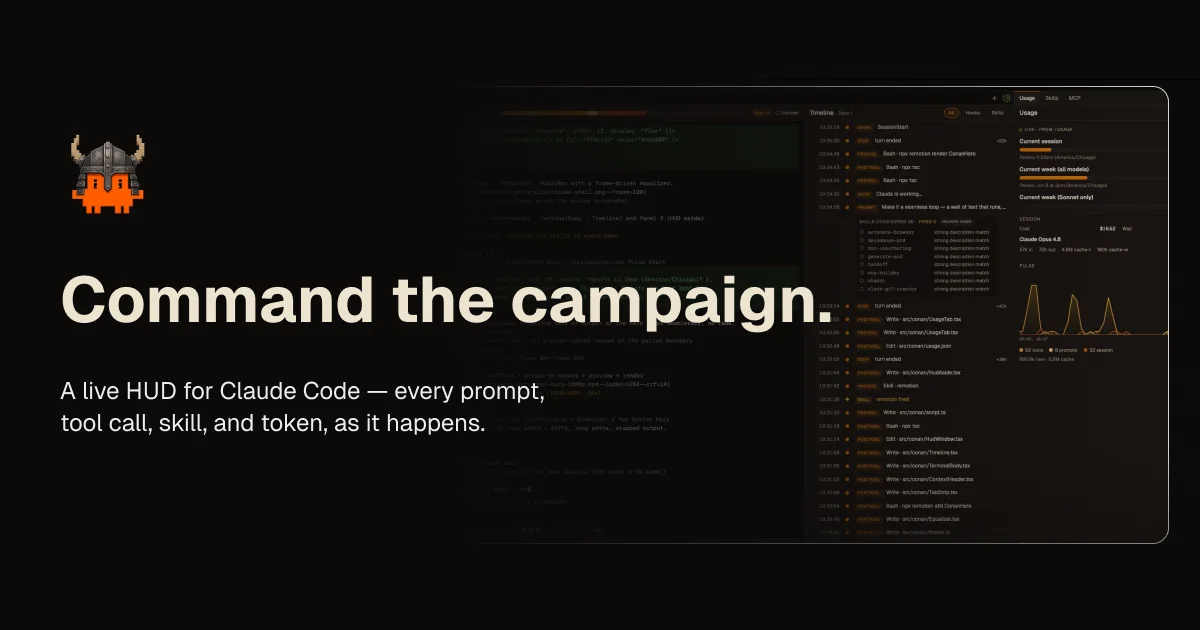
Key Features
Use Cases



Frequently asked questions about Conan
What is Conan?
Conan is a native macOS application designed to integrate seamlessly with Claude Code. It provides a live heads-up display (HUD) that showcases every prompt, tool call, skill, and token in real time, enhancing user interaction and productivity during coding tasks.
Key Points
- Real-time Interaction: Displays all prompts and tool calls as they happen.
- User-Friendly Interface: Designed specifically for macOS for optimal performance.
- Enhanced Productivity: Helps developers streamline their workflow by visualizing coding actions.
Detailed Explanation
Conan serves as an innovative tool for developers using Claude Code, providing a transparent view of the coding process. The live HUD feature allows users to see every interaction in real time, which can significantly enhance understanding and debugging. For example, if a developer inputs a command, Conan immediately reflects this in the HUD, showing the corresponding tool calls and any active tokens.
This functionality is particularly beneficial during complex projects, where tracking multiple variables and calls can become overwhelming. By visualizing these elements, Conan enables developers to maintain focus and streamline their workflow effectively.
Use Cases
- Debugging: Quickly identify issues by seeing real-time feedback on commands.
- Learning: New developers can learn coding nuances by observing the prompts and tool calls.
- Collaboration: Teams can use Conan to share insights and streamline coding sessions.
Best Practices / Tips
- Regular Updates: Ensure you are using the latest version of Conan for optimal performance and new features.
- Customize HUD Settings: Tailor the HUD display to suit your specific development needs, choosing what information is most crucial to you.
- Integrate with Other Tools: Use Conan alongside other development tools to enhance overall productivity.
Additional Resources
How does Conan work?
Conan is an advanced tool that operates by integrating real-time monitoring and feedback features, allowing users to track command executions, context usage, and system performance seamlessly. It provides a native macOS application for Apple silicon users, enabling efficient oversight of Claude code sessions without any subscription fees.
Key Points
- Real-Time Monitoring: Track every command, edit, and tool call as they happen.
- Context Management: Monitor the context window and token usage in real time.
- Native Application: Available for macOS 13+ without subscription costs.
Detailed Explanation
Conan is designed to enhance the user experience during the development and execution of Claude code sessions. Here’s a breakdown of its core functionalities:
-
Live Timeline: Every command, edit, and tool call appears on a dynamic timeline. This feature allows users to visualize their interactions and actions in real time, making it easier to debug and optimize workflows.
-
Context Window Meter: Users can observe how the context window fills as they engage with the system. This is crucial for managing token burn, as it helps avoid reaching limits that could lead to inefficient processing or unexpected costs.
-
Session Pulse: The tool includes a visual representation of session activity, which spikes when the system is actively processing tasks and calms during idle times. This feature helps users gauge the system's responsiveness and performance at a glance.
-
Skills & MCP Visibility: Conan displays every skill and Multi-Channel Processing (MCP) server in use. By making these elements observable, users can better understand the mechanics of their workflows and optimize their interactions with the AI.
-
Native macOS Application: Designed specifically for Apple silicon Macs running macOS 13 and above, Conan does not require a subscription, making it accessible to more users without recurring costs.
Best Practices / Tips
- Monitor Regularly: Regularly check the live timeline and context window meter to ensure that you are operating within token limits and maintaining optimal performance.
- Utilize the Session Pulse: Use the session pulse feature to identify peak activity periods and adjust your coding sessions accordingly to maximize efficiency.
- Stay Informed About Skills: Keep an eye on which skills and MCP servers are in play. Understanding their functions can significantly improve your debugging and development processes.
Additional Resources
What are the main features of Conan?
Conan boasts several key features that enhance user experience, including a Live Timeline for real-time command tracking, a Context Window Meter for monitoring token usage, and a native macOS app for seamless integration on Apple silicon devices. It also offers Skills & MCP visibility and a Session Pulse that tracks activity.
Key Points
- Live Timeline: Streams all commands and edits in real time.
- Context Window Meter: Monitors context usage as tokens are consumed.
- Session Pulse: Visualizes activity levels of the AI.
Detailed Explanation
Conan is designed to provide an intuitive user experience through its innovative features:
-
Live Timeline: This feature displays every command, edit, and tool call in real time, allowing users to stay informed about ongoing interactions. This is particularly useful for developers and researchers who need to track the progression of tasks and ensure that the AI is responding appropriately.
-
Context Window Meter: Users can observe the context window filling up across various components like system settings, tools, memory, skills, and messages. This visual representation helps users understand how many tokens are being utilized in real time, which is crucial for optimizing interactions and avoiding context overflow.
-
Session Pulse: This feature provides a live throughput pulse that indicates the system's activity levels. A spike represents when the AI (Claude) is actively processing requests, while a calm state shows when it's idle. This visibility helps users gauge system performance and responsiveness throughout their sessions.
-
Skills & MCP Visibility: Conan allows users to see every skill and Multi-Context Processor (MCP) server currently in use. This visibility enhances transparency and lets users optimize their AI interactions by strategically leveraging different skills as needed.
-
Native macOS App: Designed specifically for Apple silicon Macs running macOS 13 and above, Conan’s native app offers a user-friendly heads-up display (HUD). This ensures a seamless experience without requiring any subscriptions, making it accessible for all users.
Best Practices / Tips
- Maximize the Use of the Live Timeline: Regularly monitor the timeline to catch any discrepancies or errors in real time. This will help in debugging and improving your command inputs.
- Utilize the Context Window Meter: Keep an eye on token usage to prevent running out of context, especially during complex tasks. Adjust your commands accordingly to remain within limits.
- Monitor Session Pulse: Use the Session Pulse to identify peak activity times and adjust your usage patterns for more efficient interactions.
Additional Resources
Who is Conan for?
Conan is designed for developers, data scientists, and AI enthusiasts who want to optimize their interaction with Claude Code Sessions. It offers real-time monitoring, token budget management, debugging capabilities, and a streamlined workflow interface. These features enhance productivity and help manage costs effectively.
Key Points
- Real-time monitoring of Claude Code Sessions
- Token budget management for cost efficiency
- Debugging agent behavior for improved workflows
Detailed Explanation
Conan serves a broad audience, primarily targeting developers and data scientists who utilize AI tools like Claude. Here’s how Conan supports these users:
-
Monitoring Claude Code Sessions: With Conan, users can observe every prompt, tool call, and skill execution in real-time. This eliminates the need to scroll through extensive logs, allowing for immediate feedback on interactions. For example, during a coding session, developers can quickly identify which commands yield desired results.
-
Token Budget Management: Effective token management is crucial in AI applications to avoid unnecessary costs. Conan provides insights into context window usage and token burn rates, helping users avoid context rot and unexpected charges. By keeping an eye on these metrics, you can plan your usage more effectively and stay within budget.
-
Debugging Agent Behavior: Conan allows users to track which skills and Multi-Channel Processing (MCP) servers are activated during sessions. This feature aids in debugging complex workflows by providing visibility into agent performance and decision-making processes. For instance, if an agent fails to execute a task, users can pinpoint the exact skill responsible for the error.
-
Staying In Flow: The user interface includes a glanceable Heads-Up Display (HUD) that summarizes session activity without distracting users from their main tasks. This feature promotes a seamless workflow, allowing developers to focus on coding while still being aware of session dynamics.
Best Practices / Tips
- Regularly Monitor Token Usage: Make it a habit to check your token budget frequently to prevent overspending. Set alerts if possible.
- Utilize Debugging Tools: Take advantage of Conan's debugging capabilities to refine your workflows. Regularly analyze which skills are effective and adjust your approach accordingly.
- Stay Organized: Keep your session logs and metrics well-organized for easy access. This can help you quickly refer back to previous sessions for troubleshooting or optimization.
Additional Resources
How much does Conan cost?
Conan offers various pricing plans based on your needs, including a free tier and paid options for teams and enterprises. For the most accurate and up-to-date pricing information, visit the official Conan website.
Key Points
- Conan has a free tier for individual users.
- Paid plans cater to teams and enterprises.
- Pricing varies based on features and user needs.
Detailed Explanation
Conan is a widely-used package manager for C/C++ projects, and its pricing structure reflects its versatility. Here’s a breakdown of the available plans:
-
Free Tier: Ideal for individual developers, the free version allows users to access core features, making it suitable for small projects or personal use. This tier includes basic package management capabilities.
-
Team and Enterprise Plans: For companies or collaborative projects, Conan offers paid plans that come with advanced features such as:
- Enhanced Security: Private repositories and access controls.
- Collaboration Tools: Features that facilitate teamwork, such as shared package registries and version management.
- Priority Support: Access to customer support for faster issue resolution.
Pricing for the paid plans is typically subscription-based and may vary based on factors like the number of users and specific feature sets. It is advisable to consult the Conan website for the most current pricing information, including any promotional offers.
Best Practices / Tips
- Evaluate Your Needs: Determine whether the free tier suffices for your projects before opting for a paid plan.
- Check for Discounts: Occasionally, Conan runs promotions or discounts for educational institutions or startups.
- Explore Documentation: Familiarize yourself with Conan's documentation to maximize your use of the tool, especially if you choose a paid plan.
Additional Resources
How do I get started with Conan?
To get started with Conan, visit conan.sh to sign up for a free account. Once registered, you can explore its features, documentation, and community support to manage your C/C++ packages effectively.
Key Points
- Easy Sign-Up: Register for a free account on the Conan website.
- Rich Documentation: Access comprehensive guides and tutorials.
- Active Community: Join forums and discussions for support and collaboration.
Detailed Explanation
Conan is a powerful C/C++ package manager designed to simplify the dependency management process. To get started, follow these steps:
-
Sign Up: Visit conan.sh and click on the "Get Started" button. You’ll need to create a free account by providing your email and setting a password.
-
Install Conan: After signing up, you can install Conan via package managers like
pip. Execute the command:pip install conanThis command installs the latest version of Conan, allowing you to begin managing your packages.
-
Explore Documentation: Familiarize yourself with the official documentation. It includes tutorials, FAQs, and API references, making it easier for beginners to understand package creation and management.
-
Create Your First Package: Follow the step-by-step guide in the documentation to create your first package. You can use the command:
conan new <package_name>/0.1@user/channelAdjust
<package_name>,user, andchannelto your specifics. -
Join the Community: Participate in forums such as the Conan Community and GitHub discussions. Engaging with other developers can provide insights and solutions to common problems.
Best Practices / Tips
- Use Version Control: Always keep your Conan files under version control (like Git) to track changes and collaborate effectively.
- Read the FAQs: Check the FAQs in the documentation for common issues and solutions.
- Leverage Profiles: Utilize Conan profiles to manage different configurations for various platforms or build types, enhancing flexibility.
Additional Resources
By following these steps, you will be well on your way to efficiently managing C/C++ packages with Conan.
Explore more AI Ai Tools tools
Browse all Ai Tools tools →Browse by use case: Code Generation
Compare Conan: vs Speech To Markdown · vs FluentDB · vs ReExplain · vs YC Has It