

Google Speech-to-speech
AIReal-time speech-to-speech translation system that streams translated audio while preserving speaker voice characteristics and prosody.
Google Speech-to-speech
Real-time speech-to-speech translation system that streams translated audio while preserving speaker voice characteristics and prosody.
About Google Speech-to-speech
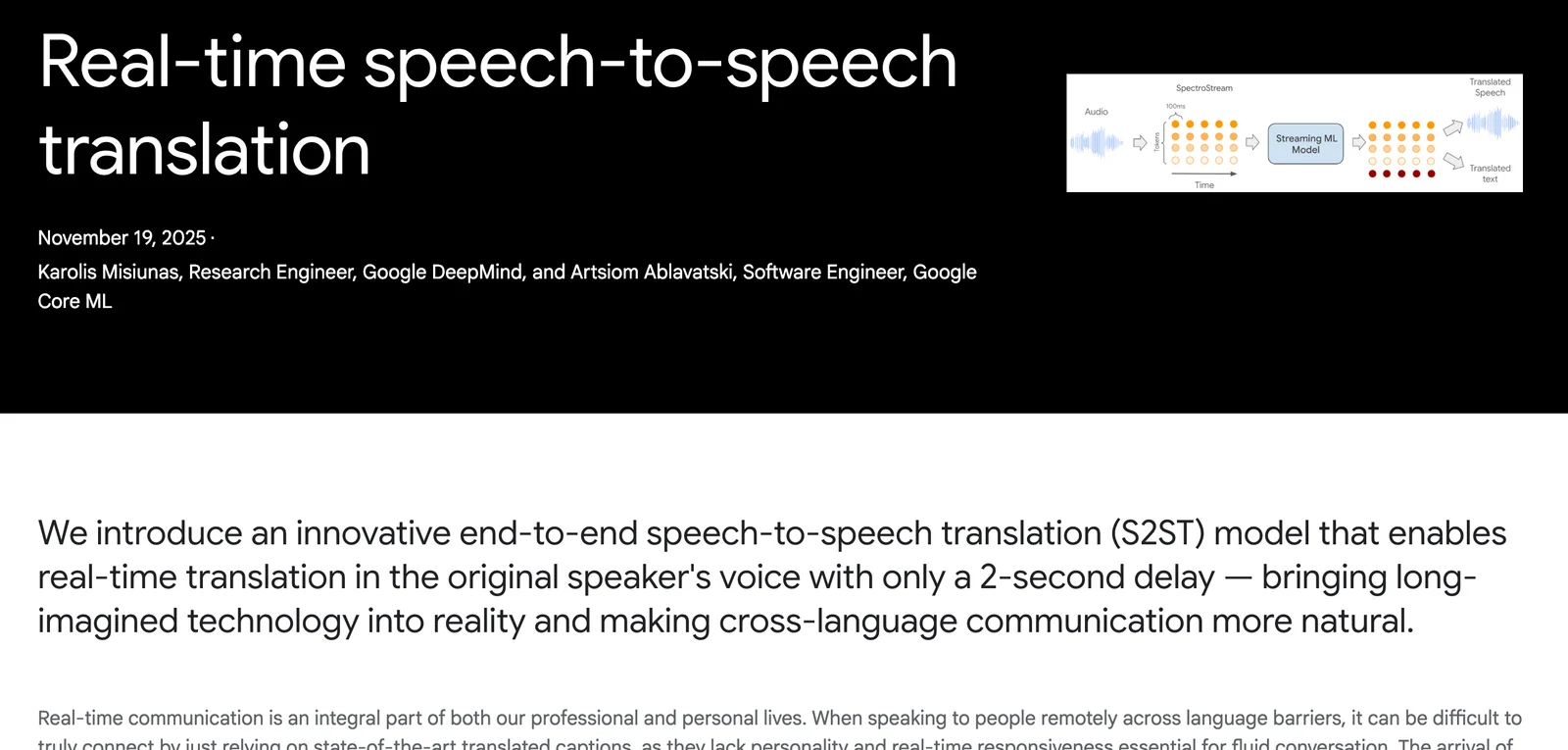
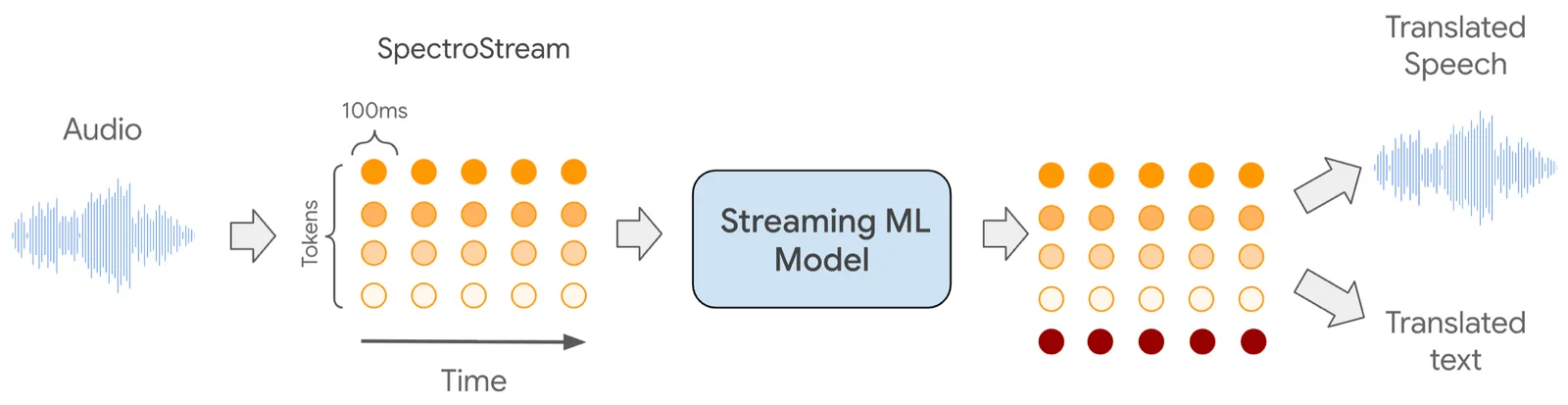
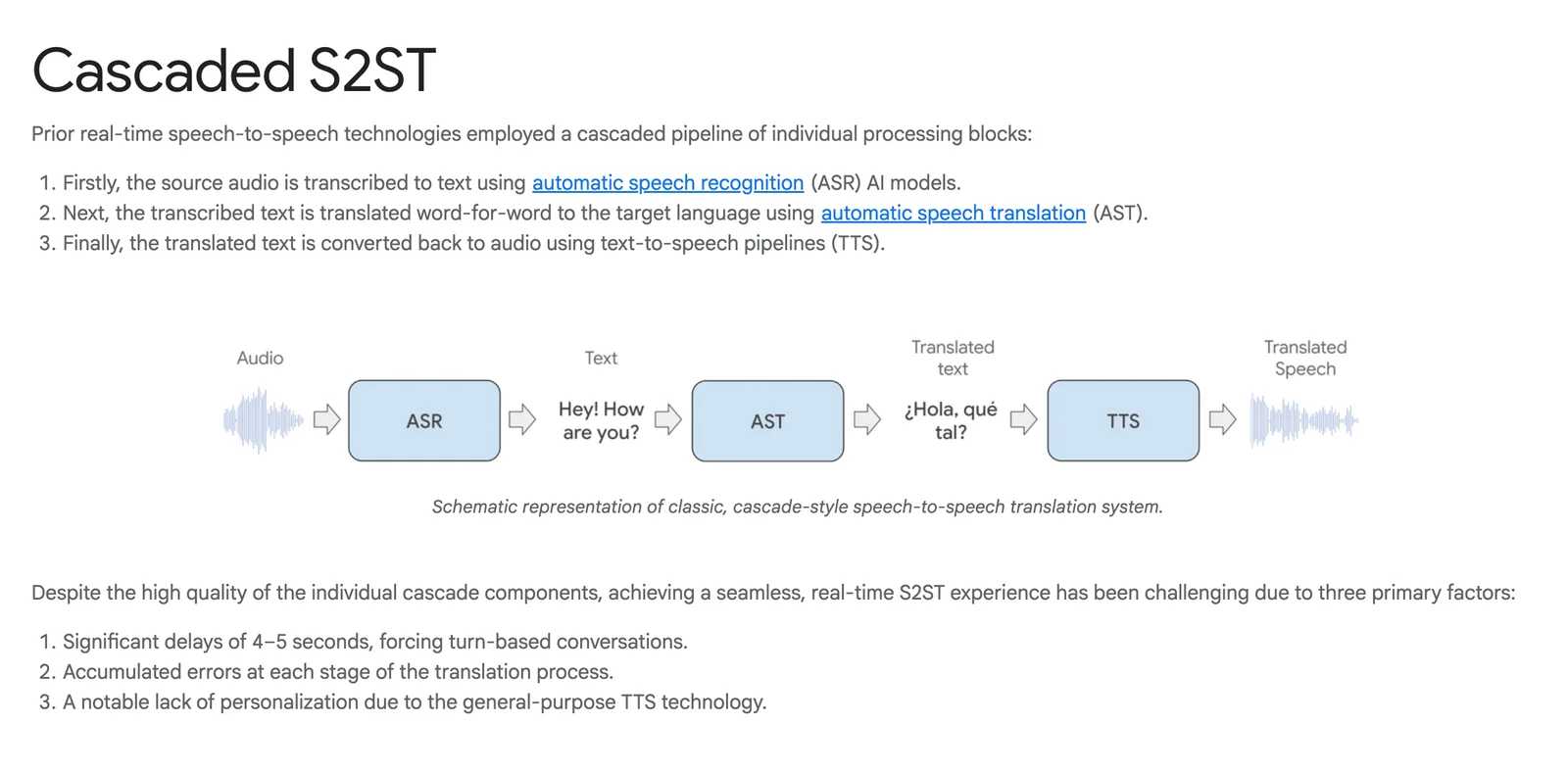
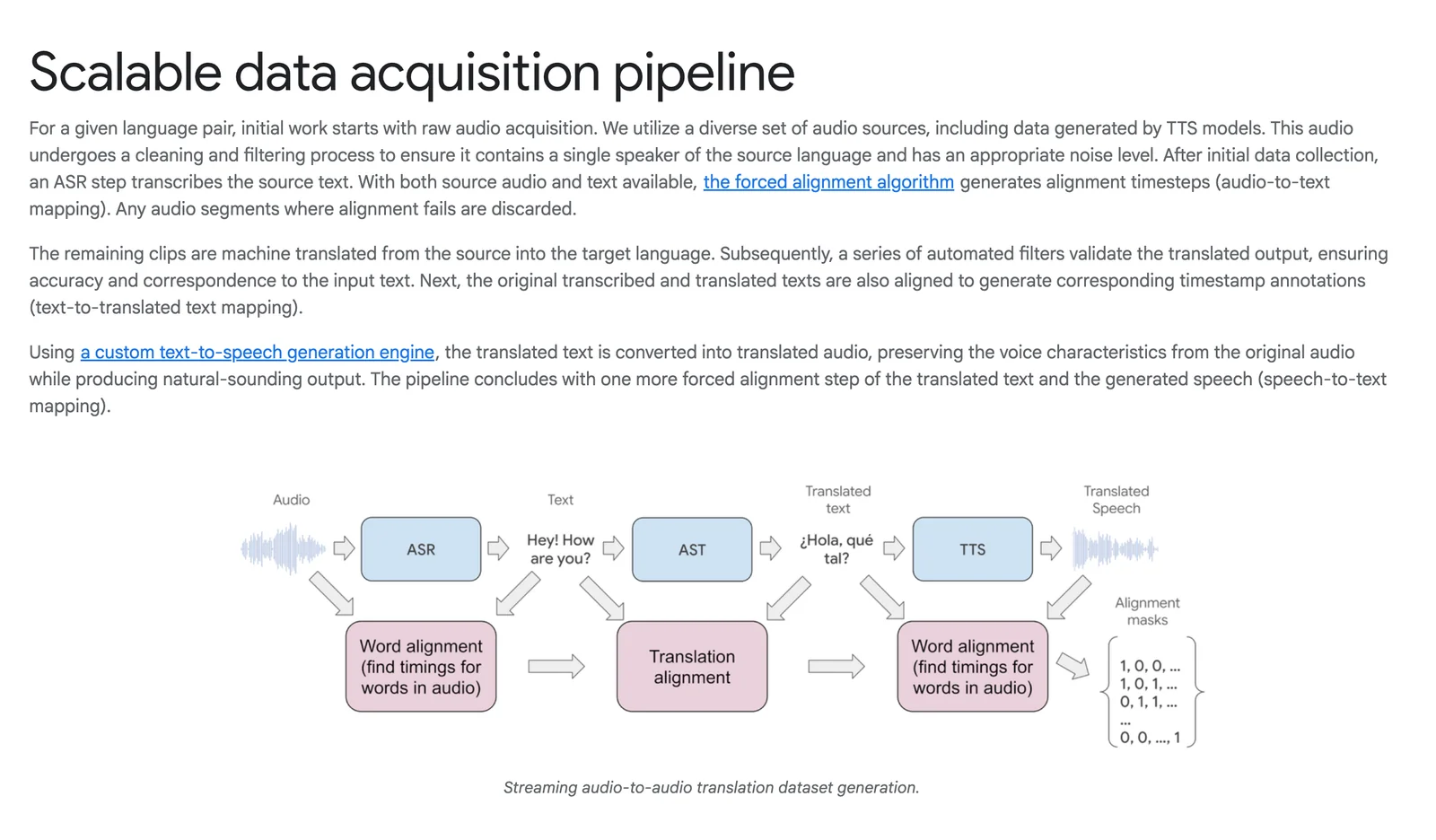
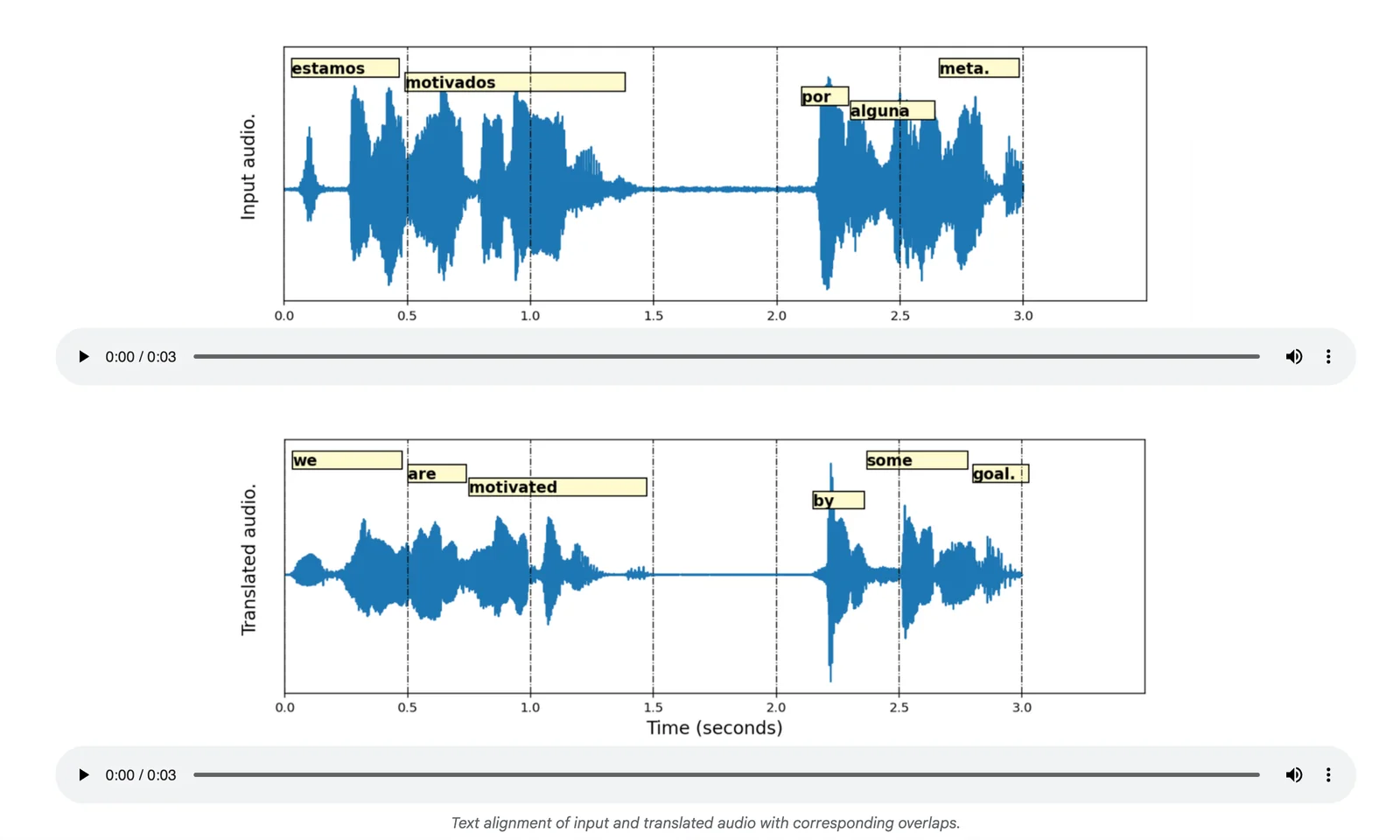
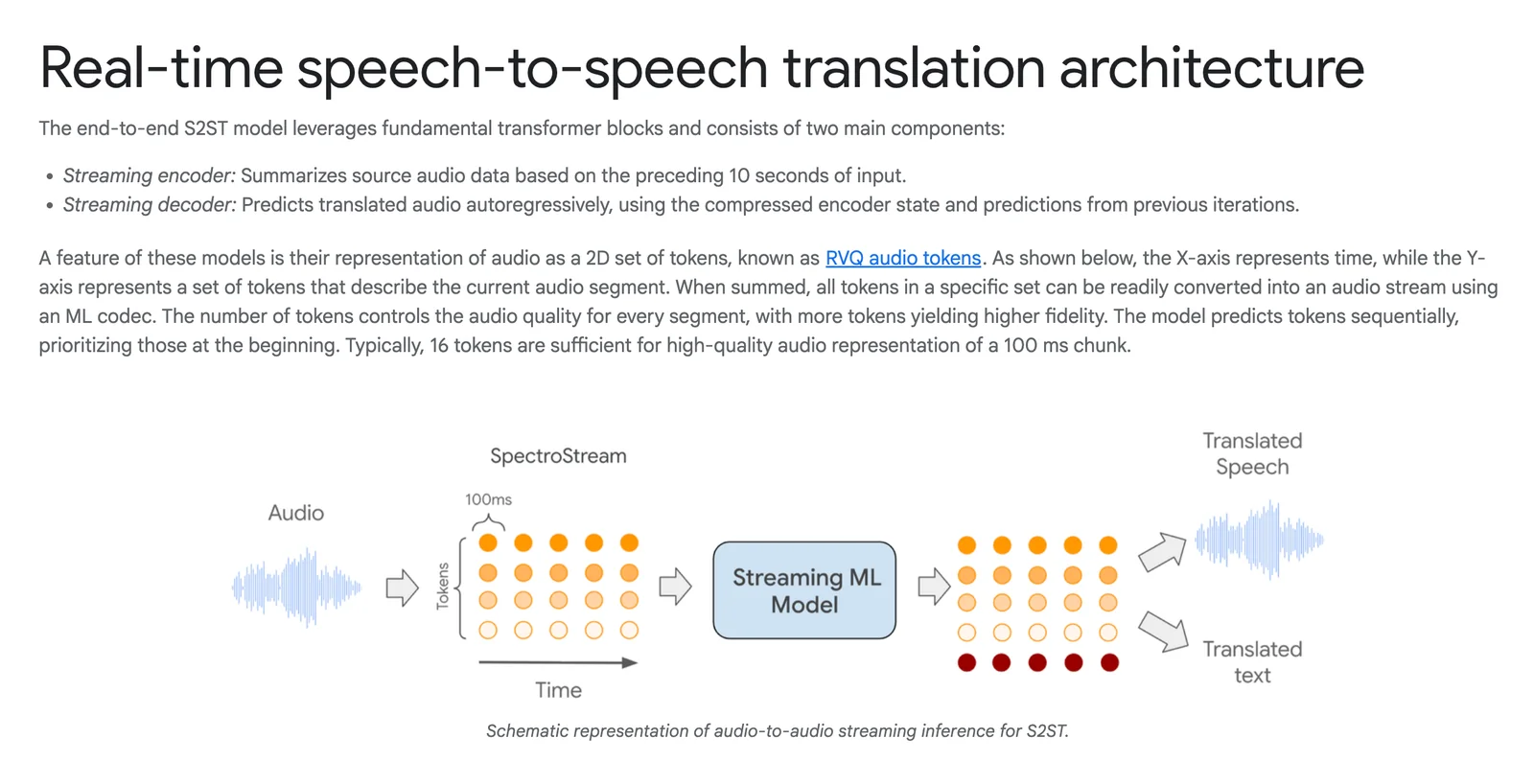
Google's real-time speech-to-speech translation is a research-backed system that converts spoken input in one language into natural-sounding spoken output in another language with low latency. The pipeline combines speech recognition, translation, and a custom text-to-speech generation engine to produce translated audio that preserves speaker voice characteristics and prosody. Google Research has developed direct end-to-end models (Translatotron 2) and unsupervised approaches (Translatotron 3) that enable robust S2S translation trained from paired or monolingual data. The technology is designed for streaming, on-device and product integration, and has been demonstrated in live translation experiences (e.g., headphone live translation beta) and integrated with Google’s broader speech and TTS capabilities.
Screenshots
Key Features
Use Cases



Frequently asked questions about Google Speech-to-speech
What are the pricing options for Google Speech-to-speech?
Google Speech-to-Text offers a freemium model with a free tier that includes monthly credits for limited usage. Pay-as-you-go pricing for Speech-to-Text starts at $0.016 per minute, while Text-to-Speech pricing varies based on usage, voice type, and language.
Key Points
- Freemium Model: Free tier with monthly credits.
- Pay-as-you-go Pricing: Starting at $0.016 per minute for Speech-to-Text.
- Variable Pricing: Costs for Text-to-Speech depend on usage and voice selection.
Detailed Explanation
Google Speech-to-Text and Text-to-Speech provide flexible pricing options suitable for different usage scenarios.
-
Freemium Tier: Users can begin with a free tier that allocates monthly credits. This is ideal for developers testing the service or users with minimal requirements. The free tier usually includes around 60 minutes of audio processing each month, allowing users to evaluate the service without financial commitment.
-
Speech-to-Text Pricing: The pay-as-you-go model for Speech-to-Text starts at $0.016 per minute for standard models. Enhanced models, which offer greater accuracy, are priced at $0.024 per minute. Users can also benefit from discounts based on monthly usage volume. This makes it a cost-effective solution for businesses requiring transcription services or real-time captioning.
-
Text-to-Speech Pricing: The cost of Text-to-Speech varies depending on the voice type and language selected. Standard voices are typically less expensive compared to WaveNet voices, which provide a more natural sound. Pricing can range from $0.004 per character for standard voices to $0.016 per character for premium voices. This flexibility allows users to choose based on their project's needs.
Best Practices / Tips
- Utilize Free Tier: Start with the free tier to gauge your needs before committing financially.
- Monitor Usage: Keep track of your usage to avoid unexpected charges, especially if your project scales.
- Choose the Right Voice: Experiment with different voice types in Text-to-Speech to find the best fit for your audience. Consider factors like tone and clarity for optimal results.
- Batch Processing: If you have large amounts of audio or text, consider batching your requests to better manage costs.
Additional Resources
By understanding the pricing structure and best practices, you can effectively integrate Google Speech-to-Text and Text-to-Speech into your projects while managing costs efficiently.
How does Google Speech-to-speech maintain speaker voice characteristics?
Google Speech-to-Speech maintains speaker voice characteristics by employing an advanced text-to-speech synthesis engine that accurately captures and replicates the original speaker's unique voice qualities, such as timbre and prosody. This technology ensures that translated audio sounds natural and retains the emotional nuances of the original speech.
Key Points
- Voice Preservation: The technology captures unique voice traits.
- Natural Sounding: Maintains emotional and tonal quality in translations.
- Advanced Synthesis: Utilizes cutting-edge algorithms for accuracy.
Detailed Explanation
Google Speech-to-Speech leverages a sophisticated text-to-speech (TTS) generation engine that synthesizes audio translations while preserving the original speaker's voice characteristics. This includes:
-
Timbre: The unique color or quality of a voice that distinguishes it from others. Google’s engine analyzes the original audio to replicate these nuances, ensuring that the translated speech sounds as close to the original as possible.
-
Prosody: Refers to the rhythm, stress, and intonation of speech. By understanding and mimicking the original prosody, Google Speech-to-Speech ensures that the emotional tone and emphasis of the speaker are retained in the translation, making it feel more genuine and relatable.
For example, if a speaker expresses excitement through their tone, the synthesized translation will reflect that same excitement, enhancing the listener's experience.
Best Practices / Tips
- Use High-Quality Audio: Providing clear, high-quality audio input enhances the accuracy of voice characteristic preservation.
- Experiment with Settings: Utilize different voice settings and languages to find the best match for your specific needs.
- Test with Diverse Voices: If applicable, test the system with various speakers to evaluate how well it maintains different voice characteristics.
Additional Resources
How can I start using Google Speech-to-speech for my project?
To start using Google Speech-to-Speech for your project, visit the official Google Cloud website to access the Speech-to-Text API documentation. Sign up for a Google Cloud account to explore the API's features and capabilities, including demos and integration options tailored to your needs.
Key Points
- Access the Google Cloud Console.
- Explore Speech-to-Text API documentation.
- Utilize demos for initial testing.
Detailed Explanation
To implement Google Speech-to-Speech, first, create a Google Cloud account if you don't already have one. This process includes providing payment information, as Google Cloud offers a free tier but may charge for extensive use.
-
Access the Console: Go to the Google Cloud Console. Here, you can manage your projects and services.
-
Enable the API: In the Console, navigate to the "API & Services" dashboard. Search for "Speech-to-Text API" and enable it for your project. This step is crucial for gaining access to the service.
-
Create API Credentials: After enabling the API, you'll need to create credentials. Click on "Credentials" in the left sidebar, then select "Create Credentials" and choose "API Key." This key will authenticate your requests.
-
Explore Documentation: Visit the Speech-to-Text API documentation for detailed guidance on how to use the service effectively. The documentation includes code samples, supported languages, and various use cases.
-
Run Demos: Before full integration, test the API using the interactive demos provided on the Google Cloud website. This allows you to see real-time transcriptions and understand the API's capabilities without writing code.
Best Practices / Tips
-
Review Quotas and Pricing: Familiarize yourself with the pricing structure and quotas to avoid unexpected charges. The API has a free tier that includes 60 minutes of audio per month, which can be beneficial for initial testing.
-
Optimize Audio Quality: Ensure your audio input is of high quality. Clear audio will yield better transcription results. Use noise-canceling microphones and avoid overlapping speech for best outcomes.
-
Utilize Language Models: Depending on your project, select the right language model. The API supports various languages and dialects, so choose one that fits your target audience.
-
Monitor Usage: Keep track of your API usage in the Cloud Console to optimize performance and costs. Set alerts for when you're nearing usage limits.
Additional Resources
By following these steps and best practices, you can effectively integrate Google Speech-to-Speech into your project, enhancing its functionality and user experience.
What technical requirements are needed for integrating Google Speech-to-speech API?
Integrating the Google Speech-to-Speech API requires a Google Cloud account, familiarity with RESTful API usage, and compatible programming environments such as Python, Java, or Node.js. Detailed technical requirements, including supported languages and authentication methods, are available in the official documentation.
Key Points
- Google Cloud account is necessary.
- Knowledge of RESTful API usage is essential.
- Compatible with various programming environments (e.g., Python, Java).
Detailed Explanation
To integrate the Google Speech-to-Speech API, follow these steps:
-
Create a Google Cloud Account: Sign up for a Google Cloud account if you don’t have one. You will need to enable billing, as usage of the Speech-to-Speech API may incur costs. Google provides a free tier for new users, which allows for limited usage without charge.
-
Enable the Speech-to-Speech API: Navigate to the Google Cloud Console, create a new project, and enable the Speech-to-Speech API for that project. This will generate an API key needed for authentication.
-
Set Up Authentication: Use OAuth 2.0 for secure access. Download the service account key in JSON format and set the environment variable
GOOGLE_APPLICATION_CREDENTIALSto point to this file. -
Install Necessary Client Libraries: Depending on your programming environment, install the appropriate Google Cloud client libraries. For Python, for example, you can use pip:
pip install google-cloud-speech -
Implement the API: Write code to call the API. Here’s a simple Python example:
from google.cloud import speech client = speech.SpeechClient() audio = speech.RecognitionAudio(uri="gs://your-bucket/audio.wav") config = speech.RecognitionConfig( encoding=speech.RecognitionConfig.AudioEncoding.LINEAR16, sample_rate_hertz=16000, language_code="en-US", ) response = client.recognize(config=config, audio=audio) -
Test and Optimize: Run your application and test the integration. Monitor performance and adjust parameters as necessary for optimal results.
Best Practices / Tips
- Use the Latest Libraries: Always use the latest version of Google Cloud client libraries to take advantage of new features and security updates.
- Understand Pricing: Familiarize yourself with the API pricing structure, including free tier limits and costs for additional usage, to avoid unexpected charges.
- Optimize Audio Quality: For best results, ensure audio files are of high quality, with clear speech and minimal background noise.
Additional Resources
Why should I choose Google Speech-to-speech over other translation tools?
Google Speech-to-Speech is a top choice for translation tools due to its real-time translation capabilities that preserve speaker characteristics, making conversations more natural. Its freemium model enables users to explore features without upfront costs, setting it apart from many competitors.
Key Points
- Real-time Translation: Provides immediate language translation with high accuracy.
- Natural Speaker Characteristics: Maintains voice tone and emotion, enhancing communication.
- Freemium Model: Allows users to test features risk-free before committing.
Detailed Explanation
Google Speech-to-Speech leverages advanced AI technology to deliver real-time translation across various languages. This tool is particularly beneficial for businesses, travelers, and global teams, allowing seamless communication without language barriers. For instance, during international meetings, team members can converse in their preferred languages, while the tool translates their speech instantly, preserving the original tone and emotional nuances.
One of the standout features is its ability to adapt to different accents and dialects. This makes it exceptionally versatile for users in diverse regions. Plus, the freemium model means you can start using basic features at no cost, which is ideal for individuals or small businesses evaluating their translation needs.
Best Practices / Tips
- Test the Freemium Version: Take advantage of the free trial to assess the tool's effectiveness for your specific needs.
- Optimize Your Speech: Speak clearly and at a moderate pace to improve translation accuracy.
- Utilize Language Packs: Download additional language packs for offline use, ensuring you can communicate anywhere without internet access.
Additional Resources
Explore more AI Ai Models tools
Browse all Ai Models tools →Browse by use case: Voice & Audio
Compare Google Speech-to-speech: vs Milliseconds.ai · vs SWE-2 · vs Desert Ant Labs · vs Hy4 preview