
.png)
PlanEat AI
AIPersonalized AI meal planner that creates weekly menus, grouped shopping lists, and daily calorie targets to help users hit nutrition goals.
PlanEat AI
Personalized AI meal planner that creates weekly menus, grouped shopping lists, and daily calorie targets to help users hit nutrition goals.
About PlanEat AI
PlanEat is an AI-driven meal planner that turns user health data and food rules into realistic weekly menus, grouped shopping lists, and per-day calorie estimates. It generates a 7-day plan tailored to dietary preferences, allergens, and nutrition goals in one click, reducing time spent planning and shopping while improving adherence to goals. The product emphasizes practical, followable menus and grouped ingredient lists to simplify grocery trips and meal preparation. PlanEat is available as a consumer-facing app and positions itself at the intersection of AI and food to simplify healthy eating.
Screenshots
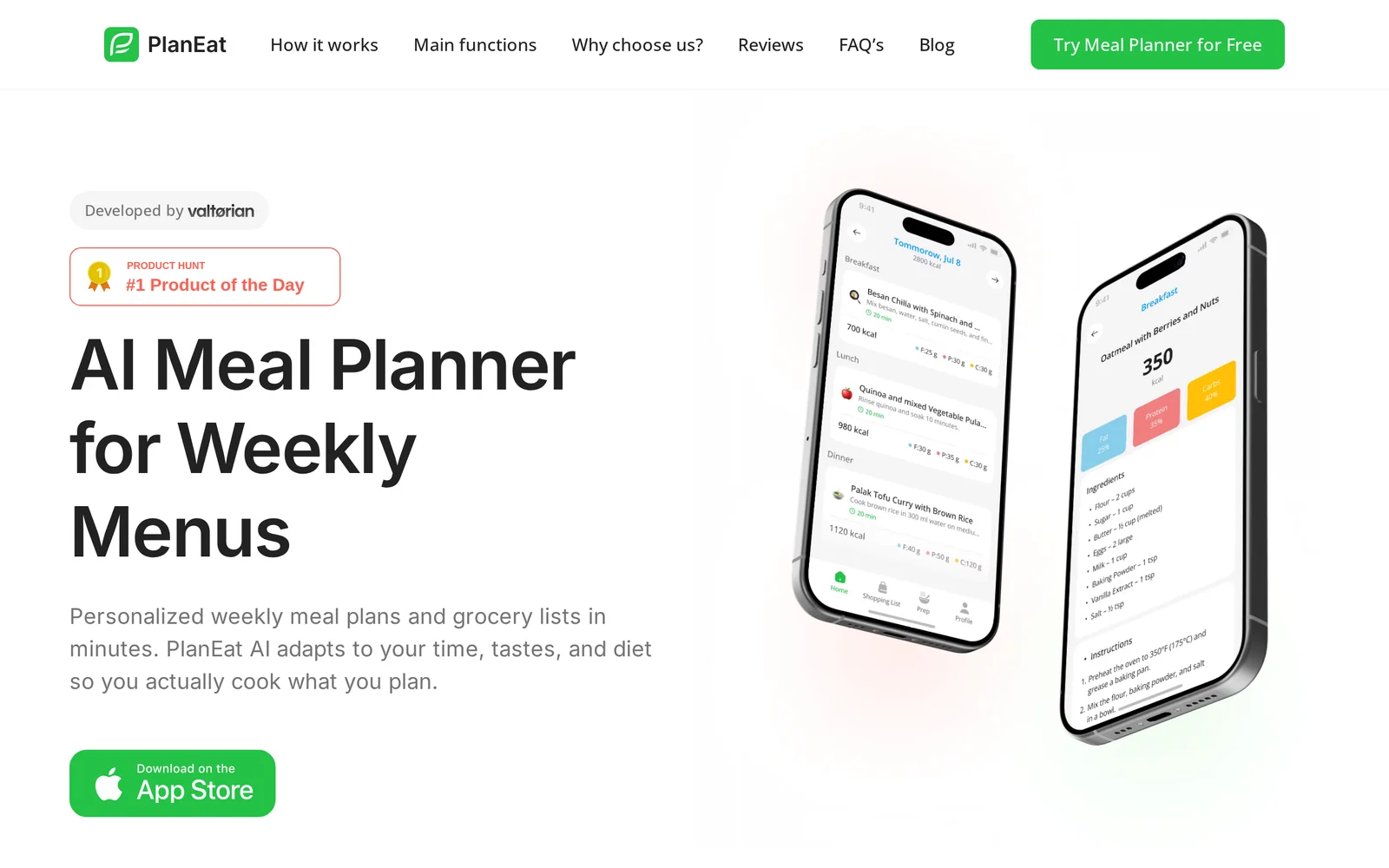
Key Features
Use Cases



Frequently asked questions about PlanEat AI
What is PlanEat AI?
PlanEat AI is a personalized meal planning application that leverages artificial intelligence to create customized weekly menus, generate organized shopping lists, and set daily calorie targets. This tool is designed to help users achieve their nutrition goals efficiently and effectively.
Key Points
- Personalized Meal Planning: Tailors menus to individual dietary preferences and restrictions.
- Shopping List Automation: Generates grouped shopping lists based on selected meals.
- Caloric Tracking: Helps users monitor daily calorie intake to meet dietary goals.
Detailed Explanation
PlanEat AI utilizes advanced algorithms to analyze user preferences, dietary restrictions, and nutritional needs. Upon signing up, users input their:
- Dietary Preferences: Vegan, ketogenic, gluten-free, etc.
- Goals: Weight loss, muscle gain, maintenance.
- Allergies: Specific foods to avoid.
With this information, PlanEat AI generates a weekly meal plan that includes breakfast, lunch, dinner, and snacks. Each meal is chosen based on nutrition and caloric goals, ensuring that users can enjoy a varied diet while meeting their health objectives.
Example Use Case:
If a user follows a vegetarian diet and aims to lose weight, PlanEat AI will create a meal plan featuring low-calorie vegetarian recipes. The app will also provide a grouped shopping list, simplifying grocery shopping by organizing items by category (produce, grains, etc.). Additionally, users can adjust portion sizes to better fit their calorie targets, making it easier to track intake.
Best Practices / Tips
- Input Accurate Data: Ensure your dietary preferences and restrictions are accurately filled out for optimal meal suggestions.
- Review Weekly Plans: Take time each week to assess the meal plan, making adjustments as necessary based on seasonal ingredients or personal cravings.
- Utilize the Shopping List: Always use the generated shopping list to save time and avoid impulse purchases.
Common Pitfalls to Avoid:
- Ignoring Portion Control: Even healthy meals can lead to weight gain if portion sizes are not managed.
- Neglecting Variety: Stick to the plan but feel free to swap meals to keep your diet interesting.
- Forgetting Meal Prep: Set aside time each week to prepare meals in advance, enhancing adherence to your meal plan.
Additional Resources
By leveraging PlanEat AI, users can streamline their meal preparation, ensure nutritional balance, and ultimately achieve their health goals more efficiently.
How does PlanEat AI work?
PlanEat AI works by leveraging advanced artificial intelligence algorithms to streamline meal planning, grocery shopping, and recipe management. It integrates user preferences and dietary restrictions to create personalized meal plans, making everyday cooking more efficient and enjoyable.
Key Points
- Personalized Meal Plans: Tailors suggestions based on dietary preferences.
- Grocery List Generation: Automatically compiles shopping lists from selected recipes.
- User-Friendly Interface: Intuitive design that simplifies meal planning.
Detailed Explanation
PlanEat AI utilizes sophisticated machine learning and natural language processing to enhance your cooking experience. Here’s how it operates:
-
User Input: Users begin by entering dietary preferences, restrictions, and favorite ingredients. This input allows the AI to understand individual needs better.
-
Recipe Database: The AI accesses a vast database of recipes, filtering them according to the user's preferences. For example, if a user is vegan and gluten-free, the system will only suggest recipes that meet these criteria.
-
Meal Planning: PlanEat AI generates a weekly meal plan based on selected recipes. This plan includes breakfast, lunch, dinner, and even snacks, ensuring balanced nutrition.
-
Grocery List Creation: Once recipes are selected, the AI compiles a grocery list, categorizing items by sections of the store. This feature saves time and enhances shopping efficiency.
-
Feedback Loop: Users can provide feedback on recipes, which further refines the AI's suggestions over time, leading to increasingly personalized meal options.
For example, if a user frequently selects Italian dishes, the AI will prioritize similar recipes in future suggestions.
Best Practices / Tips
- Be Specific: When entering dietary preferences, provide detailed information (e.g., "dairy-free" instead of just "no dairy") to ensure better meal suggestions.
- Explore New Ingredients: Use the AI to experiment with new foods that align with your dietary goals, broadening your culinary repertoire.
- Regularly Update Preferences: As dietary needs change, make sure to update your preferences in the app. This ensures that the meal plans remain relevant and enjoyable.
Additional Resources
By utilizing PlanEat AI effectively, you can simplify your meal preparation process, save time on grocery shopping, and enjoy a wider variety of dishes tailored to your tastes.
What are the main features of PlanEat AI?
PlanEat AI offers powerful features including meal planning assistance, dietary tracking, and personalized recipe suggestions. Its core AI capabilities enhance user experience by providing tailored recommendations based on individual preferences and dietary restrictions, streamlining the process of maintaining a balanced diet.
Key Points
- Meal Planning Assistance: Simplifies the meal preparation process.
- Dietary Tracking: Monitors nutritional intake effectively.
- Personalized Recipe Suggestions: Adapts to individual preferences and dietary needs.
Detailed Explanation
PlanEat AI is designed to make healthy eating easier and more accessible. Here’s how its main features work:
Meal Planning Assistance
PlanEat AI allows users to create customized meal plans based on their dietary goals, preferences, and available ingredients. By inputting your dietary restrictions—such as vegan, gluten-free, or low-carb—the AI can generate a week’s worth of meals that align with your health goals. For instance, if you're aiming to reduce cholesterol, PlanEat AI will suggest heart-healthy recipes.
Dietary Tracking
The platform includes a built-in dietary tracking feature that enables users to log their daily food intake. This feature helps in monitoring macronutrients and micronutrients, making it easier to stay on track with dietary goals. Users can view their nutritional breakdown and receive alerts if they exceed or fall short of their targets.
Personalized Recipe Suggestions
PlanEat AI’s intelligent algorithm learns from user interactions to provide personalized recipe suggestions. For example, if you frequently select Mediterranean dishes, the AI will prioritize similar recipes in the future. This feature not only saves time but also introduces users to new dishes that fit their taste and health criteria.
Best Practices / Tips
- Input Accurate Data: To get the best meal suggestions, ensure that you accurately input your dietary preferences and restrictions.
- Regularly Update Preferences: As your tastes or dietary needs change, update your profile to receive the most relevant suggestions.
- Utilize Meal Planning Features: Take full advantage of the meal planning tools to prepare your shopping lists efficiently and reduce food waste.
Additional Resources
Who is PlanEat AI for?
PlanEat AI is designed for individuals and businesses seeking to enhance their daily workflows through artificial intelligence. It caters to a diverse audience, including professionals, entrepreneurs, and anyone interested in optimizing productivity with AI-driven solutions.
Key Points
- Target Audience: Professionals, entrepreneurs, and tech enthusiasts.
- Use Cases: Daily task automation, data analysis, and content generation.
- Accessibility: User-friendly for both novices and experienced users.
Detailed Explanation
PlanEat AI is a versatile tool that appeals to a wide range of users. Professionals can leverage it to automate repetitive tasks, allowing them to focus on strategic initiatives. For example, marketing teams can utilize PlanEat AI to generate content ideas, analyze market trends, and streamline their outreach efforts. Entrepreneurs, on the other hand, can use the platform to optimize their workflows, manage projects more effectively, and gain insights from data analytics.
Students and educators can also benefit from PlanEat AI by utilizing its capabilities for research assistance, organizing study schedules, or creating lesson plans. Additionally, small business owners can harness AI for inventory management, customer relationship management (CRM), and personalized marketing campaigns.
PlanEat AI stands out for its ease of use. Its intuitive interface allows users with minimal technical experience to navigate and utilize its features effectively. The software integrates seamlessly with existing tools, making it an attractive option for those looking to enhance their productivity without a steep learning curve.
Best Practices / Tips
- Start Small: Begin with one or two features that address your immediate needs. Gradually explore additional functionalities as you become more comfortable with the tool.
- Leverage Integrations: Take advantage of integrations with tools you already use, such as Google Workspace or project management software, to enhance efficiency.
- Stay Updated: Regularly check for updates or new features released by PlanEat AI to keep your workflows optimized and up-to-date.
- Experiment: Don’t hesitate to test various features to see what works best for your specific tasks or projects.
Additional Resources
How much does PlanEat AI cost?
PlanEat AI offers a free tier, allowing users to access basic features without any cost. For those seeking advanced functionalities, paid plans start at $9.99 per month, providing enhanced options for meal planning, recipe management, and nutritional tracking.
Key Points
- Free Tier Access: Basic features available at no cost.
- Paid Plans: Advanced features start at $9.99/month.
- Feature Comparison: Differentiate between free and premium options.
Detailed Explanation
PlanEat AI provides a robust platform for meal planning and nutritional tracking. The free tier is ideal for users who want to explore the app's basic functions, including meal logging and recipe suggestions.
For those looking for more advanced features, paid plans are available. The basic paid plan starts at $9.99 per month and includes additional functionalities such as personalized meal plans, grocery list generation, and dietary tracking tools. Higher-tier plans may offer even more features, such as integration with fitness apps or personalized coaching.
Users can seamlessly transition from the free tier to a paid plan as their meal planning needs evolve. The platform is designed to cater to both casual users and serious health enthusiasts.
Example Use Case
For instance, a user on the free plan can manage their meals for a week but may find it challenging to create a shopping list that optimally matches their dietary preferences. Upgrading to the paid plan allows them to easily generate grocery lists based on selected recipes, making meal preparation more efficient.
Best Practices / Tips
- Start with the Free Tier: Test the basic features to determine if PlanEat AI meets your needs before committing to a paid plan.
- Explore Promotions: Look out for discounts or promotions that may reduce the cost of paid plans.
- Utilize Trial Periods: If available, take advantage of trial periods to experience premium features without immediate payment.
Additional Resources
Explore these resources to gain more insights into how PlanEat AI can enhance your meal planning experience.
How do I get started with PlanEat AI?
To get started with PlanEat AI, visit planeatai.com to sign up for an account. Once registered, you can explore its features, customize your preferences, and begin optimizing your meal planning with AI-driven insights tailored to your dietary needs.
Key Points
- User-Friendly Registration: Quick and simple sign-up process.
- Personalized Meal Planning: AI-driven suggestions based on your dietary preferences.
- Comprehensive Features: Explore various functionalities, from recipe suggestions to grocery lists.
Detailed Explanation
Getting started with PlanEat AI is straightforward. Follow these steps for a smooth onboarding experience:
-
Sign Up: Navigate to planeatai.com and click the "Sign Up" button. You will need to provide basic information like your email address and create a password.
-
Set Preferences: After registering, you’ll be prompted to fill out your dietary preferences. This could include any food allergies, favorite cuisines, or specific dietary goals such as weight loss or muscle gain.
-
Explore Features: Once your profile is set up, take some time to familiarize yourself with PlanEat AI’s features. These include:
- Recipe Suggestions: Generate meal ideas based on your preferences.
- Grocery Lists: Create shopping lists that sync with your meal plans.
- Nutrition Tracking: Monitor your intake with built-in analytics.
-
Utilize the Community: Engage with community features or forums within the platform to share tips and recipes with other users, enhancing your experience and knowledge.
Best Practices / Tips
- Take Advantage of Tutorials: PlanEat AI often provides tutorials and guides. Utilize these resources to get the most out of the platform.
- Regular Updates: Check back frequently for updates and new features as PlanEat AI continually evolves to enhance usability.
- Feedback Loop: Provide feedback on your meal suggestions. This helps the AI learn your preferences better over time, ensuring more personalized recommendations.
Additional Resources
By following these steps and leveraging the available resources, you can effectively utilize PlanEat AI to transform your meal planning experience.
Explore more AI Ai Tools tools
Browse all Ai Tools tools →Compare PlanEat AI: vs nodeterm · vs A.I.G (AI Infra Guard) · vs Trama · vs Agents Never Sleep